Best Way to Set Up a Vizio 5.1 Soundbar, From Box to Speaker Test
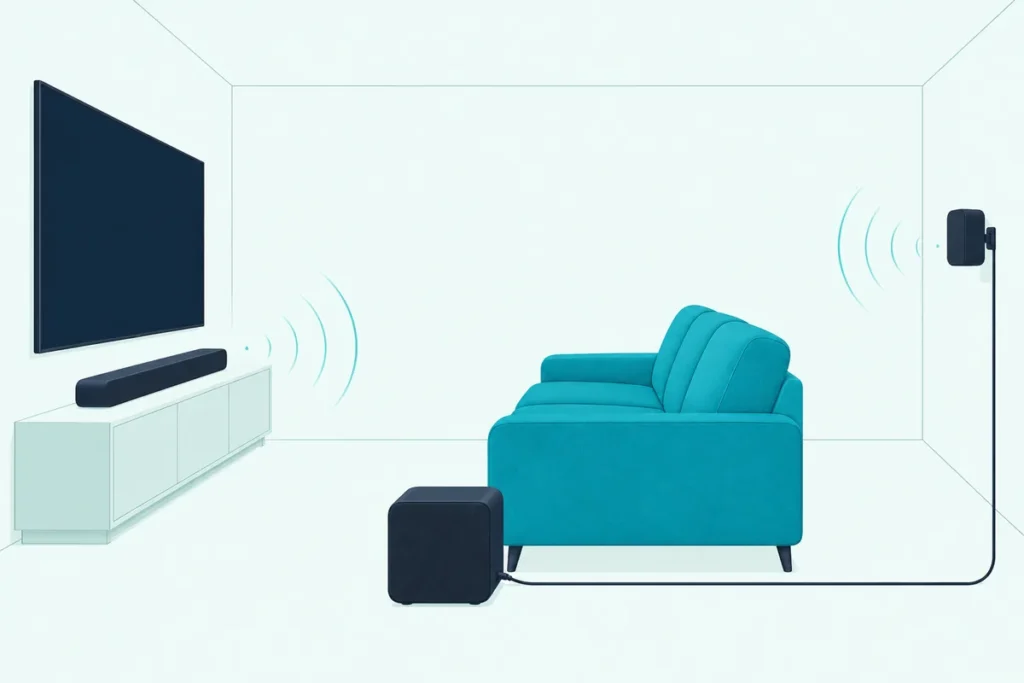
For the best way to set up a Vizio 5.1 soundbar, follow the order in Vizio’s own manuals: the included HDMI cable to your TV’s ARC or eARC port, power to the bar, both surround speakers into the subwoofer, and the subwoofer’s power cord last.
The rear speakers are the odd part, because they have no socket on the soundbar at all and plug into the back of the subwoofer instead.
Follow it and the subwoofer should link to the bar by itself, and Vizio’s speaker test can then confirm every channel before the first movie.
Below, Vizio’s manuals for the V51x-J6, M51ax-J6, SV510X-0806 and SL512X-0806 cover each box, where each piece goes, the connection, the first power-on and the levels.
Then come the checks for when the rears or the subwoofer stay quiet, starting with the setting that switches the surrounds off on purpose.
What Is the Best Way to Set Up a Vizio 5.1 Soundbar?
That order comes straight from the First-time Setup chapter, and the system setup runs the same way on all four bars. The best way is Vizio’s own four steps, with the subwoofer plugged in last so it links by itself (Vizio’s SV510X-0806 manual):
- Connect the soundbar to the HDMI ARC or eARC port on your TV with the included HDMI cable.
- Connect the soundbar’s power cable and plug it into an outlet.
- Connect each surround speaker to the subwoofer with the included surround speaker audio cable.
- Plug in the subwoofer last; it should power on and link to the soundbar by itself.
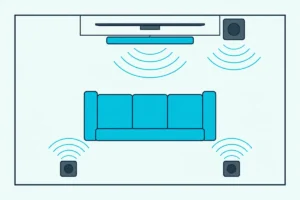
The quick setup steps reproduced in the V51x-J6 and M51ax-J6 manuals also say where the pieces go: “Place subwoofer and surround speakers in the rear of the room.” So the Vizio 5.1 soundbar setup starts with the floor plan, and the cables follow.
After those four steps come the remote or the app, the levels and the speaker test. Each gets its own section below, in the order you’ll meet them.
What Comes in the Box With a Vizio 5.1 System?
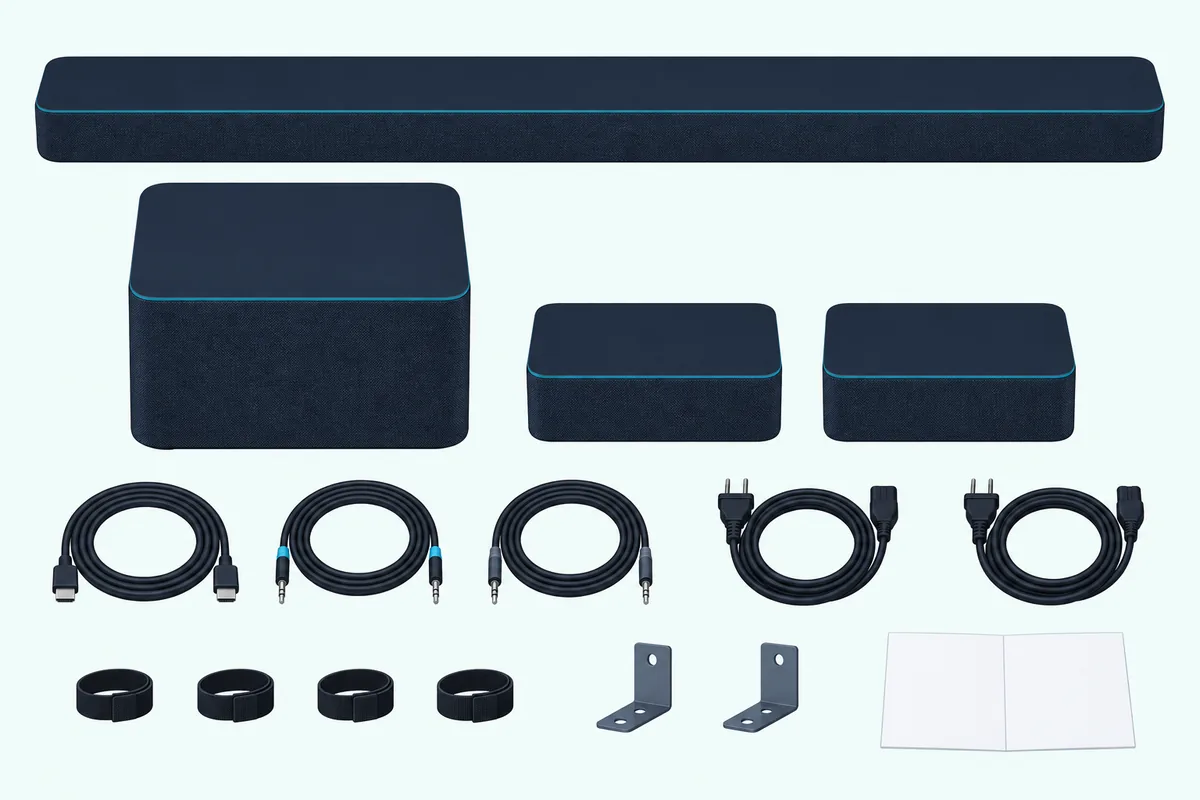
Those cables are all in the box, which is the first thing worth checking. Every one of the four systems ships a soundbar, a wireless subwoofer, two surround speakers, two surround speaker audio cables, an HDMI cable and two power cables, but only the V51x-J6 and M51ax-J6 add a remote with two AAA batteries.
| In the box | V51x-J6 (V-Series 5.1) | M51ax-J6 (M-Series 5.1) | SV510X-0806 (5.1 SE) | SL512X-0806 (Elevate SE) |
|---|---|---|---|---|
| Bar, wireless subwoofer, 2 surround speakers | Yes | Yes | Yes | Yes |
| 2 surround speaker audio cables | Yes | Yes | Yes | Yes |
| HDMI cable | Yes | Yes | Yes | Yes |
| 2 power cables | Yes | Yes | Yes | Yes |
| Remote | Yes, with 2 AAA batteries | Yes, with 2 AAA batteries | No | No |
| Mounting parts | 2 bar brackets, 2 surround brackets, 4 wall mount screws | 2 bar brackets, 2 surround brackets, 4 wall mount screws | 2 surround brackets with screws, 2 QuickFit screws | 2 surround brackets with screws, 2 QuickFit screws |
| Cable ties | 4 | 4 | 4 cable management straps | 4 |
Each column is that manual’s Package Contents page, and all four also pack a wall mount template and a quick setup guide. None lists an optical cable, and the V51x-J6 and M51ax-J6 manuals mark both a digital optical cable and a 3.5 mm to RCA cable “Not included.”
On the SV510X-0806 and SL512X-0806, your TV’s own remote stands in for the missing one. It wakes the bar along with the screen and handles volume and mute, the VIZIO app does the rest, and Vizio’s spec tables say it in two words: “Remote No.”
Where Should the Bar, Subwoofer and Rear Speakers Go?
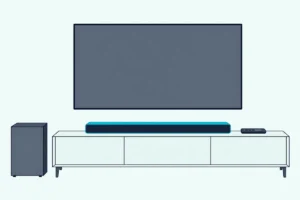
Those two surround speakers decide most of the layout. Vizio’s placement drawings center the bar below the TV, close to ear level, set the subwoofer on the floor beside the sofa and put the two surrounds on the wall behind the seats (Vizio’s V51x-J6 manual).
The SV510X-0806 and SL512X-0806 manuals draw the same layout, with the left and right surrounds marked L and R. Every one of these manuals adds two rules for the subwoofer: don’t block its port, and allow 1-2 inches of space around all sides for ventilation.
If the wall behind the sofa won’t work, each manual has a second layout called Front Surround Mode. The surrounds go up front beside the bar, and DTS Virtual:X produces what Vizio calls a virtual surround sound experience.
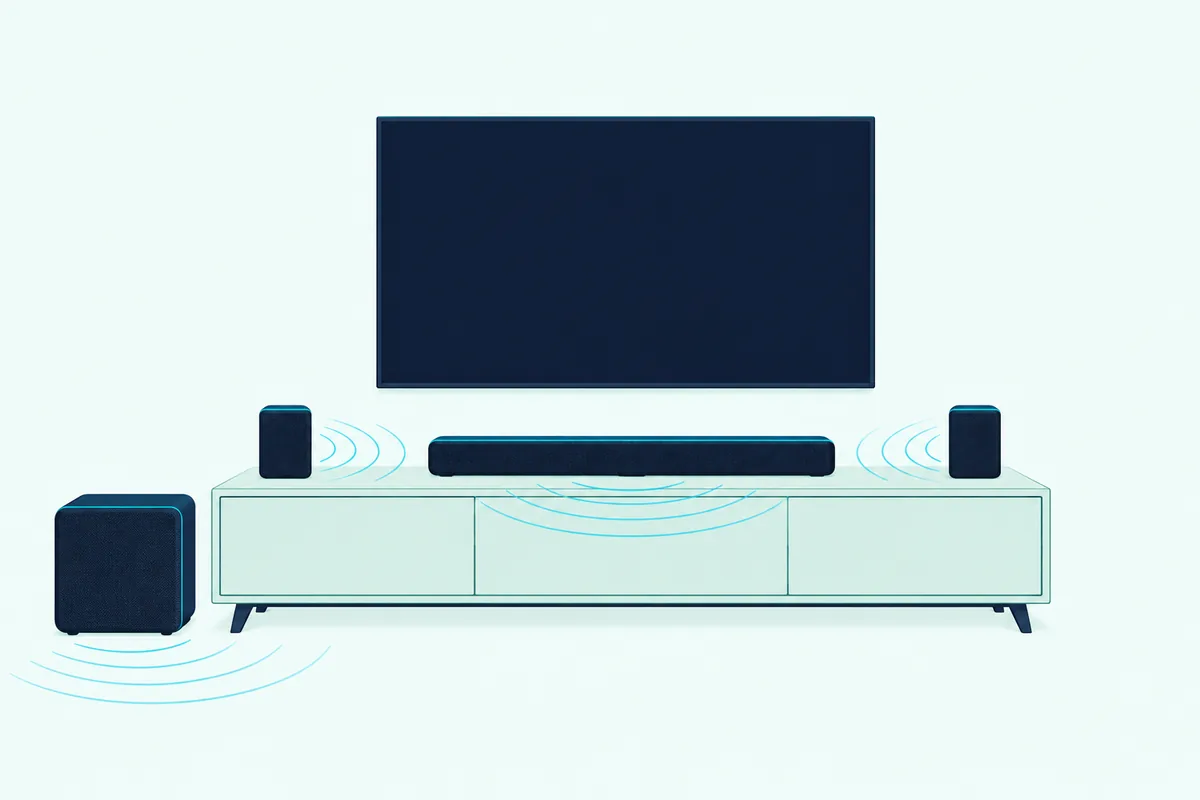
On the V51x-J6 and M51ax-J6 you pick that layout under EFFECT, then Surnd, then Front. Vizio offers it for rooms where ideal placement of the surround speakers isn’t practical, such as a sofa that backs onto a window.
Setting up a Vizio 5.1 soundbar with wireless surrounds changes the advice. Vizio’s guides for the SV510MW-0906 and SV510XW-0906 put the subwoofer in the corner of the room on the same wall as the screen, keep the surrounds in line with each other, and say not to put them on the floor, because their best spot is at or above ear level (Vizio’s SV510XW-0906 guide).
Those guides also say to check the bottom of each wireless surround for its L or R mark. For brackets and wall screws on any of these systems, the wall-mounting steps for each Vizio series cover the bar and both surrounds.
How Do the Rear Speakers Connect to the Subwoofer?
That spot beside the sofa makes sense once you see the wiring. On all four systems, each surround speaker has a single port on its back, and the included surround speaker audio cable runs from it to the matching port on the back of the subwoofer: blue for the left surround, gray for the right.
Vizio’s spec tables for the SV510X-0806 and SL512X-0806 put it in five words: “Wired Satellite Surrounds to Subwoofer.” The box adds cable ties to wrap the unused length (cable management straps, in the SV510X-0806’s case).
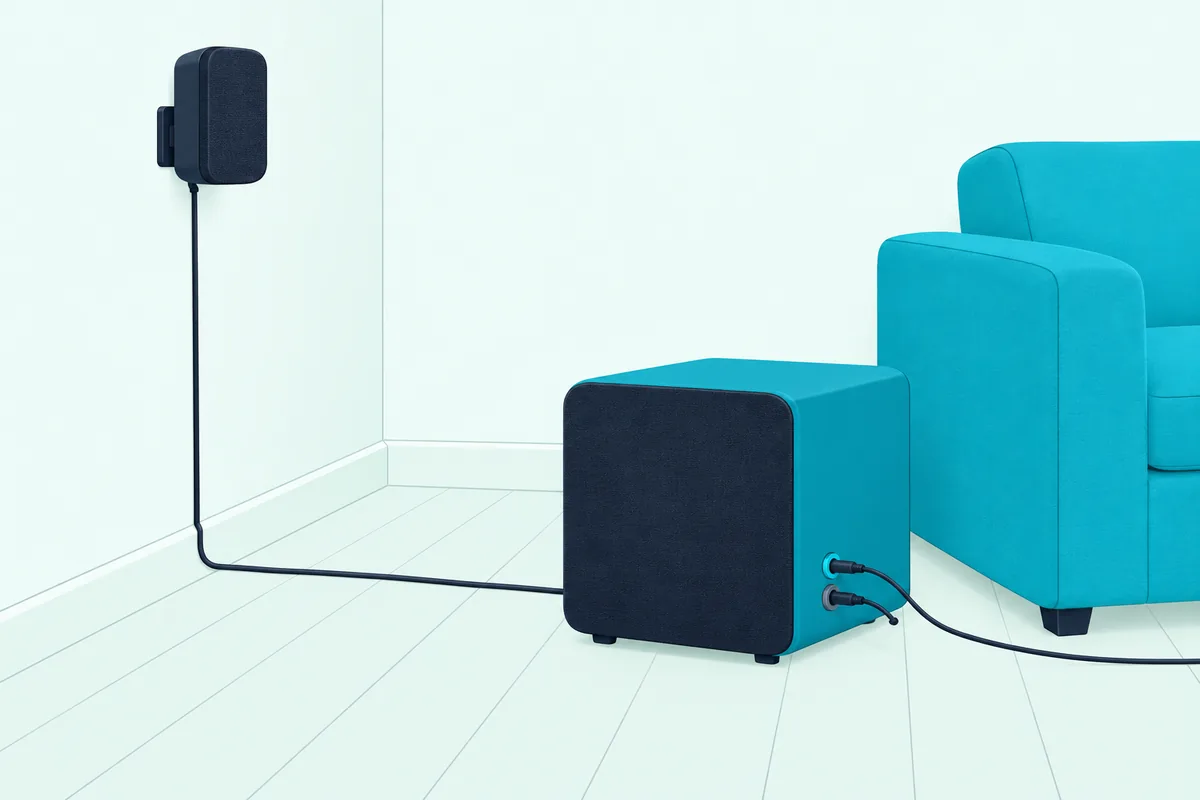
No power cord goes to the rears on these four. Vizio’s quick setup steps read “Plug in power cables to power on your sound bar and subwoofer,” and the box holds exactly two power cables.
Think of the subwoofer as the hub. The bar reaches it without a cable, and the rears hang off it by wire.
The wireless-surround versions are the exception. The SV510MW-0906 and SV510XW-0906 guides have you plug in the subwoofer and both surrounds with the included power cables, and the lights on their backs turn solid white when they’re powered on and connected.
Which TV Port Should a Vizio 5.1 Soundbar Use?
With the rears wired up, that leaves one cable, the one to the screen. Use the TV’s HDMI ARC or eARC port with the included HDMI cable, which is the only connection the SV510X-0806 and SL512X-0806 offer for it and the one the V51x-J6 and M51ax-J6 manuals mark “BEST.”
| Soundbar | Port for the TV | Other inputs on the bar |
|---|---|---|
| V51x-J6 | HDMI (ARC) | Digital optical, AUX and AUX VA (3.5 mm), USB |
| M51ax-J6 | HDMI Out (eARC) | HDMI In, digital optical, AUX and AUX VA (3.5 mm), USB |
| SV510X-0806 | HDMI (eARC) | USB |
| SL512X-0806 | HDMI (eARC) | USB |
The ports come from each manual’s Controls & Connections pages. The V51x-J6, M51ax-J6 and SV510X-0806 manuals add one warning: be sure the TV port is an audio output, not an audio input.
On the M51ax-J6, don’t use HDMI In for the first-time setup. That second port is for a player or console, and the manual lists Dolby Atmos on HDMI eARC and HDMI In, not on the optical input (Vizio’s M51ax-J6 manual).
Vizio’s 2024 guide for the SV510X notes that a TV may have two or more HDMI ports, with only one labeled ARC or eARC, and asks you to turn on HDMI CEC and eARC in its settings. For the menus on that end of the cable, connecting a Vizio soundbar to your TV walks through Vizio’s steps, from CEC to Device Discovery.
If your TV has no ARC port, the V51x-J6 and M51ax-J6 take a digital optical cable instead, and the box doesn’t include one. For that run, KabelDirekt’s 6 ft TOSLINK optical cable fits both bars.
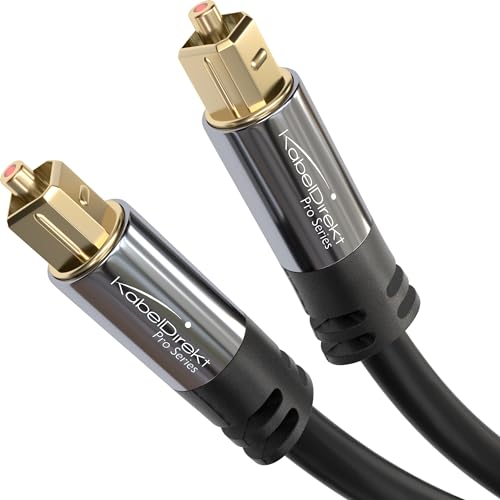
KabelDirekt’s 6 ft TOSLINK optical cable
When a digital input plays nothing, Vizio suggests setting the TV’s output to PCM. The SV510X-0806 and SL512X-0806 have no optical input at all, and Vizio’s product pages send owners who need optical to its customer support.
What Happens When You Power It On the First Time?
Once the HDMI cable is in, the power cords go on in Vizio’s order. The subwoofer should power on and link to the bar by itself when you plug it in, and its LED glows solid to confirm.
On the V51x-J6 and M51ax-J6, put the two AAA batteries in the remote, then turn on the TV and the bar. The bar searches its inputs on its own, cycling its front LED through colors until it finds an audio source, and the HDMI input shows magenta.
That automatic search only happens during the first-time setup. After that, press INPUT to choose the source, or hold INPUT for 3 seconds to run the search again.
The SV510X-0806 and SL512X-0806 skip the remote entirely. Turn on the TV with its own remote and the soundbar wakes up; that same remote then adjusts the volume and mutes and unmutes it.
Everything else needs the VIZIO app and a VIZIO account, and for the first hour after installation the app finds the soundbar on its own. Open the app in that hour and pick “VIZIO 5.1 Soundbar” or “VIZIO Elevate” from the list of discovered devices (Vizio’s SL512X-0806 manual).
Miss that window and you hold the Bluetooth button on the bar’s side for at least 5 seconds. That opens 3 minutes of pairing, with the LED blinking slowly in blue, and only one phone can control the bar at a time.
Vizio calls the SV510X-0806 its 5.1 SE Soundbar, and the SE setup has one shortcut on a Vizio TV. Its 2024 guide sends you to the Settings button on that set’s remote, then ALL SETTINGS and AUDIO, for the Audio Control Menu.
The wireless-surround SV510MW-0906 and SV510XW-0906 give you longer. Their guides say the app discovers the soundbar for the first 72 hours after installation.
How Do You Set the Speaker Levels on a Vizio 5.1 System?
After that first power-on, the balance between the speakers sits in the level settings. On the V51x-J6 and M51ax-J6, press LEVEL on the remote and step through Center, Surr Lvl, Surr Bal and Subwoofer with the Up and Down buttons, changing each with Next and Previous while the remote’s LCD display shows the setting.
The bar’s LEDs show the level, with the two center LEDs meaning 0. Two notes in the manual matter here: the surround level only adjusts with Surround turned on, and taking the subwoofer level down to its minimum turns the subwoofer off.
None of the four manuals has a speaker-distance setting, so there’s no distance to enter for the rears. On the two older bars, the only delay control is AV Delay, which adds an amount of audio delay you choose.
On the SV510X-0806 and SL512X-0806, the levels live in the VIZIO app. Vizio lists bass, treble, height and dialogue among them, with dialogue called ClearDialog on the SL512X-0806.
The wireless-surround guides add subwoofer intensity, surround volume and surround balance. They also say to adjust the surround volume and balance when placing the surrounds further apart.
Here’s a quick test on the two older bars: play a stereo show with Surround on and EQ set to Movie, then switch EQ to Music. Vizio says Movie gives stereo a realistic 5.1 effect and Music gives it DTS Virtual:X, so you’ll hear which one your room suits.
For what each EQ mode and effect does, Burton Acoustix’s guide to Vizio sound bar settings goes through them one by one, including the TV settings that matter.
How Do You Check That All Six Speakers Work?
Those levels are easier to judge once you know every speaker is playing. On the V51x-J6 and M51ax-J6, run SETUP, then Spkr Test, then OK, and a voice calls out each speaker in turn: Left Front, Center, Right Front, Right Rear and Left Rear, then the subwoofer plays white noise.
If any of them is missing, Vizio’s instruction is to check that connection and run the test again. For a missing rear, that connection is its cable at both ends: the port on the speaker and its blue or gray port on the subwoofer.
On the SV510X-0806 and SL512X-0806, press and hold the Bluetooth and Volume Up buttons together for 5 seconds. The same speaker test is also in the VIZIO app.
Why Are the Rear Speakers or Subwoofer Silent?
If that test skips the rears or the subwoofer, work through these checks in order. Start with the Surround setting, because on the V51x-J6 and M51ax-J6, turning Surround off disables the surround speakers and leaves only the bar’s DTS Virtual effect.
Vizio’s manual adds a second trap: with stereo content, EQ set to Direct and Surround set to Off, the bar outputs 2.1 audio without the center or the surrounds. Set Surround back to On and Dolby and DTS Surround content plays in full 5.1.
- The subwoofer level. Turn it up from the minimum, which switches the subwoofer off.
- Night Mode, on the two older bars. It lowers bass frequency levels, and the manual says it sets itself to Off after a power cycle.
- The cables. Blue goes to the left surround and gray to the right, each plugged in securely at the subwoofer.
- The subwoofer’s light. It glows solid when the subwoofer is linked to the bar.
If the light isn’t solid, re-link the subwoofer. Vizio pairs it at the factory, and its manuals say it may need to be re-linked if there’s no sound coming from the subwoofer.
On the V51x-J6 and M51ax-J6, with the subwoofer’s power LED lit, hold the ON/OFF button on its back for 5 seconds until the LED blinks, then hold the Power button on top of the bar for 5 seconds. The front LEDs flash 3 times once the subwoofer is linked.
On the SV510X-0806 and SL512X-0806, the subwoofer’s LED blinks white after those 5 seconds, and the bar’s Power button is on its side. The front LED flashes white until paired, then flashes green and turns solid white.
Vizio’s manuals give the wired rears no pairing step of their own; on the hub layout from earlier, they ride on the subwoofer’s cables. Once the subwoofer is linked, run the speaker test again, and if the link still won’t hold, Burton’s guide to re-pairing a Vizio subwoofer to its bar covers every button sequence and light by model.
When there’s no sound from anything, Vizio’s checklist includes one setting on the other end: the TV’s audio output should be set to FIXED or STANDARD, not VARIABLE. A factory reset comes last, holding the Bluetooth and Volume Down buttons for 5 seconds, and it erases your settings; on the SV510X-0806 and SL512X-0806 the subwoofer stays paired while the app has to be paired again.
The Bottom Line
Place the pieces first, run one HDMI cable to the TV’s ARC or eARC port, wire both rears into the subwoofer and plug the subwoofer in last. With a Vizio 5.1 soundbar set up in that order, the remote or the app, the levels and Vizio’s speaker test finish the job.
When something stays quiet, check the Surround and subwoofer settings before the cables. Then re-link the subwoofer before you reach for a factory reset.
Frequently Asked Questions
Do the rear speakers on a Vizio 5.1 soundbar need power?
Not on the V51x-J6, M51ax-J6, SV510X-0806 or SL512X-0806. Each surround speaker has one port on its back, for the cable to the subwoofer, and the box holds two power cables, one for the bar and one for the subwoofer. The wireless-surround SV510MW-0906 and SV510XW-0906 are different: their guides have you plug the subwoofer and both surrounds into power with the included cables, and their lights turn solid white when they’re powered on and connected.
Is the Vizio V-Series 5.1 soundbar wireless?
Partly. The V51x-J6’s subwoofer is wireless and links to the bar without a cable, but its two surround speakers aren’t: each one plugs into the subwoofer with the included surround speaker audio cable. The bar and the subwoofer each need their own power outlet, and the bar connects to the TV with the included HDMI cable or an optical cable you buy separately.
What is the best connection for a Vizio soundbar?
HDMI ARC or eARC. The V51x-J6 and M51ax-J6 manuals mark the HDMI ARC cable “BEST” among the ways to connect a TV, beside optical and a 3.5 mm to RCA cable, and the SV510X’s 2024 guide says its HDMI eARC port is for the highest-quality audio formats, such as full-bandwidth Dolby Atmos. With HDMI, your TV’s remote can also control the bar’s volume once System Audio Control is on in the CEC menu. On the SV510X-0806 and SL512X-0806 it’s the only option, since neither bar has an optical input.
Can you use a Vizio 5.1 soundbar without the rear speakers?
You can switch them off. On the V51x-J6 and M51ax-J6, setting Surround to Off disables the surround speakers, and the bar then produces a DTS Virtual sound effect on its own; Front mode keeps them in use beside the bar instead. Vizio’s manuals describe those settings, not running the system with the rears unplugged, so treat the Surround setting as the supported way to go without them.