Can a Samsung Subwoofer Work Without the Soundbar? What Works

No, a Samsung subwoofer without its soundbar has nothing to play, because Samsung’s wireless subs are set up to connect only with the bar they shipped with or a bar Samsung lists for them.
Plug one in by itself and its light blinks blue or glows red, and there’s no jack on it for the TV, a phone or any cable.
That doesn’t make it scrap: the right Samsung bar can link to it again, and a regular powered subwoofer can still bring deep bass to a TV.
Each rule below comes from the makers’ own manuals and support pages, Samsung first and then LG, Sony, Vizio, Bose and Sonos, with the models they name.
Start with what the sub’s back panel shows, then pick the route that matches the gear you still have.
Can a Samsung Subwoofer Work Without the Soundbar?
That back panel settles the question. A Samsung subwoofer can’t work without the soundbar, since Samsung’s Canadian support page says the sub “is configured to connect with the included soundbar only.”
The hardware agrees. In Samsung’s HW-B550 manual, the drawings of the PS-WB65D subwoofer’s back show a power socket, LINK and STANDBY lights and a recessed ID SET button, with no RCA, optical or HDMI input anywhere.
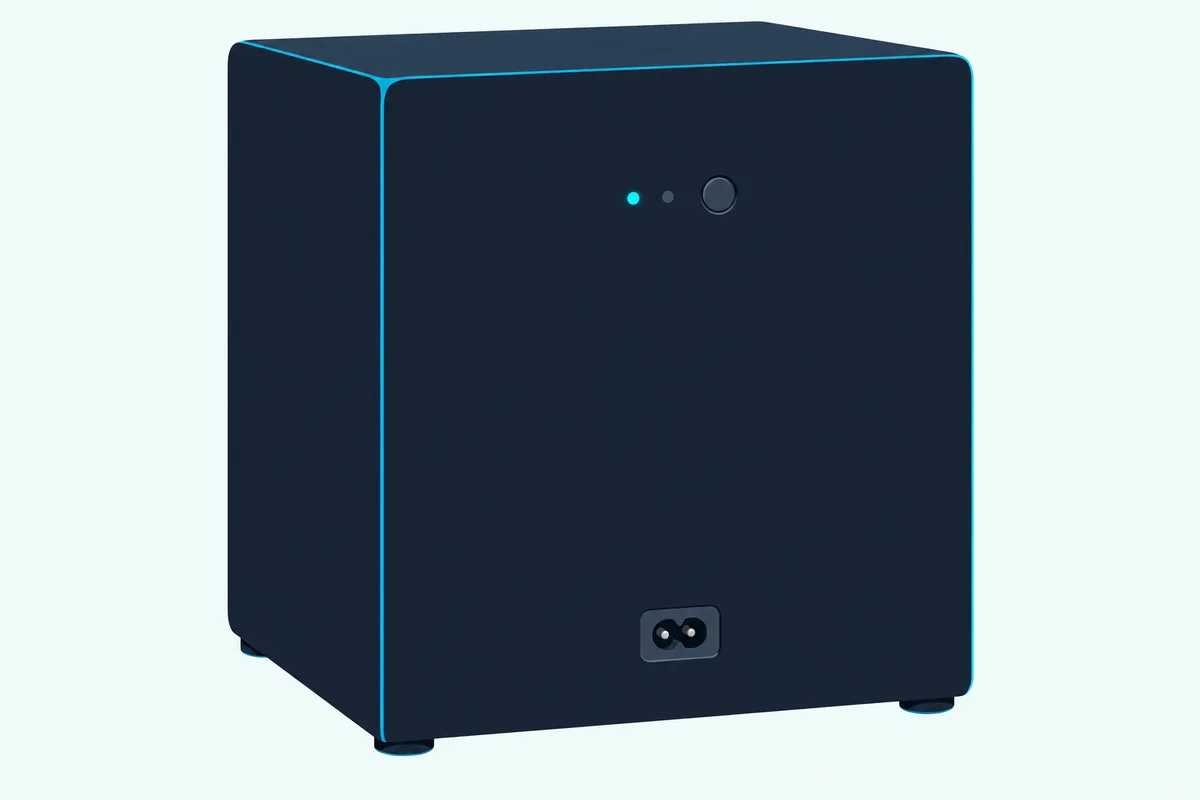
Sound reaches it by radio instead. The manual puts the bar’s wireless range at about 10 meters (33 feet), on 5.8 GHz in most countries and 5.2 GHz in Morocco, Tunisia and Egypt, with the receiving antennas built into the sub.
So the sub waits for its bar. When the soundbar is off, the manual says the sub goes into standby, its STANDBY light turning red after blinking blue several times.
Those lights tell you which state it’s in. Here’s the HW-B550 manual’s table in plain words:
| Light on the sub | What it means | What Samsung suggests |
|---|---|---|
| Blue, steady | Connected to the soundbar | Nothing to do |
| Blue, blinking | Recovering the connection | Check the bar’s power cable or wait about 5 minutes, then link them manually |
| Red, steady | Standby with the bar off, or a failed connection | Link them again manually |
| Red and blue, blinking | Malfunction | Contact Samsung service |
With no Samsung bar switched on nearby, the sub has nothing to link to, so it can’t reach the steady blue in the first row. The manual’s fix for the blinking and red states is a manual link, which is what the one button on the back does.
What Does the ID SET Button on a Samsung Subwoofer Do?
That button links the sub to a Samsung soundbar, and Samsung’s instructions describe no other device for it. If you searched how to connect a Samsung wireless subwoofer without the soundbar, ID SET is the only connection Samsung documents, and it needs a bar on the other end.
Most of the time you never touch it. Samsung’s pages say the sub and bar automatically connect when both are switched on, and ID SET is the manual fallback when they don’t.
Samsung gives two versions of the steps, and they differ on whether the bar starts on or off:
| Step | HW-B550 manual | Samsung’s support pages |
|---|---|---|
| The bar | On | Off |
| On the sub | Hold ID SET for at least 5 seconds, until the blue light blinks | Hold ID SET until STANDBY goes off and LINK blinks quickly |
| On the remote | Hold Up for at least 5 seconds, until ID SET shows | Hold Mute until ID SET shows, and try Up if Mute does nothing |
| Finish | ID SET shows briefly, and LINK goes steady blue | Turn the bar on while the light blinks, and LINK goes steady blue |
Samsung’s pages add that some bars have their own ID SET button, and that a manual link is the step after a sub or bar is serviced or replaced, or after a factory reset. Full steps by model are in how to connect a Samsung subwoofer to a soundbar, and other brands’ versions in the guide to pair a subwoofer to a soundbar.
Nothing in either version involves a TV, a phone or an app. Samsung’s manual handles Bluetooth on the soundbar itself, where TVs and phones pair with the bar, and the sub isn’t part of those steps.
Get Studio Tips Weekly
Join 5,000+ creators getting acoustic treatment advice every week.
No spam. Unsubscribe anytime.Which Soundbars Can a Spare Samsung Subwoofer Pair With?
That “replaced” note is the opening for a spare sub. A bundled Samsung sub pairs with its own soundbar model, and an add-on sub pairs with the bars Samsung lists for it, so a used or new bar has to be one of those.
Samsung’s manuals name the subwoofer that ships with the bar. The HW-B550’s specifications list the PS-WB65D, so a spare PS-WB65D needs an HW-B550.
Add-on subs come with their own lists, and Samsung’s pages name the bars:
| Add-on sub | Bars Samsung names | Where Samsung says so |
|---|---|---|
| SWA-W700, the Sound+ subwoofer | HW-MS650, HW-MS6501, HW-MS750 | Samsung Singapore’s product page |
| SWA-W510, for S-Series soundbars | HW-S61B/61D, HW-S60B/61D, HW-S50B | Samsung’s reply on its US product page |
That US reply answers a buyer whose replacement sub wouldn’t connect, and it’s blunt: the SWA-W510 is “exclusively compatible” with those S-series bars. Each sub, bundled or add-on, belongs to a named set of bars.
So before buying a used bar to rescue a spare sub, match the sub’s original bar or the add-on’s list exactly. Samsung documents no pairing with another series or brand.
Do LG, Sony, Vizio, Bose and Sonos Subwoofers Work Without the Soundbar?
Samsung isn’t the odd one out. The other big makers’ documents describe the same arrangement, with one Sony exception that runs a sub from a TV:
| Maker | What its documents say | Models named |
|---|---|---|
| LG | The wireless sub connects to the soundbar automatically, and a PAIRING button on its back links it again | S40T (2024 manual) |
| Sony | Its optional subs work “only with specific models”: a compatible sound bar or receiver, or a BRAVIA TV that supports the wireless speaker connection | BRAVIA Theatre Sub 8 and Sub 9; HT-A7000, HT-A5000, HT-A3000, HT-A9 |
| Vizio | The sub comes paired with the sound bar, and holding the sub’s ON/OFF button, then the bar’s Power button, for 5 seconds each links them again | V-Series 5.1, V51x-J6 (2021 manual) |
| Bose | The Bass Module 700 “can only be added to” the Bose bars it lists | Smart Ultra, Smart Soundbar 300, 600, 700 and 900, Soundbar 500, SoundTouch 300 |
| Sonos | The Sub 4 needs an amplified, non-portable Sonos product, and the Sub Mini can’t pair with portable or unamplified ones | Sub 4, Sub Mini |
LG’s S40T manual covers one connection for its wireless sub: to the S40T bar, automatically or with the PAIRING button on the sub’s back. Its light reads green when linked and red for a bad connection or standby, the same idea as Samsung’s.
So an LG wireless subwoofer without its soundbar has one documented link, and the steps for pairing an LG soundbar with its wireless subwoofer cover it. The S40T manual says nothing either way about other devices, so that gap stays a gap here.
Sony’s help guide for the BRAVIA Theatre Sub 8 and Sub 9 says the sub “is a product that works only with specific models.” With no sound bar connected, though, it can link straight to a BRAVIA TV that supports the wireless speaker connection, which makes it the only sub here documented to run from a TV.
With a compatible Sony bar or receiver, the same sub links there instead, and the steps to pair a Sony subwoofer to its soundbar cover that side. Two subs of the same model can share a main device that supports dual subwoofers.
Vizio’s V51x-J6 manual says the sub “has already been paired with the sound bar by VIZIO,” and its surround speakers plug into the sub. The rest of Vizio’s rules are in Burton Acoustix’s Vizio subwoofer guide.
Bose answers the question on its Bass Module 700 page: it can’t be added to one-piece speakers such as the Bose Smart Speaker 500, only to the listed soundbars. Two of them, the Bose TV Speaker and the Lifestyle Ultra Soundbar, take it by wire only.
Sonos’s Sub 4 guide lists “an amplified non-portable product, such as Arc Ultra or Era 300” as a requirement, and an unpaired Sub shows as “unused” in the app. That partner can be a Sonos speaker rather than a bar, since Sonos pairs the Sub 4 with the Five, Era 300 or Era 100 for music.
The Sub Mini has its own limits. Sonos says it can’t pair with portable or unamplified products, including Move, Roam, Connect and Port.
Why Won’t Bluetooth or a Cable Connect the Subwoofer to a TV?
That pattern has one cause: the bar runs the sub. The soundbar takes the TV’s sound and sends the sub its signal over the bar’s own wireless link, and even the sub’s level is set from the bar, which Samsung’s Australian support page says to adjust with the soundbar remote.
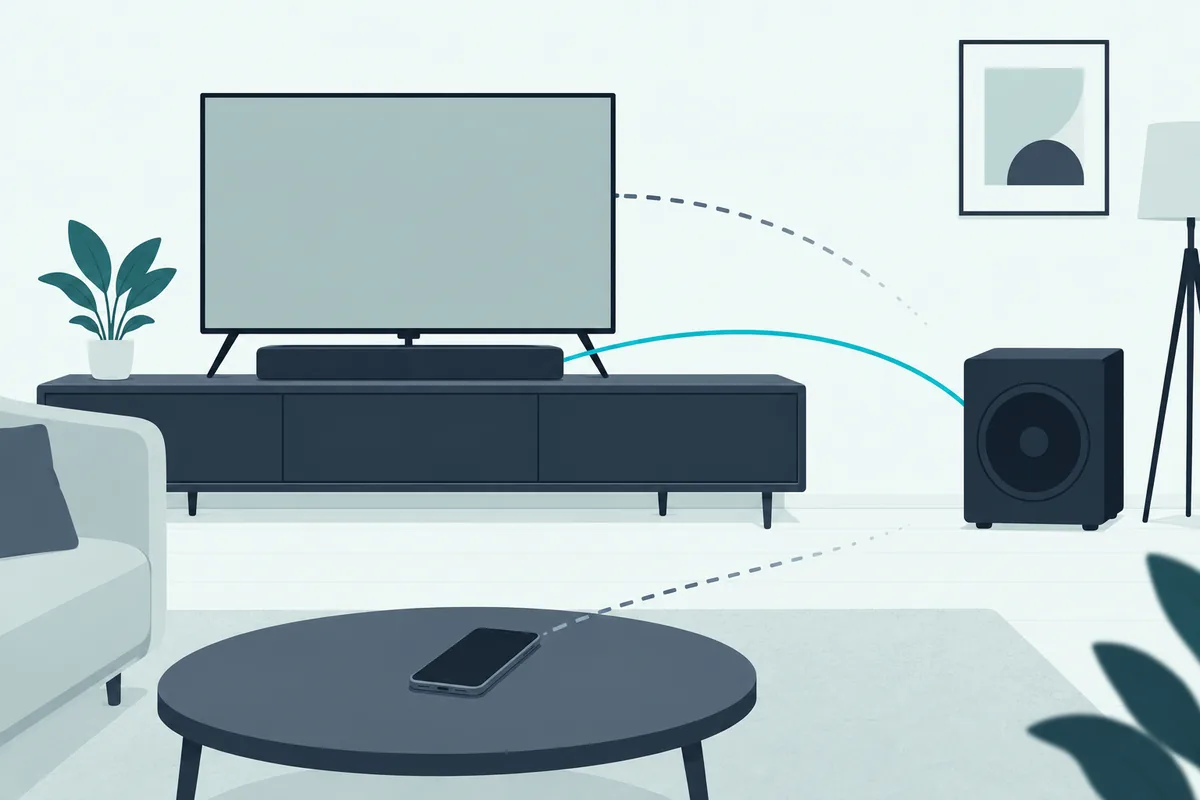
Vizio does the same, with the subwoofer level under LEVEL in the bar’s settings. Its manual adds that turning that level to the minimum switches the sub off.
The inputs make the point. Samsung’s PS-WB65D has a power socket and ID SET, Sony’s Sub 8 a LINK button and an AC inlet, and Sonos’s Sub 4 an Ethernet port that’s there for connecting to a router.
Bluetooth doesn’t change that. In Samsung’s manual, Bluetooth is a soundbar feature for TVs and phones, while the sub listens on the bar’s 5.8 GHz link, and no step anywhere in it pairs a phone with the sub.
So the related search “how to connect Samsung subwoofer to phone” ends at the soundbar. Pair the phone with the bar, as the manual’s Bluetooth steps describe.
Can You Rewire a Soundbar Subwoofer to Run on Its Own?
That closed design is the snag in any “Samsung wireless subwoofer hack.” With no input on the outside, any rewiring means opening the sub, and Samsung’s manual says not to.
Its safety page is blunt: “To reduce the risk of electric shock, do not remove the cover (or back),” and no user-serviceable parts are inside. The manual’s symbol table adds that high voltage is present inside and that touching any internal part is dangerous.
The PS-WB65D has a 250-watt amplifier of its own and plugs straight into a wall socket. That makes it an active subwoofer, but an active sub still needs a signal, and this one is configured to connect with its own bar only.
A regular powered sub needs no opening up, and it’s the next route.
How Do You Connect a Subwoofer to a TV Without a Soundbar?
That regular powered sub has what a soundbar sub lacks. You connect a subwoofer to a TV without a soundbar by using a powered sub with a line-level input, then feeding it from the TV’s audio out, an optical converter or an AV receiver.
Polk’s PSW10 shows what to look for. Its back panel has LINE IN jacks (left and right RCA), speaker-level inputs and outputs, a LOW PASS dial from 80 to 160 Hz, a 0° and 180° PHASE switch and an ON/AUTO/OFF switch.

Polk’s PSW10 powered subwoofer takes a line-level feed from a TV, a converter or a receiver.
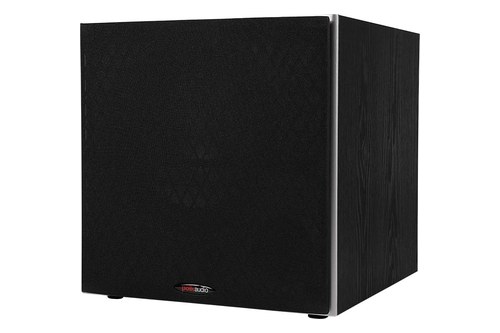
Polk’s PSW10 powered subwoofer
Does Your TV Have an Audio Out or Headphone Jack?
That jack is the simplest feed. Sony’s BRAVIA TVs make it a menu choice: an older BRAVIA i-Manual has a Headphone/Audio Out setting with a Subwoofer option, and says “To output from a subwoofer, select [Subwoofer].”
Sony’s 2016 guide uses the same setting for its own SWF-BR100 wireless sub, through a transceiver plugged into the TV’s AUDIO OUT jack and USB port. Other TVs mute their speakers instead: TCL says a dedicated headphone jack “will automatically disable sound from the TV speakers.”
TCL’s fix is to check the TV’s manual for a fixed audio output that runs alongside the speakers. From that jack, an RCA cable, or a 3.5 mm-to-RCA one for a headphone-size jack, reaches the sub’s LINE IN.
What If the TV Only Has Optical?
If the TV’s only audio output is optical, a small digital-to-analog converter turns it into the RCA signal the sub needs. Set the TV’s digital audio format to PCM first, because the converter below asks for PCM/LPCM in its listing.
PROZOR’s optical-to-RCA converter sits between the TV’s optical output and the sub’s LINE IN.
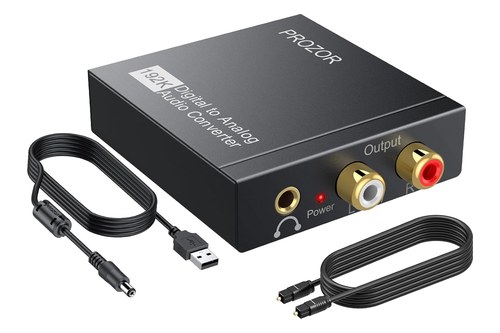
PROZOR’s optical-to-RCA converter
A TV with HDMI ARC but no optical port can use the receiver route below instead. The trade-offs between those two connections are covered here.
When Does an AV Receiver Make Sense?
A receiver is the route if you want speakers as well as bass. Denon’s AVR-S570BT manual connects the TV over HDMI ARC or eARC, or by optical when the TV has no ARC, and its PRE OUT jacks are “used to connect a subwoofer with a built-in amplifier.”
It can run two subs, which get the same signal. Its crossover menu defaults to 80 Hz, the setting Denon says “will work best with the widest variety of speakers.”
What Crossover Setting Should a TV Subwoofer Use?
That 80 Hz default is the place to start on any of these routes. THX requires an 80Hz crossover point in every receiver it certifies, so the sub handles the lows and the speakers handle the mids and highs.
On a sub fed straight from the TV, its own LOW PASS dial does that job, and the PSW10’s dial starts at 80 Hz. On a receiver, the crossover menu does it, and Denon’s runs from 40 to 250 Hz.
From there, change one thing at a time from your usual seat. A simple test is a scene with steady dialogue: turn the dial down if voices sound boomy, and up if the bass seems to stop short of the TV’s own sound.
Phase is the other switch. Sonos’s guide gives the rule for its own and third-party subs alike: flip between 0° and 180° if you don’t hear enough bass from your usual listening position.
What Should You Do With a Spare Soundbar Subwoofer?
Those routes leave the old sub itself. Keep it if you might find its original bar, since Samsung’s steps cover linking a sub after the soundbar is replaced, or sell it to someone who owns that bar.
List it with its model number and the bar it came from. The HW-B550 manual’s specifications pair that bar with the PS-WB65D, and that pairing is what a buyer needs to know.
If the bar died and you’d rather start again, a new set comes with its own sub. Whether you need one at all depends on the room and what you watch, which this room-by-room breakdown works through.
Samsung’s HW-B550F is a 2.1-channel set that comes with its own subwoofer.
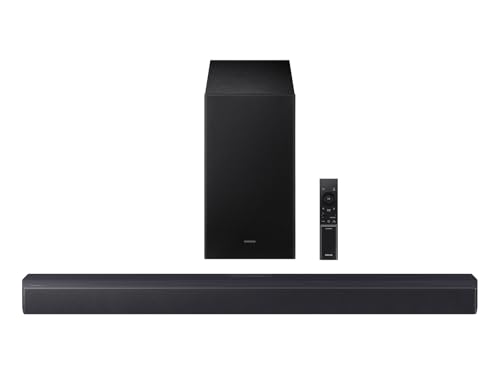
Samsung’s HW-B550F
Whether a new bar can take a wired sub at all is covered in how to connect subwoofer speakers to a soundbar. For complete sets, see Burton Acoustix’s soundbar-and-subwoofer picks.
The Bottom Line
That spare sub comes down to one rule: a Samsung subwoofer without its soundbar works only with that bar or one Samsung lists for it. For bass with no soundbar at all, feed a regular powered sub from the TV’s audio out, an optical converter or a receiver, and start the crossover at 80 Hz.
Frequently Asked Questions
Can I use a Samsung subwoofer with a different Samsung soundbar?
Only if Samsung names that pairing. Samsung’s Canadian support page says a bundled sub is configured to connect with the included soundbar only, and add-on subs carry their own lists: Samsung lists the SWA-W700 for the HW-MS650, HW-MS6501 and HW-MS750, and says the SWA-W510 is exclusively compatible with the HW-S61B/61D, HW-S60B/61D and HW-S50B. Outside those lists, Samsung documents no pairing.
Does a Samsung wireless subwoofer have an input jack?
No audio input, on the model Samsung’s HW-B550 manual draws. The PS-WB65D’s back has a power socket, LINK and STANDBY lights and an ID SET button, and the sound arrives over the bar’s wireless link, which runs on 5.8 GHz in most countries.
Can a Samsung subwoofer connect to my phone?
Not in any step Samsung documents. Its manual pairs phones and TVs with the soundbar over Bluetooth, and the sub’s only documented link is to the bar through ID SET, so connect the phone to the bar.
Why is my Samsung subwoofer blinking blue?
Blinking blue means the sub is trying to recover its connection to the soundbar, according to the HW-B550 manual. Samsung suggests checking the bar’s power cable or waiting about 5 minutes, then linking the two manually with ID SET; with no bar switched on, there’s nothing for it to find.
Can a Sony subwoofer work without a soundbar?
Sony’s BRAVIA Theatre Sub 8 and Sub 9 can, with the right TV. Sony’s help guide says they work only with specific models, and with no sound bar connected they link straight to a BRAVIA TV that supports the wireless speaker connection; with a compatible bar such as the HT-A7000, HT-A5000 or HT-A3000, they link to the bar instead.