You play a note
The key or pad senses which note you played and how hard you hit it. Nothing inside the controller is making a piano, synth, or drum sound.
Your laptop can already make sounds. The problem is that drawing notes, drums, and automation with a mouse can make music feel slow and disconnected.
A controller gives you keys, pads, knobs, and faders so you can record ideas into your DAW faster. Start with the software, then choose the surface that fits the parts you actually want to play.
A MIDI controller does not make sound on its own. It tells your DAW what you played: which note, how hard you hit it, or which knob you moved. The software instrument makes the sound. Keep that clear and the rest of the buying decision gets much easier.
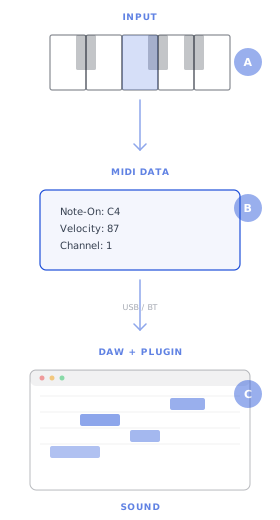
The key or pad senses which note you played and how hard you hit it. Nothing inside the controller is making a piano, synth, or drum sound.
The controller sends a small MIDI message over USB or Bluetooth. Think of it as performance instructions, not audio.
Your DAW routes the message to a virtual instrument. Change the plugin and the same key press can become a piano, synth, bass, or drum. The controller controls; the DAW creates.
Keys make sense when you play chords, melodies, basslines, or piano parts. Pads make sense when you build drums, trigger samples, or launch clips. Hybrids are useful when you want one small surface for both jobs.
25–88 keys · No pads
Piano-style keys for chords, basslines, and melodic parts where the feel of the note matters as much as the note itself.
8–16 pads · No keys
Velocity-sensitive pads for finger-drumming, sample triggering, and launching clips. The natural surface for beats, loops, and groove-led music.
25 keys · 8 pads · Knobs & faders
Keys, pads, knobs, and faders on a single surface. The all-rounder — handles melodies and beats without needing a second box.
Your DAW shapes the way you work: clips, piano roll, plugins, mixer control, and shortcuts. Some controllers map cleanly to one DAW and feel clumsy in another. Choose the software first so the controller helps you make music instead of forcing a setup project.
A full piano has 88 keys, but most production does not need the full range on the desk. The real question is how many octaves you play in one take, how often you use two hands, and how much space you can give the controller.
Two octaves. Enough for one-handed melodies, bass lines, and pad triggering. You'll octave-shift constantly, but you'll learn what range you actually use before spending more.
~40 cm wide — fits on any desk 49Four octaves. Two-handed chords plus bass without octave-shifting. The most popular size for general production — wide enough to play real parts, narrow enough to sit beside a monitor.
~82 cm wide — needs a keyboard tray or desk edge 61Five octaves. Covers most piano literature except the extreme bass and treble. If you play piano parts and don't want to octave-shift during a take, 61 is the minimum serious range.
~100 cm wide — needs its own stand or keyboard desk 88Seven+ octaves. The complete piano. Only necessary if you're recording performances where extreme registers matter — Chopin, wide jazz voicings, film scoring with orchestral bass.
~137 cm wide — this is a piano, not a desk accessoryA light synth key is fast for parts, leads, and portable production. A weighted key is slower, heavier, and closer to piano. The right feel depends on what you play, not on which action costs more.
The lightest touch. Keys snap back instantly. Best for: fast synth leads, beat programming, portability. Not for piano realism — no weight simulation, so expressive playing feels flat.
More resistance than synth action, less than hammer. Best for: general production, DAW control, playing parts that need some expression. The most popular action across the learner-to-producer range.
A physical hammer strikes when you press. Graded weighting: bass heavier, treble lighter. Best for: piano performance, classical recording, dynamic touch. Heavy, expensive, large. Only if you're actually a pianist.
No keys — velocity comes from hitting rubber pads. Best for: finger drumming, sample slicing, clip launching, beat sequencing. A dedicated pad controller is a different instrument from a keyboard.
Most MIDI problems are not broken hardware. They come from the cable, USB hub, driver, DAW input setting, Bluetooth delay, or audio buffer. Work through those in order before buying something new.
Most controllers are class-compliant USB-MIDI — plug the USB cable into your computer, the OS recognises it, your DAW sees it. No driver needed. If it doesn't appear: try a different USB port, avoid hubs (especially unpowered ones), and check that the cable is data-capable (some USB-C cables are charge-only).
Bluetooth adds 10–20 ms of latency. Fine for casual playing, noticeable for tight finger-drumming or recording quantised parts. If you're gigging or recording, use USB. If you're sketching ideas on the couch, Bluetooth is fine.
Newer iPads (USB-C) connect directly. Older iPads (Lightning) need the Apple Camera Connection Kit. GarageBand on iPad is surprisingly capable — and any class-compliant controller works. The main limit: iOS audio buffer sizes are larger, so latency is higher than on a laptop.
If playing feels laggy, check your DAW's audio buffer size first. 128 samples at 44.1 kHz = ~3 ms. 1024 samples = ~23 ms (noticeable). Lower the buffer for playing, raise it for mixing. This is a DAW setting, not a hardware problem — buying a new controller won't fix it.
90% of "broken controller" problems are cable or driver issues. The fix is almost always one of these six steps — work through them in order before assuming the hardware is faulty.
Do not start with the most expensive controller. Start with the limit: too little range, poor key feel, not enough pads, weak DAW control, or unreliable setup. Pick the level that removes that limit without adding features you will not use.
For total beginners. 25 mini synth-action keys, 8 hit-sensitive pads, 8 rotary knobs, USB bus-powered. Includes MPC Beats software. Works with every DAW and gives you a low-risk way to learn what you actually use.
Tradeoff — Mini keys, no pressure-after-the-note control, synth action only. If you start playing two-handed parts, the key size becomes the limit. That is fine: this level is for starting cheaply.
Also consider: Arturia MiniLab 3 — better pads, nicer keybed; or M-Audio Keystation Mini MK3 if budget is everything.
Producers outgrowing 25 mini keys. 49 full-size semi-weighted keys, 16 velocity pads, 8 rotary knobs, faders, native Ableton integration, also works with Logic, FL, and HUI. Two-handed chord range without jumping to hammer-action territory.
Tradeoff — Semi-weighted, not hammer. Pianists will notice the lack of weight. Producers won't care — the action is fast and responsive for synth and pad work.
Also consider: Arturia KeyLab Essential 49 MK3 — deeper Analog Lab integration; or NI Komplete Kontrol A49 if you already use Komplete instruments.
Active producers playing full keyboard parts. 61 semi-weighted keys with aftertouch, 16 velocity pads, 9 faders, 9 knobs, CV/Gate outputs, deep Analog Lab and DAW integration. Doubles as a command surface for transport, mixer, and plugin browsing.
Tradeoff — Still semi-weighted. If you need hammer action, look at the pianist option. If you need 61 keys with lighter action for fast synth work, this is the ceiling before piano territory.
Also consider: NI Komplete Kontrol S61 MK3 — polychromatic light guide, NKS deep-integration with every Komplete plugin.
Pianists going digital. 88 Fatar hammer-action keys with aftertouch, 16 pads, 9 faders, 9 knobs, CV/Gate, DAW integration. Same feel as your acoustic, for recording piano parts where dynamic touch matters as much as the notes.
Tradeoff — 18 kg and 137 cm wide. This lives on a piano stand, not your desk. If you don't need 88 keys, the 61-key option saves space and money.
Also consider: NI Komplete Kontrol S88 MK3 — Fatar TP/110 keybed (industry reference); or Kawai VPC1 for the most realistic piano feel in any controller.
Dedicated producers making full tracks by hand, not just playing notes into a DAW. 64 hit-sensitive pads, MPE support, built-in audio input/output, and the option to run Ableton without a laptop. Choose this when pads and hands-on production matter more than keys.
Tradeoff — Built mainly for Ableton. If you use FL Studio or Logic, Push is the wrong answer. Also: no keys — pair it with a keyboard if you need to play melodies.
Also consider: Native Instruments Maschine+ — sampling and arranging without a laptop; or Akai MPC Live II — an MPC setup with built-in speakers.
Start with the signal flow if MIDI is still unclear. If you already know your DAW, key count, or setup problem, jump straight to the guide that solves that part.
Most of these claims sound confident because they skip the signal flow. Once you know what the controller does — and what the software does — the buying decision gets simpler.
A smaller controller can still play the same software instruments. The number of keys changes your physical playing range, not the sounds available to you. Use 88 keys when you need full piano range in one take.
Better for piano realism. Worse for fast synth work, beat programming, and portability. Weighted action is heavier, more expensive, and slower to bounce back. If you're not a pianist, semi-weighted or synth action is the better tool.
They do not. A MIDI controller sends note and control data to a DAW; the DAW's virtual instruments make the sound. Without software, the controller has nothing to play.
You need to know your DAW. Piano skill helps for playing keys, but pads don't require it, and most beat-making is step-sequenced or drawn in a piano roll. Knowing scales helps; knowing Chopin is irrelevant for most production workflows.
They have zero sounds. The sounds come from the software. A starter M-Audio Keystation playing Spitfire Audio libraries sounds identical to a flagship Komplete Kontrol playing the same libraries. What you're paying for in expensive controllers is build quality, keybed feel, and DAW integration — not audio quality.
Once you can play parts into your DAW, the next question is usually whether you want to perform finished tracks, hear your room more accurately, or stop sound from leaving the room.
Jog wheels, crossfaders, software choices, and controller picks from starter units to laptop-free rigs. The live performance counterpart to your production controller.
Explore the hubStart here if you are still deciding whether you want to DJ finished tracks or produce your own music from scratch.
Read the pillarPanels, bass traps, diffusers — everything that stops room reflections from lying to you while you mix and produce on your new controller.
Explore the hubCorners pile up bass before it reaches your monitors. Treat them first — it's the single biggest accuracy win for a home studio mix position.
See the picksFirst reflections lie to you at the mix position. Mid/high treatment for bedroom studios, from starter panel plans to pro-grade broadband absorbers.
Browse panelsFoam wedges, where they help, where they do not, and how to use them carefully in a small bedroom production space.
Read the guide