Best DJ Controller for Traktor: 6 Picks Compared
What’s the best DJ controller for Traktor? One the software sets up on its own, which today means Native Instruments’ Traktor MX2 or Pioneer DJ’s DDJ-FLX4.
Plug in a controller Traktor doesn’t recognize and the jog wheels do nothing while you hunt through forums for a mapping file.
Native Instruments’ own support pages and release notes list which controllers get automatic setup, and six of them make up the picks below.
You’ll see how each one connects, what Traktor software comes with it, what the software costs, and what to do when your controller isn’t on the list.
The short answer comes first, then the details behind it, starting with a table of all six.
What Is the Best DJ Controller for Traktor?
The Traktor MX2 is the best DJ controller for Traktor if you want Native Instruments’ own hardware, and the DDJ-FLX4 is the best value if you’d like one controller that also runs other software. Both are two-channel controllers that Traktor configures for you, and the table below shows where the other four fit.
| Controller | Channels | How Traktor sets it up | Traktor software with it |
|---|---|---|---|
| Native Instruments Traktor MX2 | 2 | Made by Native Instruments | Traktor Pro 4 included |
| Pioneer DJ DDJ-FLX4 | 2 | Plug and play since version 4.4.0 | Free Traktor Play through Native Access |
| AlphaTheta DDJ-FLX2 | 2 | Plug and play since version 4.4.0 | Free Traktor Play through Native Access |
| Numark Party Mix II | 2 | Plug and play in Traktor Play since 4.5.0 | None (Serato DJ Lite in the box) |
| Numark DJ2GO2 Touch | 2 | Plug and play in Traktor Play since 4.5.0 | None (Serato DJ Lite in the box) |
| Native Instruments Traktor Z1 | Mixer, 4-channel control | Made by Native Instruments | Traktor Pro 4 included |
Two things stand out in that table: only the Native Instruments pair ships with Traktor Pro 4, and the Numark pair ships with software that isn’t Traktor. If you’re not sure you need a controller at all, our answer to do you need a DJ controller comes first.
Which Controllers Does Traktor Set Up Automatically?
The “How Traktor sets it up” column draws on Native Instruments’ Traktor Controller Setup Guide, which sorts every controller into five groups. Those are current Native Instruments controllers, discontinued Native Instruments controllers, third-party plug-and-play controllers, third-party “Traktor Compatible” controllers and generic MIDI controllers.
Its examples for the plug-and-play group are the AlphaTheta DDJ-FLX2, the DDJ-FLX4 and the Pioneer CDJ-3000. The release notes add the version history: version 4.3.0 added the MX2, 4.4.0 added plug-and-play support for the FLX4 and FLX2, and 4.5.0 added three Numark controllers.
The “Traktor Compatible” group has the Reloop Buddy, the Reloop Ready and the older Numark Mixtrack Pro as examples, each with mapping documentation. Native Instruments’ separate Traktor Play compatibility list names the S2 MK3, MX2, DDJ-FLX2, DDJ-FLX4, Reloop Buddy and Reloop Ready as officially supported.
That list also says other controllers may work only partly through generic MIDI mapping. As of 30 September 2026 it doesn’t name the Numark models from the 4.5.0 notes, so check it again before you buy one of those.
Get Studio Tips Weekly
Join 5,000+ creators getting acoustic treatment advice every week.
No spam. Unsubscribe anytime.Is the Traktor MX2 the Best Pick for Traktor Itself?
Of the six, the MX2 is the only two-channel controller in Native Instruments’ current DJ controller store, and it’s the one built around the software. If you want hardware made by the company that makes Traktor, the Native Instruments Traktor MX2 is the one to buy.
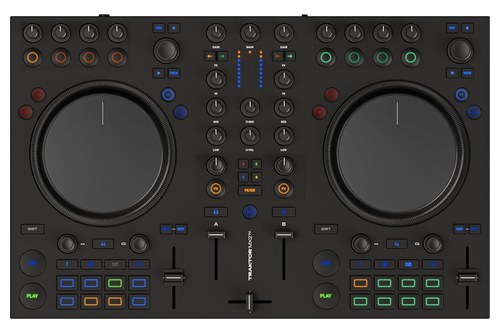
the Native Instruments Traktor MX2
Its product page describes a two-channel mixer, jog wheels, deck effects controls and 16 pads that switch between Stems, Pattern Player, Hot Cues and Loops. The FAQ adds that the jog wheels are the same size as the Traktor S4’s but aren’t motorized.
The built-in sound card has an RCA and a mini-jack main output, a mini-jack and a quarter-inch headphone output, a quarter-inch mic input and a USB-C port. Native Instruments says the MX2 must connect to a computer running Traktor Pro 4 and needs its power supply, which comes in the box.
That same FAQ says a full version of Traktor Pro 4 is required, and one comes with the controller. Press both SHIFT buttons together and the MX2 switches into MIDI mode, so you can use it with other software as well.
Measure your desk first: Native Instruments lists the MX2 at 511.4 by 323.1 millimeters (20.1 by 12.7 inches), about 58 millimeters deeper than the S2 MK3.
Is the Pioneer DJ DDJ-FLX4 a Good Traktor Controller?
The MX2 isn’t the only route, because a third-party controller can be plug and play too, and the DDJ-FLX4 is the clearest case. Native Instruments’ notes for version 4.4.0 add plug-and-play support for it, including automatic audio configuration and mapping.
That makes the Pioneer DJ DDJ-FLX4 the value pick. Pioneer DJ’s manual lists rekordbox and Serato DJ Lite as supported software, and Serato DJ Pro with a paid license, so it isn’t tied to Traktor.
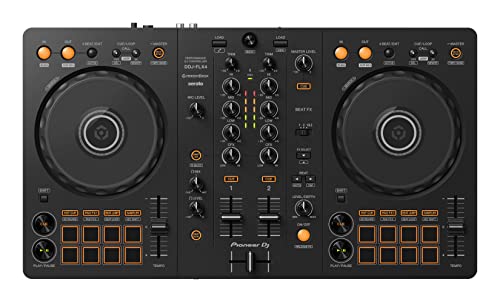
the Pioneer DJ DDJ-FLX4
Native Instruments’ page on third-party controllers with Traktor Play says FLX4 and FLX2 owners can install a free copy of Traktor Play. In Native Access, connect the controller and click Get Traktor Play, then Get it free.
If you already own Traktor Pro 4, the same page says to use it instead, since Pro 4 is fully compatible with those controllers. Readers of our Serato DJ controller picks will recognize the FLX4, and it can stay in your rig if you later switch programs.
The manual lists USB bus power at 5 V and 500 mA, a weight of 2.1 kilograms (4.6 pounds) and dimensions of 482 by 272.8 by 59.2 millimeters. On the back there’s a quarter-inch TS microphone jack and RCA master outputs, and the headphone output is a 3.5 mm stereo mini jack.
Windows owners should know that Native Instruments’ 4.4.0 and 4.4.1 notes list audio problems on some Windows 11 PCs with this controller. The 4.4.2 notes list a fix that makes the FLX4 and FLX2 default to WASAPI Exclusive Mode.
Should You Choose the DDJ-FLX2 Instead?
Choose the FLX2 if size and weight matter more than the FLX4’s microphone jack and RCA outputs, because AlphaTheta calls it its lightest and most compact DJ controller. The AlphaTheta DDJ-FLX2 weighs 1.2 kilograms (2.6 pounds) and measures 383.2 by 208 by 48.2 millimeters, according to AlphaTheta’s page.
The AlphaTheta DDJ-FLX2
It runs on USB bus power through its USB Type-C port, so it needs no power adapter. AlphaTheta lists Traktor Play among its compatible software, next to rekordbox, djay and Serato DJ Lite.
The specifications show a 3.5 mm stereo mini jack for the master output and another for headphones, and they list no microphone input. Studio monitors with RCA or quarter-inch inputs need a suitable adapter cable.
Are the Numark Party Mix II and DJ2GO2 Touch Worth Buying for Traktor?
They can be, as long as you go in knowing that both ship with Serato DJ Lite rather than Traktor. Two entry-level Numark controllers joined Traktor’s plug-and-play list later than the AlphaTheta pair: the 4.5.0 notes add support for the Numark Party Mix II, Party Mix Live and DJ2GO2 Touch, with automatic audio configuration and dedicated mappings for Traktor Play.
The Numark Party Mix II has those three lights, two large touch-sensitive jog wheels, and four performance pads on each deck in Effect, Cue, Loop and Sampler modes, per Numark’s page. Its main and headphone outputs are 1/8-inch (3.5 mm) jacks, and it draws power over USB.
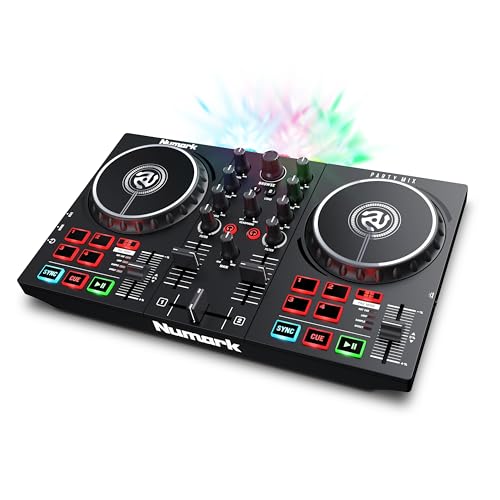
The Numark Party Mix II
Numark lists it at 12.8 by 7.8 by 2 inches and 2.1 pounds. If you’d like the smallest option, the Numark DJ2GO2 Touch is pocket-sized, with capacitive touch jog wheels for scratching and a driverless built-in audio interface.
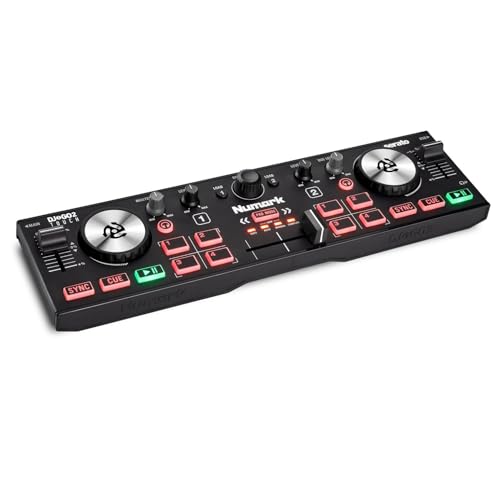
the Numark DJ2GO2 Touch
Numark’s page for it lists a 1/8-inch main output and a 1/8-inch headphone output, and Serato DJ Lite as the included software. One flag on both: Native Instruments’ Traktor Play list doesn’t name these Numark models yet, so confirm the current list before you order.
What Does Traktor Cost on Top of the Controller?
Software is the hidden difference between those six controllers, because some include Traktor and some don’t. The MX2, X1 and Z1 pages each say Traktor Pro 4 comes with the hardware, and FLX2 and FLX4 owners get Traktor Play free.
Everyone else pays Native Instruments: its store lists Traktor Play at $49 and Traktor Pro 4 at $149 as of 30 September 2026. The Play page says you can upgrade to Pro at any time and pay only the difference.
The two differ in scope. Traktor Play gives full control of two decks, an 808 kit from Pattern Player, streamlined stem separation, loops, effects and Beatport streaming, while Traktor Pro 4 is described as professional four-deck software.
Where Do the Traktor X1, Z1 and S4 MK3 Fit?
They fit as parts of a bigger setup rather than as one-box starters, and Native Instruments’ own pages say so. The Native Instruments Traktor Z1 is an ultra-compact mixer controller and sound card, with a 3-band EQ, stem volume controls, three OLED displays, line faders and a crossfader.
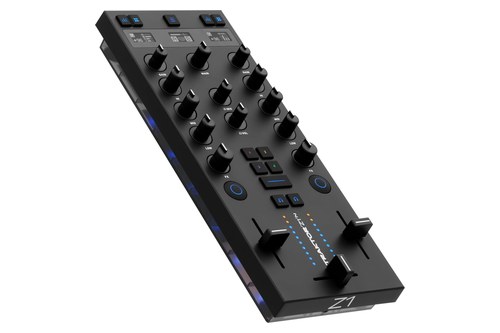
The Native Instruments Traktor Z1
The Z1 page says it toggles between all four Traktor decks, and it lists nine Mixer FX including Filter, Reverb and Time Gater. Its 24-bit/96 kHz interface has a mini-jack speaker output and a USB-B port, and the 4.2.0 notes let you connect two Z1 MK2 units as a combined four-channel controller.
The Traktor X1 MK3 handles the deck side, with five OLED displays, two encoders per deck for browsing and loop size, and 10 transport buttons per deck. Native Instruments’ X1 page shows a four-deck club setup that daisy-chains two X1 MK3 units with a mixer that has a built-in audio interface.
The Traktor Kontrol S4 MK3 sits in the setup guide’s current-controllers group and on the stem-support list, yet the store page listed only the X1, Z1 and MX2 on 30 September 2026. Ask a retailer about stock and shipping before you plan around an S4 MK3.
Does Traktor Work With CDJs and Turntables?
Those add-ons suit DJs who already own decks, and Traktor works with those too. Native Instruments’ Traktor Pro 4 page says you can plug and play with any club-standard mixer, turntables or CDJs, and that Traktor Control Vinyl keeps the feel of mixing vinyl with your digital tracks.
The setup guide’s plug-and-play examples include the Pioneer CDJ-3000. The 4.2.0 notes add that one physical stereo input can now be assigned to several decks, so a single turntable can control two decks.
That’s the setting where a Z1 or X1 earns its place, because the X1 page describes connecting to CDJs, custom setups or more X1 units. A full controller like the MX2 or DDJ-FLX4 makes more sense when there are no decks to plug in.
Can You Use Any MIDI Controller With Traktor?
None of those controllers is required, because the Traktor Ready list that Native Instruments’ support pages link to says Traktor is compatible with any standard MIDI controller. The catch is the mapping, the file that tells Traktor what each knob and button does.
The same page lists Traktor Ready controllers, which have enhanced integration and downloadable mapping files. Many of the models on that list are older units, from names such as Numark, Reloop, Denon, Vestax and Stanton, so it’s a poor shopping list today.
Anything off the list needs a mapping made or imported. Native Instruments says to add only one mapping per controller, because accidental duplicates can stop the controller from working correctly.
How Do You Set Up a Controller Traktor Doesn’t Recognize?
That leaves the practical question of how to set one up, and Native Instruments documents two routes. For a generic controller, connect it and open Traktor’s Preferences, then go to Controller Manager.
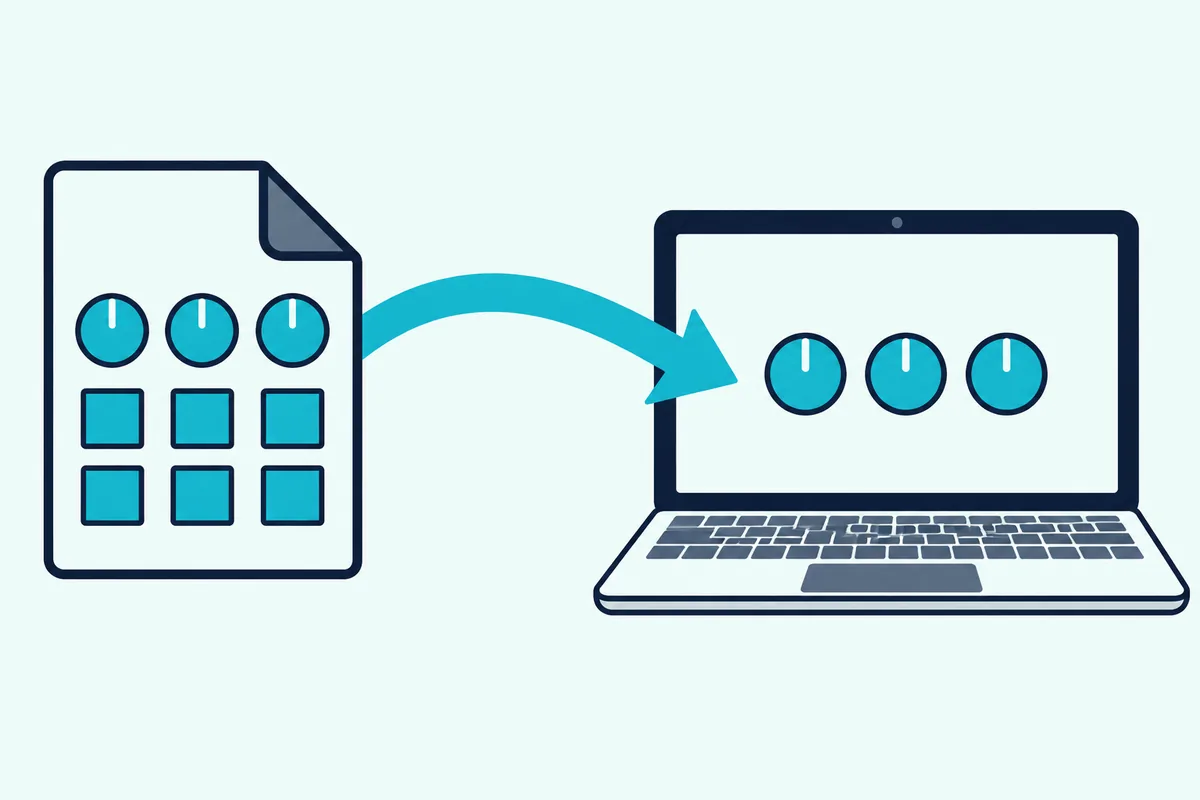
Click Add under the Device field and choose Generic MIDI to start an empty mapping, or choose Import TSI to load a mapping file with the .tsi extension. Then set the In-Port and Out-Port to your controller’s MIDI ports, per the generic MIDI article.
For a Traktor Ready controller in Traktor Pro 4, Native Instruments’ steps start with downloading its mapping file and unzipping the .tsi file inside. Then open Preferences, click Import, pick the .tsi file, and make sure Controller Mappings is ticked in the Categories to Import window.
Mapping files are shared by manufacturers and user communities, and any mapping you build can be exported from the Controller Manager as a .tsi file. That’s how you back one up or move it to another computer.
What Do the Pads Do in Traktor?
Once a controller is set up, the pads are where most of Traktor’s performance features live. On the MX2, Native Instruments says the 16 pads switch between four physical modes: Stems, Pattern Player, Hot Cues and Loops.
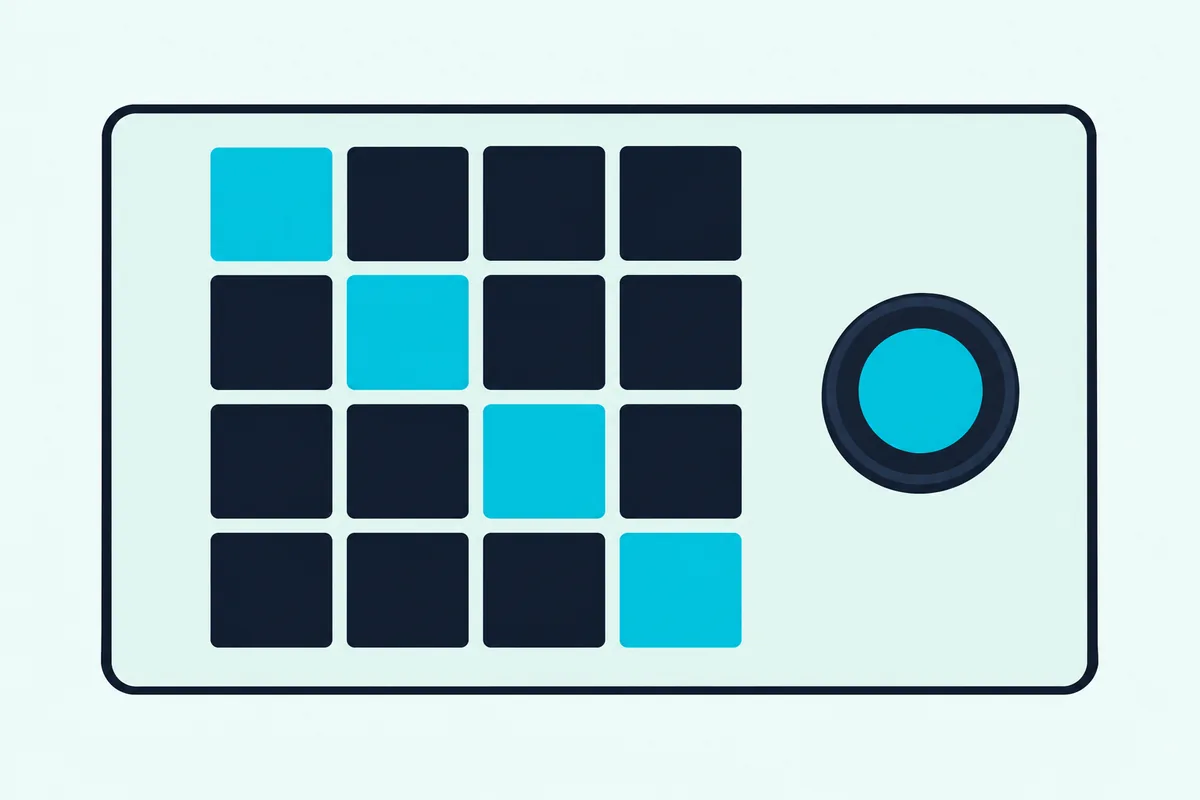
Hot cues jump to key points in a track, and loops let you build energy before a drop without interrupting the track. Pattern Player turns the pads into a step sequencer for layering drum patterns, and Traktor Pro 4 includes kits from producers such as Rebekah, Len Faki and Luke Slater, while Traktor Play keeps the 808 kit.
On third-party controllers, what each pad does depends on the mapping. Native Instruments publishes mapping documentation for the DDJ-FLX2 and DDJ-FLX4, listed in the setup guide, so read it to see exactly what each pad does in Traktor.
Do Stems Work on Every Controller?
Stems are the pad mode that most often needs extra mapping. Native Instruments’ Traktor Pro 4 notes say stem performance is supported on the S2 MK3, S4 MK3, S3, X1 MK3, D2, S8 and S5.
For older Traktor controllers and for third-party controllers, the same notes say stem controls can be added manually to the mappings. The MX2 has a Stems pad mode and the Z1 has stem volume controls, and Traktor Play lets you mute the drums with a single button.
Pattern Player is more forgiving. The notes say it’s supported by all Traktor controllers and can be mapped through MIDI to third-party ones.
Can You Use a Microphone With a DDJ-FLX4 in Traktor?
The DDJ-FLX4’s microphone is the other thing that needs a manual step: Native Instruments lists it as a known issue that Traktor’s auto-configuration doesn’t set up the mic inputs. You do it once in Input Routing, and Traktor remembers it.
On a Mac, choose the DDJ-FLX4 as the audio interface, open Input Routing and select DDJ-FLX4 MIC IN L and MIC IN R in the Input Aux section. On Windows, raise the buffer size to 640 samples and select Line L and Line R there instead, and the blue meters show the signal your microphone picks up.
The controller side, from the plug to the level knob, is in our guide to wiring a microphone into a DJ controller. The MX2 has its own quarter-inch mic input on its built-in sound card.
Does Each Controller Have a Built-In Sound Card?
That built-in sound card is worth comparing across all six, because the connectors differ more than the pad layouts do. All six can send sound out without an extra box, but you need to match the connectors to your speakers.
The MX2 has RCA and mini-jack main outputs plus mini-jack and quarter-inch headphone outputs. The FLX4 has RCA master outputs and a 3.5 mm headphone jack, while the FLX2 uses a 3.5 mm mini jack for the master output and another for headphones.
Numark lists 1/8-inch main and headphone jacks for both the Party Mix II and the DJ2GO2 Touch. The Z1 has a mini-jack speaker output and a USB-B port on its 24-bit/96 kHz interface.
A sound card lets Traktor send the master mix to your speakers and the cue mix to your headphones separately, which is how you preview the next track. Our guide to hooking a controller up to speakers covers the cables.
What Should You Check Before You Buy?
The manual steps above are why a short checklist helps before you order. Start with power: the MX2 needs its power supply, while the FLX4 and FLX2 can run on USB bus power.
Check the outputs against your speakers using the comparison above, since RCA or quarter-inch speakers need an adapter cable on any of the mini-jack models.
Check your operating system, too. The 4.5.0 notes say macOS 12 (Monterey) is no longer officially supported, so stable operation isn’t guaranteed on it.
Finally, check which Traktor you’re buying into, since the MX2 needs Traktor Pro 4 while the FLX pair starts with a free Traktor Play copy.
Is a Second-Hand Traktor Controller Still Worth Buying?
Second-hand hardware is where those checks matter most. Native Instruments’ Traktor Pro 4 FAQ says all current Traktor hardware controllers keep working with Pro 4, but that macOS 10.15 ended operation of some legacy hardware, including the Traktor S2, S4 and X1 MK1, and the same applies to macOS 11 and 12.
The setup guide’s discontinued list runs from the S2 MK1 to the S2 MK3, the S4 MK1 and MK2, the S5, the S8, the D2, the X1 MK1 and MK2, the Z1 MK1, the F1 and the Z2. Of those, only the S2 MK3 is on the Traktor Play list, and the 4.4.2 notes say it works with Traktor Play if you bought it second-hand without a Traktor Pro license.
So check the generation printed on the unit and the manual on Native Instruments’ site before you pay, because the MK1 units are the ones the FAQ names.
Which Controller Fits Which DJ?
Those checks narrow the six picks quickly. If you want the least fuss and the full software, the MX2 is the match.
If you’d like one controller that also runs rekordbox or Serato, the DDJ-FLX4 covers all three programs. If it has to fit in a backpack, the DDJ-FLX2 and the DJ2GO2 Touch are the light ones.
Both also fit the personal-item sizes that the big US airlines publish, and flying with a DJ controller gets easier when the unit is that small.
If you’re brand new to DJing, our beginner DJ controller picks compare these against options built for other software. If you already have decks or CDJs, the Z1 is the piece that adds Traktor’s mixer, and an X1 adds the deck controls.
The Bottom Line
The best DJ controller for Traktor is the one Native Instruments’ software sets up on its own, and that gives you a short list: the MX2 for Native Instruments hardware, the DDJ-FLX4 for value, and the DDJ-FLX2 when space is tight. The Numark pair is the budget route, and the Z1 is an add-on rather than a starter.
Check Native Instruments’ Traktor Play list and release notes before you buy, because the plug-and-play list has grown with each update. Whichever controller you choose, confirm it on Native Instruments’ pages on the day you order, since that list keeps changing.
Frequently Asked Questions
What is the best DJ controller for Traktor?
The Traktor MX2 is the best fit if you want Native Instruments’ own hardware, since it includes Traktor Pro 4. The Pioneer DJ DDJ-FLX4 is the value pick, because Traktor sets it up automatically and Native Instruments gives FLX4 owners a free copy of Traktor Play.
Does Traktor work with any DJ controller?
Yes, the Traktor Ready list on Native Instruments’ support pages says Traktor is compatible with any standard MIDI controller. A controller that isn’t plug and play needs a mapping, which you create in the Controller Manager or import as a .tsi file.
Is the DDJ-FLX4 compatible with Traktor?
Yes. Traktor 4.4.0 added plug-and-play support for the DDJ-FLX4, including automatic audio configuration and mapping, and its microphone inputs need one manual setup in Input Routing.
Do I need Traktor Pro if I have a DDJ-FLX4?
No. Native Instruments says FLX4 and FLX2 owners can install a free copy of Traktor Play through Native Access, and you can upgrade to Traktor Pro 4 later and pay only the difference.
Can I use Traktor without a controller?
Yes. Native Instruments says you can start Traktor Play with just your laptop, and controllers are an optional addition to it.
Does the Traktor MX2 work without Traktor Pro 4?
No. Native Instruments’ FAQ says the MX2 needs a full version of Traktor Pro 4 running on a computer, and one comes free with the controller.