Can You Add a Subwoofer to a Soundbar? Which Bars Take One

You can add a subwoofer to a soundbar only if the bar has a subwoofer output jack or its maker sells a wireless subwoofer that lists your exact model.
Skip that check and the new subwoofer blinks, sits silent or never shows up, because each maker’s wireless link only talks to its own models.
Match the subwoofer to the bar and you get the deep bass a slim bar can’t make on its own, through one cable or the maker’s own pairing.
The makers’ manuals and support pages below name the bars with a Subwoofer Out jack, from Yamaha’s SR-B20A to Denon’s DHT-S216, and the add-on subwoofers Samsung, Sonos, Bose, Sony, Roku and Klipsch sell for their own bars.
Start with the back of your soundbar, since that one jack, or the lack of it, tells you which of the two routes is yours.
Can You Add a Subwoofer to a Soundbar?
That back panel is where the answer starts. You can add a subwoofer to a soundbar in two ways only: wire a powered subwoofer to a Subwoofer Out jack (ZVOX also allows a line out), or pair the add-on subwoofer the bar’s maker lists for that model.
Anything else runs into a closed system. Samsung’s Canadian support page says a bar’s bundled subwoofer “is configured to connect with the included soundbar only,” and Roku’s subwoofer support page says its subwoofer “cannot be connected directly to any other TV or existing sound system.”
Here’s how the two routes compare:
| Route | What to look for | Which subwoofers work | Where to confirm it |
|---|---|---|---|
| Wired | A jack labeled SUBWOOFER OUT or Subwoofer Out on the bar’s back panel | A powered subwoofer, one with its own amplifier, on a mono RCA cable | The bar’s manual and back-panel drawing |
| Wireless add-on | Your bar’s model number on the maker’s add-on subwoofer page | Only that maker’s add-on, for the models it names | The add-on subwoofer’s product or support page |
| Neither | No jack and no add-on list | None for that bar | Replace the set or move to a receiver |
The same rule works in reverse: a soundbar’s wireless subwoofer can’t run without its own bar, which this Samsung subwoofer explainer covers. So the route depends on the bar you own, not on the subwoofer you’d like to buy.
Which Soundbars Have a Subwoofer Out Jack?
That first route depends on one labeled jack. Soundbars with a Subwoofer Out jack include Yamaha’s SR-B20A, Denon’s DHT-S216 and Vizio’s 2.0-channel SB3620n-H6, and each maker’s manual shows the jack on the back panel.
The manuals agree on what goes into it:
| Soundbar | The jack | What the maker’s manual says |
|---|---|---|
| Yamaha SR-B20A | SUBWOOFER OUT, analog RCA (mono) | Connect a subwoofer with a built-in amplifier using a monaural cable, sold separately; bass then plays from the bar’s built-in subwoofers and the external one |
| Denon DHT-S216 | SUBWOOFER OUT | Use a commercially available subwoofer cable and a subwoofer with a built-in amplifier for deeper bass than the bar’s own subwoofer gives |
| Vizio SB3620n-H6 | Subwoofer Out | No subwoofer in the box; the bar’s bass level also sets the subwoofer’s level, and Night Mode lowers it |
Vizio shows how the answer can split by model. Its SB3620n-H6 manual puts the jack on a 2.0-channel bar sold without a subwoofer, and Burton Acoustix’s page on which Vizio sound bars have a Subwoofer Out jack works through the rest of Vizio’s range.
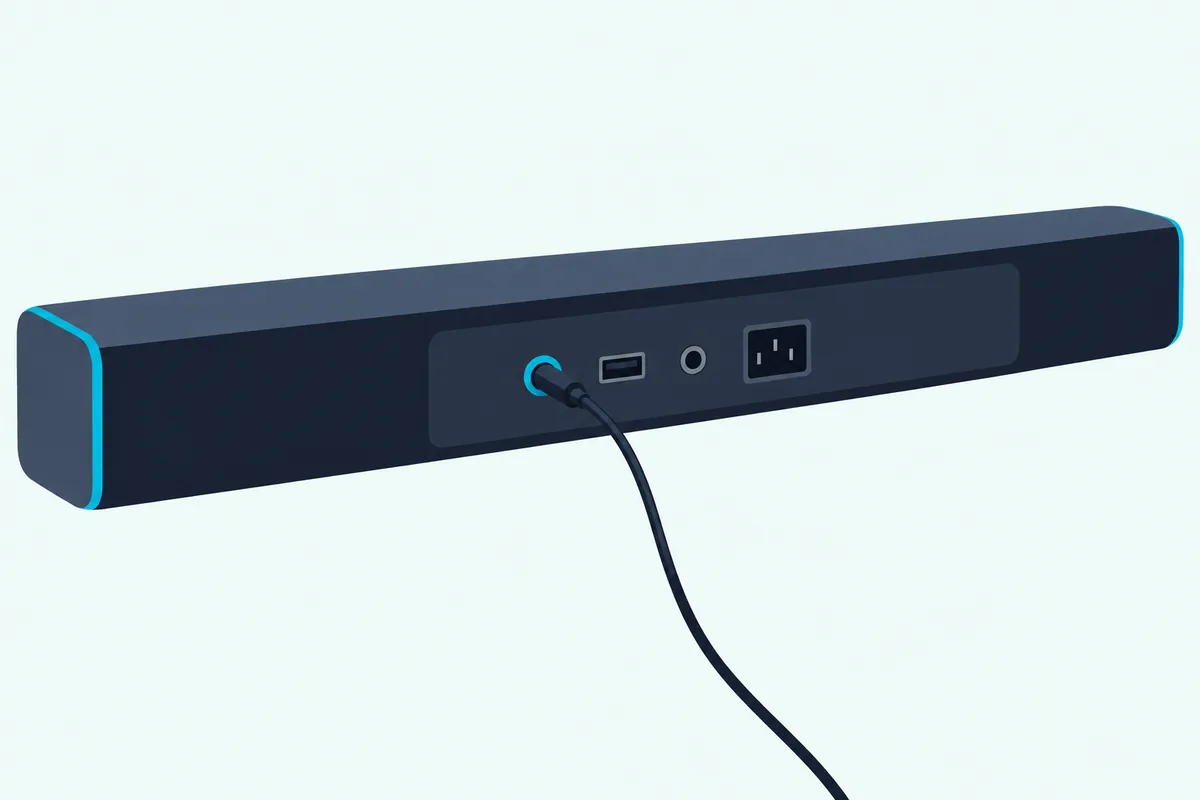
ZVOX handles it a little differently. Its support page says you can connect a subwoofer to a ZVOX that has a Subwoofer Output, Line Out or Headphone jack, as long as it’s powered, but those jacks carry full-range sound, so the subwoofer needs its own low-pass filter.
Check the subwoofer as well as the bar. Yamaha and Denon both specify a subwoofer with a built-in amplifier, so a passive subwoofer, one with no amplifier inside, isn’t what these jacks are for.
Yamaha’s NS-SW050 powered subwoofer is the compact 8-inch model Yamaha’s own how-to connects to the SR-B20A’s Subwoofer Out jack.
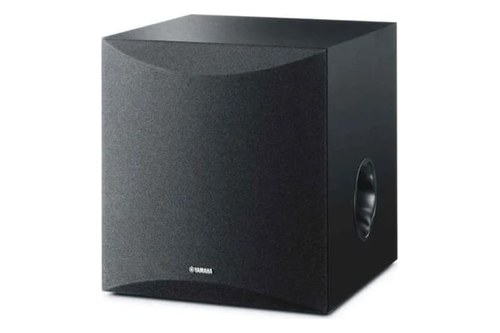
Yamaha’s NS-SW050 powered subwoofer
FosPower’s 6-foot RCA subwoofer cable is the single-plug lead those manuals tell you to buy separately.
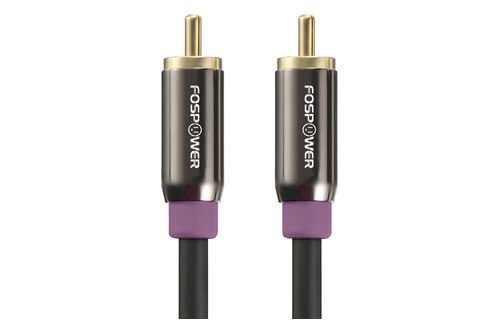
FosPower’s 6-foot RCA subwoofer cable
Get Studio Tips Weekly
Join 5,000+ creators getting acoustic treatment advice every week.
No spam. Unsubscribe anytime.How Do You Connect a Wired Subwoofer to a Soundbar?
Once you’ve found the jack, the hookup takes one cable. You connect a wired subwoofer to a soundbar by running a mono RCA subwoofer cable from the bar’s SUBWOOFER OUT jack to the subwoofer’s input, then plugging the bar in, the order Yamaha’s SR-B20A manual gives.
The steps are short:
- Turn the subwoofer’s volume control to minimum, where Yamaha’s NS-SW050 manual starts.
- Run the cable from the bar’s SUBWOOFER OUT jack to the input on the back of the subwoofer (Denon’s drawing labels it SUBWOOFER IN).
- Plug in the bar and the subwoofer only after the cable is connected, as both Yamaha manuals have you do.
- Play something with deep bass and raise the subwoofer’s volume until it blends in.
Yamaha describes the target in plain words: keep the subwoofer at a level where it is “barely distinguishable” from the other speakers. That makes a simple test for any model: if the bass stands out as a separate sound from across the room, turn it down a step.

The cable is simpler than it looks. Yamaha’s specifications call the SR-B20A’s jack analog RCA, monaural, and its NS-SW050 connects to a subwoofer output with an ordinary audio pin cable, which is all a subwoofer cable is.
Two details still trip people up. On a ZVOX full-range output the subwoofer’s own low-pass filter does the bass split, and on Yamaha’s SR-B20A the bar’s built-in subwoofers keep playing alongside the new one.
Which Soundbars Take a Wireless Add-On Subwoofer?
That second route needs no audio cable at all. Soundbars that take a wireless add-on subwoofer are the models a maker names on its add-on’s page, such as Samsung’s HW-S60D for the SWA-W510 or Sonos’s Arc and Beam for the Sub 4.
Here are the lists as the makers publish them:
| Maker | Add-on subwoofer | Bars the maker names |
|---|---|---|
| Samsung | SWA-W510 | HW-S60D and HW-S61D (2024); HW-S60B, HW-S61B and HW-S50B (2022) |
| Sonos | Sub 4 | Arc Ultra, Arc, Beam (Gen 1 and Gen 2) and Ray, plus the Five, Era 300 and Era 100 speakers |
| Sonos | Sub Mini | Arc, Arc SL, Arc Ultra, Beam (Gen 1 and Gen 2), Beam Ultra, Playbar, Playbase and Ray |
| Bose | Bass Module 700 | Smart Ultra Soundbar, Smart Soundbar 300, 600, 700 and 900, Soundbar 500 and SoundTouch 300; TV Speaker and Lifestyle Ultra by wire only |
| Sony | SA-SW3, SA-SW5 | HT-A3000, whose help guide names both as its optional subwoofers |
| Roku | Wireless Bass, Wireless Bass Pro | Streambar SE, Streambar, Streambar Pro, Smart Soundbar, or a Roku TV with Roku wireless speakers or a Roku soundbar |
| Klipsch | Flexus Sub 100 | Flexus Core 100, 200 and 300 |
Samsung’s SWA-W510 page is blunt about it: “Only compatible with selected Samsung soundbars,” followed by those five models. A 2024 HW-S60D owner can add one; an owner of a Samsung bar that isn’t listed can’t count on it.
Sonos widens its list on its support site, where the Sub 4 works with every Sonos home theater speaker except Playbar and Playbase. The Sub Mini can’t pair with portable or unamplified products such as Move, Roam, Port or Connect.
Bose answers the same way on its Bass Module 700 page: it “can only be added to” the bars it lists. Two of them, the TV Speaker and the Lifestyle Ultra Soundbar, take it by wire only.
Sony’s HT-A3000 help guide names the SA-SW3 and SA-SW5 as its optional subwoofers and sends you to Sony’s website for anything else, and Sony’s subwoofer linking steps cover the pairing side. Roku’s Wireless Bass pairs only with a Roku audio host, and Roku adds that it won’t work with the speakers built into a Roku TV.
Klipsch builds its own Klipsch Transport wireless link into every Flexus product. Its Flexus Sub 100 is sold as the add-on for the Flexus Core bars.

Samsung’s and Sony’s add-ons link up automatically once they have power. Samsung’s connect when the bar is turned on, until the blue LINK LED stops blinking, with ID SET as the manual connection, and Sony’s links when switched on, with a LINK button for manual linking; the general re-pair steps for a soundbar and its subwoofer cover what to try when one won’t.
Samsung’s SWA-W510 wireless subwoofer is the add-on for the S-series bars on Samsung’s list, and only those.
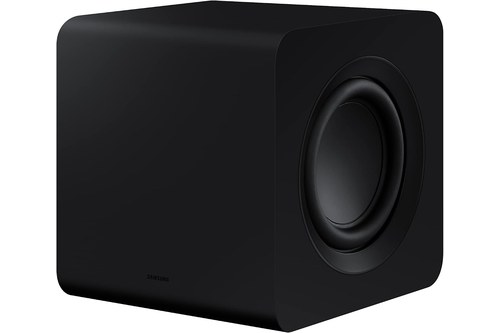
Samsung’s SWA-W510 wireless subwoofer
Can You Connect Any Wireless Subwoofer to a Soundbar?
Those lists answer the most common version of the question too. You can’t connect just any wireless subwoofer to a soundbar, because each maker’s subwoofer links only through that maker’s own system to the models it names, and none of their pages describes pairing another brand’s wireless model.
Bluetooth doesn’t bridge the gap either. In Sony’s HT-A3000 guide, Bluetooth is how the bar connects to devices such as a phone, a TV or headphones, while the optional subwoofer links through the bar’s Wireless Speaker Settings and its own LINK button.
The other makers use their own steps as well. Roku’s subwoofers pair from the host’s menu (hold Home on the remote for 5 seconds, then choose Subwoofer), and Samsung’s link through the ID SET button on the back of the unit.
So a subwoofer that “should” work because it’s wireless, or because it came from the same brand’s older set, still needs its model and your bar’s model on the same maker list. Samsung’s pages describe a manual re-link for a serviced or replaced unit, or after a factory reset, and its Canadian page ties each bundled subwoofer to the bar it came with.
Can a Soundbar Take Two Subwoofers?
Even with a matched subwoofer, a second one is a separate question. A soundbar can take two subwoofers only where its maker supports it, as Sonos does for the Arc Ultra and Beam Ultra (two Sub 4s, two Sub (Gen 3)s, or one of each) and Klipsch does for its Flexus bars.
Sonos’s other home theater speakers have narrower pairings. On the Arc, Beam (Gen 1 and 2), Ray and Amp, a Sub 4 can share the room with another Sub 4 or a Sub (Gen 3), as Sonos’s Sub setup page lays out.
Klipsch pitches the pair for bigger rooms and smoother bass. It says two identical Flexus subwoofers even out the peaks and nulls that a single one leaves in a room.
Roku is the opposite case: it says you can pair only one wireless subwoofer to a Roku host device. For Samsung and Sony, the maker pages read for this guide don’t cover a second subwoofer, so check the bar’s own manual before buying one.
Samsung, LG, Sony and Vizio each describe a single subwoofer in their manuals, and our page on whether you can add another subwoofer to a soundbar sets out each brand’s rule, plus the wired and receiver routes.
Rear speakers follow the same matching rule. If you want rear-channel sound as well, same-brand wireless rears that share processing and timing with the main bar are the move before buying any rear speaker kit.
Can You Use Your Existing Subwoofer With a Soundbar?
That leaves the subwoofer you might already own. You can use your existing subwoofer with a soundbar only if the bar has a Subwoofer Out jack, or a ZVOX-style line out, and the subwoofer is powered, since Yamaha’s and Denon’s manuals call for one with a built-in amplifier.
A passive subwoofer from an old speaker set has no amplifier of its own. It needs an amplifier or receiver to drive it, which is why the soundbar manuals above ask for a subwoofer with its own amplifier.
If the bar has no jack, a receiver is the route that takes a regular subwoofer. A discrete AVR plus wired or wireless speakers can drive timed 5.1 or 7.1 the way a soundbar-plus-sub cannot explains when that bigger setup makes more sense.
If you’d rather build around speakers, passive bookshelf speakers driven by a discrete amp give driver and amp upgrade paths a soundbar-plus-sub cannot helps you decide whether the extra wiring is worth it. Either way, the old subwoofer’s RCA lead still fits, since Yamaha’s NS-SW050 manual uses the same kind of audio pin cable on a receiver’s subwoofer output.
How Do You Set the Subwoofer Level After Adding It?
Once the subwoofer plays, its level is the last step. You set the subwoofer level from the bar or its app on these systems: Denon’s BASS + and – buttons, Vizio’s bass level, Sony’s SW + and – buttons and the Sub Level slider in the Sonos app all adjust the added one.
A powered subwoofer on a jack has its own volume knob too. Start it at minimum, as Yamaha’s NS-SW050 manual does, and turn it up from there rather than making the bar louder.
Sonos adds a phase setting, 0° or 180°, to flip if you don’t hear enough bass from your usual seat. Vizio’s Night Mode lowers an external subwoofer along with the bar’s own bass, so check it’s off before you judge the level.
Placement changes the result too. Bose wants its Bass Module 700 on the floor against the same wall as the TV, closer to walls and corners for more bass, and Roku keeps its subwoofer within 30 feet of the host; where an added subwoofer works best goes through the rest.
What If Your Soundbar Can’t Take a Subwoofer?
If you’ve checked the back panel and the maker’s lists and both come up empty, no setting will add a subwoofer output the bar doesn’t have. Your options are a set that comes with a subwoofer, a bar that takes an add-on later, like Samsung’s HW-S60D with the SWA-W510, or a receiver-based system.
For the choice between sets, 2.1 pairs the bar with a wireless sub; 5.1 adds two wireless rears to that pairing covers the upgrade before you spend money on add-ons. If you’re comparing options, the bar-plus-sub picks compared by woofer size, channels and TV ports is the better next page.
If you’re unsure whether you need a subwoofer at all, whether the bar’s own drivers handle action scenes and music or collapse at higher volume is the diagnostic before buying. Denon’s note is a fair guide: even a bar with its own subwoofer gets deeper bass from an external powered one.
The Bottom Line
That decision comes back to the back panel and the maker’s list. You can add a subwoofer to a soundbar through a Subwoofer Out jack and a powered model, or through the add-on your bar’s maker names for it, and the makers document no third way.
For bigger changes, use the soundbar vs receiver comparison, the 5.1 surround vs soundbar comparison, or the soundbar hub depending on where you want the system to go.
Frequently Asked Questions
Can I use any subwoofer with my soundbar?
Only on a bar with a Subwoofer Out jack, and then it has to be a powered model. Yamaha’s SR-B20A and Denon’s DHT-S216 manuals both call for a subwoofer with a built-in amplifier on that jack, while wireless subwoofers pair only with the bars their makers list, such as Samsung’s SWA-W510 with the HW-S60D, HW-S61D, HW-S60B, HW-S61B and HW-S50B.
Can I add a subwoofer to my soundbar after buying it?
Yes, if the bar was built for one: check its back for a Subwoofer Out jack and its maker’s add-on pages for its model number. Samsung’s 2024 HW-S60D, for example, is on the SWA-W510’s list, and Sonos lets you add a Sub to a speaker that’s already set up through Connect Sub in the Sonos app.
Will a Bluetooth subwoofer work with a soundbar?
Not in any of the makers’ documents read for this guide. Sony’s HT-A3000 guide uses Bluetooth for phones, TVs and headphones and links its optional SA-SW3 or SA-SW5 through the bar’s own wireless speaker settings, Samsung pairs its subwoofers with ID SET, and Roku pairs its subwoofer from a menu on the host device.
Can you connect two wireless subwoofers to a soundbar?
Some systems can. Sonos’s Arc Ultra and Beam Ultra take two Subs, its other home theater speakers take two in certain pairings, and Klipsch’s Flexus bars take two identical Flexus subwoofers. Roku allows only one wireless subwoofer per host device.
Do subwoofers play music or just bass?
They play the bass in everything, music included. Sony’s help guide says the subwoofer is designed for bass or low-frequency sound and may be hard to hear when a source has little bass, and Sonos says its Sub 4 takes over the lowest frequencies so the paired speakers can deliver the highs and mids more clearly.
Is it better to get a soundbar with a subwoofer?
For deeper bass, yes. Denon says even its DHT-S216, which has its own subwoofer, gets deeper bass with an external powered subwoofer, and Yamaha’s hub article says a bar’s small drivers and enclosure limit how much low bass it can reproduce; whether you need that depends on your room and what you watch.