Soundbar vs Surround Sound: Which Home Theater Fits Your Room?
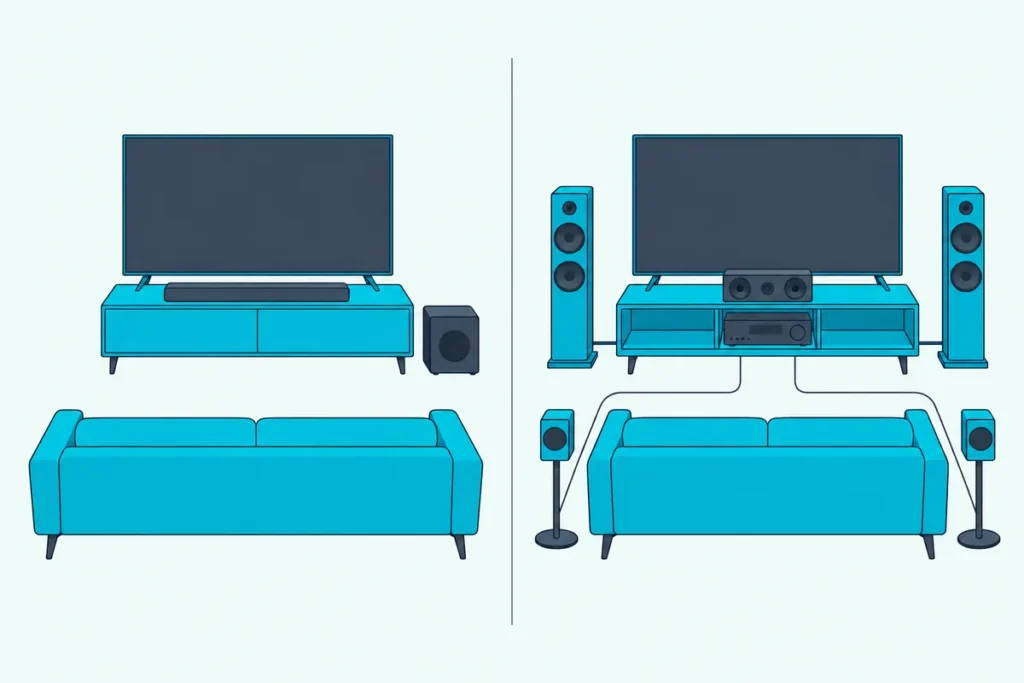
Choosing between a soundbar vs surround sound comes down to a question no spec sheet answers: is there room for speakers beside and behind the seat you actually watch from?
Five speakers and a receiver in a living room that can’t place them leave you with surrounds in the wrong spots, and a lone bar in a dedicated room leaves real channels unused.
Match the setup to the room and you get the most sound that room can deliver, without paying for hardware it can’t use.
This guide compares a soundbar, a soundbar with wireless rear speakers, a home-theater-in-a-box and a receiver with separate speakers, using Dolby’s own setup guides and the makers’ manuals.
The short answer and a side-by-side table come first, then speaker placement, room size, wiring and the systems worth buying at each step.
Soundbar vs Surround Sound, Which Is Better for Your Room?
The room decides it, more than the hardware does. Dolby’s home theater guide calls a soundbar a good fit for a living room or family room, a balance of convenience and room-filling sound, and points to an AV receiver with individual speakers for each channel when you have a dedicated space (Dolby).
| Setup | What’s in the box (example) | Speakers beside or behind you | Wiring | Overhead sound |
|---|---|---|---|---|
| Soundbar alone | One bar (Sonos Arc Ultra, 14 drivers) | None; side-firing or virtual | Power and one HDMI cable | Up-firing drivers or virtual height |
| Soundbar with rears and sub | Bar, subwoofer, two surround speakers (Samsung HW-Q990F) | Two wireless rears | A power outlet for every box | Top channels in the bar and the rears |
| Home theater in a box | Receiver, five speakers, subwoofer, speaker wire (Yamaha YHT-4950U) | Two wired surrounds | Speaker wire to every speaker | None on this model |
| Receiver and separate speakers | Chosen piece by piece (Denon AVR-X1800H, 7.2 channels) | Two to four surrounds | Speaker wire to every speaker | Ceiling or Atmos-enabled speakers |
The middle two rows put real speakers behind the sofa, and they differ mainly in whether a cable or a wireless link reaches them.
What Is a Soundbar, and How Many Speakers Are Inside?
That first row hides more hardware than it looks like it does. A soundbar is a single cabinet that holds several speaker drivers working together, and Sonos says its Arc Ultra packs 14 of them to do the work of nine ear-level speakers, one subwoofer and four overhead speakers (Sonos).
Bose describes the same idea: its Smart Ultra Soundbar has nine transducers firing in multiple directions, in one box whose setup is a power cable to an outlet and an HDMI cable to the TV (Bose).
The numbers printed on soundbar boxes follow Dolby’s naming. The first number counts ear-level speakers, the second counts subwoofers, and a third, if there is one, counts height speakers for Dolby Atmos (Dolby).
So a 3.1.2 bar claims left, center and right channels, one subwoofer and two height channels. Burton Acoustix’s guide to what channel numbers mean walks through each layout.
The trade-off sits in that single cabinet. Bose says a soundbar can’t be upgraded on its own, and if something stops working the whole bar has to be repaired or replaced.
Get Studio Tips Weekly
Join 5,000+ creators getting acoustic treatment advice every week.
No spam. Unsubscribe anytime.How Is a Home Theater System Different From a Soundbar?
Those channel numbers mean something different once the speakers leave the cabinet. In a home theater system each channel gets its own speaker placed around the room, and an AV receiver sits at the center, receiving and processing the sound from your sources, amplifying it and powering every speaker (Dolby).
Dolby’s layouts spell out what that means in boxes on the floor. A 5.1 system is left, center, right, two surrounds and one subwoofer, while 7.1 adds a second pair, so the surrounds split into two front surrounds and two rear surrounds.
Dolby also notes you can buy every piece separately or pick a system-in-box with matched speakers and sometimes a receiver.
Receiver and Separate Speakers
The component route starts with the receiver. Denon’s AVR-X1800H, for example, is a 7.2-channel receiver that runs a 7.2 or 5.2.2 layout with Dolby Atmos and DTS:X, uses Audyssey room correction, and, Denon says, easily fills small to medium-size rooms (Denon).
Every speaker after that is your choice, and so is every upgrade: Denon’s manual lets you connect two subwoofers to the same receiver.
The soundbar vs receiver comparison covers the receiver side of the decision in more depth.
Home Theater in a Box
A packaged system takes the matching out of it. Yamaha calls its YHT-4950U a home-theater-in-a-box that combines an AV receiver with five speakers, a subwoofer and speaker wire in a single package (Yamaha).
Read the spec table before you assume Atmos, though. Yamaha lists Dolby Atmos as not available on the YHT-4950U, while its newer YHT-4970U adds a Dolby Atmos receiver and DTS Virtual:X.
You’ll also see the phrase home cinema used for the same thing. Dolby’s own guide plans a “home cinema setup” in its first step and calls the result a home theater throughout.
Where Do the Speakers Go in a 5.1 or 7.1 System?
All those separate speakers only pay off in the right spots. Denon’s manual places the front left and right speakers 22 to 30 degrees either side of the line to the screen, the surrounds at 90 to 110 degrees (120 degrees if you have no surround backs), and the surround backs at 135 to 150 degrees, each pair an equal distance from your seat (Denon).
The center speaker goes just above or below the TV so dialogue comes straight at you, Dolby says, and the main speakers should sit at seated ear level, about 3.9 feet from the floor. Angle the left and right speakers in toward your seat, which Dolby calls toe in, until everything meets at the sweet spot.
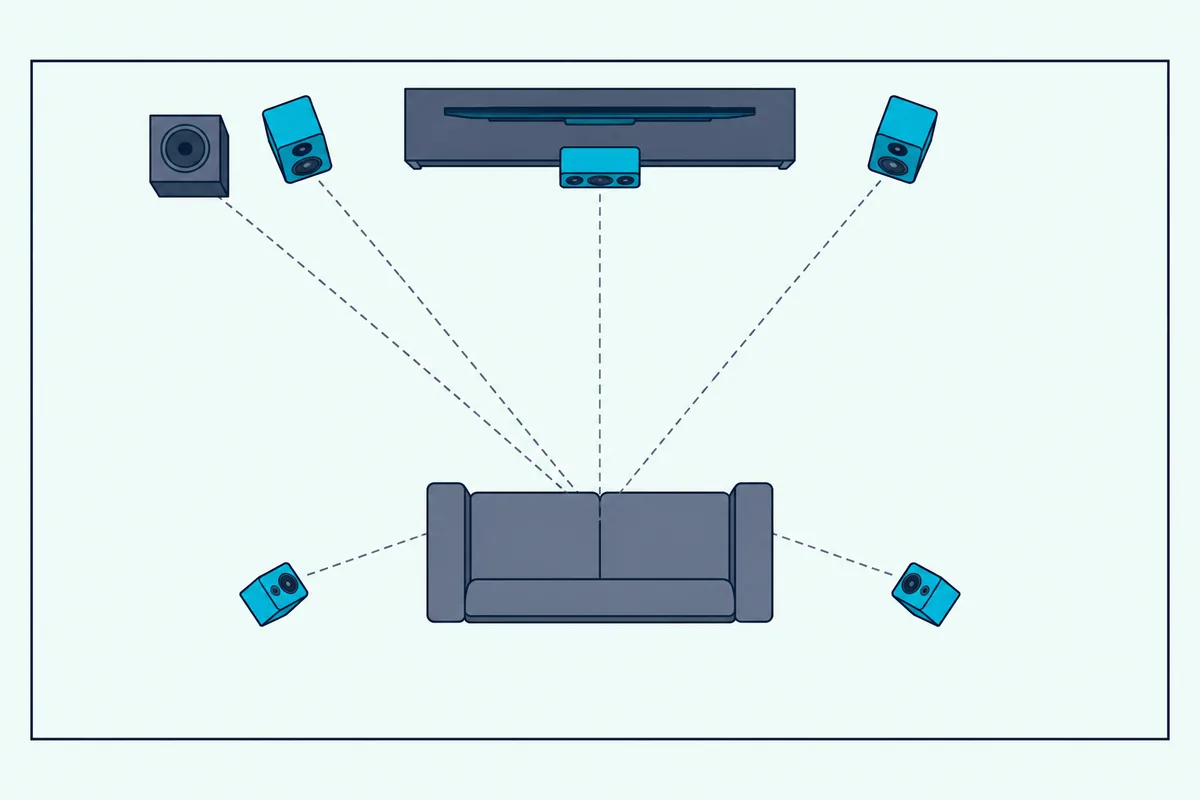
Bass is the easy part. Dolby says a subwoofer can go almost anywhere because bass isn’t directional, so try a few spots, while Denon suggests near the front speakers, with two subwoofers placed asymmetrically across the front.
Try this before you buy anything. Sit in your usual seat and look left and right: if there’s no wall, floor or stand space roughly beside you or a little behind you on both sides, those 90 to 110 degree positions don’t exist in your room.
That’s the moment the 5.1 surround vs soundbar question gets decided for you.
Can a Soundbar Create Real Surround and Height?
A soundbar has to recreate most of those positions from the front of the room. It does so partly by processing: Dolby says sound bars without surround speakers use virtualization to create enveloping, 360-degree audio without speakers behind or beside you, and some add upward-firing speakers that bounce height effects off the ceiling (Dolby).
Dolby’s height virtualizer uses 2 to 7 ear-level channels to create the sense of either 2 or 4 overhead speakers. It’s found in 2.1 and 3.1 bars and in 5.1 designs with wireless surrounds.
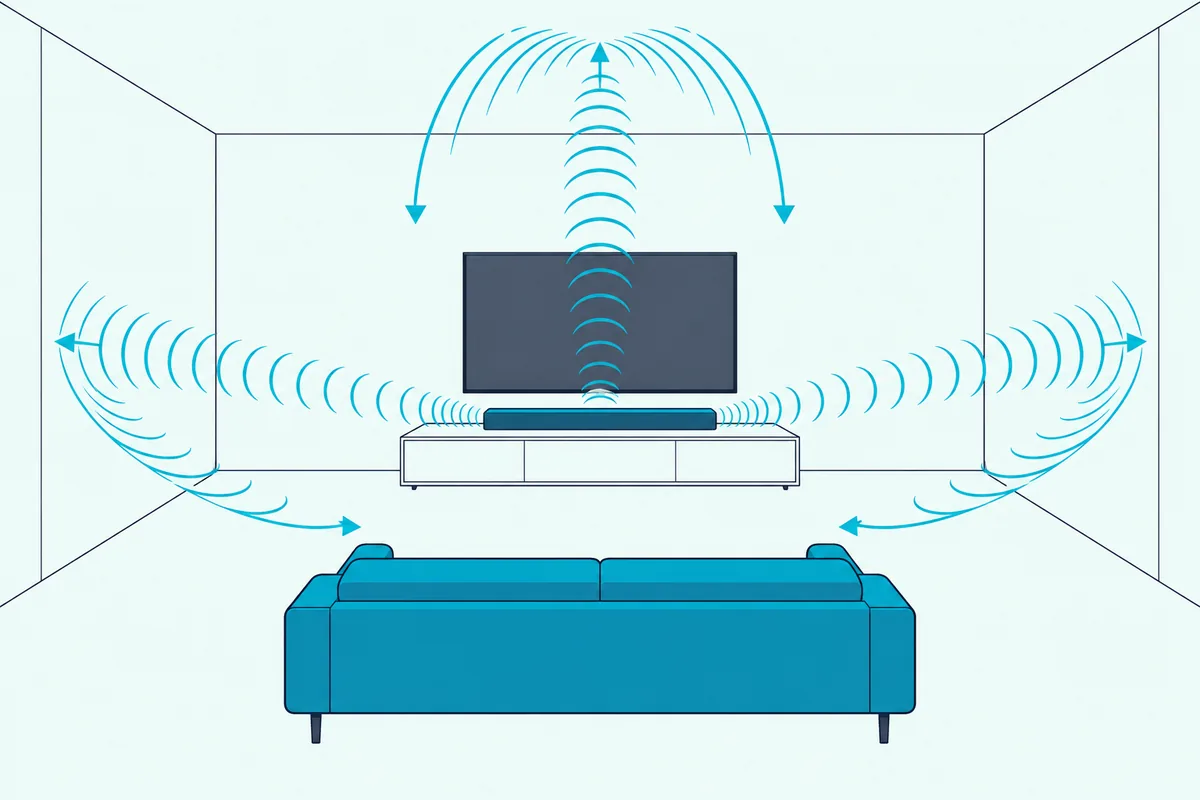
The two methods ask different things of your room. Dolby says its height virtualizer doesn’t require any special room considerations, but bars with upward-firing speakers need a ceiling between 7.5 and 12 feet high, flat or shallow vaulted, made of a hard material such as wallboard or plaster, and Dolby says to avoid acoustic tiles.
Side-firing drivers have their own rule. Dolby wants their sound in direct line of sight with the side walls, with the first reflection back to you unblocked by furniture, and it wants an up-firing bar at least 4 to 5 feet from your seat.
Receivers borrow the same trick. Denon’s manual describes Dolby Atmos Enabled speakers that sit on top of the front speakers and reflect sound off the ceiling, and its Speaker Virtualizer has to be on for Atmos with 5.1 speakers or fewer.
If height is your priority, the guide to Atmos bars sorted by where their height comes from separates the up-firing bars from the virtual ones.
Does Room Size Decide Between a Soundbar and Surround Sound?
Those ceiling and wall rules are really room rules, and size narrows the choice further. Dolby’s guide suggests virtualized Atmos from the TV’s own speakers for a small spare room, a soundbar with or without satellite surrounds for a living room or family room, and a receiver with individual speakers for a dedicated space.
For a receiver, Dolby gives a rough power guide by room size.
| Room size (Dolby) | Watts per channel |
|---|---|
| Under 200 sq ft | 50 to 100 |
| 200 to 500 sq ft | 80 to 150 |
| Over 500 sq ft | 100 to 150 minimum |
A 12 by 15 foot living room is 180 square feet, so it lands in Dolby’s smallest row. Bose, for its part, says high-quality bars like its Smart Ultra easily fill any small or midsize entertainment space.
Bose adds a warning about the other direction: a full traditional speaker system in a tight space may sound distorted because of the high number of reflections. Sonos makes the matching point for big rooms, saying a multi-speaker system’s extra speakers around the listener make it more powerful and tailored, especially in larger rooms.
Open-plan rooms are the awkward middle. If one side of your seat opens onto a kitchen, there’s no side wall for a bar’s side-firing drivers to reach, and that’s where real rear speakers earn their space.
How Much Wiring and Setup Does Each Need?
Room size also sets how much cable you’ll run. Bose puts soundbar setup at a power cable to an outlet and an HDMI cable to the TV, and Sonos’s setup for the Arc Ultra is to plug in power, connect the TV with the included HDMI cable and finish in the Sonos app (Sonos).
A receiver system needs speaker wire from the receiver to every speaker. Denon’s manual lists the job for each run:
- Unplug the receiver and turn off the subwoofer before you connect anything.
- Strip about 3/8 inch (10 mm) of sheathing from the cable tip and twist the core tightly.
- Match left and right, and red (+) and black (−), at both ends.
- Use speakers rated 4 to 16 ohms, and set the receiver to the lowest impedance you connect.
So a 5.1 system means five speaker runs plus a subwoofer cable, and Dolby adds that the receiver should have HDMI 2.1 or higher to pass 4K video and Dolby Atmos.
Wireless rears cut the cable runs but not the power cords. Bose says its Surround Speakers 700 connect wirelessly to the soundbar once you plug the included adapters into a power source, so each rear still needs an outlet nearby.
Every option then wants a calibration pass. Yamaha’s YPAO tunes the YHT-4950U from a supplied microphone placed at your seat, Denon uses Audyssey, Sonos runs room tuning from its app, and Dolby says it’s worth recalibrating, especially after you move speakers or furniture.
Which Soundbars Add Wireless Rear Speakers and a Subwoofer?
Those wireless rears are the middle road between the two setups. Several makers sell a soundbar that grows into a surround system: Samsung ships the HW-Q990F with a subwoofer and two surround speakers in the box, while Sonos and Bose sell the subwoofer and rears as add-ons and Polk sells the rears.
Dolby’s sound bar guide notes that sound bars with wireless surround speakers may also put Dolby Atmos drivers in the surrounds. Its example layout for that kind of system is 5.1.4.
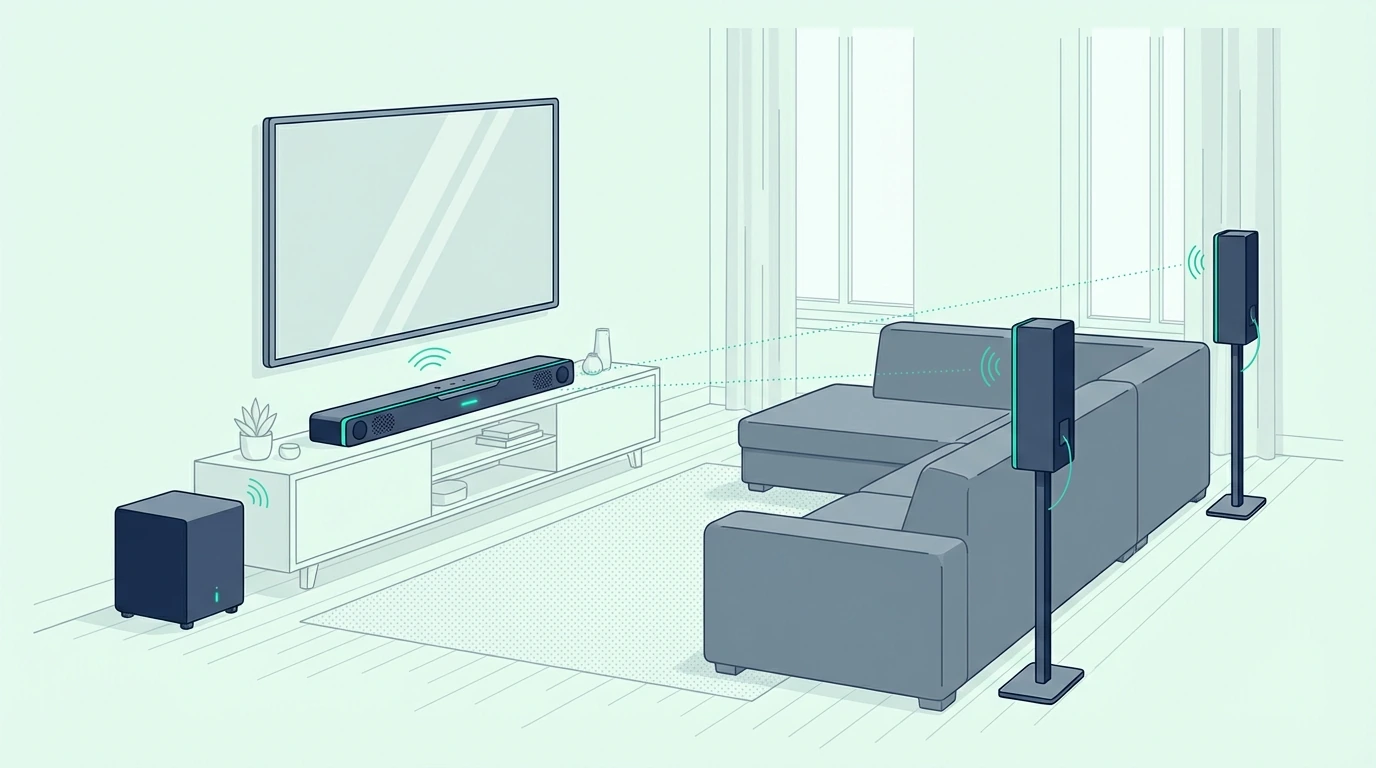
For a complete system in one purchase, the Samsung HW-Q990F is the pick.
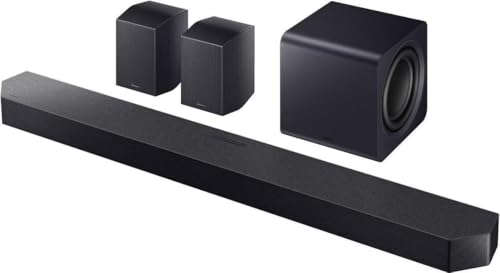
the Samsung HW-Q990F
Samsung’s HW-Q990F user manual lists the soundbar, the subwoofer and left and right surround speakers in the box, and its channel-level menu has both a front top level and a rear top level, so height comes from behind you as well as in front. Its output table plays a Dolby Atmos input as 11.1.4 channels in the Surround mode.
To start with one bar and add the rest later, the Sonos Arc Ultra is the pick.

the Sonos Arc Ultra
Sonos’s guide adds a Sub and surrounds from the bar’s settings in the app, and pairs the Arc Ultra with a Sonos Sub and Era 300 rear speakers for its full surround layout. Sonos also says it doesn’t currently support speakers as front channels for TVs, so the bar stays the front of the system.
For a Bose living room, the Bose Smart Ultra Soundbar is the pick.
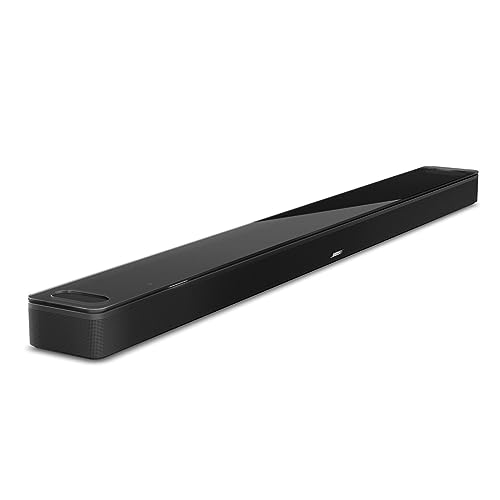
the Bose Smart Ultra Soundbar
Bose’s owner’s guide lists the Bass Module 700 and 500 and the Surround Speakers 700 among the accessories you can connect to it (Bose).
For the biggest subwoofer in the box, the Polk MagniFi Max AX is the pick.
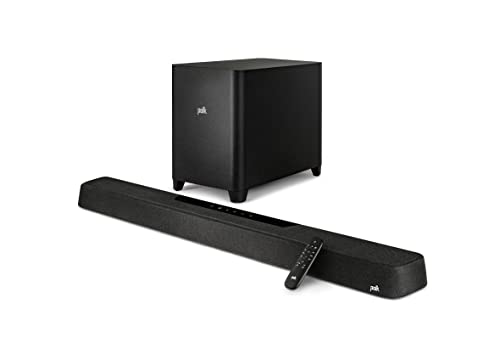
the Polk MagniFi Max AX
Polk lists a 10-inch down-firing wireless subwoofer with it and says you can expand its surround with Polk SR2 wireless rear speakers, sold separately or bundled in the MagniFi Max AX SR 7.1.2 system (Polk). More systems built around real rear speakers are in the roundup of 5.1 soundbars that ship with real rear speakers.
One path that doesn’t lead here is a second bar. Chaining a second soundbar is a separate job from adding surrounds, and the rear-speaker options these makers list are surround speakers, not a second bar.
Which Should You Buy, a Soundbar or a Home Theater System?
With the middle road mapped, the soundbar vs home theater choice comes down to the seat test from earlier. Buy a soundbar if there’s no space beside or behind your seat, a soundbar with wireless rears if you can place two small speakers near outlets back there, and a receiver system if you have a room you can wire and want to swap parts over the years.
Here’s how that plays out in three common rooms:
- A 12 by 15 foot living room with the sofa against the back wall: a soundbar, with up-firing drivers if the ceiling is flat and 7.5 to 12 feet high.
- The same room with the sofa a few feet off the wall and outlets behind it: a soundbar with wireless rears and a subwoofer.
- A dedicated room you can run wire around: a receiver with separate speakers, or a home-theater-in-a-box to start.
For a wired 5.1 system in one package, the Yamaha YHT-4950U is the pick.
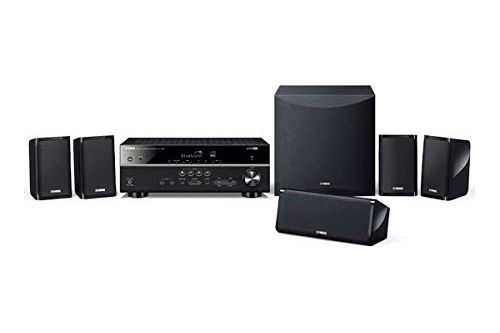
the Yamaha YHT-4950U
Yamaha lists four HDMI inputs, Bluetooth and YPAO tuning on its receiver, but no Dolby Atmos (Yamaha); its YHT-4970U is the model in this range that adds it.
The upgrade path is the long-term difference. With a receiver you can add a second subwoofer or replace one speaker, while Bose says a soundbar’s built-in parts can’t be swapped on their own.
The Bottom Line
A soundbar is the right call for a living room where speakers can’t go beside and behind you, and Dolby itself points living rooms that way.
A soundbar with wireless rears and a subwoofer gives you real surround channels without speaker wire, as long as each box has an outlet.
A receiver with separate speakers, or a home-theater-in-a-box to start, wins in a room you can wire to Denon’s angles, and it’s the only setup here you can rebuild one piece at a time.
Frequently Asked Questions
Is a soundbar as good as surround sound?
For most living rooms it can be close enough, but not identical. Sonos, which sells both, says a multi-speaker system benefits from the simple fact that there are more speakers placed around the listener, which makes it more powerful and tailored, especially in larger rooms.
A soundbar makes up the gap with processing and side-firing or upward-firing drivers, and wireless rears put real speakers behind you again.
Can a soundbar replace a home theater system?
In a living room or family room, yes. Dolby’s home theater guide calls a soundbar a good Dolby Atmos solution there, with or without satellite surround speakers.
In a dedicated room with space for multiple speakers, Dolby points to an AV receiver with an individual speaker for each channel instead, because it lets you tailor the sound to the room.
Is a soundbar considered surround sound?
It depends on the model. A soundbar alone creates surround through virtualization or side-firing drivers that reflect off your walls, which Dolby describes as 360-degree audio without speakers behind or beside you.
A soundbar system with wireless rear speakers, such as Samsung’s HW-Q990F, has physical surround speakers behind you, so it’s surround sound in the same sense as a 5.1 speaker system.
What are the disadvantages of a soundbar?
The main one is that it’s a single unit. Bose says a soundbar can’t be upgraded on its own, and if something stops working the whole bar has to be repaired or replaced.
Its surround effects also depend on your room: Dolby wants side-firing drivers in line of sight with the side walls and up-firing ones under a flat, hard ceiling. For music alone, Sonos says separate speakers will serve you better than a soundbar on its own.
Is home cinema the same as a home theater?
Yes, the two terms describe the same setup. Dolby’s own guide talks about planning a home cinema setup and building a home theater in the same article.