How to Control Multiple Devices With One MIDI Keyboard
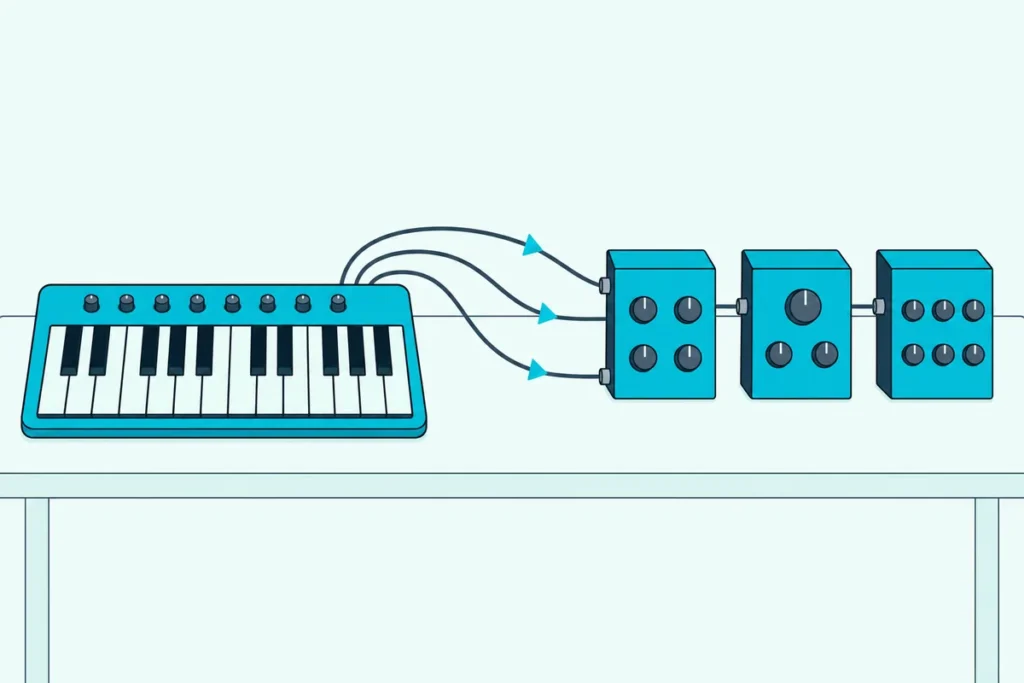
You can control multiple devices with one MIDI keyboard as long as each device listens on its own MIDI channel and the keyboard’s signal reaches every device’s MIDI IN.
Skip either half and the rig fights you: both synths play every note in unison, or the one at the end of the cable never makes a sound.
Get both right and one keyboard plays a bass synth with your left hand and a pad with your right, and a footswitch on the right channel can change patches on two effects units at once.
Every step follows the MIDI Association’s MIDI 1.0 specification and the makers’ manuals, from Kenton’s THRU-5 thru box to CME’s H2MIDI PRO and Novation’s Launchkey 49 MK4.
Start with the five setups in the table below, then set your channels and pick the wiring that matches the ports on your gear.
How Do You Control Multiple Devices With One MIDI Keyboard?
Those five setups share one rule, because every wiring method below delivers the same stream of notes to every device. You control multiple devices with one MIDI keyboard by giving each device its own receive channel and then getting the keyboard’s MIDI OUT to every MIDI IN, through THRU sockets, a thru box, a USB host or a computer.
| Setup | How it’s wired | Computer needed? | Best for |
|---|---|---|---|
| Daisy chain | Keyboard MIDI OUT to device 1 MIDI IN, then device 1 MIDI THRU to device 2 MIDI IN | No | Two or three devices with THRU sockets |
| MIDI thru box | Keyboard MIDI OUT to the box’s input, then one output to each device | No | Three or more devices, or devices without THRU |
| Split or layer | One keyboard sends two zones on two channels, wired as a chain or through a box | No | Two sounds from one keyboard at once |
| USB MIDI host | A USB-only keyboard plugs into the host’s USB-A port, and the host’s 5-pin MIDI OUT feeds the devices | No | Controllers with no 5-pin MIDI OUT |
| Computer and interface | The keyboard plays into a DAW, and each track sends to one synth’s port and channel | Yes | Recording, and changing which synth plays per song |
Most rigs combine two of these, such as a split keyboard feeding a thru box. The channel rule comes first, though, because none of the wiring works without it.
Why Does Every Device Need Its Own MIDI Channel?
That shared stream is the reason: a chain or a thru box hands every device the same notes, so the channel number decides who plays them. MIDI 1.0 carries 16 channels on one cable, and the specification addresses each note message to the receivers whose channel matches the number inside it (MIDI Association).
The catch is Omni mode, which the specification recommends as the power-up setting so that two instruments can be connected and played without choosing channels. A receiver in Omni mode answers on all 16 channels, which is why two synths on one cable can end up playing in unison.
Switch Omni off on each device and give it a receive channel, and it plays only the notes sent on that channel. The keyboard then picks the device: send on channel 1 and only the channel 1 synth plays, switch to channel 2 and the next one takes over.
Here’s one way to set a three-device rig, using the Launchkey 49 MK4’s defaults from Novation’s manual for the keyboard side.
| Device | Receives on | What plays it |
|---|---|---|
| Bass synth | Channel 1 | The Launchkey’s Part A, channel 1 by default |
| Pad synth | Channel 2 | Part B, channel 2 by default |
| Drum machine | Channel 10 | The drum pads, channel 10 by default |
Try this before you buy anything: set the keyboard to channel 1 and play one key. If two devices sound, the second one is still in Omni mode or also set to channel 1.
A keyboard with no channel setting should send on channel 1, according to the specification. Controllers with one let you change it, and the Arturia KeyStep 37 mk2’s Global Settings, for example, set an Output Channel from 1 to 16 (Arturia).
One device can also answer on more than one channel. The specification describes an instrument that behaves as several receivers, each on its own basic channel, as working in “Multi Mode,” so one multitimbral synth can take two of those channels by itself.
If channels are new to you, Burton Acoustix’s explainer on what MIDI stands for covers them from the first note message up.
Get Studio Tips Weekly
Join 5,000+ creators getting acoustic treatment advice every week.
No spam. Unsubscribe anytime.What Does MIDI THRU Do in a Daisy Chain?
With the channels set, the cheapest wiring is a chain, and it uses the THRU socket that sits beside MIDI IN and MIDI OUT on gear that has one. MIDI THRU sends out a copy of whatever arrives at MIDI IN, which the specification calls “a direct copy of data coming in MIDI In,” so each device can pass the keyboard’s notes on to the next.
- Run a MIDI cable from the keyboard’s MIDI OUT to the first device’s MIDI IN.
- Run a second cable from that device’s MIDI THRU to the next device’s MIDI IN.
- Repeat THRU to IN for each device you add.
- Give each device its own receive channel, then switch the keyboard’s channel to choose who plays.
Use THRU, not OUT, for the onward cables. A device’s MIDI OUT carries what that device sends itself, such as notes from its own keys, while THRU repeats only what came in.
Some gear has no THRU socket but can echo its input. Arturia’s KeyStep 37 mk2 has a MIDI Thru setting that forwards everything arriving at its MIDI IN to its MIDI OUT, merged with its own notes, and Arturia suggests turning it on “when daisy-chaining multiple devices together.”
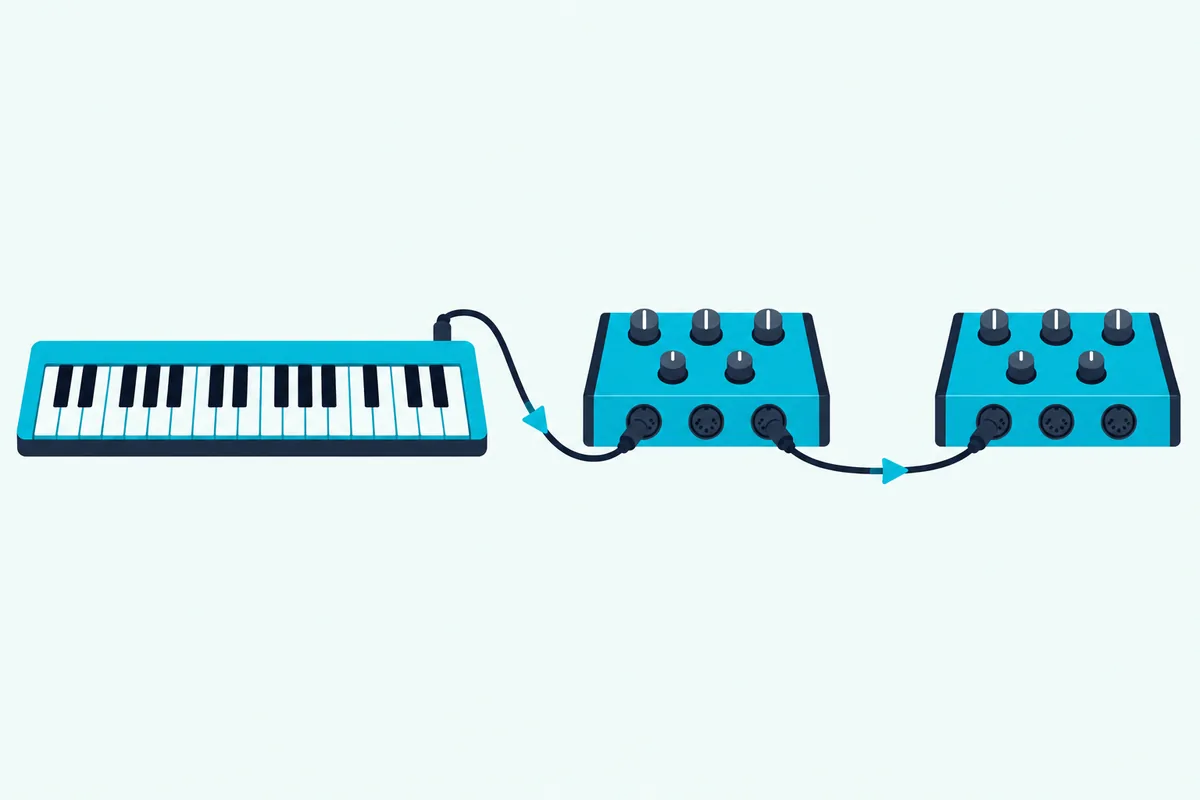
Chains do have a limit. The specification warns that timing errors from each device’s opto-isolator “tend to add up” along a THRU chain, so “there is a limit to the number of devices which can be chained,” and it suggests faster opto-isolators for chains of more than three instruments.
Kenton, which builds thru boxes, draws the line in the same place: it says daisy chaining works fine for two or three devices, but each link adds some latency, degrades the signal and leaves every device relying on the ones before it (Kenton). Cable length matters less, since the specification allows each MIDI cable up to 50 feet (15 meters).
When Is a MIDI Thru Box Better Than a Chain?
That three-device line is where a thru box earns its place. A thru box beats a chain once you pass two or three devices, because it copies one MIDI OUT to several outputs at once, so each device gets the keyboard’s signal directly instead of through the device before it.
CME’s U6MIDI Pro manual calls the same job a “MIDI thru/splitter,” and a Y-cable can’t do it, because the specification says one MIDI output “shall drive one and only one input.” Kenton’s THRU-5 shows how a box solves that, with one opto-isolated MIDI IN, five MIDI THRU sockets “each with its own driver” and every message type passed through, clock and SysEx included (Kenton).
The wiring becomes a star instead of a chain. Plug the keyboard’s MIDI OUT into the box’s input, run one cable from each output to a device’s MIDI IN, and set the channels exactly as before.
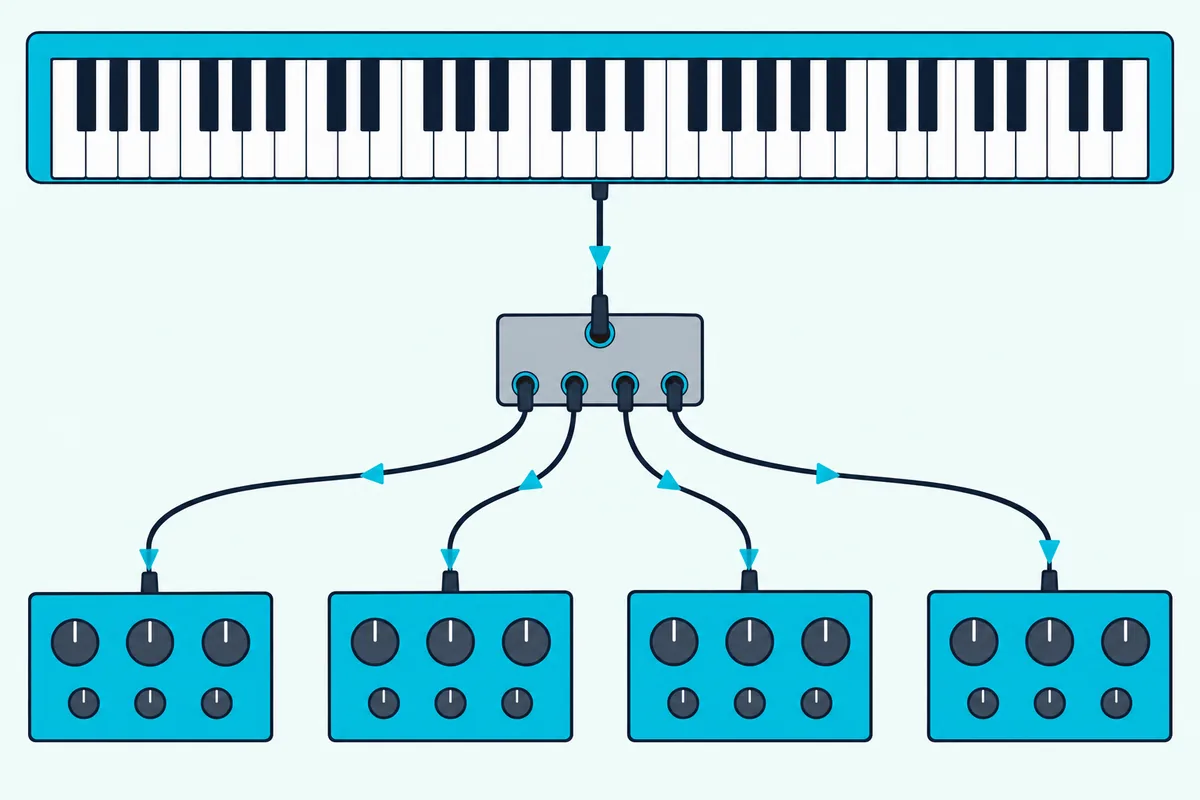
Power is the main difference between boxes. Kenton’s THRU-5 runs from an included 9-volt supply, while MIDI Solutions’ MultiVoltage Quadra Thru, a 1-in, 4-out box, draws its power from the MIDI OUT or THRU that feeds it and needs no supply with most gear (MIDI Solutions).
That MIDI power has a floor. MIDI Solutions says its MultiVoltage boxes need at least 3 volts at the source’s MIDI port, and it sells a Power Adapter for gear that doesn’t supply it (MIDI Solutions).
One wiring mistake breaks either kind of box. Kenton’s manual warns never to run a THRU output back to the MIDI IN of the device feeding the box, because the loop can cause hung notes (Kenton).
Can One Keyboard Play Two Synths at Once?
A thru box hands every synth the same notes, so playing them with different hands has to start at the keyboard. Yes, one keyboard can play two synths at once if it splits or layers its keys across two MIDI channels, because each synth then hears only the notes on its own channel.
Novation’s Launchkey 49 MK4 is one example. Its two Parts send on channels 1 and 2 by default, Split mode plays Part A below the split point and Part B from the split key up, and Layer mode sends every note on both channels (Novation).
To set the split, hold Shift and Fader button 8, then press the key where Part B should start, and Novation’s default split point is C3. The Launchkey’s 5-pin DIN MIDI OUT, which Novation says sends MIDI from the keyboard to external hardware, then feeds the thru box or the chain.
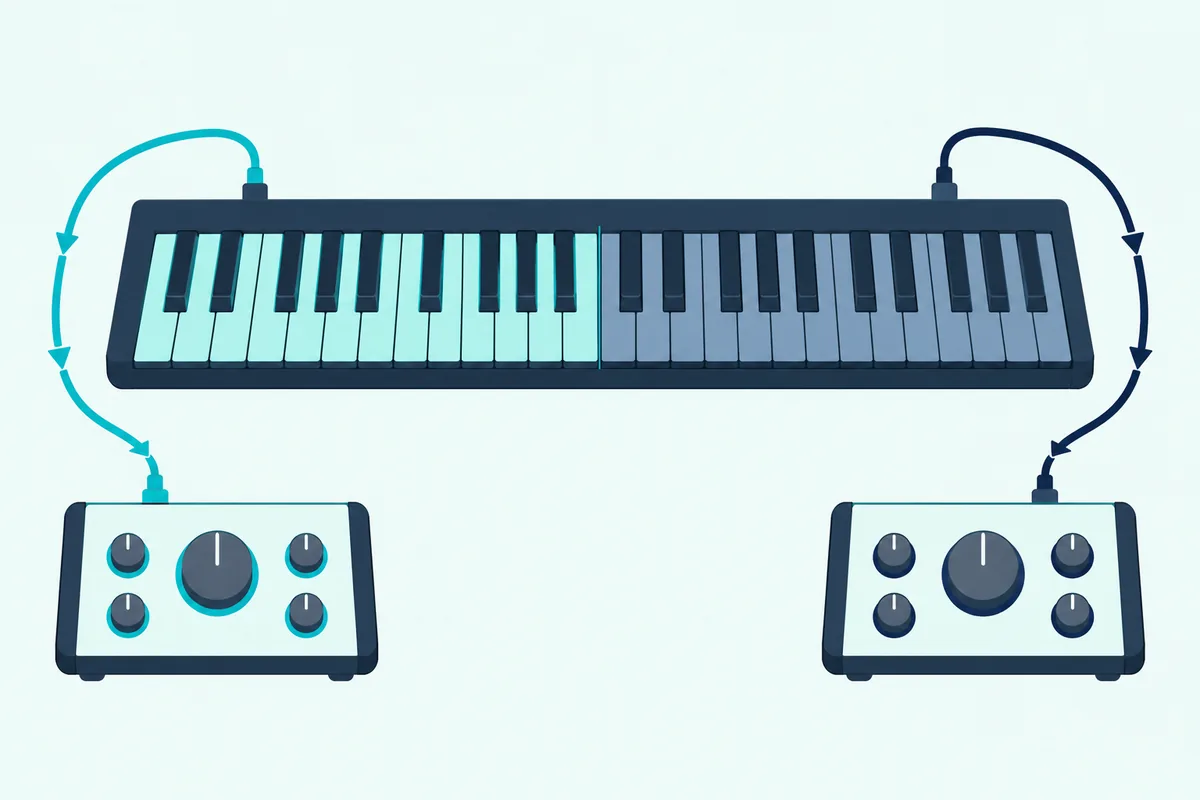
Set the bass synth to receive on channel 1 and the pad synth on channel 2, and your left hand plays bass below C3 while your right hand plays the pad. Novation’s own tip for Split mode suggests the same pairing: a mono bass synth on the lower notes and a polyphonic pad above.
The receiving end can split too. The specification notes that a synthesizer set to a split mode “operates like two individual instruments,” and Arturia’s KeyStep 37 mk2 can send its keys on one channel while its sequencer plays another.
What If Your Keyboard Only Has USB?
Every setup so far starts from a 5-pin MIDI OUT, and a controller without one can’t plug into any of them directly. A USB-only keyboard needs a USB host to reach hardware, because the MIDI Association explains that USB is a host-controlled bus, so a USB MIDI device needs a computer, phone, tablet or other host to start the conversation (MIDI Association).
A USB MIDI host box plays the computer’s part. CME’s H2MIDI PRO has one USB-A host port, a USB-C port and a 5-pin MIDI IN and OUT, and its manual says it recognizes a class-compliant USB keyboard as soon as the keyboard is powered on and routes it to the 5-pin MIDI OUT automatically (CME).
From that MIDI OUT, the chain or the thru box from earlier carries the notes to every synth. CME says the box runs from a USB charger, a power bank or a separate 9-volt supply, and saves the routing you set in its free HxMIDI Tools app so it works without a computer.
Watch the power on its USB-A port, which CME limits to 5 volts at 500 mA. If the keyboard, or a hub full of devices, draws more than that, CME says to use a self-powered USB hub.
Don’t improvise with a USB-A to USB-A cable between two hosts. The MIDI Association warns that the Type A connector supplies power, so connecting two hosts that way can seriously damage your gear.
Some instruments have their own USB-A port marked To Device. The MIDI Association says these usually take flash drives and that what else they accept depends on the instrument, so check its manual before you count on it.
A controller that does have 5-pin MIDI can skip the computer for power as well. Arturia says a USB phone charger supplying at least 5 volts and 100 mA powers the KeyStep 37 mk2 with no computer present.
How Do You Route One Keyboard to Several Synths in a DAW?
A computer can do the same routing in software, and it adds recording on top. In a DAW, you route one keyboard to several synths by giving each synth its own MIDI track whose output is that synth’s MIDI port and channel, then arming the tracks you want to hear.
Ableton’s Live 12 manual puts it in one line: set the track’s Output Type to the port the synth is connected to and its Output Channel to the channel the synth listens on (Ableton). Its External Instrument device does the same from inside a track, sending MIDI out and returning the synth’s audio through your interface, with a Hardware Latency slider to line up the timing (Ableton).
To play two synths at once from one keyboard, arm both tracks. Live arms several at once when you hold Ctrl (Windows) or Cmd (Mac) while clicking their Arm buttons, or when Exclusive Arm is off in its Record, Warp & Launch Settings.
The computer also needs enough MIDI outputs. The MIDI Association says USB can carry several MIDI ports on one cable, each a group of 16 channels, and CME’s U6MIDI Pro gives a DAW three 5-pin outputs with 48 channels in all (CME).
Unplug the computer and the U6MIDI Pro keeps working, since CME says it runs from a USB charger or power bank as a MIDI merger, thru box and router, using the routing saved from its UxMIDI Tools app. It isn’t a USB host, though, so a USB-only keyboard still needs a port like the H2MIDI PRO’s.
If the keyboard is itself a synth, turn its Local Control off. Ableton’s manual asks for exactly that, and the specification explains the effect: with Local Off, the keys go only to MIDI OUT and the synth plays only what arrives at MIDI IN, instead of hearing each note from its own keys and again from the computer.
Our guide on how to use a synthesizer as a MIDI controller covers the ports and Local settings on specific synths. If the keyboard doesn’t show up in your DAW at all, go back to the basic DAW setup first.
Can Two Keyboards Share One Synth?
Everything above runs one keyboard out to many devices, and the reverse needs a different box. Yes, two keyboards can share one synth through a MIDI merge box, which MIDI Solutions describes as letting multiple MIDI Outs or Thrus connect to a single MIDI In, such as several keyboards into a sound module with one input (MIDI Solutions).
CME’s U6MIDI Pro merges too, since its manual says an output combines the messages from every input routed to it. If both keyboards go into a computer instead, our guide on how to use two MIDI controllers at the same time covers the DAW side.
Why Do Notes Double, Hang or Go Missing?
Merges, chains and splits fail in a handful of predictable ways, and most trace back to a channel, a socket or a loop. Doubled notes usually mean a device is in Omni mode or hearing the same notes twice, hung notes point to a loop, and silence points to a channel mismatch or the wrong socket.
| What you hear | Likely cause | What to do |
|---|---|---|
| Every device plays every note | Devices in Omni mode or sharing a channel | Turn Omni off and give each device its own receive channel |
| A keyboard synth sounds each note twice | Local Control is on while the computer sends the notes back | Turn Local Control off on that synth |
| The last device in a chain is silent | The onward cable starts at MIDI OUT, or the device has no THRU | Move the cable to THRU, turn on a soft thru setting, or add a thru box |
| Notes hang on after you let go | A THRU output loops back into the source’s MIDI IN | Remove the loop, then send All Notes Off |
| Notes drop or stick late in a long chain | Timing errors adding up past about three devices | Feed each device from its own thru box output |
| A MIDI-powered box stays dark | The source’s MIDI port gives too little voltage (MultiVoltage models need 3 volts) | Add MIDI Solutions’ Power Adapter, or use a box with its own supply |
| A USB keyboard does nothing on a host box | Too little power, or the keyboard isn’t class compliant | Use a self-powered hub, or ask CME about compatibility |
Work down from the top row, since a channel problem can look like any of the others. CME’s H2MIDI PRO can be set in HxMIDI Tools to send All Notes Off on all 16 channels from its button, and a quick press on the U6MIDI Pro’s button does the same.
Which Box Do You Need for Your Setup?
That table also maps to hardware, since most fixes past the channel settings come down to one box. Pick by the problem: a thru box for three or more 5-pin devices, a USB host for a USB-only keyboard, and a multi-port interface when a computer runs the show.
For three or more synths on one keyboard, MIDI Solutions’ MultiVoltage Quadra Thru turns a fragile chain into a star with nothing to plug into the wall.
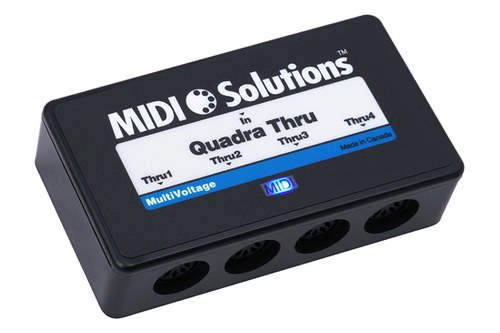
MIDI Solutions’ MultiVoltage Quadra Thru
For a keyboard with only USB, the CME H2MIDI PRO gives it the 5-pin MIDI OUT that a chain or a thru box needs.
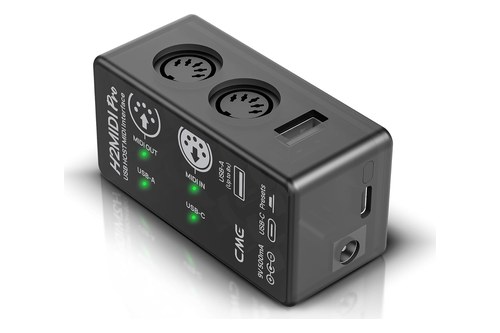
the CME H2MIDI PRO
For a DAW that plays several hardware synths, the CME U6MIDI Pro sends each synth its own port and still splits and merges when the computer is off.
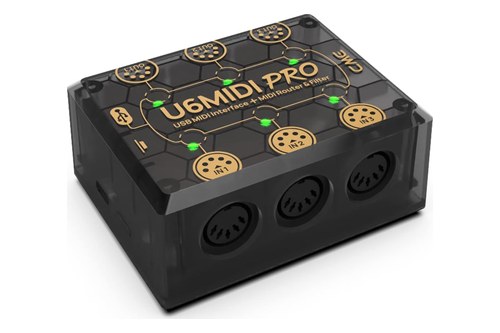
the CME U6MIDI Pro
The Bottom Line
Give every device its own receive channel with Omni off, then get the keyboard’s MIDI OUT to each MIDI IN: THRU sockets for two or three devices, a thru box for more, a USB host for a USB-only keyboard and a DAW when you want to record.
If two synths still play together, send one key on channel 1 and see which device answers before you change a single cable.
Frequently Asked Questions
Can a MIDI Moose control two devices?
Yes. Tech 21’s MIDI Moose manual says to link two or more MIDI-controlled processors and set them and the Moose to the same MIDI channel, so one footswitch press changes the program on both (Tech 21). To keep one unit from following, give it a different channel; a unit in Omni mode follows the Moose on any channel.
Can MIDI be daisy chained?
Yes, through MIDI THRU: the keyboard’s MIDI OUT goes to the first device’s MIDI IN, and each device’s THRU feeds the next one’s IN. The MIDI 1.0 specification warns that timing errors add up along the chain, and Kenton says chaining works fine for two or three devices, so use a thru box beyond that.
What is a MIDI splitter?
A MIDI splitter is another name for a MIDI thru box: one MIDI input copied to several outputs, such as the five on Kenton’s THRU-5 or the four on MIDI Solutions’ Quadra Thru. You need one because the MIDI 1.0 specification lets a MIDI output drive only one input, so a Y-cable won’t do the job.
How many devices can one MIDI cable control?
One 5-pin MIDI cable carries 16 channels, so it can play up to 16 separate parts, each on its own channel, though every device still needs its own feed from a THRU socket or a thru box output. Over USB, one cable can carry several 16-channel ports, which is how CME’s U6MIDI Pro offers 48 channels.
How many MIDI controllers can you have connected at one time?
On a single 5-pin MIDI IN, one, unless a merge box combines several. On a computer, Ableton’s Live 12 manual says you can use any number of MIDI ports for track input and output, and its All Ins setting merges every external MIDI port into one track’s input.
Is MIDI obsolete?
No. The MIDI Association says MIDI now travels over 5-pin DIN, USB, Ethernet, Bluetooth and more, and it lists both USB MIDI 1.0 and USB MIDI 2.0 class definitions created with the USB Implementers Forum (MIDI Association). The 5-pin sockets this guide relies on are still on current gear, such as the Launchkey 49 MK4’s MIDI OUT.
Does MIDI THRU send a synth’s own notes?
No. The MIDI 1.0 specification defines THRU as a direct copy of what arrives at MIDI IN, so a synth’s own keys go out through its MIDI OUT. A soft thru setting, like the KeyStep 37 mk2’s MIDI Thru, is the exception: it merges what comes in with the device’s own notes on MIDI OUT.