Bluetooth vs Optical for a Soundbar: Which Should You Use?

If you’re weighing Bluetooth vs optical for a soundbar under your TV, run the optical cable for the television and keep Bluetooth for your phone, because only the cable carries Dolby Digital surround.
The gap shows in dialogue, and when Bluetooth leaves voices behind the lips, a bar’s sync setting can only add delay, which Samsung’s HW-Q600F guide doesn’t even offer in BT mode.
Give each connection its own job and both behave: the cable stays in for the screen, and the phone pairs whenever you want music.
Start with the back panels, because an HDMI ARC port on both the set and the bar beats either option for movies and shows.
Next comes a side-by-side table, then formats, delay, games, music and the settings to change once you’ve picked.
Bluetooth vs Optical for a Soundbar: Which Is Better?
Those back panels come into it later, so start with the two connections on their own. For a soundbar that plays your TV, optical is better because it carries Dolby Digital and DTS surround from the set, while Bluetooth is better for music from a phone, where nothing on screen has to match the sound.
Think of optical as a dedicated pipe and Bluetooth as a walkie-talkie. The pipe only goes where you run it, and the walkie-talkie squeezes your sound into a small radio signal before it crosses the room.
Here’s how the two compare on the points that decide most setups, with Roku’s guidance for its televisions and Samsung’s HW-Q600F and LG’s SK5Y bars as the worked examples.
| What matters | Optical | Bluetooth |
|---|---|---|
| Sound from the set | Stereo PCM, or 5.1 surround as Dolby Digital or DTS | Stereo, in Samsung’s description of a TV paired with the HW-Q600F |
| Dolby Atmos | No, Dolby sends Atmos to soundbars over HDMI | No, stereo only |
| Codec to match | None, the bar gets the PCM or Dolby Digital stream as it was sent | SBC on the HW-Q600F, SBC or AAC on LG’s SK5Y |
| Lip-sync setting on the bar | 0 to 300 ms SYNC on the HW-Q600F | SYNC not available in BT mode on the HW-Q600F |
| Reach | As long as the cable | 32.8 ft (10 m) on the HW-Q600F |
| Best for | Shows, movies and games | Phone music, podcasts and guests’ playlists |
Read the table from the bottom up: the last row is the verdict, and the rows above it are the reasons. If the set and the bar both have HDMI ARC, that port outranks both columns, which the ARC section below comes back to.
Burton Acoustix ranks every way to connect a soundbar to a TV on a separate page, Furrion’s RV soundbars included. This page settles the narrower choice between Bluetooth and optical.
What Can Optical Carry That Bluetooth Can’t?
That first table row is where the two split furthest. Optical can carry 5.1 surround as Dolby Digital or DTS, while Bluetooth carries stereo, so the center channel and rear effects of a movie mix only reach the bar as separate channels over the cable.
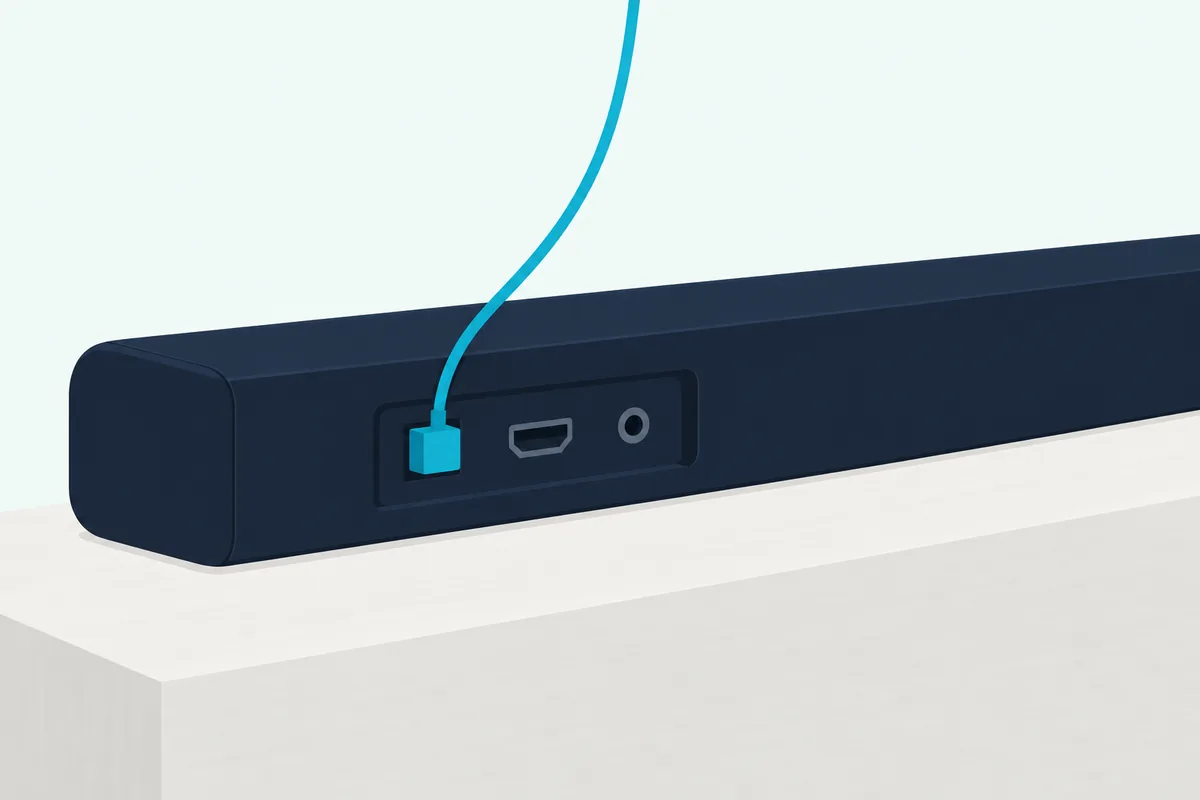
Roku puts the limit in one line in its guide to connecting surround sound to a Roku TV: the optical output, which it says is sometimes called S/PDIF, “is limited to 2 channels of uncompressed stereo sound (PCM), or 5.1 channels of compressed surround sound (Dolby Digital™ or DTS®).” Sonos’s Ray, which plugs into the set through its optical port, plays exactly that trio of stereo PCM, Dolby Digital and DTS, the formats Sonos lists for all of its home theater products.
Bluetooth’s side of the row is shorter. Samsung describes a TV paired with its HW-Q600F as giving “stereo sound without the hassle of cabling.”
Optical has a ceiling too, and newer formats sit above it. Dolby’s paper on Atmos for sound bars delivers Atmos to the bar “via HDMI and bitstream output,” and Dolby’s Dolby Digital Plus brochure says a Dolby Digital Plus soundtrack is converted to a 640 kbps Dolby Digital signal for output over S/PDIF.
Put Roku’s limit and Dolby’s conversion together and you have the route a streaming app’s Dolby Digital Plus mix takes out of an optical port. You still get 5.1, but as Dolby Digital, and since Atmos travels over HDMI in Dolby’s paper, the height effects don’t make the trip.
Lossless formats need more room again. HDMI Licensing Administrator lists uncompressed 5.1 and 7.1, Dolby TrueHD, Dolby Atmos, DTS-HD Master Audio and DTS:X among the formats eARC carries, and Sonos marks TrueHD and multichannel PCM as needing an eARC connection.
So the fair summary of optical is 5.1 at best, as Dolby Digital or DTS. Bluetooth stays a step below that, at stereo.
How Much Sound Quality Does Bluetooth Lose Against Optical?
Those format limits matter more than the codec for most movie nights, but the optical vs Bluetooth question still comes up for music. Over optical the bar receives a PCM or Dolby Digital stream exactly as sent, while over Bluetooth the sound is compressed into a codec first, and the codec your bar accepts decides how much of the original survives.
SBC is the floor. According to the Bluetooth SIG, it’s “the SBC codec included with Classic Audio,” and the SIG says its newer LC3 codec improves on SBC’s audio quality even at a 50% lower bit rate.
The HW-Q600F stops at that floor: Samsung’s HW-Q600F user guide says the bar “supports SBC data (44.1kHz, 48kHz).” LG’s SK5Y owner’s manual lists SBC and AAC.
Higher-rate codecs exist, and Qualcomm puts aptX Adaptive at typically 279 to 420 kbps. A phone’s codec list doesn’t change what the bar decodes, though, so check the soundbar’s own manual for the codec names before you expect more than SBC.
Try this at home: play the same song from your phone over Bluetooth, then from a music app on the set over optical, at matched volume. Listen to the cymbals and the room sound around the voice, then switch back.
If you can’t tell them apart on your bar, Bluetooth is good enough for that music. The decision then moves to the things you can measure, the formats from the last section and the delay in the next.
Why Does Bluetooth Lag Behind the TV Picture?
That delay is the one difference nobody has to listen hard for. Every Bluetooth link adds the time it takes to encode, send and decode the audio, and Qualcomm gives its aptX Low Latency codec a latency of about 40 ms, which it calls “the rate needed to synchronize visual and audio.”

That 40 ms is aptX Low Latency’s figure, not Bluetooth’s in general. Qualcomm lists aptX Adaptive at about 80 ms, and Samsung’s HW-Q600F guide gives no delay figure for its Bluetooth link at all.
Soundbar sync settings can’t pull late sound forward, because they work by holding the audio back. Samsung’s SYNC sets “the audio delay between 0~300 milliseconds,” which helps when the sound runs ahead of the picture, and the guide marks it “Not available in “USB” or “BT” mode.”
Optical keeps that tool in play, and some sets have their own. Roku’s out-of-sync article points to an A/V Sync feature in the TV’s sound menu, which “may also be called something like Audio delay or Lip-sync,” and suggests switching the digital audio output to PCM when the sound arrives after the picture.
Roku’s surround guide adds Auto passthrough, a setting in its S/PDIF and ARC menu that lets a capable soundbar play content “without any delay due to processing in the TV.” That menu covers the wired outputs only, so a Bluetooth link gets no such shortcut.
Burton Acoustix’s soundbar delay guide lists each maker’s sync setting and its range, with a section on Bluetooth delay. Work through the set’s menu first, then the bar’s.
That’s why the same Bluetooth bar can feel fine for music and wrong for the news. A song has no lips to watch, and a newsreader’s face shows the gap.
Is Bluetooth or Optical Better for Gaming?
Games push that delay problem harder than any show. For gaming, optical beats Bluetooth, because footsteps and button sounds have to land with the picture, and the fastest Bluetooth figure here, Qualcomm’s 40 ms, needs a codec that the SBC and AAC bars above don’t list.
Qualcomm pitches aptX Low Latency at “gaming and lip-syncing media,” the two jobs where a Bluetooth delay shows first. A fast shooter or a rhythm game is where it’s hardest to ignore.
Consoles narrow the choice before you compare anything. On a PlayStation 4, the PS4’s wired soundbar routes set out which port to use and whether Bluetooth works at all.
eARC goes further than either. Dolby says eARC can correct processor delays automatically “so that your audio and video always match,” and Roku says eARC has built-in lip-sync, which was optional on the original ARC.
When Is Bluetooth the Better Choice for a Soundbar?
All of that delay talk falls away when there’s no picture. Bluetooth is the better choice for music, podcasts and audiobooks from a phone, tablet or laptop, because it needs no cable, works from across the room and has nothing on screen to keep in step with.

Samsung’s HW-Q600F guide gives a working range: the link drops beyond 32.8 ft (10 meters). You can pair up to 8 devices, but only the last 2 stay connected at once, and playing from the second phone pauses the first.
The same guide asks you to keep microwaves and wireless LAN devices away from the bar, since electronic devices can cause radio interference. So a bar that shares a shelf with the Wi-Fi router is worth moving before you blame Bluetooth for dropouts.
That makes Bluetooth the guest-friendly input. A friend’s phone pairs, plays a playlist and leaves the optical cable untouched.
To connect a phone to a soundbar step by step, including the modes Samsung calls BT READY and BT PAIRING, Burton Acoustix has a separate guide. Some bars need setup first, since Sonos says its Arc Ultra has to be set up with the Sonos app on Wi-Fi before it can pair over Bluetooth.
Can You Use Optical and Bluetooth at the Same Time?
That split, cable for the screen and radio for the phone, raises the obvious question. You can keep both connected, but the bar plays one input at a time: Samsung’s HW-Q600F uses D.IN mode for the optical cable and BT mode for Bluetooth, and you switch between them with the Source button.
HDMI wins if all three are plugged in. The same guide says that when the HDMI and optical cables are both connected, “the HDMI signal is received first.”
Wiring the set also keeps Bluetooth free for phones. Samsung’s guide warns that the bar drops its Bluetooth devices when a Samsung TV asks to connect over Bluetooth, and that multi-connection may not work while a TV is connected.
In practice that makes a tidy setup. Optical or ARC from the set stays connected, and Bluetooth sits ready for whoever wants music.
One Samsung setting helps it run hands-free. The guide’s Bluetooth Power feature “automatically turns the Soundbar on when it receives a connection request from a previously connected TV or Bluetooth device,” and it’s on by default.
What Does HDMI ARC Do Better Than Bluetooth or Optical?
Both of those inputs become backups once the set and the bar share an ARC port. HDMI ARC beats Bluetooth and optical for movies and shows because it carries Dolby Digital Plus and compressed Dolby Atmos and lets the TV remote run the bar’s volume, while eARC adds lossless formats on top.
Roku lists those benefits for its televisions: ARC “supports the same formats as the digital audio output” plus Dolby Digital Plus and Dolby Atmos, Atmos on ARC comes “only in a compressed format,” and with CEC on, the Roku remote adjusts the soundbar’s volume and mute. Sonos draws the same line for its Arc, Arc Ultra, Beam (Gen 2) and Beam Ultra, which play Atmos in Dolby Digital Plus over ARC but need an eARC connection for Dolby TrueHD, Atmos in TrueHD and multichannel PCM.
Samsung’s guide says the same of its own bar: “Dolby Atmos® is supported in the ARC/eARC function.” Over ARC, a streaming app’s Atmos track can reach the bar instead of being turned into plain Dolby Digital at the optical port.
The remote is the everyday win. On ARC, Samsung has you use the set’s remote volume buttons for the bar, while on other inputs the HW-Q600F can follow the infrared remote of ten listed brands once its TV REMOTE mode is on, or, over optical, a 2017 or later Samsung TV with Bluetooth.
Burton Acoustix weighs HDMI ARC or optical for a soundbar in more depth, including when optical is the steadier choice. For movies and shows the order runs eARC, then ARC, then optical, with Bluetooth last, and this page is about the last two.
What If Your Soundbar or TV Has No Optical Port?
That order assumes both ends have the ports, and newer bars don’t always. Some soundbars take optical through an adapter instead: Sonos connects its Arc Ultra to a TV’s optical port with a Sonos Optical Audio Adapter, sold separately, on the included HDMI cable, and tells Beam owners whose set lacks HDMI ARC or eARC to use the optical adapter.
Check the box as well. Sonos includes the optical cable with its Ray, while Samsung’s HW-Q600F guide marks the optical cable “not supplied.”
Some simpler bars lean on optical and analog inputs instead. The iLive optical and RCA hookup steps show how iLive’s bars connect by optical, RCA or a 3.5 mm line in, and what each light means.
If the set is the one without an optical port, ARC is the wired route to use and Bluetooth the wireless one. The split stays the same, with ARC for surround and Bluetooth for convenience.
Why Can Optical Sound Worse Than Bluetooth?
Once the cable’s in, a show can still sound flatter over optical than a song did over Bluetooth, which seems backward after everything above. Settings at either end can cause it, so check three before blaming the cable.
First, the output format. Samsung’s HW-Q600F guide recommends changing the television’s “Digital Output Audio Format” from PCM to Dolby Digital when a broadcast is in Dolby Digital, for better sound quality.
Second, dynamic range control. The same guide says its DRC setting applies to Dolby Digital and DTS tracks and that with DRC turned on, “loud sound is reduced,” and a phone’s Bluetooth stream isn’t one of those tracks.
On the HW-Q600F, DRC switches on or off when you hold the SOUND MODE button for more than 5 seconds with the bar powered off. On another bar, look in the manual’s sound settings for a dynamic range or night option.
Third, the PCM trade-off from the delay section. Switching the output to PCM can fix late sound, as Roku suggests, but by Roku’s own description optical carries PCM as 2 channels only, so the trade costs the surround.
Here’s a quick test. Play the same loud movie scene with DRC off and then on, at the same volume, and listen to whether the explosions shrink.
Which Connection Should You Use for Your Setup?
Those settings fine-tune a choice that’s mostly made by now, so here it is by setup.
| Your setup | Use | Why |
|---|---|---|
| Set and bar both have HDMI ARC or eARC | HDMI | Dolby Digital Plus or more, and the set’s remote runs the volume |
| Set has an optical port but no ARC | Optical | Dolby Digital or DTS 5.1, and the bar’s sync setting still works |
| Music from a phone or tablet | Bluetooth | No cable, and 32.8 ft (10 m) of range on the HW-Q600F |
| Gaming | HDMI, then optical | Bluetooth adds delay a bar can’t remove |
| No cable route between set and bar | Bluetooth, for now | Stereo with delay, so switch when you can run a cable |
The last row is the only one where the screen goes wireless. If that’s your room, connect your TV to a soundbar via Bluetooth for the pairing steps, and treat it as the stopgap the delay section describes.
For every optical row, the cable and the menus come next. A bedroom set with an optical port and no ARC is the classic case, with the cable carrying the shows and the phone keeping Bluetooth.
How Do You Switch a Soundbar From Bluetooth to Optical?
If that table points you at the cable, the switch takes three steps. Connect the set’s optical out to the bar’s optical in, select the bar’s optical input (D.IN on Samsung’s HW-Q600F), then move the sound output off the built-in speakers in the television’s sound menu.
Take the protective cap off each end of the cable first, as Roku, Samsung and Sonos all remind you. Sonos adds that the port is D-shaped, so line the plug up rather than forcing it.
If your bar didn’t come with a cable, Cable Matters’ 6 ft Toslink optical audio cable reaches from the set’s optical port to a bar on the stand below. It met Burton Acoustix’s rating, review and stock checks on 27 October 2026.
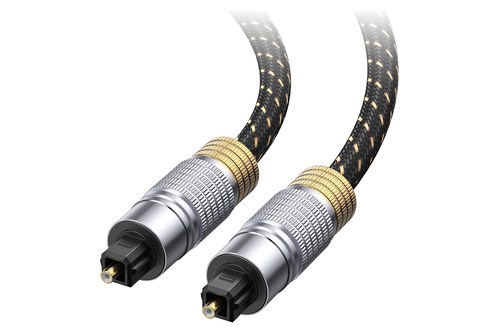
Cable Matters’ 6 ft Toslink optical audio cable
The sound menu is the step people miss. Burton Acoustix’s optical connection guide walks through the cable, the soundbar’s input and the TV menu for each major brand.
The Bottom Line
Bluetooth vs optical for a soundbar comes down to the source more than the sound. Run optical, or ARC where both ends have it, for the screen, and pair Bluetooth for the phone.
Optical carries Dolby Digital or DTS 5.1 with the bar’s sync setting still in play, while Bluetooth carries stereo through a codec your bar may limit to SBC. If voices trail the lips, start with the set’s own sync fixes from the delay section, and if a show sounds flat, check DRC and the output format before blaming the cable.
Nothing here was played or measured. The formats, codecs, ranges and delays come from the makers’ and standards bodies’ own documents.
Frequently Asked Questions
Is optical better than Bluetooth for a soundbar?
For TV sound, yes. Optical carries stereo PCM or 5.1 Dolby Digital and DTS, and the bar’s own sync setting stays available, while Bluetooth sends stereo through a codec, often SBC, and adds delay that a soundbar can’t take back out. For music from a phone the gap is smaller, because there’s no picture to match and skipping the cable usually matters more. If the set and the bar both have HDMI ARC or eARC, use that instead of either one.
Can optical carry Dolby Atmos to a soundbar?
No. Dolby delivers Atmos to soundbars over HDMI, and its Dolby Digital Plus brochure says a Dolby Digital Plus soundtrack is converted to a 640 kbps Dolby Digital signal for output over S/PDIF, the connection Roku says optical ports are sometimes called. So an Atmos stream leaves the optical port as Dolby Digital, with the Atmos layer left behind. Roku notes that ARC carries Atmos in a compressed format, and eARC carries it uncompressed.
What is a Bluetooth soundbar?
A Bluetooth soundbar is one that can receive sound from a phone, tablet, laptop or television over Bluetooth, as well as through its wired inputs. The name describes an input rather than a cord-free bar: it still needs power, and for movies and shows it can still connect by HDMI ARC or optical where it has those ports. The Bluetooth input then plays music and podcasts from a phone within the range the maker states, such as 32.8 ft (10 m) on Samsung’s HW-Q600F.
Does a TV send surround sound over Bluetooth?
Not as surround. Samsung describes a TV paired with its HW-Q600F over Bluetooth as giving “stereo sound,” and Roku says that to get surround sound from a Roku TV you must connect the soundbar with an HDMI cable or an optical cable. A bar’s own modes can still widen a stereo feed, such as DTS Virtual:X, which Samsung describes as “immersive 3D sound from any content,” but the separate center and rear channels of a Dolby Digital track only arrive over a wire.
Is HDMI ARC better than Bluetooth for a soundbar?
Yes, for movies and shows. HDMI ARC carries Dolby Digital Plus and compressed Dolby Atmos and lets the set’s remote control the bar’s volume, while Bluetooth carries stereo and adds delay. eARC goes further, carrying Dolby TrueHD, DTS-HD Master Audio, DTS:X and uncompressed 5.1 and 7.1, and Roku says it has built-in lip-sync. Keep Bluetooth for music from your phone.