PCM vs Dolby Digital for Soundbar: Which TV Setting Is Right? [2026]

PCM vs Dolby Digital soundbar settings look like a small menu choice, but the wrong one can quietly cut a surround mix down to stereo.
That pain usually sounds like flatter movies, weaker center dialogue, and surround effects that never seem to leave the front of the room.
The cause is bandwidth.
Standard HDMI ARC cannot carry multi-channel PCM, so the TV may downmix a 5.1 track before it ever reaches the bar.
Switch the TV to Dolby Digital, bitstream, or passthrough and the encoded surround mix can stay intact for the soundbar’s own decoder.
The first move is to check whether your TV-to-soundbar link is optical, standard ARC, or eARC, then match the output format to that connection and to your bar’s channel count.
Once that is clear, the PCM versus Dolby Digital choice gets much easier.
For most 3.1, 5.1, and Atmos soundbars on standard HDMI ARC or optical, Dolby Digital, bitstream, or passthrough is the right TV setting.
PCM often forces ARC down to two-channel stereo before the bar ever sees the surround mix.
The main exception is eARC, which can carry multi-channel PCM. On basic 2.0 or 2.1 bars, the audible difference is much smaller because the final output is still effectively stereo plus optional bass.
What Do PCM and Dolby Digital Mean on a Soundbar?
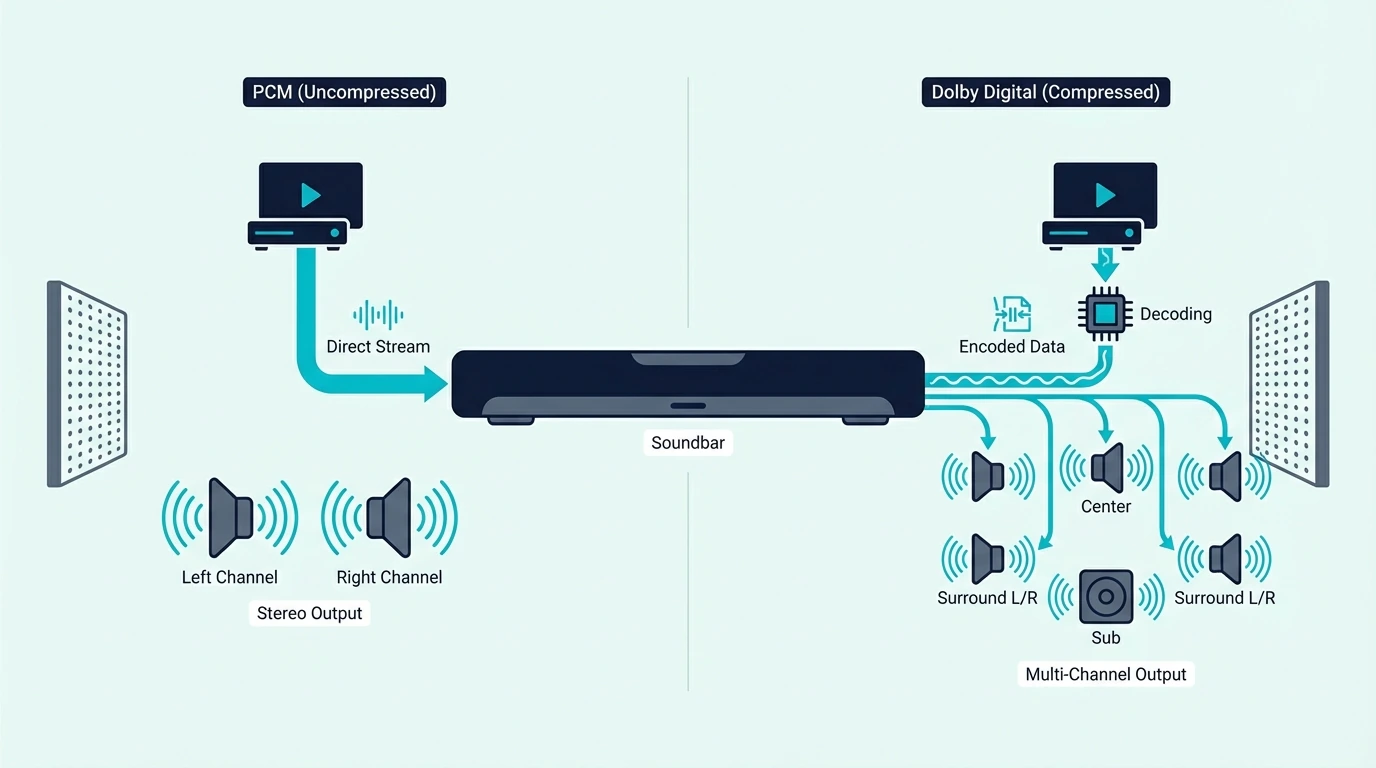
Both are digital audio formats your TV can send to the soundbar.
The practical difference is compression, channel capacity, and where the decoding happens.
PCM: Uncompressed Raw Digital Audio
PCM stands for Pulse Code Modulation.
It is raw digital audio that sits underneath CDs, lossless movie tracks, and much of the TV’s internal audio processing.
When the TV is set to PCM, it decodes the incoming soundtrack first.
Then it sends the result to the soundbar as raw audio data.
That sounds ideal until connection limits enter the picture.
Standard HDMI ARC can only carry two PCM channels.
If the source is a 5.1 movie, the TV may decode it correctly and then still downmix it to stereo before it leaves the TV.
Your soundbar receives two channels, not the full surround layout you paid for.
That is why a surround bar can sound clear and still be wrong.
You may hear left and right audio plus some bass, but the system feels flatter because the bar never received discrete center and surround information in the first place.
Our bitstream vs PCM guide breaks down that signal path in more detail.
Dolby Digital: Compressed Surround Sound
Dolby Digital is a compressed format designed to carry up to 5.1 channels through consumer connections.
That includes the left, center, right, surround, and subwoofer channels in one encoded stream.
When the TV is set to Dolby Digital, bitstream, or passthrough, it usually sends that encoded stream onward without decoding it first.
The soundbar then does the decoding itself.
That is why Dolby Digital is still the safer setting for many soundbar setups.
It preserves surround information within the bandwidth limits of optical and standard ARC.
In real use, that is why movies and streaming apps often sound fuller on bitstream than on PCM when the bar supports more than two channels.
The point is not that Dolby Digital is magically higher fidelity. The point is that it keeps the surround layout intact for the hardware you actually own.
That is also why so many TV menus feel misleading: PCM sounds like the premium option until ARC bandwidth quietly strips the extra channels away.
Our HDMI vs optical guide explains why both connections can still carry Dolby Digital 5.1 even when they cannot carry multi-channel PCM.
Where Dolby Digital Plus, Atmos, and eARC Fit
Dolby Digital Plus is the higher-capacity successor to basic Dolby Digital.
Streaming apps often use it because it carries more data efficiently and can act as the base layer for Atmos.
Optical cannot carry Dolby Digital Plus or Atmos.
Standard ARC can carry Dolby Digital Plus in many cases, while full Atmos and uncompressed multi-channel PCM are where eARC becomes important.
Our HDMI vs HDMI ARC guide and the broader soundbar guide explain why the connection method changes the answer as much as the format label itself.
Which TV Audio Setting Should You Use for Your Soundbar?
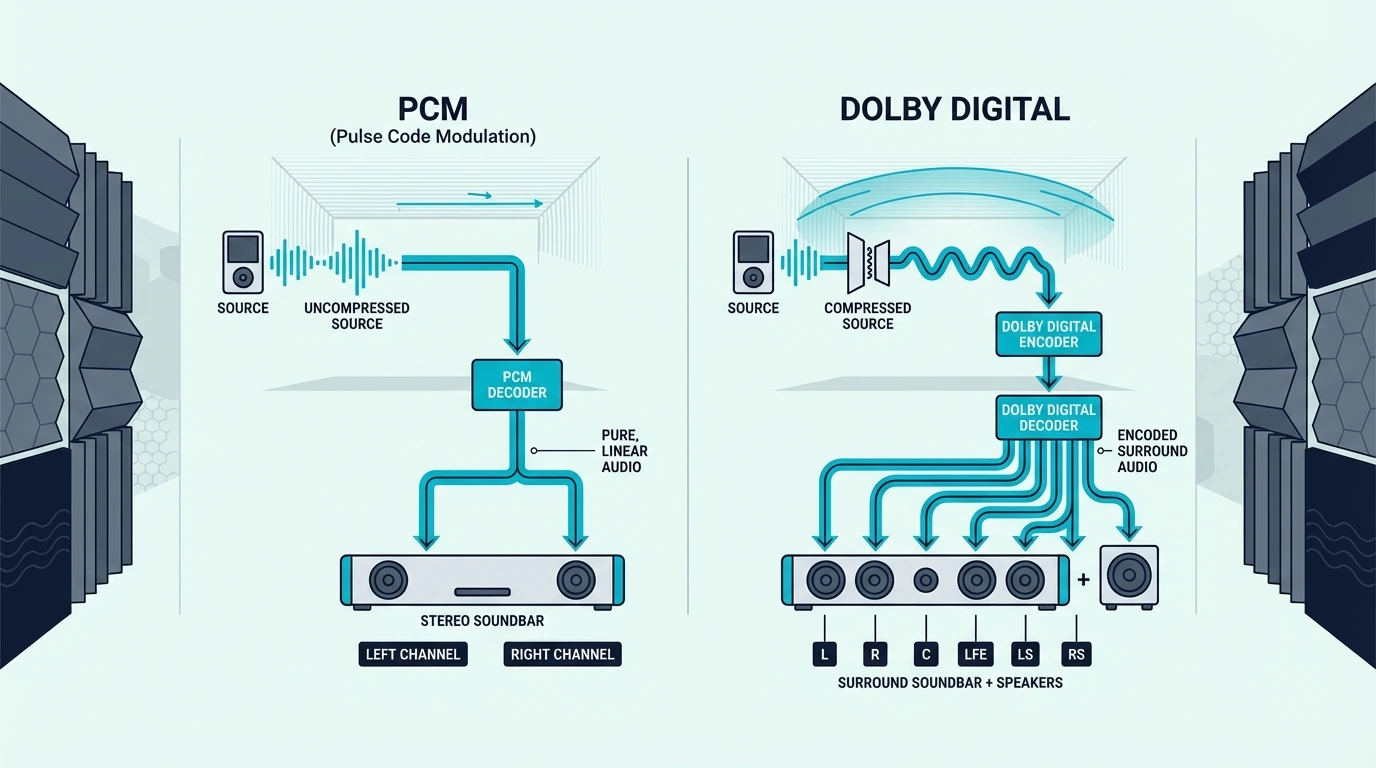
The right setting depends on the bar’s channel count and on whether you are using optical, HDMI ARC, or eARC.
A 3.1 soundbar and a simple 2.0 bar do not benefit from the same TV output choice.
For 3.1, 5.1, and Atmos Soundbars: Use Dolby Digital or Passthrough
If your soundbar has three or more channels, use Dolby Digital, bitstream, or passthrough.
That is the safest way to keep the surround mix intact on standard ARC or optical.
A 3.1 bar like the Amazon Fire TV Soundbar Plus makes that difference easy to understand in practice.

Amazon Fire TV Soundbar Plus
If the TV sends stereo PCM over standard ARC, the bar cannot rebuild missing center-channel information that never arrived.
That is why the idea that PCM always sounds better can be misleading in a real living-room setup.
More channels with the right format usually beat cleaner stereo on a multi-channel bar.
For 2.0 and 2.1 Soundbars: Either Works
On a 2.0 or 2.1 soundbar, the practical difference is smaller.
The final playback is still front-left and front-right, plus a subwoofer on 2.1 models.
A 2.1 bar like the Polk Audio Signa S2 soundbar system can still sound fuller than TV speakers, but it is not relying on discrete surround channels the way a 3.1 or 5.1 bar does.
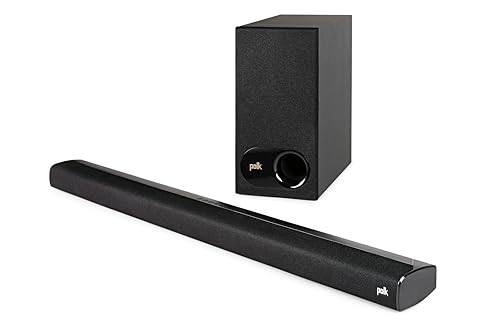
Polk Audio Signa S2 soundbar system
Dolby Digital is still a sensible default.
The soundbar’s own downmixing can handle dialogue more intelligently than the TV in some cases.
Still, this is the category where many people will not hear a dramatic difference.
If your bar only outputs stereo plus bass, the connection path matters less than it does on a true surround model.
For channel-count context, our 2.1 vs 5.1 soundbar guide and our choose a soundbar guide help explain what those channel numbers mean in daily use.
The eARC Exception
If both the TV and soundbar support eARC, PCM stops being the obvious problem.
eARC has enough bandwidth for uncompressed multi-channel PCM, Dolby Digital Plus, and higher-end Atmos delivery.
In that setup, PCM can carry full surround without the ARC downmix penalty.
That is the one common case where PCM can genuinely match the quality promise people expect from it.
Even then, bitstream is still often the easier default.
It leaves the original encoded format intact and lets the soundbar handle decoding the way it was designed to.
Our soundbar setup guide and soundbar to TV connection guide walk through how to verify the connection path before you judge the sound.
What setting names should you look for in the TV menu?
TV menus do not always say the same thing.
One brand may offer PCM, Dolby Digital, and Auto.
Another may use Bitstream, Passthrough, or Digital Output Audio Format.
If you have a 3.1, 5.1, or Atmos soundbar on standard ARC or optical, Bitstream, Passthrough, Dolby Digital, or sometimes Auto is usually safer than forcing PCM.
If the TV only gives you Auto and PCM, start with Auto, then confirm the soundbar is actually receiving a surround format instead of stereo.
Some TVs also hide the best option until HDMI-CEC, ARC, or eARC is enabled.
Others only expose Dolby Digital or passthrough after the app or source device starts playing a compatible soundtrack.
That means it is worth reopening the audio menu after playback begins instead of assuming the first menu view showed every real option.
How can you tell if the change actually worked?
Use content that you know carries a 5.1 or Atmos track.
Dialogue should lock more firmly to the center of the screen, and the mix should feel wider or more enveloping than the stereo fallback.
Many bars also show Dolby Digital, DD+, or Atmos on the front panel or in the companion app.
If the bar keeps showing PCM or stereo, double-check the app’s audio track, the TV’s output menu, and whether ARC or eARC is actually enabled on both devices.
It also helps to test an internal streaming app and then an external HDMI source like a console or streaming box.
Some TVs pass 5.1 differently from internal apps than they do from external devices.
That split behavior explains why one source may sound correct while another still collapses to stereo.
Get Studio Tips Weekly
Join 5,000+ creators getting acoustic treatment advice every week.
No spam. Unsubscribe anytime.The Bottom Line
For most soundbars on standard HDMI ARC or optical, Dolby Digital, bitstream, or passthrough is the correct TV setting.
That keeps surround information intact for bars with three or more channels.
PCM is still fine on eARC and usually harmless on basic 2.0 or 2.1 bars.
The real mistake is assuming PCM always sounds better when the connection cannot carry the channels your soundbar needs.
If you are still deciding whether your current bar is even the right fit for the room, our best soundbar guide and best budget soundbar guide are good next steps.
Frequently Asked Questions
Which is better, PCM or Dolby Digital?
On standard HDMI ARC or optical, Dolby Digital is usually better for multi-channel soundbars because it preserves 5.1 surround channels.
PCM is uncompressed, but that does not help if the TV has to collapse the mix to stereo first.
Should I use PCM with my soundbar?
Use PCM mainly if both devices support eARC or if your soundbar is a basic 2.0 or 2.1 model where stereo output is the end result anyway.
For 3.1, 5.1, and Atmos bars on standard ARC, Dolby Digital or passthrough is usually the safer choice.
What are the disadvantages of PCM audio?
The biggest drawback on standard ARC is channel loss.
A 5.1 soundtrack may leave the TV as stereo PCM, which means your center and surround information never reach the soundbar intact.
Is PCM still used today?
Yes.
PCM is still the base format behind digital audio on TVs, discs, streaming devices, and internal device processing.