Bose Smart Soundbar 300 vs Bose TV Speaker: What Wi-Fi Adds
Anyone weighing the Bose Smart Soundbar 300 vs Bose TV Speaker is really choosing between a Wi-Fi smart bar and a Bluetooth TV bar, since only the 300 adds a voice assistant, AirPlay 2 and wireless rear speakers.

Anyone weighing the Bose Smart Soundbar 300 vs Bose TV Speaker is really choosing between a Wi-Fi smart bar and a Bluetooth TV bar, since only the 300 adds a voice assistant, AirPlay 2 and wireless rear speakers.
Both sit low under a TV, both connect by HDMI ARC or optical, and both take a Bose bass module, so their spec sheets blur together.
Get the split right and you’ll know whether you need the Bose Music app at all, and whether a full 5.1 setup is ever on the table.
This guide lines the two up from Bose’s owner’s guides and product pages, adding RTINGS’ reviews and the Amazon listings only where Bose’s pages are silent.
The side-by-side table comes first, then each difference in turn, and finally which buyer each bar suits, including what Bose says about the 300 today.
What Separates the Bose Smart Soundbar 300 vs Bose TV Speaker?
That Wi-Fi radio is most of the story. The 300’s guide gives it Wi-Fi, the Bose Music app, Google Assistant or Amazon Alexa and a list of Bose bass modules and surround speakers, while Bose lists only Bluetooth as the TV Speaker’s wireless connectivity and says it comes with no app (Bose’s Smart Soundbar 300 owner’s guide).
| Feature | Bose Smart Soundbar 300 | Bose TV Speaker | Where it’s stated |
|---|---|---|---|
| Speakers | Four full-range drivers | 3 total speakers | Bose’s product pages |
| Channels | 3.0, with a center channel | 2.0, no center channel | RTINGS’ reviews |
| TV connection | HDMI ARC or optical | HDMI ARC or optical | Owner’s guides |
| Other ports | BASS, IR, SERVICE | AUX IN, USB, BASS | Owner’s guides |
| Wi-Fi and app | Wi-Fi, Bose Music app | Neither | 300 guide; TV Speaker page |
| Streaming | AirPlay 2, Spotify Connect, Bluetooth | Bluetooth 4.2 | Bose’s product pages |
| Voice assistant | Google Assistant or Alexa, built in | None | 300 guide; TV Speaker page |
| Dialogue mode and bass | In the Bose Music app | Buttons on the remote | Owner’s guides |
| Bass Module 500 or 700 | Yes | Yes, wired only | Bass Module pages |
| Surround speakers | Surround Speakers 700 or Surround Speakers | No | 300 guide; TV Speaker page |
| Size | Not in Bose’s 300 documents | 2.21 x 23.38 x 4.02 in, 4.34 lb | TV Speaker page |
| Sold | From 2020 to 2024 | From 2020, still at Bose US | Bose’s help pages; Bose US |
Think of the TV Speaker as a sealed appliance and the 300 as a small hub that also joins your network and your other Bose speakers. For the TV Speaker against Bose’s current bars, see how the Bose TV Speaker compares with Bose’s smart soundbars.
How Many Speakers Does Each Bar Have?
That table’s first row is where the sound starts. Bose Canada’s page says four full-range drivers work together in the 300, while Bose’s TV Speaker page lists 3 total speakers (Bose TV Speaker page).
The TV Speaker’s Amazon listing names its three: two angled full-range drivers and a center tweeter “specifically focused on elevating vocals.”
RTINGS counts channels instead, calling the 300 a 3.0 bar with a discrete center channel and the TV Speaker a 2.0 bar that lacks one. Compared with the TV Speaker, RTINGS says, the 300 “adds an additional channel to improve vocal reproduction in the mix” (RTINGS’ Smart Soundbar 300 review).
Neither plays Dolby Atmos. RTINGS says so for both, Bose’s TV Speaker page marks Atmos “No,” and both owner’s guides carry a Dolby Audio license notice with no mention of Atmos or DTS.
Bose suggests the TV Speaker for a room of 8 ft x 8 ft, and RTINGS says it “doesn’t get very loud,” while listing “Gets loud” among the 300’s pros.
Which Connections Does Each One Have?
Those speakers are fed through the same two TV ports. Both guides connect the bar by HDMI ARC or optical, with an optical cable in the box and the HDMI cable “not provided” (Bose’s TV Speaker owner’s guide).
Over HDMI ARC, both guides say the TV remote handles power, volume and mute. The TV Speaker’s guide also calls it Roku TV Ready, so a Roku TV can set it up and control it from its own menu.
The rest of the back panels differ. The 300 has BASS, IR and SERVICE ports beside HDMI and optical, while the TV Speaker has AUX IN, USB and BASS.
That AUX IN matters for a TV without HDMI or optical. The TV Speaker’s guide uses it for a TV with only red and white analog outputs (a 3.5 mm to RCA cable) or only a headphone jack (a 3.5 mm cable).
Whichever bar you pick, the steps to connect a Bose soundbar to a TV cover both cable routes.
What Does Wi-Fi Add to the 300?
Those cables carry the TV’s sound, but the 300’s network connection changes what else the bar can do. Its guide says the Bose Music app lets you stream music, set presets, add music services, explore internet radio, configure Google Assistant or Amazon Alexa and manage the bar’s settings.
Bose Canada’s page adds Spotify Connect to the guide’s AirPlay 2, which needs an Apple device running iOS 11.4 or later on the same Wi-Fi network. Bose Canada’s page also says the 300 plays in synchronized multi-room groups with other Bose smart speakers and soundbars.

Bose’s TV Speaker page answers the app question with a flat “No,” and its comparison chart marks Multi-room Grouping “No” too. It can still play along: the same page says it plays music in sync with a Bose smart speaker or soundbar through SimpleSync, and it lists the Smart Soundbar 300 among them.
That’s the network split in one line: the 300 can be the hub, and the TV Speaker can only be a guest.
Does Either Bar Have a Voice Assistant?
That app is also where the 300’s voice features live. Only the 300 has one: its guide sets up Google Assistant or Amazon Alexa in the Bose Music app, one at a time, while Bose’s TV Speaker chart lists Built-in Voice Control as “No.”
With Alexa, Bose’s Voice4Video lets the 300 turn the TV on or off, pause and resume video, and tune a cable or satellite box by network name or channel number. The guide’s own example is “Watch channel 802.”
If you’d like to ask for a channel from the couch, that’s the 300; for clearer dialogue alone, the TV Speaker has less to set up.
How Do Bluetooth and the Remotes Compare?
Voice aside, both bars still ship with a remote and Bluetooth. Bluetooth is nearly a tie: both guides give a 30 ft (9 m) range and room for eight stored devices, with audio from one at a time, and the TV Speaker’s guide adds that it can stay connected to two at once.
The remotes split by purpose. The TV Speaker’s has Dialogue mode and bass buttons beside power, TV, Bluetooth, volume and mute, while the 300’s guide shows Play/Pause and a Bose Music button in their place.
Bose Canada’s page calls the 300’s a basic IR remote that needs a line of sight to the bar.
Both guides say a cable or satellite box remote can be programmed to run the bar, for volume on the TV Speaker and for power and volume on the 300. The TV Speaker’s guide also teaches it your TV remote’s volume and mute buttons, as long as that remote sends infrared.
If either remote goes missing, Burton Acoustix’s guide to Bose bars without a remote covers both.
Is Dialogue Mode the Same on Both?
That Dialogue button is the main difference here. Mostly yes: both guides say Dialogue mode improves the clarity of dialogue and vocals in movies, TV programs and podcasts by adjusting the audio balance, and both keep it on for the current source.
The TV Speaker switches it with a remote button, while the 300’s guide sends you to the Bose Music app.
Bose’s TV Speaker page says its mode analyzes what you’re watching, separates the vocals and amplifies them. RTINGS calls the 300’s vocal reproduction “really great” thanks to its center channel, and says the TV Speaker’s voices are “clear and detailed” even without one.
Bass works differently too. The TV Speaker’s remote steps through five settings from -2 to +2, while the 300 adjusts bass in the app, and RTINGS says the 300 also offers treble adjustment.
Can You Add a Bass Module or Rear Speakers?
Those bass settings only go so far, which is where Bose’s add-ons come in. Both take a Bose Bass Module 500 or 700, but only the 300 takes rear speakers: Bose’s Bass Module pages list both bars, marking the TV Speaker “wired connection only” (Bose Bass Module 700 page).
The 300’s guide goes further, adding the Acoustimass 300 bass module, the Surround Speakers 700, the Surround Speakers and the Virtually Invisible 300 wireless surround speakers.

Bose Canada’s page says the 300’s bass module and surround speakers pair wirelessly in the Bose Music app, and a bass module plus surround speakers gives “the full 5.1 experience.” It even takes two bass modules, as long as both are the same model.
The TV Speaker’s route is a cable: its guide runs a 3.5 mm audio cable from the bass module to the BASS port, not the AUX port. Bose’s page names its Bass Module Connection Cable or a standard 3.5 mm cable, both sold separately.
Bose’s TV Speaker FAQ rules out satellite surround speakers. If rear sound is in your plans for next year, the TV Speaker stops at the sub, while the 300 keeps going.
How Big Is Each Bar?
All those add-ons spread around the room, but the bar itself still has to fit under the screen. Bose gives the TV Speaker as 2.21 inches tall, 23.38 inches wide and 4.02 inches deep at 4.34 lb, but the 300’s manual, quick start guide and Bose Canada’s page give no dimensions.
The 300’s Amazon listing says it measures just over 2 inches tall, the phrase the TV Speaker’s listing uses too.

Both mount with the Bose Soundbar Wall Bracket, sold separately. Each guide also has a five-second hold that retunes the sound for the wall: Mute on the 300, Dialogue mode on the TV Speaker.
Is the Bose Smart Soundbar 300 Discontinued?
Size only matters if you can still buy one. Bose’s help page for the 300 lists it as sold from 2020 to 2024, and Bose US’s soundbar range on 6 November 2026 showed five bars, the TV Speaker and TV Speaker (2nd Gen) among them, but no 300 (Bose US soundbars).
Bose Canada still has a page for the 300, marked “Sold out” (Bose Canada’s Smart Soundbar 300 page). Bose’s help page for the TV Speaker lists it as sold from 2020, and its US page had an Add to Cart button that day.
Amazon’s main 300 listing showed one unit left on 6 November 2026, and a separate renewed listing turned up as well. Check which one you’re buying.
None of Bose’s 300 documents names a replacement. The guide says the bar can receive automatic security updates once it’s set up in the Bose Music app and online, and it gives no end date for them.
Which One Should You Buy?
With both still findable, the choice comes back to that Wi-Fi radio. If you want voice control, AirPlay 2 or a path to rear speakers, get the 300, as long as you can find it new.
For Wi-Fi streaming, a built-in assistant and room to grow into 5.1, the Bose Smart Soundbar 300 still covers it while new stock lasts.
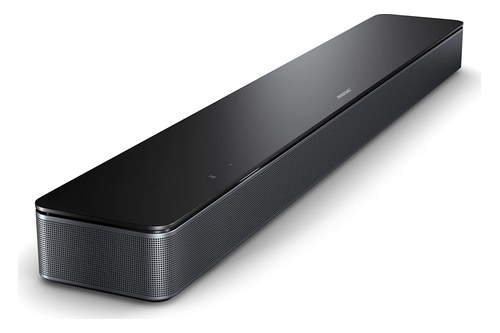
Bose Smart Soundbar 300
If you mainly want clearer TV dialogue from one cable and a remote with a Dialogue button, the Bose TV Speaker is the simpler buy, and it can still take a wired bass module later.
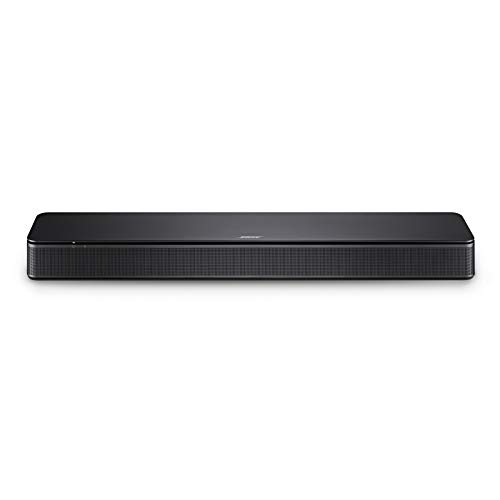
Bose TV Speaker
Each listing met Burton Acoustix’s rating, review and stock checks on 6 November 2026. For Bose’s current bars, from the TV Speaker up to the Smart Ultra, see Bose’s whole soundbar lineup, ranked.
The Bottom Line
Those rows come down to one split: the 300 adds a network to what the TV Speaker does, with Wi-Fi, the Bose Music app, Alexa or Google Assistant, AirPlay 2 and wireless rear speakers. Pick it if you’ll use those and can find it new; otherwise the TV Speaker covers clear dialogue and a wired bass module.
The descriptions come from Bose’s owner’s guides and product pages, plus the RTINGS reviews named above.
Frequently Asked Questions
Can the Bose TV Speaker and Smart Soundbar 300 play music together?
Yes, with the 300 in charge. Bose’s TV Speaker page says it plays music in a synchronized 1-1 connection with a Bose smart speaker or soundbar through SimpleSync, controlled from that product in the Bose Music app, and it lists the Smart Soundbar 300 as compatible.
Does the Bose Smart Soundbar 300 support Dolby Atmos?
No. RTINGS says it doesn’t offer Dolby Atmos and downmixes 5.1 formats like Dolby Digital into stereo, and the TV Speaker does the same, per RTINGS and Bose’s “No” for Atmos.
Can you connect headphones to either bar?
Neither has a headphone output, Bose says. The 300 can pair with Bose Noise Cancelling Headphones 700 through SimpleSync, with separate volume levels, while Bose’s TV Speaker page says you can’t connect headphones to it for synchronized audio.
Is the Bose TV Speaker (2nd Gen) different?
Bose calls it a successor to the original TV Speaker, with improved acoustic performance and clarity. It ships with an HDMI cable in the box, where the original comes with an optical cable.