How to Connect a Turntable to Sonos
Hey there, fellow music lover, ready to connect your turntable to Sonos? Remember the first time you dropped the needle on a vinyl record and heard that warm, rich sound fill the room?
It’s a magical experience, right? You can combine that vintage charm with the convenience of modern wireless speakers.
How to Connect a Turntable to Sonos
Connecting a turntable to Sonos is a process that involves using a phono preamp and a Sonos device with a line-in port, such as the Sonos Five or Sonos Port.
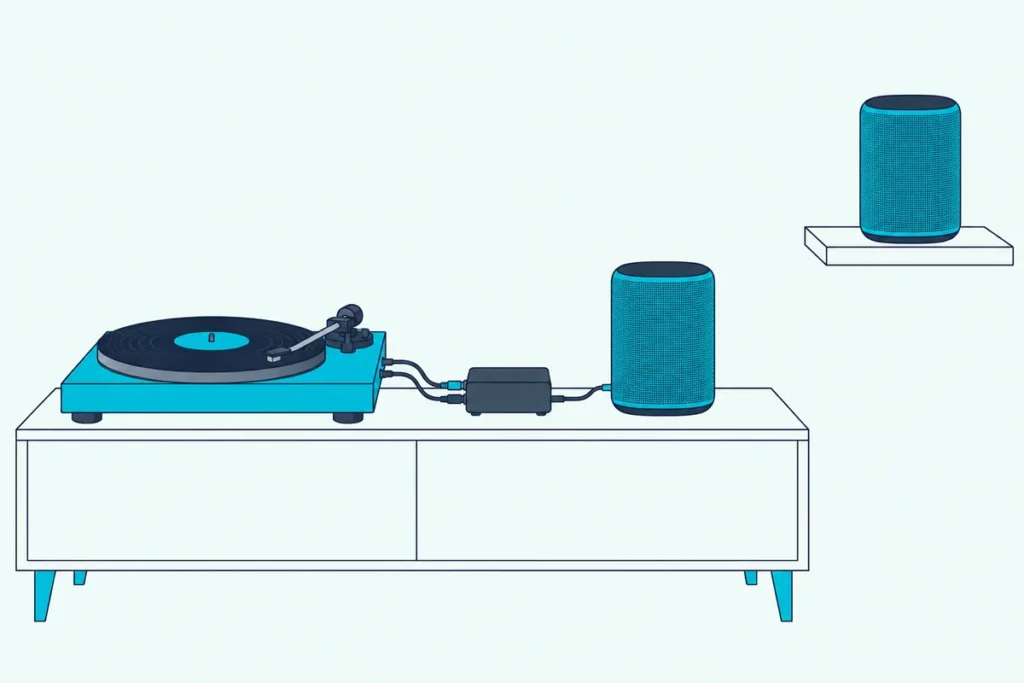
You’ll need to connect your turntable to the phono preamp, then connect the preamp to your Sonos device using RCA cables.
After making the physical connections, you’ll need to configure the Sonos app to recognize the turntable input.
This setup allows you to stream your vinyl collection through your Sonos speakers, combining the warmth of analog sound with the convenience of wireless audio.
Understanding Turntables and Sonos Compatibility
Alright, let’s get down to brass tacks.
First things first, you need to understand that turntables output a very low-level signal that needs to be amplified before it can play nice with other audio equipment.
This is where a phono preamp comes in. Some turntables have this built-in (aren’t they fancy?), but most don’t.
Now, on the Sonos side of things, you’re going to need a Sonos device with a line-in port.
The main contenders here are the Sonos Five (formerly Play:5), Sonos Port, or Sonos Amp. These are designed to accept external audio sources, which is what a vinyl setup needs.
Here’s a pro tip: make sure your Sonos device is placed somewhere accessible.
One more thing to keep in mind is that once your turntable is connected to Sonos, you can stream that sweet, sweet vinyl sound to any Sonos speaker in your home.
Remember, compatibility is key here. Not all turntables are created equal, and neither are all Sonos devices.
Essential Equipment for Connecting a Turntable to Sonos
Okay, folks, it’s time to talk gear!
First up, obviously, you need a turntable. Duh, right?
But here’s the kicker – make sure it has a built-in preamp, or be prepared to buy one separately.
Next, you’ll need a Sonos device with a line-in port. Your best bets are the Sonos Five, Sonos Port, or Sonos Amp.
Place it somewhere you can reach the back panel easily.
Now, let’s talk cables. You’ll need a set of RCA cables to connect your turntable (or preamp) to your Sonos device.
If your turntable doesn’t have a built-in preamp, you’ll need a separate phono preamp. This little box of magic boosts the signal from your turntable to a level that your Sonos can understand.
Oh, and don’t forget about the grounding wire! Some turntables come with this, and it’s crucial for reducing unwanted hum.
Lastly, you’ll need the Sonos app on your smartphone or tablet. This is where you’ll configure everything and control your music.
Remember, quality matters.
Step-by-Step Guide to Connecting Your Turntable
Step 1: Check your turntable
First things first, figure out if your turntable has a built-in preamp. If it does, great!
If not, you’ll need to add an external one.
Step 2: Connect the preamp (if necessary)
If you need an external preamp, connect your turntable to it using RCA cables. Make sure to match the colors – red to red, white to white.
Step 3: Connect to Sonos
Now, connect your turntable (or preamp) to your Sonos device. A Sonos Five, Port or Amp all work.
Again, use those RCA cables and match the colors.
Leave yourself room to reach the back of the Sonos – accessibility is key!
Step 4: Grounding
If your turntable has a grounding wire, connect it to the grounding terminal on your preamp or Sonos Amp. Skipping this step?
Prepare for a hum that’ll drive you nuts.
Step 5: Power up
Plug in and turn on all your devices. This is the moment of truth!
Step 6: Configure the Sonos app
Open your Sonos app and add the line-in source. Go to Settings > System > [Your Sonos Device] > Line-In.
Select the appropriate source name (like “Turntable”) and adjust the line-in level.
Step 7: Play that funky music!
Put on a record, drop the needle, and bask in the glory of vinyl through your Sonos speakers.
Remember, patience is key here. It might take some tweaking to get everything just right.
Optimizing Your Turntable-Sonos Setup for Best Sound Quality
With everything connected, the next step is fine-tuning the setup.
First things first, let’s talk about turntable placement.
Keep your turntable away from vibrations and electrical interference.
A solid, level surface is your best bet.
Next up, cartridge alignment.
Your cartridge needs to be properly aligned to get the best sound and avoid wear on your precious vinyl.
Now, let’s talk about tracking force and anti-skate. These settings ensure your needle sits just right in the groove of your records.
Too much pressure, and you’ll wear out your vinyl faster than you can say “audiophile.” Too little, and you’ll be skating across the surface like a clumsy ice skater.
On the Sonos side of things, don’t forget to play around with the settings in the app. The line-in level is particularly important.
Set it too high, and you’ll get distortion. Too low, and you’ll be straining to hear anything.
Room acoustics matter too!
Experiment with speaker placement and consider acoustic treatments if you’re really serious about sound quality.
Don’t forget about your vinyl care routine. Clean records sound better, period.
Lastly, be patient and trust your ears. What sounds good to one person might not be perfect for you.
Remember, optimizing your setup is a journey, not a destination. Embrace the process, and before you know it, you’ll be the go-to person for all your friends’ audio questions.
Troubleshooting Common Issues When Connecting Turntables to Sonos
Alright, folks, let’s talk troubleshooting. Because let’s face it, even with the best instructions (ahem), things can sometimes go a bit sideways.
First up, the dreaded hum. If you’re hearing a constant buzz that’s louder than your Great Aunt Mildred after her third glass of wine, you might have a grounding issue.
Make sure your turntable is properly grounded.
If you’re using an external preamp, double-check that the ground wire is connected.
No sound at all? First, check all your connections.
Also, make sure you’ve selected the correct input source in the Sonos app.
If your sound is distorted or too quiet, you might need to adjust the line-in level in the Sonos app.
A few tweaks to the line-in level, and voila – audio bliss!
Skipping or skating issues? This could be due to improper cartridge alignment or incorrect tracking force.
If you’re hearing a lot of surface noise or static, it might be time to clean your records and stylus.
If the sound cuts out now and then, look at your Wi-Fi.
Make sure your Sonos device has a strong connection to your network.
Lastly, if you’re not getting that warm, full sound you expect from vinyl, you might need to play around with your Sonos EQ settings.
Remember, troubleshooting is part of the fun… okay, maybe “fun” is stretching it, but it’s definitely part of the process.
And hey, if all else fails, there’s always the trusty “turn it off and on again” method. You’d be surprised how often that works.
Conclusion
Now you can spin records and enjoy that warm, rich sound through your Sonos system. It’s like having the best of both worlds!
The beauty of this setup is how it brings together the tactile, intimate experience of vinyl with the convenience of modern technology.
There’s something special about carefully selecting a record, gently lowering the needle, and then being able to hear that music anywhere in your home.
But here’s the thing – your journey doesn’t end here. The world of audio is vast and ever-evolving.
Experiment, tweak, try new things. Maybe you’ll upgrade your cartridge, or try out different Sonos speakers.
The possibilities are endless!
And remember, this isn’t just about the tech – it’s about the music. It’s about rediscovering your favorite albums, or introducing your kids to the joys of vinyl.
It’s about hosting listening parties where your friends marvel at how you’ve managed to combine retro cool with modern convenience.
So go ahead, drop that needle, fire up your Sonos, and let the music play.
Happy listening, folks!