Best MIDI Foot Controller Picks for Guitar Rigs, DAWs and Apps
Choosing the best MIDI foot controller starts with what it has to talk to, since ten switches won’t help if the board can’t reach your amp modeler, laptop or phone.
Pick the wrong one and you’re bending down mid-song to change a preset, or learning the night before a gig that your pedal only speaks USB while your effects unit wants 5-pin MIDI.
Get the match right and one press changes a patch, starts a looper or punches in a recording while both hands stay on your instrument.
The eight picks below run from a ten-switch floorboard with two built-in expression pedals to a pocket-size Bluetooth pedal, each described from its maker’s own documents.
Start with the quick answer and the table, then use the sections after the picks to settle switch count, connections, expression pedals and the software you want to control.
What Is the Best MIDI Foot Controller?
That match between board and rig is what the quick answer hangs on. The best MIDI foot controller for most rigs is the Nektar Pacer, because it’s the only pick here that pairs ten footswitches with USB, a MIDI out, four relays for a non-MIDI amp and inputs for two expression pedals, per Nektar’s Pacer page.
The other seven each fit a narrower job, as the table shows:
| Pick | Best for | Footswitches | Expression | MIDI connections |
|---|---|---|---|---|
| Nektar Pacer | Most rigs | 10, plus 4 external | 2 inputs | USB, MIDI out, 4 relays |
| Behringer FCB1010 | Hardware on 5-pin MIDI | 10, plus Up/Down | 2 built in | 5-pin in and out/thru, 2 relay jacks |
| Paint Audio MIDI Captain | Deep programming | 10 | 2 inputs | USB, 5-pin in and out |
| Boss FS-1-WL | Small wireless pedal | 3, plus 2 external | 1 input | Bluetooth, USB, TRS MIDI out |
| M-VAVE Chocolate Plus | Pocket-size wireless | 4 | Pedal jack | Bluetooth, USB-C, host port |
| IK Multimedia iRig BlueBoard | iPhone, iPad and Mac apps | 4 | 2 inputs | Bluetooth |
| Line 6 FBV 3 | Line 6 amps and PODs | 13 | Built-in wah/volume | USB, FBV cable to Line 6 gear |
| Line 6 FBV Express MkII | A compact Line 6 board | 4 | Built-in wah/volume | USB, RJ-45 cable to Line 6 gear |
Every linked pick had at least 4.0 stars from 50 or more Amazon reviews and was in stock when checked on 16 October 2026. Prices stay off the page because they change too often.
This guide covers controllers you switch and rock with your feet to send MIDI. Bass-note pedalboards played like an organ’s pedals are a different product, and Burton Acoustix’s organ controller guide covers how they fit an organ setup.
| Product | Link |
|---|---|
Best Overall 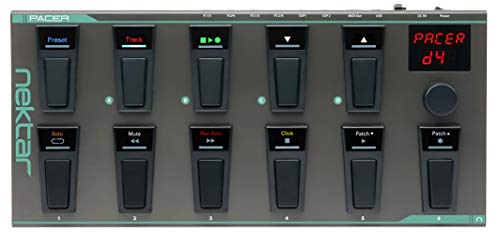 | See ratings |
Best for 5-Pin Hardware Rigs 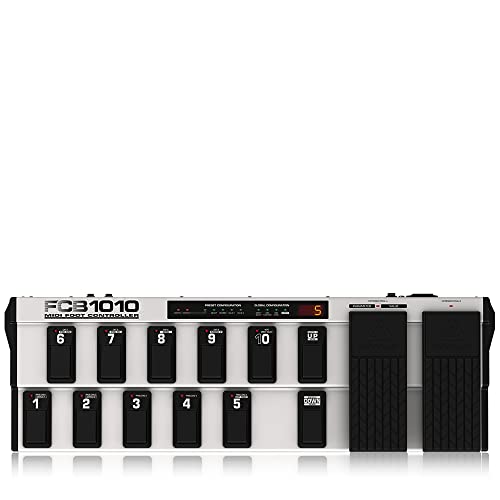 | See ratings |
Best for Deep Programming 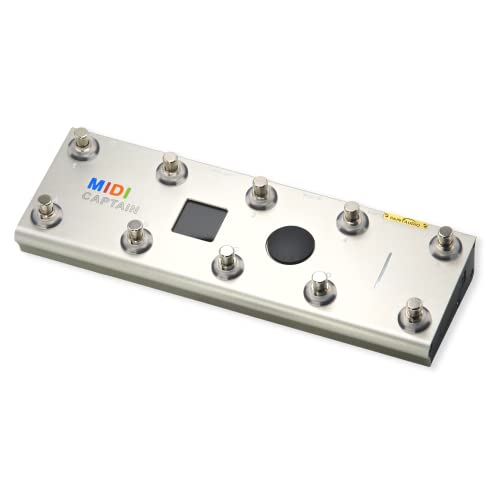 | See ratings |
Best Small Wireless Pedal 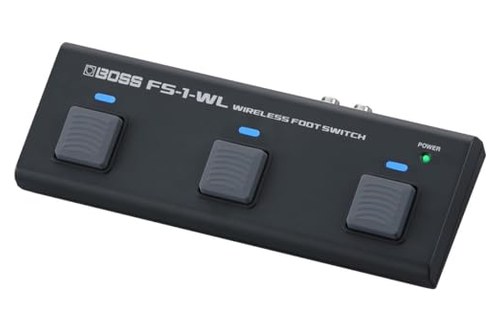 | See ratings |
Best Pocket-Size Pick 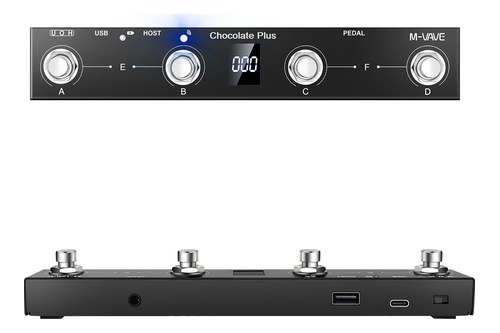 | See ratings |
Best for iOS and Mac Apps 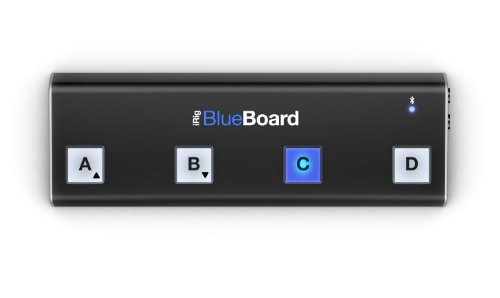 | See ratings |
Best for Line 6 Amps 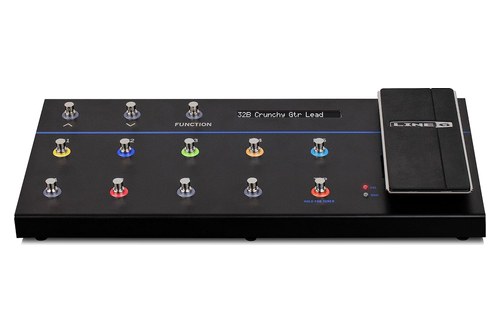 | See ratings |
Best Compact Board With a Pedal 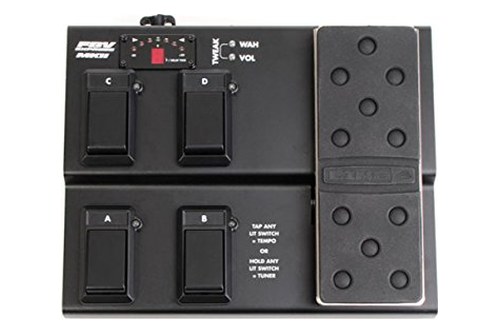 | See ratings |
Which MIDI Foot Controllers Made the List?
Those eight rows are the short version, and the write-ups below take each board in the same order. The MIDI foot controllers that made the list in October 2026 are three ten-switch floorboards, two Line 6 boards with built-in pedals and three small wireless pedals for software and apps.
Each ‘best for’ label is a reading of the maker’s specifications, not a verdict on feel.
Nektar Pacer
If one board has to run your DAW, switch a plain amp’s channels and change presets on MIDI gear, the Nektar Pacer covers all three.
the Nektar Pacer
Nektar lists 10 programmable footswitches, each lit by an RGB LED, four switching relays, and jacks for up to four external footswitches and two expression pedals. It holds 24 presets, and loading one can send up to 16 MIDI messages or relay states at once.
For DAWs it’s Mackie Control (MCU) compatible, with a Transport preset for Cycle, Rewind, Forward, Stop, Play and Record and a Track preset for Solo, Mute, Record Arm and Click. Nektar’s own DAW integration adds track and patch selection in Bitwig, Cubase, GarageBand, Logic, Nuendo, Reason, Reaper and Studio One.
Its factory presets cover the Line 6 Helix and Pod HD, Fractal Audio’s AxeFX, Avid’s Eleven Rack and the Kemper Profiler. It runs on USB power or an optional 9 V, 600 mA center-negative adapter and measures 500 x 230 x 47 mm at 3.5 kg.
Behringer FCB1010
If your rig is rack gear, synths or a modeler on 5-pin MIDI and you want pedals built in, the Behringer FCB1010 puts 10 footswitches and two expression pedals on one floorboard.
the Behringer FCB1010
Behringer’s FCB1010 page lists 10 banks of 10 user-editable presets, and each preset can send five program changes and two MIDI controller messages at once. Both expression pedals take their own MIDI channel, controller number and range, and the board also sends MIDI notes for triggers and tap tempo.
Two relay-controlled switch jacks change channels on a guitar amp, a MIDI merge function passes incoming MIDI through alongside the board’s own messages, and a MIDI SysEx backup saves your setups. Behringer says everything can be programmed while standing.
Behringer’s quick start guide lists 5-pin MIDI in and out/thru jacks, a three-digit LED display, a built-in power supply on a standard IEC mains cable, and no USB port. At about 687 x 221 x 60 mm and 4.34 kg, it’s wider and heavier than any other pick with a published size, and if you want a Behringer FCB1010 alternative that plugs into a computer, the Pacer and MIDI Captain both add USB.
Paint Audio MIDI Captain
If you want to decide exactly what each switch sends, on press and on release, the Paint Audio MIDI Captain lets you set it all, down to text files on a computer.
the Paint Audio MIDI Captain
Paint Audio’s MIDI Captain manual, version 2.01 from March 2023 in a copy on Shopify’s file server, lists 10 footswitches with color LED rings and a 1.54-inch 240 x 240 color screen. Each switch can send a program change, a control change or a MIDI note, with separate actions on press and release, and a control change can toggle between two values.
Its Time Engine records the switch changes you make along a backing track and replays them from one switch, with 10 time tracks to choose from. Deeper settings live in text files on a virtual USB disk that a Windows PC or Mac sees when you hold Key 1 at power-on, which suits complex setups more than quick edits.
It has USB for power and data, a 9-12 V input that takes a normal 9 V pedal supply, 5-pin MIDI in and out, and two AA batteries, Ni-MH recommended, for 6-12 hours. It measures 283 x 90 x 55 mm at 0.75 kg, and Paint Audio’s hardware examples include the Line 6 HX Stomp, Fractal’s FM3 and the Kemper Profiler.
Amazon sells it in Gold, Blue and STD versions, and the manual doesn’t say how they differ, so check the listing’s version name before counting on any one feature.
Boss FS-1-WL
If you want three quiet switches that reach phones, computers and MIDI gear without a cable, the Boss FS-1-WL does both in a pedal 207 mm wide.
the Boss FS-1-WL
Boss’s FS-1-WL page describes a rear-panel switch between MIDI mode, which sends program and control changes, and HID mode, which sends computer keyboard commands and holds three onboard setups. Over USB it’s a class-compliant MIDI device, though Boss says HID mode doesn’t work over USB.
That HID mode turns pages in score apps, controls YouTube playback and runs record and play in a DAW, and an editor for macOS, Windows, iOS and Android sets what each switch sends. Boss also lists wireless control of its Pocket GT, Katana-Air and Waza-Air.
Jacks take up to two external footswitches and an expression pedal, and a TRS MIDI out drives MIDI hardware by cable. Two AAA batteries last up to 14 hours by Boss’s figure, and the pedal measures 207 x 77 x 32 mm and weighs 258 g.
M-VAVE Chocolate Plus
For four wireless switches in a bar 212 mm long, the M-VAVE Chocolate Plus is the smallest pick with a published size, at 212 x 36 x 17 mm.
the M-VAVE Chocolate Plus
M-VAVE’s Chocolate Plus manual, on M-VAVE’s file host, shows four footswitches, A to D, plus two combinations: A and B pressed together count as E, and C and D as F. A small display shows each command you send, and M-VAVE’s product data adds a custom mode with switchable banks and keyboard key combinations.
In U mode its USB-C port is a USB MIDI connection to a computer, and in H mode that port only supplies power while the MIDI host port controls an effects unit directly. It pairs over Bluetooth 5.0 with Windows, Mac, iOS and Android, and M-VAVE’s CubeSuite and MidiSuite apps set it up.
A 2.5-hour charge gives up to 12 hours of use, though the same product data also shows ’40h+’ among its highlights. The manual shows a pedal jack without saying what kind of pedal it takes.
IK Multimedia iRig BlueBoard
If your rig lives on an iPhone, iPad or Mac, the IK Multimedia iRig BlueBoard gives you four lit switches and two pedal inputs over Bluetooth.
the IK Multimedia iRig BlueBoard
IK’s iRig BlueBoard manual, in the copy zZounds hosts, calls it a wireless MIDI pedalboard for iPhone, iPod touch, iPad and Mac, with four backlit soft-touch pads and two TRS jacks for footswitches or expression pedals. In BlueBoard mode, IK’s free iRig BlueBoard app turns its Bluetooth signals into MIDI program and control changes for apps such as AmpliTube.
With firmware 1.2.0 it also works as a standard Bluetooth MIDI device: hold B at power-on and the switches send notes C3 to F3, or hold C and they send CC 20 to 23, with the pedal inputs on CC 12 and 13. Those modes need iOS 8 or OS X Yosemite or later.
Four AAA batteries last about 50 hours with the backlight off and 35 with it on, and IK allows only non-rechargeable alkaline or carbon-zinc cells. A micro-USB port inside the battery compartment handles firmware updates and can power a board fixed to a pedalboard.
Line 6 FBV 3
If you play a Line 6 amp or POD and also want USB MIDI for computer software, the Line 6 FBV 3 puts 13 switches and a wah/volume pedal on one board.
the Line 6 FBV 3
Line 6’s FBV 3 Pilot’s Guide describes hands-free control of Line 6 amps and POD products with 13 switches, a wah/volume pedal, multicolor LEDs and a large display for preset names and the tuner. It also says the FBV 3 controls Mac and PC MIDI apps over USB, with Line 6’s free FBV Control app building the MIDI setups.
The 13 are bank up and down, a function footswitch, five effect footswitches, four channel footswitches and Tap, which brings up the tuner when you hold it. Line 6 lists it for the Spider V MkII, Firehawk 1500, AMPLIFi, POD HD and other Line 6 amps, and the guide gives no size or weight.
Line 6 FBV Express MkII
If you want a smaller Line 6 board with a full-size pedal, the Line 6 FBV Express MkII keeps four switches and an expression pedal.
the Line 6 FBV Express MkII
Line 6’s foot controller page lists four footswitches for preset selection, tap tempo and a chromatic tuner, and a full-size volume and wah pedal whose toe switch toggles between the two. With most Line 6 guitar amps, the switches also run Quick Loop, the amps’ built-in 14-second looper.
Line 6’s FBV Control guide says it works as a standard USB MIDI controller with no driver to install, sending CC, bank and program changes, MIDI Machine Control or Mackie Control messages through four USB MIDI out ports. Power comes through the included locking RJ-45 cable, and neither Line 6 document read here says how it’s powered on USB alone.
Get Studio Tips Weekly
Join 5,000+ creators getting acoustic treatment advice every week.
No spam. Unsubscribe anytime.How Were These Foot Controllers Picked?
Those eight write-ups all lean on the same kind of evidence. Every pick is a MIDI foot controller whose maker publishes a manual or product page, saved on 16 October 2026 and linked in its write-up, and none was played or measured for this guide.
On Amazon, each card had to show at least 4.0 stars from 50 or more reviews and be in stock on the day it was checked, and the buttons send you there for ratings and prices.
Boards that failed those checks are listed near the end with the reason, and feel is left to a store visit or a return window.
How Many Footswitches Does a MIDI Foot Controller Need?
That spread, from three switches on the Boss to 13 on the FBV 3, is the first thing to match to your set. Count the separate commands one song needs: a four-switch pedal handles patch up, patch down, a looper and tap tempo, while ten or more switches let each sound sit under its own switch without a bank change.
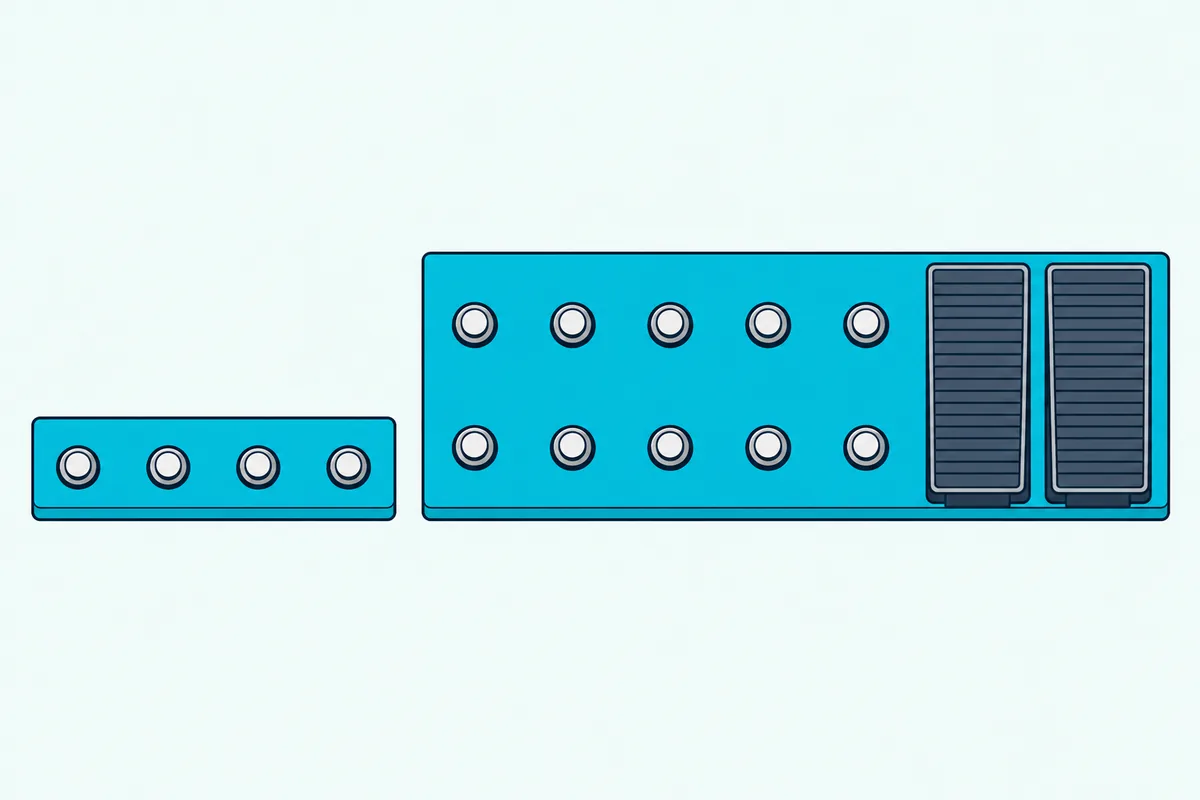
Banks multiply what your feet can reach. The FCB1010’s 10 banks of 10 presets give 100 presets from ten footswitches, the Pacer holds 24 presets, and the MIDI Captain keeps 10 presets of 10 switches each.
Small pedals stretch in other ways: the Chocolate Plus adds two combinations by pressing two switches at once, and the FS-1-WL takes two external footswitches. The Pacer takes four external footswitches and lets each one fire up to six actions in one press.
Try this before you buy: write down every change you make during your longest song, from patch changes to looper and tap tempo. If the list fits on four switches with room to spare, a small pedal will do, and if you’re already changing banks on paper, look at the ten-switch boards.
Switch count sets the size, too: the ten-switch boards run from 283 mm wide for the MIDI Captain to about 687 mm for the FCB1010. Footswitches change sounds but don’t play parts, and if you also launch clips or play lines on stage, choosing a stage controller with pads and keys compares five controllers for that side of a live rig.
Should You Choose a USB, 5-Pin or Bluetooth MIDI Foot Controller?
Those switch counts mean little until the board’s messages reach something, which is where the connections come in. Choose USB for a computer, a 5-pin or TRS MIDI out for hardware such as a multi-effects unit or synth, and Bluetooth for phones, tablets and computers you’d rather not cable; the Pacer, MIDI Captain and FS-1-WL each reach both a computer and hardware.
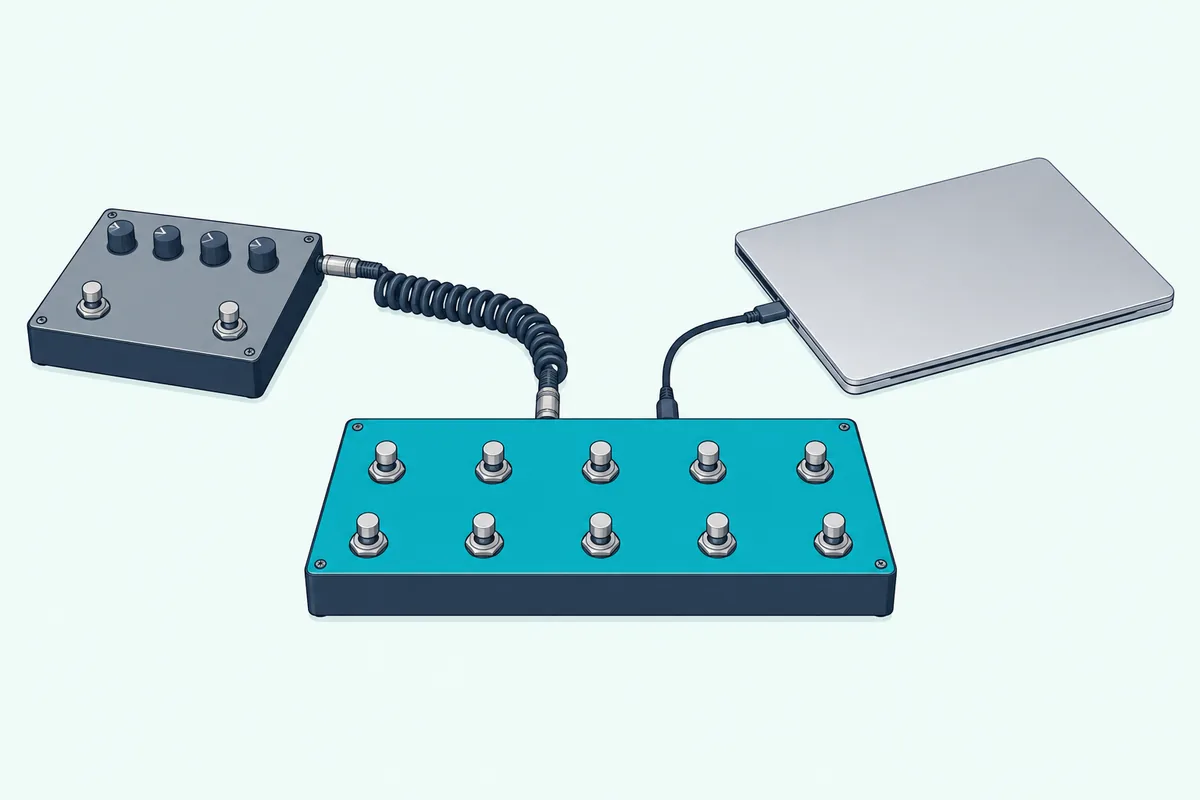
A 5-pin MIDI cable runs from the controller’s MIDI out to the MIDI in on the gear you want to change. The FCB1010 has only 5-pin MIDI, so it needs a USB MIDI interface to reach a computer, and our page on 5-pin ports instead of USB shows that hookup.
TRS MIDI does the same job through a smaller jack, and Boss lists its BMIDI-5-35 cable, 3.5 mm TRS at one end and 5-pin at the other, among the FS-1-WL’s options. The Pacer’s MIDI out also works as a USB MIDI interface, so MIDI from your computer can reach hardware through it.
USB is the simplest route to a computer. The Pacer and FS-1-WL are class compliant, Line 6 says the FBV Express MkII needs no driver, and Paint Audio says the MIDI Captain works with almost all recording and effects software on a computer, tablet or phone, with an OTG cable for the last two.
Bluetooth trades the cable for pairing. The FS-1-WL, Chocolate Plus and BlueBoard pair by Bluetooth, while the MIDI Captain uses a 2.4 GHz link to Paint Audio’s MIDI MATE receiver, sold separately, which Paint Audio rates at under 5 ms of delay in the air.
If timing worries you, our page on whether Bluetooth adds MIDI latency puts a number on the extra delay and says when to go back to a cable. Here’s how all eight connect and power up, as each maker lists them:
| Pick | USB | MIDI out for hardware | Wireless | Power | Size and weight |
|---|---|---|---|---|---|
| Nektar Pacer | Yes, class compliant | MIDI out | None listed | USB or 9 V adapter | 500 x 230 x 47 mm, 3.5 kg |
| Behringer FCB1010 | None listed | 5-pin out/thru | None listed | Built-in supply, mains cable | 687 x 221 x 60 mm, 4.34 kg |
| Paint Audio MIDI Captain | Yes | 5-pin out | 2.4 GHz to MIDI MATE, sold separately | USB, 9-12 V adapter or 2 AA | 283 x 90 x 55 mm, 0.75 kg |
| Boss FS-1-WL | USB-B, class compliant | TRS MIDI out | Bluetooth | 2 AAA or PSA adapter | 207 x 77 x 32 mm, 258 g |
| M-VAVE Chocolate Plus | USB-C | Host port for effects units | Bluetooth 5.0 | Built-in battery | 212 x 36 x 17 mm, 280 g |
| IK Multimedia iRig BlueBoard | Micro-USB for updates and power | None listed | Bluetooth LE 4.0 | 4 AAA or 5 V USB supply | Not listed |
| Line 6 FBV 3 | Yes, USB MIDI | None listed | None listed | Not listed | Not listed |
| Line 6 FBV Express MkII | Yes, no driver needed | None listed | None listed | Through the RJ-45 cable | Not listed |
Power is the other half of the choice. The FCB1010 needs a mains outlet, the Pacer runs from USB or an adapter, and the three wireless pedals carry their own batteries, as the MIDI Captain can with two AA cells.
Do You Need a MIDI Foot Controller With an Expression Pedal?
Those jacks on the back also decide how much smooth control you get. You need an expression pedal if you want volume swells, wah or a filter sweep rather than on/off switching; the FCB1010 has two built in, both Line 6 boards have a wah/volume pedal, and the Pacer, MIDI Captain, FS-1-WL and BlueBoard take pedals you add.
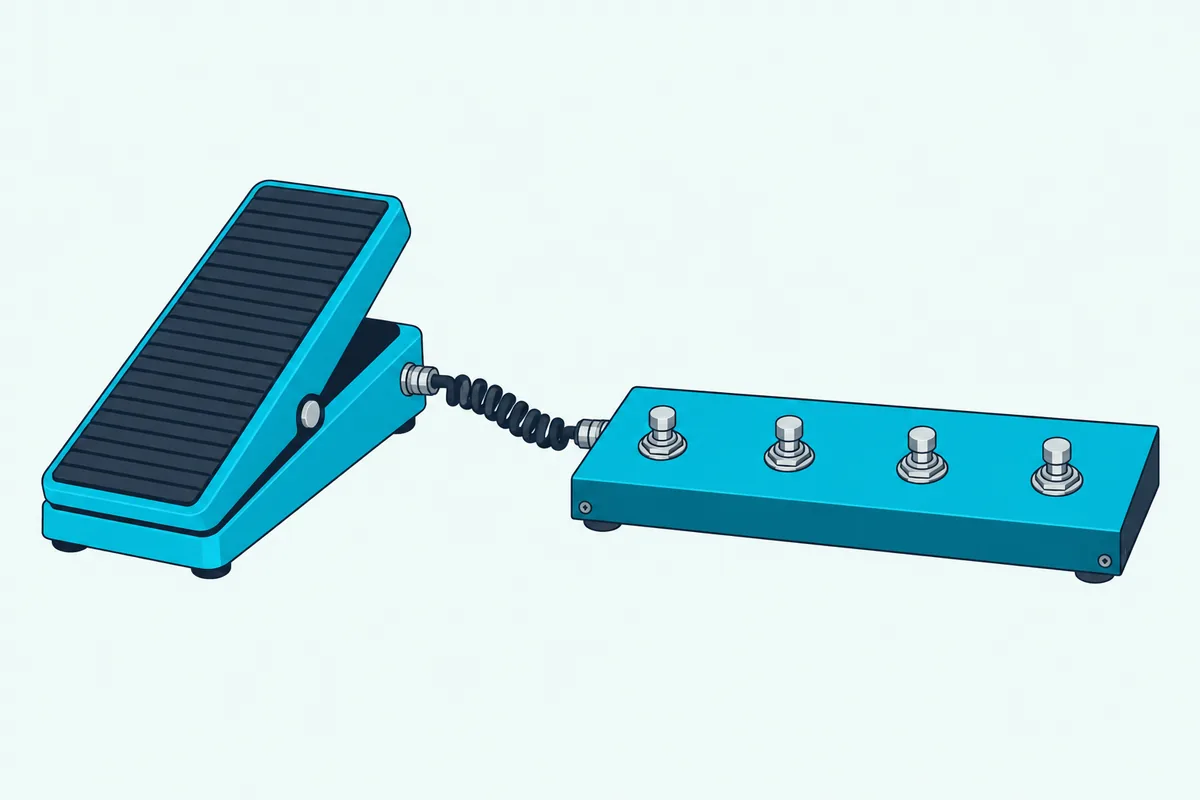
An expression pedal sends a stream of values instead of a single press. The MIDI Association’s summary of MIDI messages describes a control change as the message sent when a controller value changes, names pedals among those controllers, and gives each value a range of 0 to 127.
Each board sets the control number its pedals send. Behringer lets each FCB1010 pedal take its own MIDI channel, controller number and range, the MIDI Captain’s two inputs each take a CC number from 0 to 127, and the BlueBoard’s Bluetooth modes put its pedals on CC 12 and 13.
Built-in pedals save carrying a separate pedal but make the board bigger, and the FCB1010, with two beside its switches, is the widest pick with a published size. The Pacer instead takes two standard pedals, such as Nektar’s NX-P, on 1/4-inch TRS jacks.
Which MIDI Foot Controller Is Best for Guitar?
Expression and switching meet on a guitar rig. For guitar, match the board to your amp or modeler: the Pacer and FCB1010 switch a non-MIDI amp’s channels through relays, the Pacer and MIDI Captain list setups for modelers such as Kemper, Fractal and Line 6 units, and the two FBV boards are made for Line 6 amps and PODs.
Relays are how a MIDI board changes a plain amp’s channels. The FCB1010’s two relay-controlled jacks connect to an amp for channel selection, and the Pacer’s four relays sit on two TRS sockets for momentary or latching switching of channels or effects.
Modelers take MIDI instead. The Pacer’s factory presets cover the Helix, Pod HD, AxeFX, Eleven Rack and Kemper Profiler, the MIDI Captain’s examples add the HX Stomp and FM3, and the FS-1-WL changes presets wirelessly on Boss’s Pocket GT, Katana-Air and Waza-Air.
Amp-sim plugins and apps are the third case. The BlueBoard pairs directly with AmpliTube for iOS, and the MIDI Captain has a factory preset named for BIAS, so a phone or laptop rig switches sounds the same way a hardware one does.
A quick check settles it: look at the back of your amp or modeler. If there’s a footswitch jack but no MIDI in, you need the relays on the Pacer or FCB1010, and if there’s a MIDI in, any board here with a hardware MIDI out will reach it.
Loopers are the other common job. The FBV Express MkII runs Quick Loop on most Line 6 amps, the Pacer has presets for the Helix and AxeFX loopers and the Electro-Harmonix 45000, and our page on how a MIDI looper works shows how a footswitch runs Ableton’s Looper.
Can a MIDI Foot Controller Run Your DAW or iPad Apps?
The same switches that change amp channels and modeler presets can also run software. Yes: the Pacer works as a Mackie Control surface with transport and track presets, the two FBV boards send USB MIDI that software can learn, and the FS-1-WL can send computer keyboard shortcuts as well as MIDI.
Nektar’s integration list covers Bitwig, Cubase, GarageBand, Logic, Nuendo, Reason, Reaper and Studio One, so Logic Pro users get track and patch selection on top of transport. Ableton isn’t on that list, so in Live you’d map the Pacer’s footswitches yourself, as you would most of these boards.
If you haven’t mapped a control before, this mapping walkthrough covers MIDI mapping in Ableton Live and FL Studio. The same steps work for FL Studio users with any board here that sends MIDI to the computer.
Keyboard shortcuts reach programs that ignore MIDI. The FS-1-WL’s HID mode sends record, play and other keystrokes to a DAW, page turns to score apps and playback commands to YouTube.
Recording yourself is where a footswitch earns its place in a studio, since one press starts a take while your hands stay on the instrument. The Pacer’s Transport preset and the FBV Express MkII’s MIDI Machine Control both do it, and our guide to MIDI software workflows compares the free and paid programs they can drive.
On a tablet, the BlueBoard is built for iPhone and iPad apps, the Chocolate Plus works with iOS and Android, and the FS-1-WL pairs with mobile devices. The MIDI Captain needs an OTG cable, and our guide to iPad music setups covers the keyboards that sit alongside them.
What Does a Programmable MIDI Foot Controller Let You Change?
Those software setups depend on what each switch can be told to send. On a programmable MIDI foot controller you choose each switch’s message, whether a program change, a control change or a note, its MIDI channel and whether it acts on press, release or both, and the deeper boards chain several messages per press.
A program change is the patch switch: the MIDI Association’s summary describes it as the message sent when the patch number changes. Control changes cover on/off effects and pedals, and notes trigger samples or play a pitch.
How deep you can go varies. The FCB1010 sends five program changes and two controller messages per preset, the Pacer lets each switch send up to six actions and a preset send 16 messages as it loads, and the MIDI Captain sets each switch’s press and release actions separately.
The floorboards are programmed on the board itself, the Pacer with its encoder and two-row display. The small wireless pedals use apps instead: Boss’s editor, M-VAVE’s CubeSuite and MidiSuite, and IK’s iRig BlueBoard app, where each switch gets its message and MIDI channel, while Line 6’s FBV Control app does the same for both FBV boards over USB.
Here’s a test before you buy: list the messages your amp, modeler or app expects for presets, effects and tap tempo in its MIDI chart. Then check the board can send each one from a single switch.
Why Didn’t Other MIDI Foot Controllers Make the List?
Those eight leave out several familiar names, which fell at the product or source checks. The MeloAudio MIDI Commander, the old page’s value pick, showed as ‘Currently unavailable’ on Amazon on 16 October, and the BT MIDI Foot Controller it listed for compact rigs names no maker model in its listing, so M-VAVE’s own Chocolate Plus took its place.
Paint Audio’s MIDI Captain NANO 4 fell short of this site’s rating and review rules, and its MINI 6 passed them, but no Paint Audio document for the MINI 6 could be read. Boss’s EV-1-WL wireless MIDI expression pedal missed both rules, too.
Hotone’s Ampero Control and Sonicake’s Pocket Control were rated below the 4.0 stars this site requires, and Looptimus had fewer than 50 reviews. Morningstar’s MC series and Keith McMillen’s SoftStep turned up no Amazon listing in this guide’s searches.
AirTurn’s BT500S-4, the XSONIC AIRSTEP and Blackstar’s Live Logic all passed the Amazon checks, but their makers’ own documents couldn’t be read here, so they aren’t described from retailer text. The FCB1010, Pacer and MIDI Captain are the picks carried over from the old page.
The Bottom Line
Those eight picks all come back to the question the intro opened with: what the board has to talk to. The Nektar Pacer covers the most ground, the Behringer FCB1010 suits 5-pin hardware with two pedals built in, the MIDI Captain suits deep programming, and the two Line 6 boards fit Line 6 amps and PODs.
For wireless control, the Boss FS-1-WL reaches software and MIDI gear, the M-VAVE Chocolate Plus is the smallest board with a published size, and the iRig BlueBoard suits iPhone, iPad and Mac apps. Count your commands, check your gear’s ports, and choose the board that reaches them.
Frequently Asked Questions
What is a MIDI foot controller used for?
A MIDI foot controller sends MIDI messages when you press its switches or rock a pedal, so you can change presets, switch effects, start a looper or run recording software without taking your hands off your instrument. Most send program changes, which the MIDI Association describes as the message sent when the patch number changes, and control changes for effects and pedals. Some, such as Boss’s FS-1-WL, also send computer keyboard commands for score apps and YouTube.
Can I use a sustain pedal as a MIDI foot controller?
Not on its own, because a plain sustain-style footswitch has no MIDI output; it adds commands only when you plug it into a board with a footswitch input. Boss, for example, lists its FS-5U footswitch and FS-6 and FS-7 dual footswitches as options for the FS-1-WL, which then sends MIDI messages or keyboard commands for them. The Pacer takes up to four external footswitches, and the BlueBoard’s two inputs accept switches as well as expression pedals.
What is the difference between a MIDI foot controller and a MIDI pedalboard?
Makers use both names for the same kind of product: IK calls the iRig BlueBoard a wireless MIDI pedalboard, while Behringer calls the FCB1010 a MIDI foot controller and compares it with other MIDI floorboards. A guitar pedalboard can also mean a board that holds effect pedals, which sends MIDI only if a MIDI controller is part of it. Organists use the word for the bass-note pedals they play, which play notes rather than switch presets.
Do I need a MIDI foot controller for studio production?
Not if you work with a mouse and keyboard between takes. A foot controller earns its place when you record yourself: the Pacer’s Transport preset covers Cycle, Rewind, Forward, Stop, Play and Record, the FBV Express MkII sends MIDI Machine Control and Mackie Control messages, and the FS-1-WL can send your DAW’s own keyboard shortcuts.
Is a MIDI foot controller worth it?
It’s worth it when your hands are busy at the moment a change has to happen: mid-song preset changes, effect switching, looper control or starting a take while you hold an instrument. If you only change sounds between songs, the buttons on your amp or modeler may be enough.
Can a MIDI foot controller work without a computer?
Yes, if it has a hardware MIDI out and its own power. The FCB1010 sends 5-pin MIDI and runs from the mains, the MIDI Captain has 5-pin MIDI out and runs on AA batteries or a 9-12 V adapter, the Pacer’s MIDI out works from a 9 V adapter, and the FS-1-WL drives MIDI gear through its TRS MIDI out on AAA batteries. M-VAVE says the Chocolate Plus’s host port controls effects units with no computer, while the BlueBoard needs a phone, tablet or Mac.