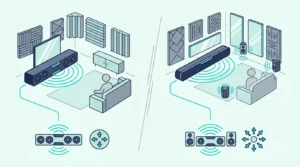
Harman Kardon’s Enchant bars add an HDMI input, while Bose’s Smart Soundbar suits a smaller TV, built-in Alexa or earbud surround.
Products in this guide
- Upward-firing transducers for Dolby Atmos height, per Bose
- AI Dialogue Mode and Personal Surround with Bose Ultra Open Earbuds
- Nine speakers including two up-firing, per Bose
- ADAPTiQ room calibration with the headset in the box
- Two angled full-range drivers and a center tweeter, per Bose
- One HDMI ARC or optical cable, with a Dialogue mode button
Settling a Harman Kardon soundbar vs Bose question on reputation misses the real split, which sits in an HDMI input, a DTS:X logo and the way each bar learns your room.
Pick on the badge alone and the mismatch shows up later, when a game console has nowhere to plug in or the rear speakers you planned to add won’t pair with the bar you bought.
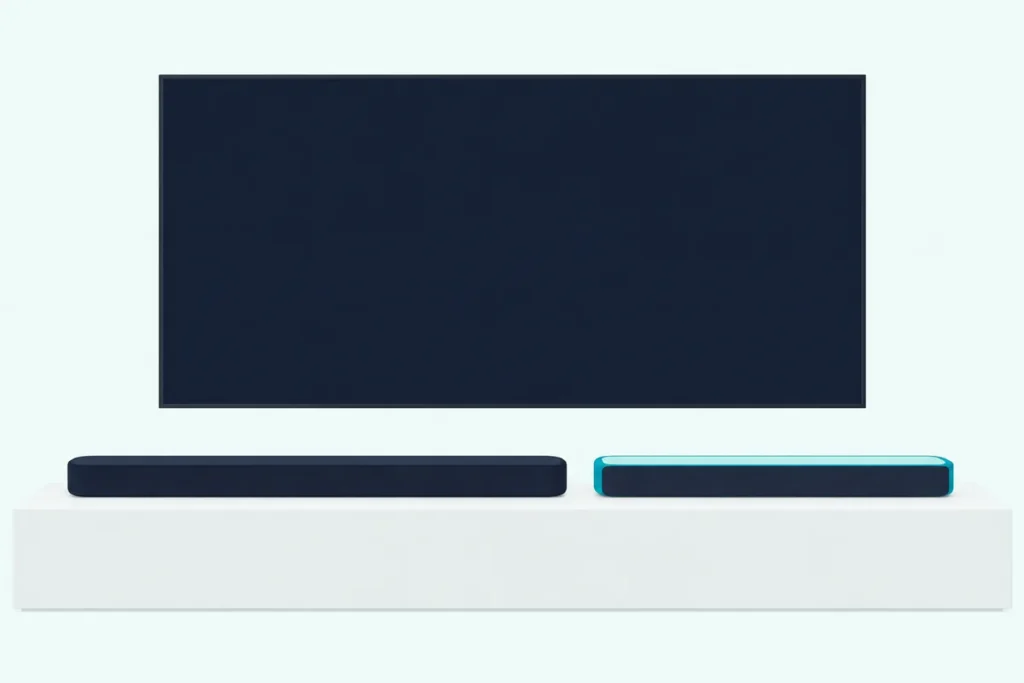
Match the bar to your TV’s ports, your room and how far you plan to expand, and either brand can give you true up-firing Dolby Atmos from one slim box.
The short answer and a side-by-side table come first, then the head-to-head pairs, from Harman Kardon’s Enchant 900 against Bose’s Smart Soundbar up to Bose’s new Lifestyle Ultra.
By the end, you’ll know which bar fits your screen and which add-ons each choice commits you to.
Is Harman Kardon Better Than Bose for a Soundbar?
That HDMI input is where the comparison starts, because among these brands’ current bars only Harman Kardon’s have one. Harman Kardon isn’t better than Bose across the board: its Enchant 900 and 1100 add an HDMI input with 4K Dolby Vision pass-through and, on the 1100, DTS:X, while Bose offers built-in Alexa, four bar sizes against Harman Kardon’s two and, on its bigger bars, calibration that measures sound where you sit.
RTINGS’s lab comparison covers older models. It rated the Bose Smart Soundbar 900 above the Harman Kardon Enchant 1300, citing the Bose’s build, Dolby Atmos support and built-in voice assistant, while noting that only the Harman Kardon had a full HDMI input for pass-through, the same split today’s bars keep.
So the choice comes down to three questions: how your sources reach the TV, whether you want DTS:X, and how much of a system you plan to build around the bar. Each question gets its own section below, after the side-by-side table.
If your TV has eARC and every source already plugs into it, the HDMI input matters little, and Bose’s Alexa, earbud surround option and range of sizes carry more weight. If your TV only has ARC, or you’re short of HDMI ports for a console and a streaming box, Harman Kardon’s input solves a problem Bose leaves to the TV.
If Yamaha is also on your list, our Bose vs Yamaha comparison sets Bose against that maker’s bars.
How Does a Harman Kardon Soundbar vs Bose Compare Spec by Spec?
Those three questions map onto a handful of hardware differences, which line up cleanly brand by brand. A Harman Kardon soundbar vs Bose comparison comes down to HDMI inputs, DTS:X, calibration, voice control and add-ons, as the table shows for each brand’s current smart bars.
| Feature | Harman Kardon Enchant 900 and 1100 | Bose Smart Soundbar, Smart Ultra and Lifestyle Ultra |
|---|---|---|
| Height channels | Two up-firing drivers in each bar | Upward-firing drivers in all three |
| Dolby Atmos | Yes | Yes |
| DTS:X | Enchant 1100 only | Not named in Bose’s owner’s guides |
| HDMI input for a source | One, with 4K HDR10 and Dolby Vision pass-through | None; sources connect to the TV |
| Connection to the TV | HDMI eARC or ARC, or optical | HDMI eARC or ARC; optical on the two Smart bars |
| Room calibration | Started from the remote or the Harman Kardon One app | ADAPTiQ headset (Smart Ultra), CustomTune with your phone (Lifestyle Ultra), none (Smart Soundbar) |
| Wi-Fi streaming | AirPlay, Google Cast, Spotify Connect | AirPlay 2, Google Cast (Chromecast built-in), Spotify Connect |
| Built-in voice assistant | None listed by Harman Kardon | Amazon Alexa |
| Add-ons | Enchant Sub and a pair of Enchant Speakers | Bass Module 500 or 700 and Bose surround speakers; Lifestyle Ultra Speakers and Subwoofer for the Lifestyle Ultra |
| Remote control in the box | Yes | Yes, except the Lifestyle Ultra |
| Wall brackets in the box | Two L-shaped brackets | No |
Read down the middle column and Harman Kardon’s case is about connections: an extra HDMI input, DTS:X on the bigger bar and mounting hardware in the box. Bose’s column is about the room and the system around the bar, from calibration that samples sound at your seat to Alexa and earbuds that act as personal rear speakers.
Both brands share the basics, from true up-firing height drivers to AirPlay, Google Cast and Spotify Connect, so neither forces you to give up mainstream streaming apps. The differences sit in the rows where one column says yes and the other says no.
Who Owns Harman Kardon, and Is It Related to Bose?
Those two columns also come from two separate companies. Harman Kardon is a trademark of HARMAN International Industries, which HARMAN’s help center says has operated as an independent subsidiary of Samsung Electronics since 2017, with its own executive leadership team.
Bose’s products come from a different company: its owner’s guides name Bose Corporation, of Framingham, Massachusetts, as the maker and the owner of the Bose trademarks. Nothing in either maker’s documents links the two product lines, so the two brands’ bars share no app and no add-ons.
JBL is another Samsung-owned brand, and our look at how JBL soundbars stack up against Bose covers that pairing on its own.
The Samsung connection may matter more in future. SamMobile reported from CES 2026 that Samsung’s booth said its Q-Symphony speaker pairing is expanding to Harman Kardon and JBL audio devices, noting that both brands are owned by Samsung Electronics.
Neither Enchant owner’s manual mentions Q-Symphony, so a Samsung TV owner shouldn’t count on it with today’s 900 or 1100 until Harman Kardon lists it. Bose’s documents don’t mention it either.
Which Is Better, the Harman Kardon Enchant 900 or Bose Smart Soundbar?
Those ownership questions fade once you put the two mid-size bars side by side. The Enchant 900 is the better fit if you need an HDMI input or want a wider bar for a bigger screen, while the Bose Smart Soundbar is the better fit for a smaller TV, built-in Alexa or Bose’s earbud surround option.
Harman Kardon’s Enchant 900 spec sheet lists nine drivers: four racetrack woofers, three 1-inch tweeters and two up-firing full-range drivers for true Dolby Atmos height. It’s 34.2 inches wide and 2.6 inches tall, with one HDMI input that passes 4K HDR10 and Dolby Vision video, an HDMI eARC port, an optical input and two L-shaped wall brackets in the box.
Bose lists the Smart Soundbar as 27.34 inches wide and 2.21 inches tall, with five speakers and a center tweeter by its own count, including upward-firing transducers for Atmos. Its one HDMI port connects to the TV’s eARC or ARC socket, with optical as the fallback.
Bose says the Smart Soundbar is similar in many ways to the Smart Soundbar 600 but adds AI Dialogue Mode, which senses dialogue and adjusts the tonal balance to keep speech clear. It also supports Personal Surround, which turns Bose Ultra Open Earbuds into rear speakers for one listener.
Calibration splits them too: the Enchant 900 runs its own sound calibration from a remote button, while Bose’s comparison table lists no ADAPTiQ for the Smart Soundbar. Voice control is the other clear split, since the Smart Soundbar has Amazon Alexa built in and Harman Kardon’s spec sheet lists no voice assistant for the 900.
Try this before you choose: measure the space under your screen. A 43-inch TV’s screen is about 37.5 inches wide, so the Smart Soundbar sits well inside it, while Harman Kardon’s bar, at 34.2 inches, leaves only about 3 inches to spare and suits a 50- or 55-inch set better.
Does the Enchant 1100 or the Bose Smart Ultra Do More at the Top?
Step up a size and the same pattern holds, with a few extras on each side. The Enchant 1100 does more for disc and console owners, with DTS:X and an HDMI input, while the Bose Smart Ultra does more for the room, with ADAPTiQ calibration and support for two bass modules.
Harman Kardon’s Enchant 1100 spec sheet gives it eleven drivers, including two 2.75-inch up-firing drivers, in a bar 45.2 inches wide and 2.6 inches tall. It’s rated at 315 watts RMS against the 900’s 195, and it keeps the same HDMI input, eARC port and optical input.
Bose describes the Smart Ultra as nine speakers, two of them upward-firing, in a glass-topped bar 41.14 inches wide and 2.29 inches tall. Like the Smart Soundbar, it has AI Dialogue Mode, Alexa built in and Personal Surround with Ultra Open Earbuds.
ADAPTiQ is the Smart Ultra’s headline extra. Bose’s Smart Ultra owner’s guide explains that a microphone on top of the supplied ADAPTiQ headset takes measurements at several spots in the room, and that the run needs 10 minutes of quiet.
Bose also lets the Smart Ultra take two wireless bass modules at once, as long as both are the same model, if you want even more bass than one gives. Harman Kardon’s manuals describe one Enchant Sub per bar.
Picture a 65-inch TV, whose screen is about 56.7 inches wide: either flagship sits comfortably inside that width, so the deciding questions go back to DTS:X discs and how many HDMI ports your TV can spare. If your discs carry DTS:X soundtracks, the Enchant 1100’s spec sheet is the only one of the two that lists the format.
Where Does Bose’s New Lifestyle Ultra Fit In?
Those two flagships now have company, because Bose launched a new Lifestyle Collection in May 2026. The collection’s Lifestyle Ultra Soundbar is what Bose calls its first major soundbar redesign in over a decade, with its own speakers and subwoofer that don’t mix with Bose’s older surround speakers.
Bose’s May 2026 announcement lists six full-range drivers, two of them up-firing and four front-facing, plus a center tweeter and two PhaseGuide drivers that place sound to the left and right where there are no speakers. It also names SpeechClarity for dialogue and TrueSpatial processing for content that isn’t mixed in Dolby Atmos.
The Lifestyle Ultra Soundbar page adds that the box holds no IR remote, since the bar takes power and volume commands from your TV’s remote over HDMI CEC. Its CustomTune calibration uses your phone’s microphone instead of a headset, and HDMI is its main connection to the TV.
Expansion is the catch: Bose says the Lifestyle Ultra works with a pair of Lifestyle Ultra Speakers but not with earlier Bose Surround Speakers or Surround Speakers 700, and a Bass Module 700 connects only by wire. With the Lifestyle Ultra Speakers and Subwoofer, Bose says the system supports true 7.1.4-channel audio.
At 43.28 inches wide, it suits screens of 55 inches and up better than a 50-inch TV, whose screen is about 43.6 inches across. That makes it a size rival for Harman Kardon’s 1100 rather than its 900.
Which Brand Handles Dolby Atmos and DTS:X Better?
That newest bar joins every other current smart bar here in supporting Dolby Atmos, so the format question shifts to how each brand handles height and the formats beyond Dolby. Both brands use real up-firing drivers for Dolby Atmos in their current smart bars, so neither relies on virtual height alone, but only Harman Kardon’s Enchant 1100 adds DTS:X.
Harman Kardon’s Enchant 900 owner’s manual adds an ATMOS button with low, mid and high levels. It also notes that the bar’s Dolby surround upmixer can expand ordinary Dolby Digital 5.1 and 7.1 soundtracks into a 3D presentation.
Bose uses its own processing for that job. Its Smart Soundbar page says TrueSpace delivers immersive multi-channel sound when content isn’t encoded in Dolby Atmos, and the Lifestyle Ultra’s announcement names TrueSpatial for the same role.
None of Bose’s owner’s guides for the TV Speaker, Smart Soundbar 600 and 900, Smart Soundbar, Smart Ultra or Lifestyle Ultra mentions DTS at all. Harman Kardon’s Enchant 900 spec sheet names Dolby Atmos only, so DTS:X is a reason to step up to the 1100 rather than a brand-wide advantage.
Check the back cover of the discs you watch most: if the soundtracks you care about say DTS:X, that one line narrows the choice to Harman Kardon’s 1100. If everything you watch streams in Dolby Atmos, either brand’s smart bars decode it.
Getting Atmos to reach the bar at all depends on settings in the TV and the source, and our guide on how to get Dolby Atmos on your soundbar walks through them.
Can You Plug a Streaming Box or Console Into the Soundbar?
Those settings depend on the cable path, which is where the two brands differ most. You can plug a streaming box, set-top box, disc player or console straight into Harman Kardon’s Enchant 900 or 1100, which pass 4K HDR10 and Dolby Vision video on to the TV, but not into a current Bose bar.
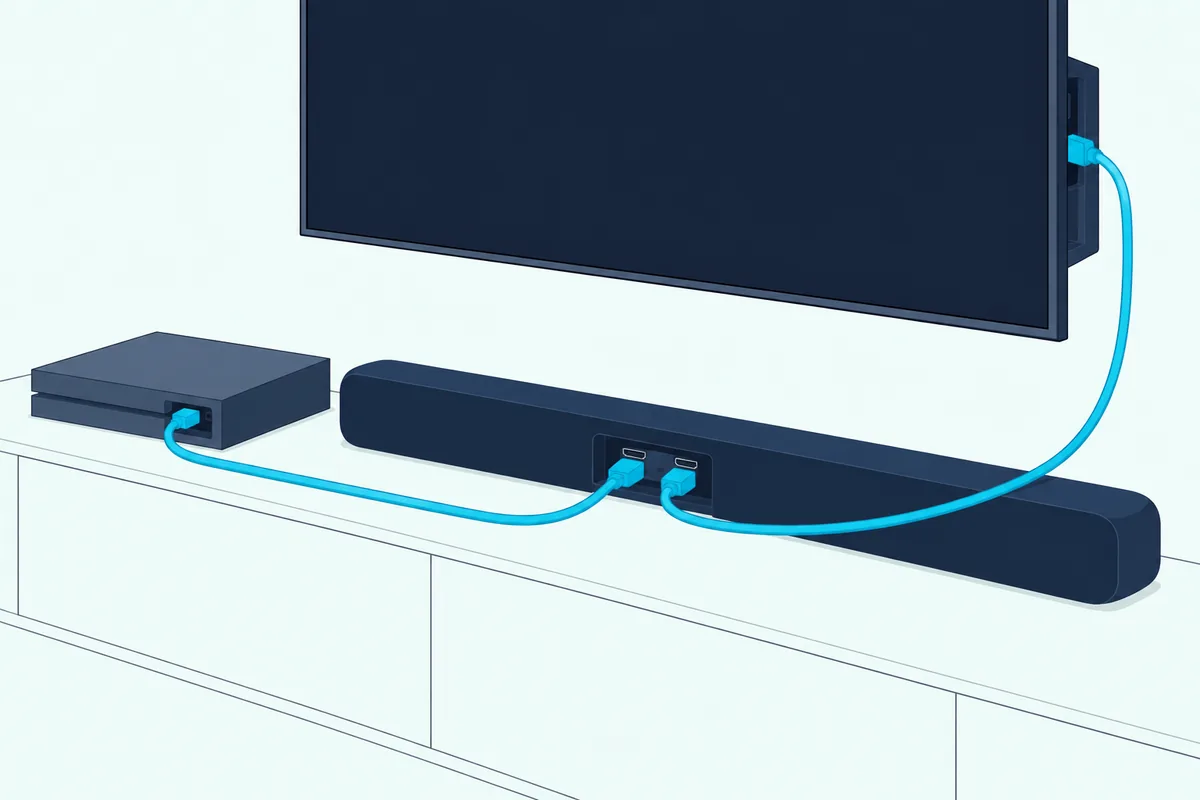
Bose’s Smart Ultra page states it plainly: every source connects to the TV, and a single HDMI or optical cable runs from the TV to the soundbar. The Smart Soundbar’s back panel has one HDMI port, marked eARC, for that link.
Harman Kardon’s manuals describe two routes. On an eARC TV, plug sources into the TV and let eARC carry the sound to the bar; on an ARC-only TV, plug them into the soundbar’s HDMI input instead.
That second route is the real advantage, because ARC doesn’t carry lossless formats, a limit Bose’s own Lifestyle Ultra page notes when it recommends eARC. On an ARC-only TV, that input lets a disc player’s soundtrack reach the bar directly instead of through the TV’s ARC port.
Count your sources against your TV’s HDMI ports. A TV with three inputs, one of them the eARC port the bar uses, leaves two for everything else, and Harman Kardon’s input adds a third.
Harman Kardon’s spec sheet lists HDR10 and Dolby Vision pass-through and says nothing about high refresh rates, so check the bar’s current specifications before you route a console that uses them. Our explainer on the difference between a soundbar’s HDMI input and its HDMI ARC port covers the port labels you’ll see on the back of a TV.
How Do Harman Kardon and Bose Calibrate a Soundbar to Your Room?
Once the cables are sorted, calibration tunes the bar to the room it’s in. Harman Kardon calibrates its bars in one step started from the remote or the Harman Kardon One app, while Bose’s ADAPTiQ and CustomTune take measurements at several listening spots with a headset or your phone.

On the Enchant 900, you press CALIBRATION, press it again to confirm, and hear a countdown and a test tone. The manual notes that environmental sound is recorded during the run.
Harman Kardon’s older Enchant 800 and 1300 manual is more direct, asking you to step out of the way and stay silent while its calibration runs for under a minute. It also asks for a fresh calibration each time the bar moves to a different spot.
Bose’s ADAPTiQ, on the Smart Ultra and the older Smart Soundbar 900, uses a headset with a microphone and needs about 10 quiet minutes. The Lifestyle Ultra’s CustomTune does the same job with your phone’s microphone.
The Smart Soundbar and TV Speaker skip calibration, according to Bose’s comparison table and their owner’s guides. That’s the gap the mid-size comparison above pointed to.
The practical difference is where the measuring happens: Bose’s methods sample the sound at the seats you choose, which is why they ask for several positions, while Harman Kardon’s runs in one go without you moving. Bose says to run ADAPTiQ again after adding a bass module or surround speakers, or after moving the bar or the furniture.
Harman Kardon’s Citation MultiBeam 700 manual adds a placement tip for the side effects its MultiBeam bars create: they work best with hard walls 5 to 15 feet to the left and right of the bar. A bar in a wide-open room has fewer walls to reflect that sound from.
Which Brand Is Easier to Expand With a Subwoofer and Rear Speakers?
Calibration comes up again once more speakers join the bar, and each brand keeps its add-ons inside its own family. Bose gives you more ways to expand its Smart bars, with two bass modules, two kinds of surround speakers and even earbuds, while Harman Kardon offers one subwoofer and one speaker for both of its bars.
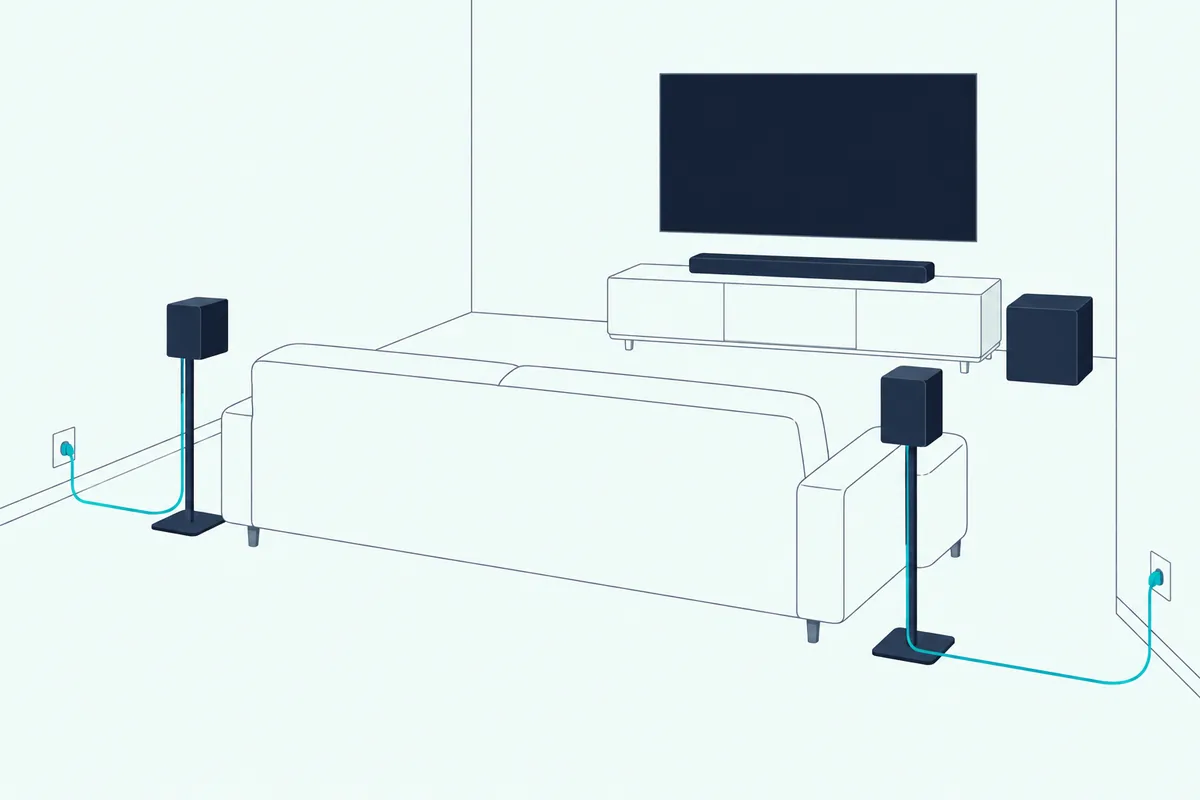
Through the Harman Kardon One app, either Harman Kardon bar pairs wirelessly with the Enchant Sub, a pair of Enchant Speakers, or both. The owner’s manual calls the full set a 5.1.4-channel surround sound system, while the spec sheet’s figure is up to 7.1.4.
The Enchant Sub has a 6.5-inch down-firing driver and a cone-shaped bass reflector that Harman Kardon says keeps bass precise even on carpet. Each speaker takes a power cord and also works on its own as a Wi-Fi and Bluetooth speaker.
On Bose’s side, the Smart Soundbar and Smart Ultra accept the Bass Module 500 or 700 and Bose Surround Speakers or Surround Speakers 700. Bose’s Surround Speakers 700 page says their wireless receivers plug into a power source.
Bose’s Personal Surround is the unusual extra. Pair Bose Ultra Open Earbuds with the Smart Soundbar and they play center, height and surround channels for one listener, with no rear speakers to place.
It works only with open earbuds, because Bose says ordinary headphones or earbuds would block your ears from hearing the soundbar itself. Bose’s separate SimpleSync feature plays the TV’s sound in stereo through Bose headphones instead.
Bose’s smallest and newest bars set limits. The TV Speaker takes a Bass Module 500 or 700 only through a 3.5 mm audio cable, and the Lifestyle Ultra accepts only Lifestyle Ultra Speakers for its rears; linking a Bose bass module to each bar covers both the app and the cable route.
Plan the outlets before you buy: Harman Kardon’s speakers and Bose’s Surround Speakers 700 both need power near where they sit. A sofa against a wall with no socket nearby turns a wireless rear pair into an extension-cord job.
The calibration advice from earlier applies here too: Bose says to run ADAPTiQ or CustomTune again after adding a bass module, subwoofer or speakers.
Which Is Better for Music Streaming and Voice Control?
Those add-ons double as music speakers on both sides, which brings streaming into the comparison. For music streaming the two brands are close, since every current smart bar from both supports AirPlay, Google Cast and Spotify Connect, but Bose is better for voice control because its smart bars build in Amazon Alexa.
Harman Kardon’s manuals add multi-room grouping through the Google Home app, with up to six Google Cast soundbars depending on your network, and AirPlay grouping from an iPhone’s Control Center. The spec sheets list Bluetooth 5.3 and Wi-Fi 6 (802.11ax) for both bars.
Bose groups its smart speakers and soundbars, its Portable Smart Speaker included, in the Bose app. Its May 2026 announcement says Lifestyle Collection products can also join Google Home or AirPlay groups with other brands’ speakers.
On voice, Bose’s Smart Soundbar has Alexa built in and works with Google Assistant through a separate Google Home device. The Lifestyle Ultra’s page says it supports Amazon Alexa and is ready for Alexa+ in the US.
Harman Kardon’s current spec sheets list no built-in assistant, though its older Citation MultiBeam 700 had Google Assistant built in. Features shift between generations, so check the latest model’s page if voice control matters.
If your household already talks to Alexa, a Bose smart bar saves you a separate smart speaker. If you live in Apple’s or Google’s apps, either brand streams the same way.
Which Has the Better Dialogue Tools?
Voice control aside, both brands also work on the voices in your shows, with different tools. Bose has more dialogue tools across its range, from the TV Speaker’s Dialogue mode button to AI Dialogue Mode on the Smart bars and adjustable SpeechClarity on the Lifestyle Ultra, while Harman Kardon relies on PureVoice and a Smart mode toggle.
Harman Kardon’s spec sheets say PureVoice keeps speech clear at any volume. The owner’s manual’s Smart mode applies EQ and surround effects, and you can switch it off for news and weather to get a plainer Standard mode.
Bose describes AI Dialogue Mode as telling speech apart from other sounds in the same frequency range. It describes SpeechClarity as AI-driven speech enhancement with adjustable levels.
Test it on the scene that bothers you most. A quiet line under loud music is exactly the case these modes are built for, so switch the mode on and off at the same volume and notice which version you follow without straining.
What About Older Models Like the Citation MultiBeam and Enchant 1300?
AI Dialogue Mode and SpeechClarity are recent additions, and older models without them still come up in comparisons. Among them, Harman Kardon’s Citation MultiBeam 1100 is the closest match for Bose’s Smart Soundbar 900, since both have up-firing drivers for Dolby Atmos, while the Enchant 800 and 1300 manual never mentions Atmos.
Harman Kardon’s Citation MultiBeam 1100 spec sheet lists 11 drivers, two of them up-firing, an HDMI input with Dolby Vision pass-through and an LCD touch display. It streams with AirPlay, Alexa Multi-Room Music and Chromecast built-in, and Citation Sub or Sub S subwoofers and Citation Surround speakers take it to 5.1.2 channels.
Bose’s Smart Soundbar 900 page lists two upward-firing dipole transducers and ADAPTiQ. It adds Chromecast built-in, AirPlay 2 and Spotify Connect, with both Alexa and Google Assistant built in.
For the Enchant 1300 against the Smart Soundbar 900, RTINGS’s lab comparison rated the Bose better, citing its build, Dolby Atmos support and built-in voice assistant. It noted that only the Harman Kardon had a full HDMI input for pass-through and a few more sound features, such as EQ presets, and that the Bose with its speakers and bass module was the better choice for movies.
The Enchant 800 and 1300 manual lists 8 and 13 audio channels, one and three HDMI inputs, Chromecast built-in and Automatic MultiBeam Calibration. So the generation gap matters more than the badge when one of these turns up next to a current bar.
The Citation MultiBeam 700’s manual lists Google Assistant built in, Chromecast and AirPlay, and Automatic MultiBeam Calibration on a touch screen. On Bose’s side, its Bass Module 700 page still lists the Soundbar 500 and Smart Soundbar 700 as compatible, so those older bars can still grow; how the Bose 700 differs from the 900 starts with the 900’s up-firing Atmos drivers.
Will a Harman Kardon or Bose Soundbar Fit Under Your TV?
Whichever generation you buy, the bar has to fit the space under your screen, and the two brands’ sizes interleave rather than match. A Harman Kardon or Bose soundbar fits under your TV if its width and height suit the screen and the gap below it: Bose’s current bars run from 23.38 to 43.28 inches wide and 2.21 to 2.65 inches tall, while Harman Kardon’s are 34.2 and 45.2 inches wide and 2.6 inches tall.
| Bar | Width | Height | Drivers or speakers (maker’s count) |
|---|---|---|---|
| Bose TV Speaker | 23.38 in | 2.21 in | 3 |
| Bose Smart Soundbar | 27.34 in | 2.21 in | 5 plus a center tweeter |
| Harman Kardon Enchant 900 | 34.2 in | 2.6 in | 9 |
| Bose Smart Ultra Soundbar | 41.14 in | 2.29 in | 9 plus a center tweeter |
| Bose Lifestyle Ultra Soundbar | 43.28 in | 2.65 in | 6 full-range, a center tweeter and 2 PhaseGuide |
| Harman Kardon Enchant 1100 | 45.2 in | 2.6 in | 11 |
Measure the gap between your stand and the bottom of the screen first. Harman Kardon’s bars stand 2.6 inches tall, so a TV on short feet can lose the bottom edge of the picture or its remote sensor behind them.
For width, a 55-inch TV’s screen is about 47.9 inches wide and a 65-inch about 56.7, so every bar in the table sits inside either screen. On a 50-inch TV, about 43.6 inches across, Harman Kardon’s 1100 overhangs the screen by about 0.8 inch at each end, while the Smart Ultra stays inside it.
Bose also suggests room sizes: 8 by 8 feet for the TV Speaker, 10 by 12 for the Smart Soundbar and 12 by 14 for the Smart Ultra. Those figures match the size order in the table, so a bigger room points to a longer bar.
If you’re wall-mounting, Harman Kardon puts two L-shaped brackets in each box, while Bose sells its Soundbar Wall Bracket separately. For the Lifestyle Ultra, Bose asks for at least 4 inches between the bar and the TV.
Which Harman Kardon or Bose Soundbar Should You Buy?
Those sizes narrow most shortlists to one pair per screen size, from a small bar for a bedroom TV to a flagship for a 65-inch screen. Buy the Harman Kardon Enchant 900 or 1100 if you need an HDMI input, or the 1100 for DTS:X, and buy Bose if Alexa, ADAPTiQ, earbud surround or a smaller bar matters more.
Nothing was played or measured for this comparison, and the descriptions come from Harman Kardon’s and Bose’s own documents and RTINGS’s published lab verdicts. Every pick met Burton Acoustix’s rating, review and stock checks on 28 October 2026.
Harman Kardon’s two bars haven’t gathered enough Amazon reviews to meet those checks yet, so they’re described here without a buying link.
A Mid-Size Bar for a 43- to 55-Inch TV
If you need the HDMI input or want a wider bar, Harman Kardon’s Enchant 900 is the pick, with nine drivers, two of them up-firing, and room calibration from the remote. Its 34.2-inch width suits a 50- or 55-inch screen.
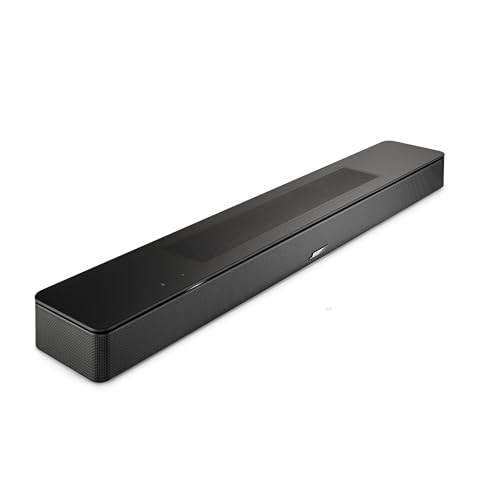
For built-in Alexa and a narrower bar, Bose’s Smart Soundbar, a compact black one-piece Dolby Atmos bar is the pick. Bose Ultra Open Earbuds can add Personal Surround later.
Bose’s Smart Soundbar, a compact black one-piece Dolby Atmos bar
A Flagship for a 55- to 65-Inch TV
For DTS:X discs or a console that needs the bar’s HDMI input, Harman Kardon’s Enchant 1100 is the pick, with eleven drivers and the same remote-started calibration. It’s the widest bar here at 45.2 inches.
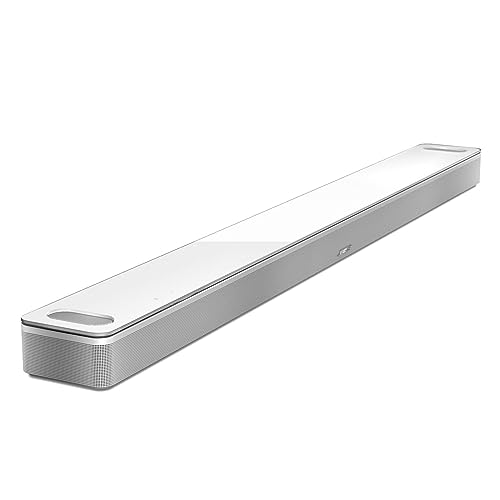
For ADAPTiQ calibration and the option of two bass modules, Bose’s Smart Ultra Soundbar in white with its glass top is the pick. It also comes in black.
Bose’s Smart Ultra Soundbar in white with its glass top
Bose’s Lifestyle Ultra is the alternative if you’d rather build into the newer Lifestyle system. Remember that it works only with Lifestyle Ultra Speakers for rears and has no remote in the box.
A Small Bar for a Bedroom or a Smaller TV
Harman Kardon’s range starts at the 34.2-inch Enchant 900, so Bose has this size to itself. A 32-inch TV’s screen is about 27.9 inches wide, so the TV Speaker sits well inside it and the Smart Soundbar fits with only about half an inch to spare.
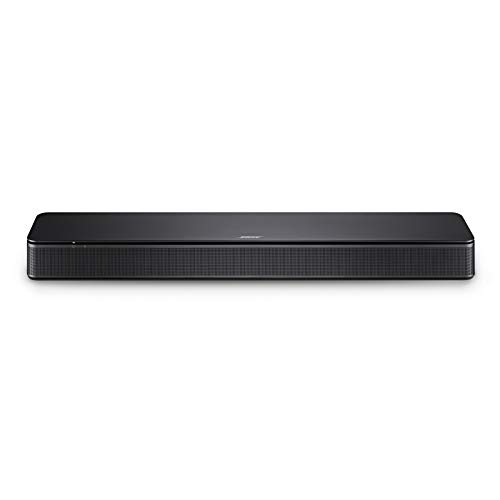
For a bedroom TV, Bose’s TV Speaker, a small black bar just over 2 inches tall connects with one HDMI ARC or optical cable. It skips Wi-Fi and Dolby Atmos, so it’s the pick for clearer TV sound rather than a home theater.
Bose’s TV Speaker, a small black bar just over 2 inches tall
The Bottom Line
Those picks come back to the three questions from the top of the page: how your sources reach the TV, whether you need DTS:X and how big a system you plan to build.
Choose Harman Kardon’s Enchant 900 or 1100 when you want an HDMI input for a console or streaming box, wall brackets in the box, or DTS:X on the 1100. Choose Bose when you want Alexa built in, ADAPTiQ or CustomTune calibration from your seat, Personal Surround through earbuds, or a bar smaller than either Harman Kardon model.
On an eARC TV with everything already plugged into it, the HDMI input loses its edge. That tilts a close call toward whichever bar fits your screen and your add-on plans.
Frequently Asked Questions
Is Harman Kardon owned by Bose?
No. Harman Kardon is a trademark of HARMAN International Industries, which HARMAN’s help center says has been an independent subsidiary of Samsung Electronics since 2017. Bose’s products come from Bose Corporation of Framingham, Massachusetts, and neither maker’s documents tie the two product lines together, so a Harman Kardon bar shares no app or add-ons with a Bose bar.
Does the Bose Smart Soundbar have ADAPTiQ?
No. Bose’s comparison table lists ADAPTiQ for the Smart Ultra Soundbar and not for the Smart Soundbar or TV Speaker, and the Smart Soundbar’s owner’s guide has no calibration step. The older Smart Soundbar 900 had ADAPTiQ, and Bose’s newer Lifestyle Ultra uses CustomTune with your phone’s microphone instead. Harman Kardon’s current bars both run their own calibration from the remote or the Harman Kardon One app.
Do Bose soundbars support DTS:X?
Bose’s owner’s guides for the TV Speaker, Smart Soundbar, Smart Soundbar 600 and 900, Smart Ultra and Lifestyle Ultra don’t mention DTS at all, and Bose’s pages describe them in Dolby Atmos terms. Among Harman Kardon’s current bars, the Enchant 1100’s spec sheet lists DTS:X alongside Dolby Atmos, while the Enchant 900’s names Dolby Atmos only. If DTS:X discs matter to you, check the current specifications of the bar you’re considering before you buy.
Can Bose surround speakers work with a Harman Kardon soundbar?
Neither maker’s documents describe it. Harman Kardon’s Enchant 900 owner’s manual pairs the bar wirelessly with the Enchant Sub and a pair of Enchant Speakers through the Harman Kardon One app, and Bose’s guides list only Bose bass modules and surround speakers for its Smart bars. Even within Bose, the Lifestyle Ultra Soundbar works only with Lifestyle Ultra Speakers, not the older Surround Speakers or Surround Speakers 700, so choose the brand whose add-ons you want before you buy the bar.
Do Harman Kardon soundbars work with Samsung’s Q-Symphony?
Harman Kardon’s Enchant 900 and 1100 owner’s manuals don’t mention Q-Symphony. SamMobile reported from CES 2026 that Samsung’s booth said Q-Symphony speaker pairing is expanding to Harman Kardon and JBL audio devices, and HARMAN, Harman Kardon’s parent, is a Samsung subsidiary. If you own a Samsung TV and want Q-Symphony, check that the specific bar lists it before you buy.