For most rooms, the best soundbar under $200 is the LG S40T, because its wireless subwoofer supplies the deep bass that RTINGS says the vast majority of TVs lack.
The picks
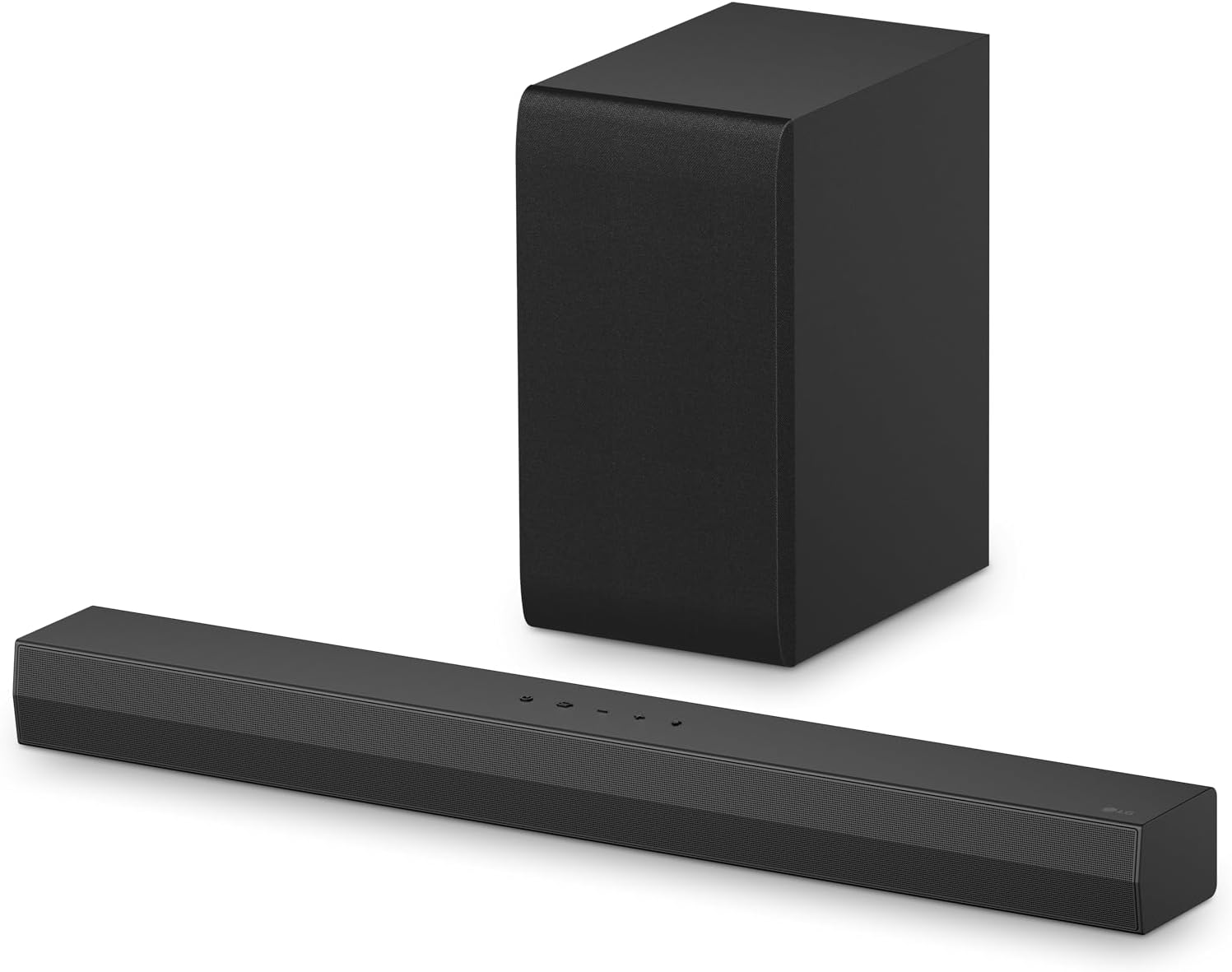
LG S40T
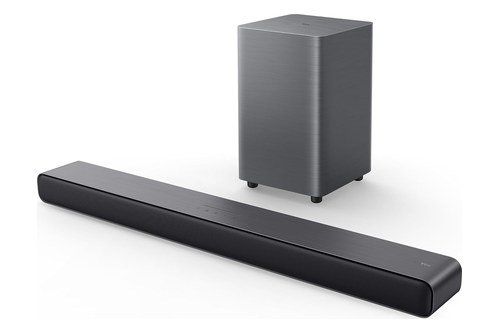
TCL S55H
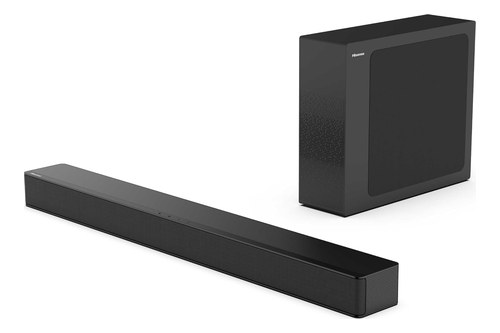
Hisense HS2100
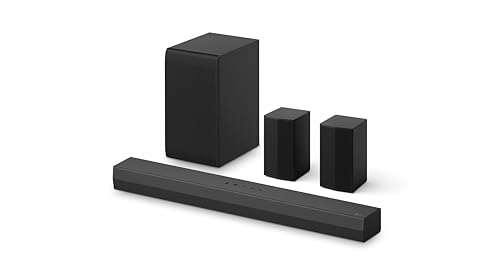
LG S40TR
Amazon Fire TV Soundbar Plus
Roku Streambar SE

Sony HT-S100F
RTINGS puts that gap down to thinner TVs with smaller speakers, and a single bar without a subwoofer, like the Sony HT-S100F, doesn’t refill it.
Pick for the problem you actually have, whether that’s thin bass, voices you keep turning up, no speakers behind you or a slow smart-TV menu.

The quick-picks table comes first, then one section per pick from the LG S40T down to the Sony HT-S100F, followed by the subwoofer, connection, Dolby Atmos, channel, TV-remote, music, gaming, floor-space and wall-mounting questions, the setup order, the bottom line and two FAQs.
Start with the table, then read the pick that matches your TV and your room.
What Is the Best Soundbar Under $200?
That missing bass is where the choice starts. The best soundbar under $200 for most rooms is the LG S40T, a 2.1 system whose wireless subwoofer level LG puts on the remote, from -15 to +6, with HDMI ARC, an optical input and an optical cable in the box.
If you stream a lot in Dolby Atmos, the TCL S55H plays it over HDMI eARC and is RTINGS’ choice as the best soundbar without satellites under $200. For speakers behind the sofa, the LG S40TR is the pick, and for clearer voices from one bar, the Amazon Fire TV Soundbar Plus has a dedicated center channel.
| Pick | Best for | Why |
|---|---|---|
| LG S40T | Most rooms | A wireless sub with its own level |
| TCL S55H | Dolby Atmos | Atmos and DTS Virtual:X over eARC |
| Hisense HS2100 | Tight spaces | A wireless sub 4.3 inches wide |
| LG S40TR | Rear speakers | 4.1 with two rears in the box |
| Amazon Fire TV Soundbar Plus | Clearer dialogue | A dedicated center channel |
| Roku Streambar SE | Built-in streaming | 4K Roku streaming, best on older TVs |
| Sony HT-S100F | The simplest setup | One cable, optical included |
Read each row for the one fact that decides it, then jump to that pick’s section for its full spec and limits. The picks run from bars with a separate subwoofer, through the one system with rear speakers, to single bars that keep everything in one box.
The descriptions come from the makers’ manuals and spec pages.
Every pick met Burton Acoustix’s rating, review and stock checks on 7 November 2026.
Which Soundbar Under $200 Should Most People Buy?
That first row is the LG S40T, and the reason sits on the floor beside the bar. Most people should buy the LG S40T, a 2.1-channel system whose spec sheet lists a wireless subwoofer, Dolby Digital and DTS decoding, HDMI ARC and an optical input.
Spec: 2.1 channels with a wireless subwoofer; HDMI ARC and optical; Dolby Digital and DTS; a 28.4-inch bar.
The subwoofer does the job your TV’s speakers do least well, and the S40T gives you control over it. LG’s S40T owner’s manual puts the subwoofer on the remote’s Sound Tuning button, with a range from -15 to +6, and treble, mid and bass each run from -6 to +6.
That’s the control to reach for if the bass starts to cover voices. The manual’s Night Time setting does the opposite job late at night, lowering the overall volume while raising soft and delicate sounds.
On an LG TV, the manual adds SIMPLINK, LG’s name for HDMI-CEC, so the TV remote runs the bar’s power, volume and mute. Over an optical cable, LG TV Sound Sync lets a compatible LG TV’s remote set the volume too.
The limits are in the same spec sheet. As a 2.1 system it has no center channel, its format list has no Dolby Atmos, and its HDMI In / Out line reads 0 / 1, so there’s no input for a console or a disc player.
LG matches the S40T to TVs of 40 inches and up, and the bar is 28.4 inches wide. The soundbar guide explains how bars like this compare with more expensive models.
Skip it if you want Dolby Atmos, or a wall bracket in the box, since LG’s spec sheet lists neither.
If thin bass is your TV’s problem, the LG S40T is the bar to check first.
LG S40T
Is There a Dolby Atmos Soundbar Under $200?
The S40T’s format list stops at DTS, and that’s where the TCL S55H takes over. Yes: the TCL S55H is a 2.1 bar with a wireless subwoofer that TCL lists with Dolby Atmos and DTS Virtual:X, and RTINGS names it the best soundbar without satellites under $200.
Spec: 2.1 channels with a wireless subwoofer and a 5.5-inch driver; HDMI eARC and optical; Dolby Atmos and DTS Virtual:X; a 31.9-inch bar.
TCL’s S55H page adds two things the LG lacks: an HDMI eARC connection and AI Sonic, an auto room calibration that TCL says tailors the sound to your space for optimal sound quality. Its sound modes are Standard, Movie, Music, Voice, Game and Sports, and TCL says Dolby Atmos puts you in the center of movies, music and games.
An HDMI cable and a wall mount kit come in the box, but an optical cable doesn’t. TCL also lists it as Roku TV Ready, which helps if your set runs Roku.
RTINGS’ list of the best soundbars under $200 found the sound balanced, with boomy, punchy bass from the subwoofer and dialogue and instruments that sound clear and natural. It also notes EQ presets, a Night mode and enough volume to fill an average room.
The catch is that it’s still a stereo bar. RTINGS hears its sound effects coming from in front of you rather than around you, so Atmos here means the format is supported, not that sound arrives from above.
Skip it if your TV has no ARC port and you’d rather not buy an optical cable, since none comes in the box.
For Atmos from a single HDMI cable, the TCL S55H is the pick here.
TCL S55H
Which Soundbar Under $200 Has the Slimmest Subwoofer?
Both of those subwoofers are boxes about 7 inches wide, and not every room has that gap beside the stand. The Hisense HS2100 has the slimmest one here: Hisense’s spec sheet lists its wireless subwoofer as ultra thin, 4.3 inches wide, 11.8 inches tall and 13.8 inches deep.
Spec: 2.1 channels with a wireless 5.25-inch subwoofer; HDMI ARC, optical, aux and USB; Dolby Digital and Dolby Digital Plus, no DTS decoder; a 31.5-inch bar.
Like the LG S40T, it’s a 2.1 bar with a wireless subwoofer, and the two pair up on their own. Hisense’s user manual says the subwoofer and the bar connect automatically once both are plugged in and switched on, with no cable between them.
The spec sheet is just as clear about what’s missing: it lists no Dolby Atmos and no DTS decoder. It decodes Dolby Digital, Dolby Digital Plus and PCM, and it lists six sound modes, Movie, Music, News, Sport, Night and Game.
On a Hisense TV, the manual describes EzPlay. With HDMI ARC and CEC on, a Soundbar Setting menu appears on the TV, and the TV remote reaches most of the bar’s settings.
RTINGS calls it a 2.1 alternative to the TCL S55H with a more balanced default sound, though it can’t get as loud as the TCL and doesn’t support Atmos. The spec sheet also lists it as Roku TV Ready, with an HDMI cable in the box and no optical cable.
Skip it if you watch discs or apps with DTS soundtracks, since the spec sheet lists no DTS decoder.
If floor space is tight, the Hisense HS2100 is the bar with the thinnest subwoofer on this list.
Hisense HS2100
Can You Get Rear Surround Speakers for Under $200?
All three of those bars play from the front of the room, and that’s the gap the LG S40TR fills. Yes: the LG S40TR is a 4.1 system that adds two rear speakers to a soundbar and a wireless subwoofer, the one pick here with speakers behind you.

Spec: 4.1 channels: soundbar, wireless subwoofer and two rear speakers; HDMI ARC and optical; Dolby Digital and DTS; a 28.3-inch bar.
LG’s S40TR owner’s manual has you join the two rear speakers with a speaker cable and plug the one holding the wireless receiver into an outlet. So plan for a power socket near one rear speaker, and keep both at least 30 cm, about a foot, from the TV, as the manual asks.
The remote’s Sound Tuning adds a rear level from -6 to +6 beside the subwoofer’s -15 to +6. The manual’s surround sound setting then uses every speaker whatever the channels in the original recording, and its own example is 2.0-channel music with the rears connected.
The manual lists Dolby Digital, DTS Digital Surround and PCM as its input formats, and no Dolby Atmos. Like the S40T, it connects by HDMI ARC or optical, and an LG TV’s remote can run it through SIMPLINK.
Skip it if there’s no outlet near the back of the room, since one rear speaker needs power.
For speakers behind the sofa, the LG S40TR is the only system here that puts them in the box.
LG S40TR
What’s the Best 3.1 Soundbar Under $200 for Dialogue?
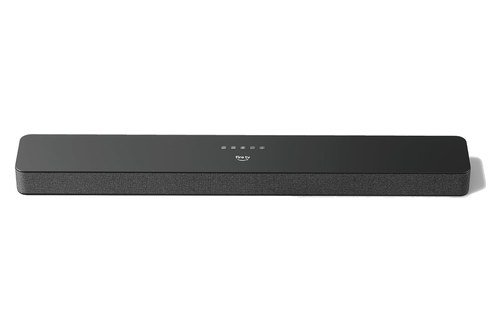
Rear speakers carry effects, but voices sit in the middle of the screen, and that’s what a center channel is for. The best 3.1 soundbar under $200 for dialogue is the Amazon Fire TV Soundbar Plus, whose listing names a dedicated center dialogue channel in an all-in-one 3.1 bar with built-in bass.
Spec: 3.1 channels in one bar; three full-range speakers, two woofers and three tweeters; HDMI eARC or ARC, optical and Bluetooth; Dolby Atmos and DTS:X.
Amazon’s set-up page for the Fire TV Soundbar Plus says it plays Dolby Atmos and DTS:X, but only over HDMI, since its optical and Bluetooth connections carry neither. The HDMI cable is in the box, and an optical cable is sold separately.
Its listing adds Movie, Music, Sports and Night modes. On compatible Fire TV devices, Amazon puts the bar’s sound settings under Display & Sounds, and one Fire TV remote runs both the TV and the bar.
The trade is the bass. The woofers sit inside the bar, while the LG S40T and the TCL S55H each add a separate subwoofer box.
Skip it if your TV only has an optical output, since Amazon says Atmos and DTS:X don’t pass that way.
If you keep turning the TV up to follow conversations, the Amazon Fire TV Soundbar Plus is the pick with a speaker for voices alone.
Amazon Fire TV Soundbar Plus
Can One Soundbar Replace Your Streaming Stick?
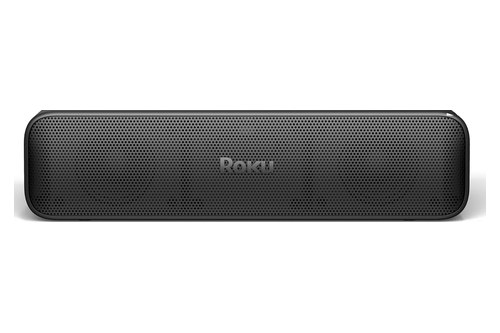
The Fire TV bar shares its settings with a Fire TV device, while the Roku Streambar SE builds the streaming player into the soundbar itself. Yes, if your TV is older or its menu is slow: Roku calls the Streambar SE the easy way to add 4K streaming and crisp, clear dialogue, and the ideal choice for bringing big-screen entertainment to smaller or older TVs.
Spec: 2.0 channels with 4K Roku streaming built in; HDMI ARC, or HDMI plus optical; PCM stereo; under 10 inches wide.
Roku’s Streambar SE set-up page says it works with any TV that has an available HDMI port. If the TV has no ARC port, you connect both the included HDMI cable and the included optical cable.
The same page says the Streambar SE can’t play Dolby Audio or DTS, so you set the TV’s audio output to PCM-Stereo. That’s the format detail to know before you buy, because a TV left on Dolby or DTS output sends sound the bar can’t use.
Roku’s quick start guide lists volume leveling, speech clarity and a night mode among its sound settings. RTINGS measures it at under 10 inches wide and finds the bass quite subdued without a subwoofer, though the tuning is acceptable for dialogue.
That trade, streaming built in against bass, is the subject of Burton Acoustix’s Roku Streambar comparison. The setup also runs through a Roku account and an on-screen activation, as Roku’s support pages describe.
Skip it if your TV already streams everything you watch and bass is the problem, since the Streambar SE has no subwoofer.
For a TV that needs streaming as much as sound, the Roku Streambar SE covers both from one box.
Roku Streambar SE
What’s the Simplest Soundbar to Set Up?
That account and activation step is what the Sony HT-S100F skips. The simplest soundbar to set up is the Sony HT-S100F, a single 2.0-channel bar that Sony’s Startup Guide connects with one cable: HDMI to the TV’s ARC jack, or the supplied optical cable when the TV has no jack labeled ARC.
Spec: 2.0 channels with a bass reflex speaker; HDMI ARC or optical, with the optical cable supplied; S-Force Pro front surround; Bluetooth and USB playback.
The guide’s box list has the bar, the remote, two AAA batteries, the optical cable and the power cord, but no HDMI cable. So an ARC hookup needs an HDMI cable of your own, while the optical route works straight out of the box.
Sony’s listing describes a bass reflex speaker for deeper audio and S-Force Pro front surround. RTINGS found the surround effect isn’t very convincing and the treble lacks detail, so voices sound muffled, though it rates the bar’s latency over ARC as superb.
RTINGS also notes it doesn’t support DTS and has no HDMI input. The missing subwoofer is the limit the intro started with, and it’s the trade you make for one box.
Skip it if deep bass is what your TV is missing, since there’s no subwoofer to add it.
If the goal is one box and one cable, the Sony HT-S100F is the simplest pick here.
Sony HT-S100F
Do You Need a Separate Subwoofer at This Price?
That missing thump on the Sony is the clearest case for a subwoofer. For most TVs, yes: in its list of the best-sounding TVs, RTINGS says even the top one, the Samsung S95H, doesn’t deliver much deep bass, like most TVs.
The LG S40T, TCL S55H, Hisense HS2100 and LG S40TR each come with a wireless subwoofer. Wireless doesn’t mean cordless, though, since each of these subwoofers still plugs into a wall outlet.
If there’s no room for a second box, the Fire TV Soundbar Plus keeps its two woofers inside the bar, and the Sony uses a bass reflex speaker instead. The explainer on whether you need a subwoofer with a soundbar covers the rooms where a bar alone is enough.
Think of the subwoofer as a separate instrument for the bottom of the soundtrack. A level control like the S40T’s -15 to +6 lets you keep that instrument in proportion, so voices stay on top.
Should You Connect With HDMI ARC, Optical or Bluetooth?
Those subwoofers only help if the TV’s sound reaches the bar in a form it can play. Use HDMI ARC or eARC whenever your TV has it: every pick here connects that way, and HDMI LA says eARC carries high-bitrate formats up to uncompressed 5.1 and 7.1 over a single cable.

HDMI ARC sends the TV’s own sound to the bar, sound from a streaming player plugged into the TV included. Amazon’s set-up page has you move a Fire TV Stick to a non-ARC port and plug the Fire TV Soundbar Plus into the ARC one.
Optical is the fallback for TVs without ARC, and it narrows the formats: Amazon says optical doesn’t carry Dolby Atmos or DTS:X to the Fire TV Soundbar Plus. The LG S40T and the Sony come with an optical cable, Roku includes both cables, and the TCL, Hisense and Fire TV bars include an HDMI cable but no optical one.
Bluetooth is for music from a phone. Amazon says it carries neither Atmos nor DTS:X to its bar and asks you to unplug the HDMI or optical cable before pairing, since connecting with both may cause connection issues.
Is Dolby Atmos Worth It on a Soundbar Under $200?
That HDMI rule matters most for Dolby Atmos. Only if the bar decodes it and your TV sends it over HDMI: on this list that’s the TCL S55H and the Amazon Fire TV Soundbar Plus, a 2.1 and a 3.1 bar with no height channel in either number.
The Hisense HS2100 takes another route. Its spec sheet lists a TV mode that uses a Hisense Atmos TV’s own decoding to enhance the bar’s sound, which helps only if your TV is a Hisense with Atmos.
The rest don’t list Atmos at all. The LG S40T and S40TR decode Dolby Digital and DTS, the Roku plays PCM stereo, and RTINGS notes the Sony skips DTS, so on those bars Atmos isn’t the deciding feature.
So treat an Atmos badge under $200 as a format the bar accepts, not a promise of overhead sound. The subwoofer and the center channel covered earlier change more of what you hear.
How Many Channels Does a Soundbar Under $200 Need?
Those height digits are only one part of the numbers on the box. Two front channels and a subwoofer cover the bass problem, and RTINGS adds that the best bars at this price get the basics right with balanced sound, solid dynamics and a discrete center channel for dialogue.
Here the Sony and the Roku are 2.0, the LG S40T, the TCL and the Hisense are 2.1, the Fire TV Soundbar Plus is 3.1 with its center channel, and the LG S40TR is 4.1 with two rear speakers. Each step up adds speakers for one more job: bass, then voices, then effects behind you, and on this list only the Fire TV Soundbar Plus has the center channel RTINGS mentions.
A primer on what 2.1, 3.1 and 4.1 mean on a soundbar explains what each digit counts. Read the number as a list of boxes and drivers, then match it to the problem you named at the start.
Will Your TV’s Remote Control the Soundbar?
Channels decide the sound, but the remote decides whether the bar is easy to live with. Usually yes, over HDMI: the feature is HDMI-CEC, and LG’s S40T manual lists the names TV makers give it, LG SIMPLINK, Sony BRAVIA Sync/Link, Philips EasyLink and Samsung Anynet+.
Roku says the same of its Streambar SE. With CEC on, your TV remote controls basic functions like power and volume, and with CEC off, Roku says you won’t be able to use the TV remote for the bar’s volume.
Optical needs a workaround, and the makers supply one. LG TV Sound Sync covers LG TVs over optical, and Amazon’s equipment-control setup teaches a Fire TV remote the bar’s volume and power, which Amazon says you need only on an optical connection.
The Hisense HS2100’s EzPlay menu, covered above, goes a step further on a Hisense TV. Check that ARC and CEC are both switched on in your TV’s settings before blaming the bar, since Roku notes ARC may be disabled on a TV by default.
Which Picks Play Music From Your Phone?
Once the TV side works, most of these bars double as a music speaker. Every pick here plays music from a phone over Bluetooth, going by the makers’ documents and listings, and the LG S40T, TCL S55H, Hisense HS2100 and Sony HT-S100F also play files from a USB stick.
LG’s spec sheet, which leads with Bluetooth connectivity, lists the SBC and AAC codecs and USB playback of FLAC, WAV, MP3, WMA and OGG files on the S40T. Hisense lists MP3, WMA, FLAC and WAV for the HS2100’s USB port, and TCL lists USB audio playback and Bluetooth 5.2 on the S55H.
For the sound itself, RTINGS calls the TCL S55H a good choice for stereo mixes. It also notes the Sony has no Wi-Fi playback or AirPlay, so music reaches it by Bluetooth or USB.
The Roku Streambar SE can also play music without a phone, since it’s a Roku player and Roku’s support pages cover adding apps and listening to music on it. The Fire TV Soundbar Plus listing names Bluetooth for playlists from a phone or tablet.
Do Any of These Bars Have a Game Mode?
Music is one extra source, and a game console is the other. Most of these bars have a game mode: LG lists a Game sound mode on the S40T and S40TR, TCL a Game setting on the S55H, and Hisense a Game mode on the HS2100.
None of those bars has an HDMI input for the console itself, so the console plugs into the TV and its sound reaches the bar over ARC. LG’s S40TR manual says exactly that for a game console or a Blu-ray player: connect it to the TV with an HDMI cable.
Roku has its own article on using a game console or a Blu-ray player with the Streambar SE. The Fire TV Soundbar Plus listing names Movie, Music, Sports and Night modes but no game mode.
How Much Floor Space Does Each Subwoofer Need?
With music and games sorted, the practical question is where the boxes go. The subwoofers here run from 4.3 to 7.7 inches wide, and the Hisense HS2100’s is the slimmest, as this table of the makers’ dimensions shows.

| Soundbar | Bar width | Sub footprint | Sub height |
|---|---|---|---|
| LG S40T | 28.4 in | 6.7 x 9.9 in | 12.6 in |
| TCL S55H | 31.9 in | 7.7 x 7.7 in | 12.6 in |
| Hisense HS2100 | 31.5 in | 4.3 x 13.8 in | 11.8 in |
| LG S40TR | 28.3 in | 6.7 x 9.9 in | 12.6 in |
The footprint is width by depth, so the Hisense subwoofer stands deep and narrow, like a large book on its end. The LG S40TR’s rear speakers add two small boxes, each 100 by 120 mm, about 3.9 by 4.7 inches, at the back of the room.
Distance is the other limit: Hisense’s user manual keeps its subwoofer within 6 m, about 20 feet, of the bar in an open area, and LG’s S40T manual says to install its subwoofer close to the soundbar. These four bars run from 28.3 to 31.9 inches wide, and whether soundbar size has to match your TV is a separate question from where the subwoofer goes.
Can You Wall-Mount a Soundbar Under $200?
The subwoofer stays on the floor, but the bar itself can often go on the wall. The TCL, Hisense and Fire TV bars come with mounting hardware: TCL and Hisense list a wall mount kit, and Amazon includes a template, anchors, screws and brackets for the Fire TV Soundbar Plus.
Amazon’s mounting page has you tape the template to the wall under the TV, drill where it says MARK HERE and use the included anchors and screws, which it recommends for drywall, not studs. It also suggests placing the bar close to ear level when you’re seated.
Sony supplies a wall mount template with the HT-S100F and points to its Operating Instructions for the steps. Roku says the Streambar SE has no mounting sockets, so it needs a universal mount sold separately.
LG’s spec sheet lists no wall bracket among the S40T’s included accessories, and the S40TR’s manual has no wall-mounting section. Wherever the bar goes, Roku’s mounting advice fits any of them: keep it centered under the screen and clear of the TV’s infrared receiver along the bottom edge.
How Do You Set Up a Soundbar Under $200?
With the bar placed, setup follows much the same order on each pick. Power the subwoofer and any rear speakers first, then the bar, then set the TV: LG’s S40TR manual gives the order as wireless subwoofer, rear speakers, then soundbar, and its LEDs turn green as each one connects.
A red LED on an LG subwoofer means the bar hasn’t connected, and LG’s fix is to press the PAIRING button on the back of the subwoofer. Hisense uses a blinking light instead, with a fast blink for pairing mode, a slow blink for a failed pairing and a steady light for a connection.
Then check the TV’s settings. Roku says to enable ARC and CEC, and Amazon says to set the TV’s Speakers or Audio Output setting to Auto if sound doesn’t start on its own.
For the Roku Streambar SE, set the TV’s audio output to PCM-Stereo, as covered above. For the Sony, the Startup Guide says to turn on the TV first, then the bar, if the bar comes on muted.
Last, set the levels with a dialogue-heavy show playing. If the bass covers the voices, turn the subwoofer down, which on the LG bars is the Sound Tuning button you met in the S40T section.
The Bottom Line
The best soundbar under $200 for most rooms is the LG S40T, because its wireless subwoofer adds the deep bass most TVs lack, with a level you can set from -15 to +6.
For Dolby Atmos over eARC, pick the TCL S55H, and if the subwoofer has to fit a narrow gap, the Hisense HS2100. For rear speakers, the LG S40TR is the one system here with them in the box.
For clearer voices from one bar, choose the Amazon Fire TV Soundbar Plus, and for streaming built in, the Roku Streambar SE. If one box and one cable matter most, the Sony HT-S100F is the simplest setup.
For a lower ceiling, the best soundbar under 150 dollars list includes the Hisense HS2100 and the Sony HT-S100F, and the best soundbar under $100 page includes the Sony. Past $200, our full budget soundbar guide compares picks across a wider price range.
Frequently Asked Questions
Are cheap soundbars any good?
Within limits, yes. RTINGS says bars under $200 usually don’t have the surround options of more expensive models, but you can still find something decent at this price point, and it warns against getting caught up in the details because no soundbar is perfect. On this list the limits are easy to name: no maker here lists up-firing height speakers, only the LG S40TR puts speakers behind you, and the Roku and the Sony skip the subwoofer. What a cheap bar can do well is the part your TV leaves out, so choose by that one problem rather than by the longest feature list.
Can you add a subwoofer or rear speakers to a soundbar later?
Some bars allow the upgrade. Amazon’s set-up page says the Fire TV Soundbar Plus becomes a 5.1-channel system with the Fire TV Soundbar Plus Series subwoofer and surround speakers, which connect to the bar automatically once they’re plugged in. RTINGS notes the Roku Streambar SE can take a subwoofer that’s sold separately. The LG S40T, TCL S55H and Hisense HS2100 already include their subwoofers, and the LG S40TR includes its rear speakers, so for any other bar, check the maker’s own list of matching accessories before buying an add-on.