Does a Samsung Soundbar Work With Any TV? Yes, With Limits

Yes, it does: a Samsung soundbar will work with any TV that has an HDMI ARC or eARC port or an optical output, whatever brand made it.
The trouble starts after the cable goes in, when the LG or Sony remote won’t touch the volume or Q-Symphony never shows up in the TV’s menu.
Get the port and one CEC setting right, and the bar plays the TV’s sound and answers its remote, leaving a short list of Samsung-only extras behind.
Samsung’s manuals name those extras, and LG, Sony, Roku and Vizio each document the CEC setting under a name of their own.
Check the TV’s ports first, then find your brand’s setting, and if the volume still won’t respond, switch the bar to its infrared mode for other TVs.
How Does a Samsung Soundbar Work With Any TV?
That short list of extras sits on top of three standard connections, and none of them belongs to Samsung. A Samsung soundbar works with another brand’s TV over HDMI ARC or eARC, over an optical cable or, where both sides support it, over Bluetooth, and Samsung’s Canada set-up guide sends owners of other TVs to their own TV’s manual for the TV-side steps.
| Connection | What the TV needs | What you get | The catch on another brand’s TV |
|---|---|---|---|
| HDMI ARC or eARC | An HDMI port marked ARC or eARC, with HDMI-CEC switched on | TV sound, Dolby Atmos when the content carries it, and the TV remote’s volume buttons | CEC goes by a different name on every brand |
| Optical | An optical digital audio output | TV sound in the bar’s D.IN mode | Volume from the TV needs the bar’s infrared mode |
| Bluetooth | Bluetooth audio output to speakers | Stereo sound with no cable | Some Samsung guides write these steps for Samsung TVs only |
HDMI is the one to aim for. Samsung’s HW-Q990D guide says the ARC and eARC protocols support Dolby Atmos, and that once the bar shows TV ARC, the volume buttons on the TV’s remote change the soundbar’s volume.
Optical carries the sound but not HDMI-CEC, which LG and Sony both describe as control between devices joined by HDMI. For that gap the bar has an infrared mode, covered in the remote section near the end, and Bluetooth, the least predictable route, gets its own part in the no-ARC section.
Each cable’s Samsung-side steps, from the TV ARC display to the D.IN source, are in our guide to connecting a Samsung soundbar to a TV, port by port. This page sticks to what changes when the TV isn’t a Samsung.
How Do You Know If Your TV Will Work With a Samsung Soundbar?
Those three routes turn the compatibility question into a look at the back of the TV. If one HDMI port carries an ARC (Audio Return Channel) or eARC label, or the TV has an optical output, it will work with a Samsung soundbar, since Samsung’s steps for any TV start at one of those two ports.
Labels vary by maker: Sony prints DIGITAL AUDIO OUT (OPTICAL), Vizio calls its port Optical Audio Out, and LG notes that its optical setting appears only on models with an optical digital port. Samsung’s HW-Q600F guide is blunt about the HDMI half: connect the terminals marked ARC or eARC, or the TV sound may not come out.

The ARC port isn’t always the same one, either. Vizio’s 2022 V-Series manual puts ARC on HDMI-1, and Sony says the location of its eARC/ARC terminal varies by model.
Try this: find the ARC or eARC print along the TV’s HDMI row, then match it on the bar, where the HW-Q990D labels its ports HDMI TO TV (eARC/ARC) and DIGITAL AUDIO IN (OPTICAL). One more check costs nothing, since Samsung says the ARC link isn’t available if the HDMI cable itself doesn’t support ARC.
If both cables end up connected, HDMI wins. The same guide says that with an HDMI and an optical cable both in place, the bar takes the HDMI signal first.
A TV with neither label isn’t a dead end. The no-ARC section further down covers what it can still do.
What Does Each TV Brand Call HDMI-CEC?
Once the cable sits in that ARC port, one TV setting decides whether the TV’s remote runs the bar: HDMI-CEC. Every maker switches it on under its own name, and between them Roku’s HDMI guide and LG’s S60T soundbar manual list Samsung Anynet+, LG SIMPLINK, Sony BRAVIA Sync, Philips EasyLink and Vizio’s plain CEC.
The second setting sends the TV’s sound to the bar, and the TV makers’ guides name both, with Roku’s covering Fire TV and Google TV:
| TV | Name for HDMI-CEC | Where the sound goes to the bar |
|---|---|---|
| LG | SIMPLINK (HDMI-CEC) | Sound Out, Use Wired Speaker, HDMI(ARC) Device |
| Sony | BRAVIA Sync | Audio output, Speakers, Audio system |
| Vizio | CEC, set to Enable, then Device Discovery | Built-in speakers switch off by themselves once a sound bar is discovered |
| Roku TV | Control other devices (CEC) | Audio, Audio Output, eARC |
| Fire TV | HDMI-CEC Devices | Display & Sound, ARC, Enable HDMI ARC |
| Google TV and Android TV | Control Other Devices (CEC) | Sound or Audio, Audio Output, HDMI ARC or eARC |
LG ties the two together, since choosing HDMI(ARC) Device turns SIMPLINK on by itself. Vizio’s manual says CEC lets the TV control a connected device’s power, volume and mute, depending on the device.
Full menu paths are in the brand guides: connecting a Samsung soundbar to an LG TV for LG, the Roku TV menus that send sound to a Samsung bar for Roku, and the Samsung-on-Vizio section of our Vizio compatibility guide for Vizio.
Each name comes with a caveat worth knowing before you blame the bar. LG says SIMPLINK works only with devices carrying the SIMPLINK logo, Sony says some devices aren’t compatible with BRAVIA Sync even though they have an HDMI jack, and Vizio warns that not all HDMI devices support CEC.
Will Dolby Atmos Reach the Soundbar Through Another Brand’s TV?
With CEC sorted, the TV also decides which sound format leaves it, and that’s where Atmos is won or lost. Dolby Atmos can reach a Samsung soundbar through any brand’s TV over HDMI ARC or eARC, since Samsung says those protocols support it, as long as the content carries Atmos and, for an eARC link, the TV’s own eARC function is on.
Samsung also flags the format menu. If a Dolby Digital broadcast meets a TV set to PCM, it recommends switching the TV to Dolby Digital, and it warns that TV makers use different words for those two options.
The words do differ. LG has eARC Support and Digital Sound Output, Sony has eARC mode and Digital audio out, Vizio’s 2022 manual has Digital Audio Out, and Roku TVs list eARC under Audio Output.
Optical has a lower ceiling. Sony’s help guide says Dolby Digital Plus is muted over its optical output, and the HW-Q990D guide names Atmos for its ARC, eARC, HDMI input and Wi-Fi links but not in its optical steps.
Try this: play something you know is in Dolby Atmos and watch the bar’s front display, which the HW-Q990D guide says reads DOLBY ATMOS when Atmos is active. If it doesn’t, check the TV’s eARC switch and its digital output format before you suspect the bar.
What Do You Lose Without a Samsung TV?
All of those settings work the same on every brand, which leaves the features Samsung keeps for its own TVs, the same ones that decide a Samsung or JBL soundbar when the TV is a Samsung. Without a Samsung TV, you lose Q-Symphony, the Wi-Fi link between TV and bar, the TV-menu controls over optical and, on some bars, SpaceFit’s TV route, because Samsung’s documents tie each one to Samsung TVs.
| Samsung extra | What it does | What Samsung’s documents tie it to |
|---|---|---|
| Q-Symphony | Plays the TV’s speakers and the soundbar together | A Samsung TV that supports it, over HDMI, optical or Wi-Fi |
| Wi-Fi link to the TV | Sends TV sound over the home wireless network, with Wi-Fi Dolby Atmos on some pairings | Samsung TVs only |
| TV-menu control over optical | Volume, mute, sound field and other settings from the TV’s own menu | Selected Samsung TVs: 2017 and later Smart TVs that support Bluetooth |
| SpaceFit Sound through Adaptive Sound+ | Turns the bar’s room tuning on from the TV menu | Some Samsung TVs |
| TV SoundConnect (SoundShare) | An older Bluetooth link with TV-remote volume | Some Samsung TVs released since 2012 |
The Wi-Fi row is the firmest, since the HW-Q990D user guide says the Wi-Fi connection is available only on a Samsung TV, and the 2026 H-series guide repeats it. The TV-menu row comes from guides such as the HW-Q600F user guide, which limits it to 2017 and later Samsung Smart TVs that support Bluetooth.
SpaceFit isn’t fully lost, though. The HW-Q990D and HW-Q990F guides switch it on from the bar’s own remote and use the Samsung TV only as a second route, while the 2026 guide says its HW-Q600H supports only the TV route.
The lock-in runs both ways. LG’s S60T soundbar manual limits WOW Orchestra to some LG TVs and soundbars over HDMI, and Vizio’s manual describes sound bar settings appearing in its Audio menu when a VIZIO sound bar is detected over CEC.
Which Samsung Soundbar Features Still Work on Any TV?
That table is shorter than the bar’s feature list, because most features live in the soundbar rather than the TV. Everything the bar does by itself works with any TV: its sound modes, its Sound Control settings, the subwoofer and rear speakers that Samsung pairs with the bar itself, and on Wi-Fi models the SmartThings app, AirPlay and Tap Sound.
The HW-Q990D guide lists what Sound Control covers: SpaceFit Sound, Active Voice Amplifier, Voice enhance, Night mode, Sync and the surround-speaker options, all set from the bar’s remote. None of those settings needs a Samsung TV in the guide.
Phones don’t care about the TV’s brand either. Once the bar is registered in the SmartThings app, the same guide has an iPhone, iPad or Mac play to it over AirPlay, and Tap Sound pairs a Samsung phone running Android 8.1 or later when you tap it on the bar.

Think of the TV as one source among several: its brand only decides how its own sound reaches the bar.
What If Your TV Has No HDMI ARC or Optical Port?
Everything above assumes the TV passed the port check from earlier, and an older set may not. Without ARC or optical, a Samsung soundbar can still play the TV’s sound over Bluetooth if both sides support it, or, on bars with an HDMI input, play your other devices directly through it.
Bluetooth depends on both manuals, and Samsung’s Canada guide admits it lacks HDMI’s sound quality. On the bar’s side, the HW-Q600F, HW-B550 and HW-C450 guides connect “a TV” and send you to the TV’s manual, while the HW-Q990D, HW-S60D, HW-B400F and 2026 H-series guides write the same steps for a Samsung TV that supports Bluetooth.
On the TV’s side, LG lists Bluetooth audio devices under Sound Out, Sony’s BRAVIA help guide supports Bluetooth speakers on its A2DP models, and Vizio’s 2023 Quantum Pro lists Bluetooth among its audio outputs. Roku is the exception: its Bluetooth page describes Headphone Mode for headphones, names only the Select Series 4K (2025), Plus Series and Pro Series as TVs that take them, and doesn’t say whether a soundbar will pair.
The HDMI route skips the TV’s audio output altogether. Samsung’s HW-B550 and HW-Q990D guides connect a player or console to the bar’s HDMI input and the bar’s HDMI TO TV port to an HDMI input on the TV, and Samsung’s Canada guide adds that its Q series bars pass 4K through, with the bar’s HDMI input topping out at 4K (4:4:4 8 bit).
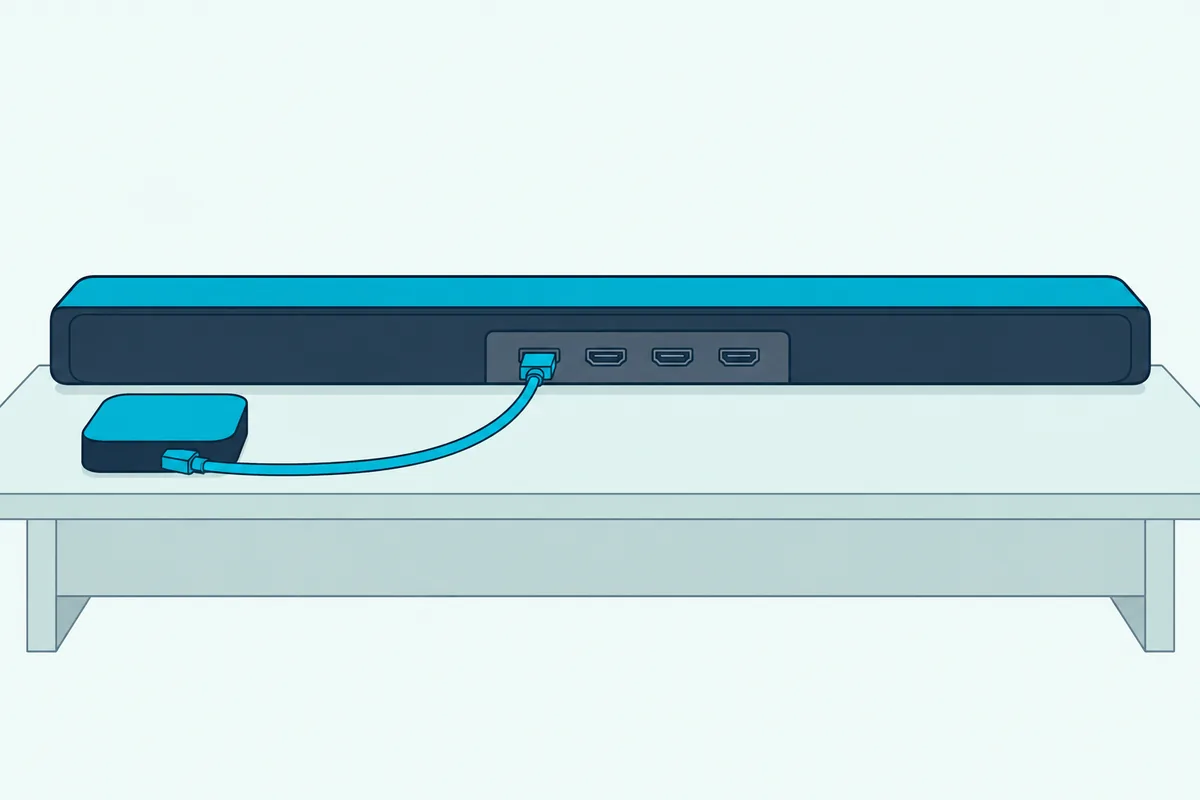
Samsung describes that route as playing the external device’s sound through the bar. So count on it for the box or console plugged into the bar, not for the TV’s own apps.
Picture a bedroom TV with no optical jack, no ARC label and a streaming stick in its only HDMI port. Move the stick to the bar’s HDMI input, run the bar’s HDMI TO TV port to the TV, and the bar plays the stick while the TV shows the picture.
Why Won’t the Other Brand’s TV Remote Control the Samsung Soundbar?
Whichever route you end up on, the last piece is the remote, and Samsung’s documents point to three causes. The TV’s remote won’t run a Samsung soundbar when HDMI-CEC is off on the TV, when the TV still plays through its own speakers, or when it talks to the TV over Bluetooth instead of infrared.
Work through the fixes in this order:
- Turn on the TV’s CEC setting under its name in the table above, and point its sound output at the HDMI ARC device or audio system.
- Unplug the TV and every HDMI device for about a minute, plug in the TV and turn it on, then plug in the soundbar and the other sources, which is the reset order in Roku’s HDMI-CEC guide.
- Check for a TV firmware update, since Roku notes that some CEC and ARC faults are fixed that way.
- If CEC still won’t hold, switch the bar to ALL-TV REMOTE: with the bar off, push the WOOFER button up and hold it for 5 seconds, and repeat until the display reads ALL-TV REMOTE.
That last mode reads the TV remote’s infrared signal instead of CEC, so it doesn’t depend on the HDMI link, which makes it the option for optical setups too. Samsung lists VIZIO, LG, Sony, Sharp, PHILIPS, PANASONIC, TOSHIBA, Hisense and RCA for it, and the TV speaker has to be set to External Speaker.
Two limits apply. Samsung says remotes that need pairing over Bluetooth aren’t supported, and Roku isn’t on the list, so a Roku TV owner should get CEC working instead.
Each brand’s TV-remote setup is in Burton Acoustix’s TV remote guide for Samsung bars. The order above still applies: CEC first, infrared second.
The Bottom Line
So yes, any TV with an HDMI ARC, eARC or optical output runs a Samsung soundbar, and Bluetooth works where both the TV’s manual and the bar’s allow it. Turn on CEC under your TV’s own name, point its sound output at the bar, and keep ALL-TV REMOTE in reserve for a TV that won’t cooperate.
What stays behind is Samsung’s own layer: Q-Symphony, the Wi-Fi link, the TV-menu controls and, on a few bars, SpaceFit’s TV route. If those matter to you, you need a Samsung TV; if they don’t, the TV’s brand barely matters.
Frequently Asked Questions
Do you have to have a Samsung TV to use a Samsung soundbar?
No. A Samsung soundbar plays any TV’s sound over HDMI ARC or eARC or an optical cable, and Samsung’s own Canada set-up guide tells owners of other TVs to follow their TV’s manual for the TV-side steps. What a non-Samsung TV can’t use are the Samsung-only extras: Samsung’s guides tie the Wi-Fi link to Samsung TVs, Q-Symphony to Samsung TVs that support it, and TV-menu control over optical to 2017 and later Samsung Smart TVs with Bluetooth. The bar’s own sound modes, buttons and app work the same on any TV.
Can you use any soundbar with a Samsung TV?
Yes. Samsung’s 2025 TV e-manual picks external speakers in its Sound Output menu, takes a soundbar over HDMI eARC or optical, and pairs Bluetooth audio devices from the Bluetooth Speaker List, with Anynet+ as its name for HDMI-CEC. The same guide warns that external speakers may not respond to the Samsung Smart Remote and that over optical, volume control may not be possible, depending on the device. Q-Symphony stays with Samsung speakers. For one common mix, here’s what an LG soundbar can do on a Samsung TV.
Can a Samsung soundbar connect to a TV without its remote?
Yes, for the basic connections. On the HW-Q990D, the Multi Function button on top of the bar steps through the sources until TV ARC or D.IN shows, and in Bluetooth, holding Mic On/Off for more than 5 seconds at BT READY switches to BT PAIRING; the HW-B550 and HW-Q600F use their Source button for the same jobs. Once HDMI-CEC is on, the TV’s own remote takes over the volume. What does need the soundbar remote is the ALL-TV REMOTE switch, since it’s a WOOFER button hold.
Will a Samsung soundbar turn on and off with another brand’s TV?
Over HDMI with CEC on, it can. Vizio lists power on and off among the functions CEC controls, depending on the device, LG’s SIMPLINK turns connected devices off with the TV on certain devices, and Sony’s BRAVIA Sync lets the TV turn off a connected device. Samsung’s 2025 TV e-manual adds a Bluetooth power link for a Samsung soundbar on that Samsung TV, which may not work on every soundbar model.