Difference Between JBL 500 and JBL 5.1 Soundbar: Which Is Which?

If you’re trying to pin down the difference between JBL 500 and JBL 5.1 soundbar systems, start with which 5.1 you mean, because JBL sold two bars under that name and only the older one has rear speakers that lift off.
Shop on the name alone and you can bring home a bar with no rear speakers when you wanted them, or one with no Wi-Fi or Dolby Atmos when you wanted both.
Put the right name on each box and the choice gets easy, since these systems trade rear speakers, HDMI inputs, streaming and height effects in clear ways.
The short answer and a quick way to identify your box come first, followed by a side-by-side table and the details behind it.
By the end, you’ll know which system you’re looking at and whether it’s the one your room needs.
What Is the Difference Between JBL 500 and JBL 5.1 Soundbar Systems?
That shared name is the heart of the confusion. The JBL Bar 500 is a one-piece 5.1-channel bar with a wireless subwoofer, virtual Dolby Atmos, HDMI eARC and Wi-Fi 6, while a “JBL 5.1” is either the older Bar 5.1 with two detachable battery-powered surround speakers or the Bar 5.1 Surround, a one-piece bar with Wi-Fi and no Atmos.
Against the Bar 5.1 Surround, the Bar 500 is a plain upgrade. RTINGS’s comparison of the two calls the 500 the better soundbar, with a better stereo soundstage, better stereo dynamics and more sound enhancement features.
Against the original Bar 5.1, it’s a real trade. The old bar gives you speakers behind the couch and three HDMI inputs, and it goes without Wi-Fi, Atmos and eARC.
One more name matters if you’re buying new today. RTINGS’s Bar 500 review now carries a notice that the bar was replaced by the Bar 500MK2, JBL’s 2025 follow-up, so that’s the current version.
All four share the same outline: a 5.1 channel count, a 10-inch wireless subwoofer and a bar that sits under the TV. If those numbers are new to you, what the 5 and the 1 actually count is a short read, and our ranking of JBL’s wider soundbar lineup shows where these four sit among the rest.
Which JBL Soundbar Do You Actually Have?
Four similar names are easy to mix up, even when the box is in front of you. The quickest way to tell which JBL soundbar you actually have is to look at the bar’s ends: two speakers that lift off mean the original Bar 5.1, and a one-piece bar means one of the other three, which the model name and the remote then separate.
| System | Model name in JBL’s manual | Name on your phone’s Bluetooth list | Quickest tell |
|---|---|---|---|
| Bar 5.1 | JBL Bar 5.1 | JBL Bar 5.1 | Ends that detach, three HDMI inputs, an AUX jack |
| Bar 5.1 Surround | Bar 5.1 CNTR, with Bar 5.1 SUB | JBL Bar 5.1_xxxx | One-piece bar, an Ethernet port, no Atmos key on the remote |
| Bar 500 | BAR 500, with BAR 500 SUB | JBL BAR 500 | One-piece bar, an Ethernet port, Atmos and CALIBR keys on the remote |
| Bar 500MK2 | BAR 500MK2, with BAR 500MK2 SUB | JBL BAR 500MK2 | A 37-inch bar, Atmos and CALIBR keys, no Ethernet port |
Notice the trap in the third column: both 5.1 systems announce themselves to your phone as JBL Bar 5.1, the newer one with a suffix, so a Bluetooth list won’t settle the question at a glance. Neither will the subwoofer, since JBL gives both a 10-inch driver and the same cabinet size.
Store listings add to the muddle. Amazon’s listing titled “JBL Bar 5.1 – Soundbar with Built-in Virtual Surround” (part number JBL2GBAR51IMBLKAM) is the one-piece Bar 5.1 Surround: its description opens with “The impressive JBL Bar 5.1 Surround” and quotes 550 watts.
JBL’s own Malaysian store keeps the two apart in its item numbers, JBLBAR51BLKAS for the Bar 5.1 and JBLBAR51IMBLKAS for the Surround. So when a listing says 5.1 and you want rear speakers, look for JBL’s words for the older system, “True Wireless Surround Speakers”, and check that the box contents include two of them.
Once you know your box, the sections below are yours in this order: original Bar 5.1 owners want the detachable speakers first, Bar 5.1 Surround and Bar 500 owners the surround sound and Atmos sections, and Bar 500MK2 owners the section on what changed.
How Do the Four Systems Compare Side by Side?
Once the names are straight, the specs fall into a clear order. Compared side by side, the Bar 5.1 is the only one with rear speakers and multiple HDMI inputs, the Bar 5.1 Surround adds Wi-Fi, the Bar 500 adds virtual Atmos and eARC, and the Bar 500MK2 adds power in a narrower bar.
| Feature | Bar 5.1 | Bar 5.1 Surround | Bar 500 | Bar 500MK2 |
|---|---|---|---|---|
| Year on JBL’s paperwork | 2017 | 2019 first manual, 2020 US spec sheet | 2022 spec sheet | 2025 spec sheet |
| Rear speakers | Two, detachable and battery-powered | None | None | None |
| Total power | 510 W | 550 W | 590 W | 750 W |
| Drivers in the bar | 6 racetrack, 3 tweeters | 5 racetrack, 2 side-firing tweeters | 4 racetrack, 3 tweeters | 5 racetrack, 4 tweeters |
| Subwoofer | 10-inch wireless | 10-inch wireless | 10-inch wireless | 10-inch wireless |
| Surround effect | Real rear speakers | MultiBeam | MultiBeam | MultiBeam 3.0 |
| Height effect | None | None | Virtual Dolby Atmos | Virtual Dolby Atmos, DTS Virtual:X |
| HDMI inputs | 3 | 1 | 1 | 1 |
| TV connection | HDMI ARC or optical | HDMI ARC or optical | HDMI eARC or optical | HDMI eARC or optical |
| Other wired ports | AUX, USB | Ethernet, USB | Ethernet, USB | USB |
| Wi-Fi | None listed | 802.11ac | 802.11ax (Wi-Fi 6) | 802.11ax (Wi-Fi 6) |
| Bluetooth | 4.2 | 4.2 | 5.3 in the manual, 5.0 on the spec sheet | 5.3 |
| App | None listed | Google Home, JBL BAR Setup | JBL One | JBL One |
| Calibration | Plug-in microphone, supplied | Built-in microphone | Built-in microphone | Built-in microphone |
| Bar width | 45 in | 40.1 in | 40 in | 37 in |
The years in that first row are the copyright dates on the documents, while RTINGS dates the releases to 2020 for the Bar 5.1 Surround, 2023 for the Bar 500 and 2025 for the MK2. JBL’s owner’s manuals for the Bar 5.1, Bar 5.1 Surround, Bar 500 and Bar 500MK2 hold the full lists if you want to check a line yourself.
Read across the rows and you can see each generation make a choice. Here’s what each step added and gave up.
| Step | What it added | What it dropped |
|---|---|---|
| Bar 5.1 to Bar 5.1 Surround | Wi-Fi, Ethernet, MultiBeam, a built-in calibration microphone, online updates | Rear speakers, two HDMI inputs, the AUX input |
| Bar 5.1 Surround to Bar 500 | Virtual Dolby Atmos, eARC, Wi-Fi 6, the JBL One app, PureVoice | One racetrack driver, five down to four |
| Bar 500 to Bar 500MK2 | 160 more watts, one more driver and tweeter, MultiBeam 3.0, PureVoice 2.0, DTS Virtual:X, HDR10+ | Ethernet, Alexa, 4K at 120 Hz pass-through per RTINGS |
That middle step is why RTINGS calls the Bar 500 the better bar, and the two end steps are the real trades. The rest of this page takes those trades one at a time, starting with the rear speakers.
Does the JBL Bar 5.1 Have Detachable Speakers?
The rear-speaker row is the one most shoppers came for. Yes, but only the original JBL Bar 5.1 has detachable speakers: its owner’s manual says to detach the two wireless surround speakers from the main bar and place them to the sides or behind the main seating area, while the other three systems are one-piece bars with a separate subwoofer.
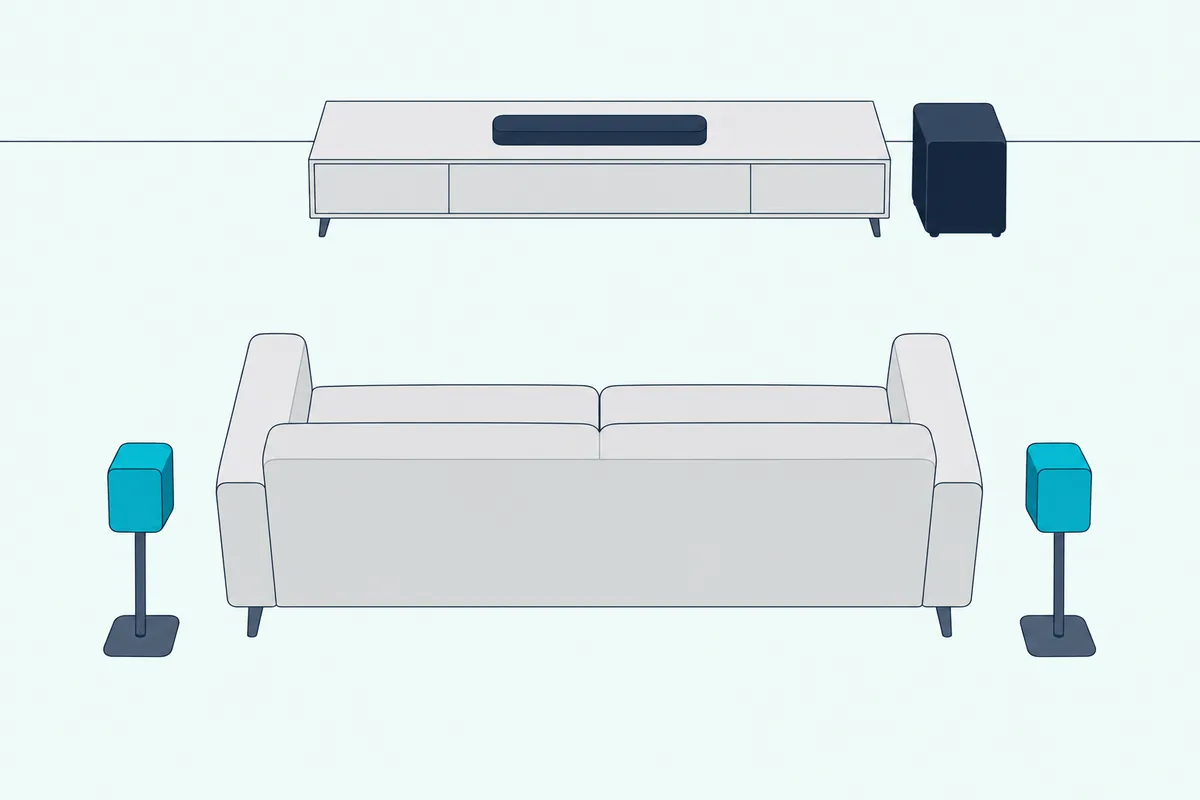
Each speaker is rated at 30 watts and 10 hours of playtime, with less than 3 hours to charge. They charge on the bar while the system is in standby and stop charging once the bar is on, so a USB connector on the bottom of each speaker is the backup for a long weekend of sports.
A blinking red light on a speaker means a low battery, and a solid red one means it’s charging. They also wake and sleep on their own: the manual says they go to standby after 10 minutes with no button presses or sound, and power off after 20.
Those speakers change what the sound modes do. With them detached, Standard, Movie and Sports send ambience and special effects to the back of the room, while Music and Voice send a mono mix.
Placement takes a little care, and the manual is specific about it. The narrow side of each speaker is the one that emits sound, so point it at the seats, and run the audio calibration again whenever you move them, with the supplied microphone at ear level and plugged into the right side of the bar.
If the 9.1 is also on your list, how that older detachable system stacks up against the Bar 9.1 covers the step up in height speakers.
Do the Bar 500 and Bar 5.1 Surround Have Real Surround Sound?
Take those rear speakers away and the other three bars have to fake the back of the room. The Bar 500 and Bar 5.1 Surround don’t have real rear surround sound: they use JBL’s MultiBeam technology to aim sound at the side walls, so it bounces back to your seat, with no extra speakers or wires.
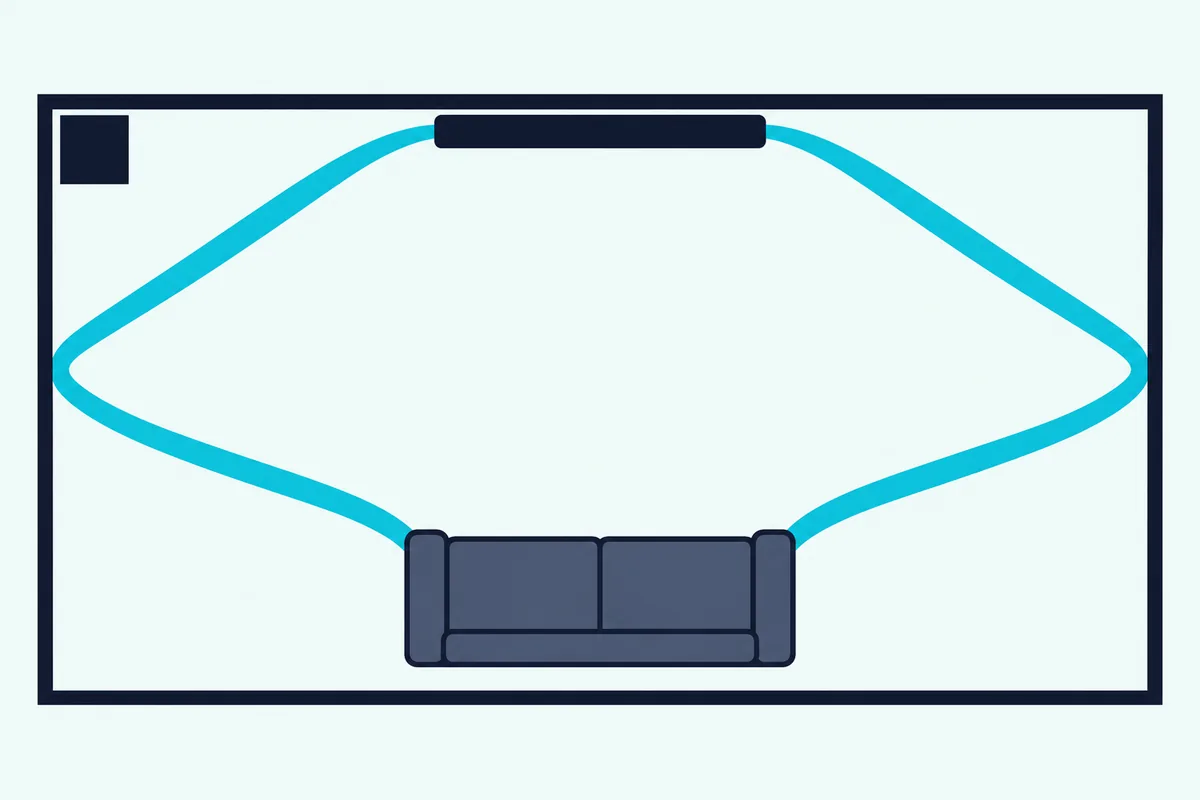
Think of it as a bank shot in pool, with the wall doing the last part of the work. JBL’s Bar 500 tech backgrounder describes digital signal processing, front-firing speakers and twin side-firing drivers working together, with the Bar 500’s two side-firing tweeters loaded in horns.
The trick does what it’s meant to, within limits. RTINGS says the Bar 5.1 Surround plays 5.1 formats virtually and doesn’t perform as well as setups with discrete surrounds, and it found the MK2’s side-firing drivers do an acceptable job with passing cars and fighter jets, with some immersion.
Your room decides how well the bank shot lands. The backgrounder says the shape of a room, especially its side walls, affects how the speakers perform, so a sofa that opens onto a kitchen on one side leaves the beams with less to work with.
Here’s a quick test you can do with a tape measure. The placement drawing in JBL’s Bar 500 manual shows a wall more than 4 m (13 ft) wide behind the TV and seats 2.5 to 3.0 m (8.2 to 9.8 ft) from the bar.
JBL doesn’t say what happens outside those numbers, but seats much farther back give the beams more distance to cover. That’s the kind of room where real rear speakers start to look better.
All three one-piece bars also run a built-in calibration, which takes the place of the plug-in microphone on the old Bar 5.1. On the Bar 500 and MK2 you press CALIBR on the remote, and on the Bar 5.1 Surround you hold a key for 5 seconds, then wait through the test tones.
Which One Supports Dolby Atmos?
Those side-wall reflections are also as close as these bars come to sound from above. Only the Bar 500 and Bar 500MK2 support Dolby Atmos, and JBL’s manuals call it virtual Dolby Atmos, while RTINGS notes that neither bar has up-firing drivers to bounce sound off a ceiling.
On the older pair, the answer is no. JBL’s Bar 5.1 spec sheet lists Dolby Digital, Dolby Pro Logic II and DTS, and RTINGS’s Bar 5.1 Surround review says that bar can’t support Dolby Atmos content.
Getting Atmos into a Bar 500 depends on your TV. With an eARC TV, your devices can plug into the TV and the sound comes back over one HDMI cable; with a plain ARC TV, the manual says to plug the device into the bar’s own HDMI input, because the Atmos information won’t pass through ARC from the TV.
Set your player or streaming box to “Bitstream” or “Raw data” in its audio settings, as JBL advises. The effect is on by default and has its own key on the remote, and the manual is clear that it won’t work over Bluetooth or casting apps.
RTINGS says the MK2 won’t render height cues very convincingly without up-firing drivers, while Wired’s review of the same bar lists “immersive Dolby Atmos” among its strengths. Treat it as a wider, fuller effect rather than true overhead sound.
You may also see older write-ups saying the Bar 500 downmixes Atmos to stereo. RTINGS’s changelog for February 2026 says it updated that box to clarify that the bar doesn’t downmix to stereo and instead plays Atmos audio from its front and side-firing drivers.
How Many HDMI Inputs Does Each One Have?
Atmos has already pulled your TV’s HDMI port into the decision, and inputs are the sharpest split after rear speakers. The Bar 5.1 has three HDMI inputs and one ARC output, while the other three have one input and one output, with eARC on the Bar 500 and Bar 500MK2.
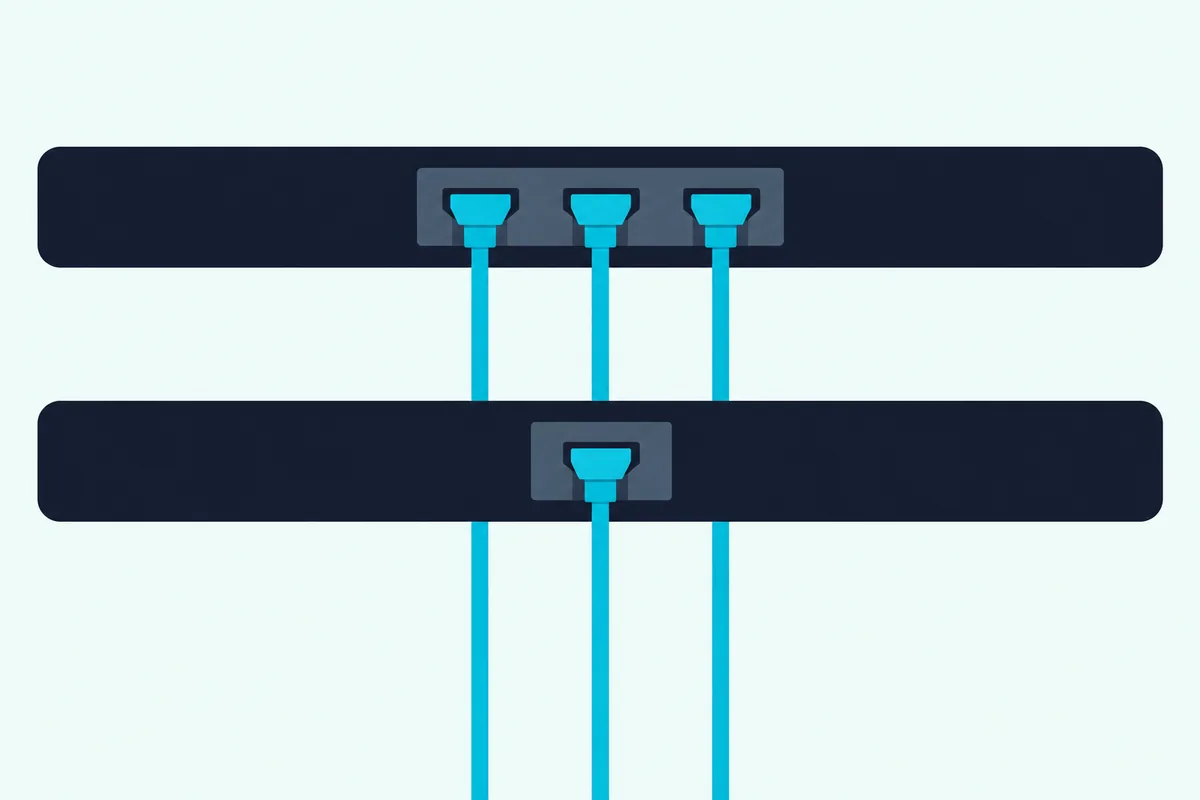
Count your boxes and the choice often makes itself. A console, a streaming stick and a disc player all fit on the old Bar 5.1 with the TV’s own ports to spare, while on the one-input bars, everything past the first device goes into the TV.
That’s where eARC earns its place on the newer bars. JBL’s Bar 500MK2 spec sheet says it carries uncompressed Dolby Atmos over a single HDMI cable, so a TV with eARC can act as the switchbox.
Gaming is the one place the newer bar takes a step back. RTINGS’s Bar 500MK2 review says the original Bar 500 supports 4K at 120 Hz pass-through while the MK2 tops out at 4K at 60 Hz, so a console plugged into the MK2 is held to that, and one plugged straight into an eARC TV skips the bar’s limit.
On picture formats, the Bar 500 passes HDR10 and Dolby Vision, and the MK2 passes HDR10+ and Dolby Vision. HDCP is 2.2 on the Bar 5.1 and 2.3 on the Bar 500 and MK2, while the Bar 5.1 Surround’s US spec sheet says 2.2 and its manual says 2.3.
All four also take optical, for a TV with no ARC at all, but only the Bar 5.1 has a 3.5 mm AUX input. Its box includes HDMI, AUX and optical cables, while the other three boxes include an HDMI cable and JBL’s manuals list the optical cable as sold separately.
Which One Streams Over Wi-Fi?
The Ethernet ports in that big table hint at the next split. Every system except the original streams over Wi-Fi: the Bar 5.1’s manual lists Bluetooth 4.2 and no Wi-Fi, so your phone reaches it over Bluetooth only, and you’d switch between TV and phone with its SoundShift button.
The three newer bars each have their own mix of services.
- Bar 5.1 Surround: Chromecast built-in, AirPlay and Alexa Multi-Room Music on JBL’s US spec sheet, set up through the Google Home or JBL BAR Setup app.
- Bar 500: Chromecast built-in, AirPlay and Alexa Multi-Room Music, plus the JBL One app and a Moment key on the remote that jumps to a playlist you’ve saved in the app.
- Bar 500MK2: Google Cast, AirPlay and Spotify Connect in its manual, with JBL’s product page adding Tidal Connect and Roon Ready, plus the same app and Moment key.
Note the swap on the MK2. Alexa doesn’t appear in its manual, and JBL’s product page names Google Assistant and Siri for voice, so a home built around Echo speakers is better served by the Bar 500 or Bar 5.1 Surround.
Wi-Fi also handles the housekeeping. On the three newer bars, software updates arrive online automatically, while the Bar 5.1 takes them from a USB drive you load yourself.
One limit applies to all three: their manuals say they support audio streaming and not video streaming, so none of them replaces the streaming box or smart TV apps you already use for video.
Does One Have More Bass Than the Others?
Streaming is where the newer bars pull ahead, and bass is where all four look closest on paper. None of them has more bass on the spec sheet, because all four use a 10-inch wireless subwoofer rated at 300 watts, and the one clear gain on record is the MK2’s over the Bar 500, per RTINGS.
| System | Subwoofer weight | Frequency response on JBL’s documents |
|---|---|---|
| Bar 5.1 | 28.7 lb (13 kg) | 35 Hz to 20 kHz |
| Bar 5.1 Surround | About 23.4 lb (10.62 kg) | 34 Hz to 20 kHz in the manual, 40 Hz to 20 kHz on the US spec sheet |
| Bar 500 | 22 lb (10 kg) | 35 Hz to 20 kHz |
| Bar 500MK2 | 17.8 lb (8.1 kg) | 40 Hz to 20 kHz |
JBL quotes the Bar 500 and MK2 figures at -6 dB and gives no tolerance for the older two, so those Hz numbers aren’t a strict ranking. Nor should you read the MK2’s 40 Hz as less bass: RTINGS says its extra power brings clear gains in overall volume and bass output over the Bar 500, and it describes the sound as warmer.
Its 750 watts deserve a footnote too, because that’s the maximum figure at 1% distortion. JBL also prints an RMS figure for the MK2, 375 watts, and doesn’t give one for the other three in these documents, so you can’t line them up on RMS.
You can steer the bass on all four. The Bar 5.1 has BASS + and – keys, and the three newer bars have five levels, with level 3 as the default.
Where you put the subwoofer matters as much as which one you own. The Bar 5.1 Surround’s and Bar 500’s manuals ask for at least 3 ft (1 m) from the bar, 4 in (10 cm) from a wall and less than 20 ft (6 m) between sub and bar, so a corner behind the sofa is fair game.
Will Each System Fit Under Your TV?
A subwoofer can hide behind furniture, but the bar sits right under your screen. The narrowest system that will fit under your TV is the Bar 500MK2 at 37 inches, with the Bar 5.1 Surround and Bar 500 at about 40 and the Bar 5.1 at 45 with its speakers attached.
| Part | Bar 5.1 | Bar 5.1 Surround | Bar 500 | Bar 500MK2 |
|---|---|---|---|---|
| Bar (W x H x D) | 45 x 2.3 x 3.7 in | 40.1 x 2.3 x 3.9 in | 40 x 2.2 x 4 in | 37 x 2 x 4.1 in |
| Bar weight | 8.6 lb | About 6.3 or 6.7 lb (JBL’s documents give 2.85 and 3.06 kg) | 6.2 lb | 6.5 lb |
| Subwoofer (W x H x D) | 12 x 17.3 x 12 in | 12 x 17.3 x 12 in | 12 x 17.3 x 12 in | 12.8 x 15.7 x 12.8 in |
| Rear speakers (W x H x D) | 6.5 x 2.3 x 3.7 in, 1.3 lb each | None | None | None |
Here’s how those widths sit against a screen. A 16:9 picture is about 0.87 times its diagonal, so a 43-inch TV’s screen is about 37.5 inches wide, a 50-inch about 43.6 and a 55-inch about 47.9.
That puts the MK2 inside a 43-inch TV’s screen, the 40-inch bars inside a 50-inch one and the docked Bar 5.1 inside a 55-inch one. Take the Bar 5.1’s two 6.5-inch speakers off and simple subtraction leaves about 32 inches of bar, though JBL’s manual doesn’t print that width.
Height is rarely the problem, since none of them tops 2.3 inches, but check the gap under your TV’s stand if it has low feet. All four boxes include a wall-mounting kit, and the MK2 comes in two colors, black and white, on JBL’s Malaysian store.
What Changed From the Bar 500 to the Bar 500MK2?
That narrower bar is only the visible part of the update. The MK2 gains 160 watts of total power, one more racetrack driver and one more tweeter in a bar 3 inches narrower, and it loses the Ethernet port, Alexa in its manual and, per RTINGS, 4K at 120 Hz pass-through.
RTINGS still calls the pair extremely similar, and its list of upgrades is short: a stronger subwoofer, a warmer tone, more volume and a big improvement in audio latency over HDMI In and eARC. So if you own a Bar 500 and it’s doing its job, the MK2 isn’t an urgent trip to the store.
JBL’s own feature names moved on as well, and these are worth decoding.
- MultiBeam 3.0: the newer name for the side-wall beaming, on the MK2’s spec sheet.
- PureVoice 2.0: raises or adjusts dialogue automatically, based on the sound in the scene and your volume, where the Bar 500 has the first PureVoice.
- SmartDetails: JBL’s sound enhancement for small details in a film’s mix, on the MK2’s spec sheet.
- DTS Virtual:X: added alongside Dolby Atmos, on the MK2’s spec sheet and product page.
One older feature drops out of the paperwork. The Bar 5.1 Surround’s and Bar 500’s manuals both describe a Smart mode that’s on by default, and RTINGS found on the Bar 500 that it can feel fake and forced with stereo music, while the MK2’s manual doesn’t describe it.
For most shoppers, those are gains. The two things to weigh are a console that plugs into the bar and a home built around Alexa, and either one points back to the Bar 500.
Which of These JBL Soundbars Can You Still Buy?
That Bar 500 advice only helps if you can find one, so stock is the next question. On 30 October 2026, you could still buy the Bar 500MK2 and the Bar 5.1 Surround on Amazon, the original Bar 500 was down to its last unit there, and the detachable Bar 5.1 was the hard one to find.
The MK2 is the current model, tagged New on JBL’s Malaysian store and in stock on Amazon. The Bar 5.1 Surround is still listed on Amazon as the “JBL Bar 5.1” with limited stock, though its listing’s name is the trap we covered earlier.
The Bar 500 is on its way out, in line with RTINGS’s replaced notice, and Amazon showed a single unit that day. JBL’s Malaysian store still listed both the Bar 500 and the original Bar 5.1.
On Amazon’s US store that day, the detachable systems on offer were newer ones such as the Bar 700 and Bar 800, so expect to shop used if you want this exact bar. If you do, ask whether both surround speakers still hold a charge against JBL’s 10-hour rating, since batteries are the part that ages, and make sure the calibration microphone is in the box.
Which JBL Soundbar Should You Pick?
Stock narrows it down, and your room and your cables settle the rest. Pick the Bar 500MK2 for most rooms, the Bar 5.1 Surround if streaming matters more than Atmos, and a current detachable system such as the Bar 700MK2 if rear speakers were the reason you looked at the old Bar 5.1.
The descriptions come from JBL’s manuals, spec sheets and product pages, with verdicts credited to RTINGS and Wired where they appear. Every pick met Burton Acoustix’s rating, review and stock checks on 30 October 2026.
The Bar 500MK2 for Most Rooms
If you want one bar that handles TV, movies and phone streaming with the fewest compromises, the JBL Bar 500MK2 is the one to buy. RTINGS rates it great for dialogue and very good for movies, and at 37 inches it suits a smaller stand.
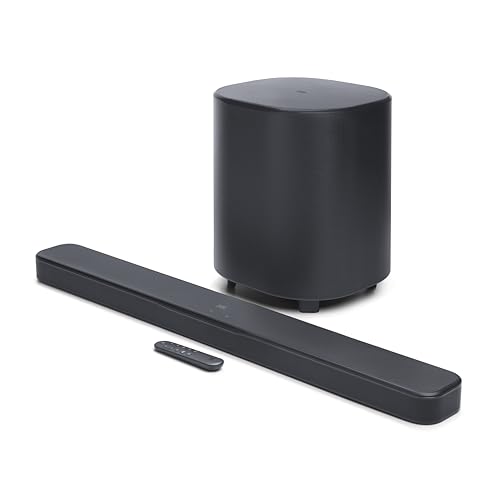
JBL Bar 500MK2
Skip it if a console has to plug into the bar at 4K 120 Hz. Plug the console into an eARC TV instead, or look for an original Bar 500 while the last ones last.
The Bar 5.1 Surround for Streaming Without Atmos
If most of what you play is music and regular TV, and your TV has only plain ARC, the JBL Bar 5.1 Surround, listed on Amazon as the JBL Bar 5.1 with Built-in Virtual Surround still makes sense. RTINGS gives it outstanding wireless connectivity options, and it keeps Alexa Multi-Room Music, which the MK2’s manual drops.
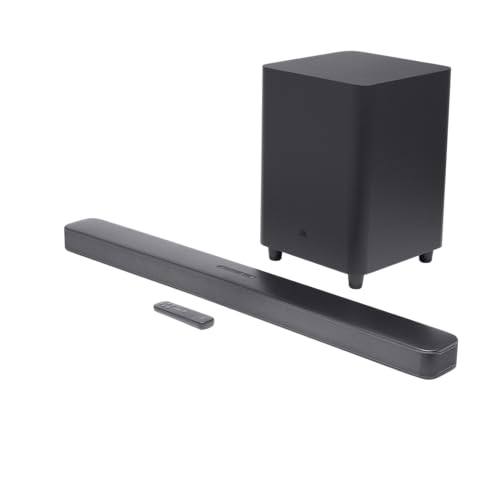
JBL Bar 5.1 Surround, listed on Amazon as the JBL Bar 5.1 with Built-in Virtual Surround
Remember what it isn’t. RTINGS lists no dialogue enhancement and no graphic EQ, and its comparison prefers the Bar 500 on sound quality.
The Bar 700MK2 for Real Rear Speakers
If the old Bar 5.1’s lift-off speakers were the draw, the current system built on the same idea is the JBL Bar 700MK2. JBL’s Canadian store describes it as a 7.1-channel system with detachable surround speakers, MultiBeam 3.0, Dolby Atmos and DTS Virtual:X, so you get the old idea with the newer bars’ features.
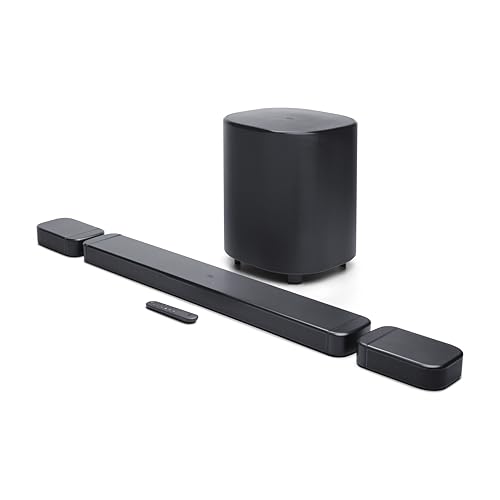
JBL Bar 700MK2
If you want to compare it with JBL’s other rear-speaker systems, the ranking linked near the top of this page lines them up. For rivals from other makers, 5.1 systems with true rear channels is the next stop.
If You Already Own One
Keep the Bar 5.1 if the rear speakers and three HDMI inputs still suit you, since nothing else in this comparison offers that mix. Move on if you want Wi-Fi, Atmos or an eARC TV connection.
Keep the Bar 5.1 Surround if streaming is your main use. Upgrade to the MK2 for the height effect and a dialogue feature, which RTINGS lists as missing on the Surround.
The Bottom Line
The difference between these systems comes down to one question: do you want speakers behind you, or one bar with better streaming and a height effect? The original Bar 5.1 is the rear-speaker system, the Bar 5.1 Surround is its one-piece namesake with Wi-Fi, and the Bar 500 and MK2 are the one-piece bars with virtual Dolby Atmos and eARC.
Check the bar’s ends, the model name and the listing’s words, and you won’t end up with the wrong 5.1. For most people buying new, the Bar 500MK2 is the safe choice, unless a 4K 120 Hz console has to plug straight into it.
Frequently Asked Questions
Is the JBL Bar 5.1 Surround newer than the JBL Bar 5.1?
Yes. The Bar 5.1’s manual and spec sheet carry a 2017 copyright, while the Bar 5.1 Surround’s first manual says 2019 and RTINGS dates its release to 2020. The name is misleading, since the one called Surround is the one with no surround speakers in the box. It creates the effect with MultiBeam instead.
Can you add rear speakers to a JBL Bar 500 or Bar 5.1 Surround?
JBL’s owner’s manuals for the Bar 500, Bar 500MK2 and Bar 5.1 Surround don’t describe pairing rear speakers, so plan around the system as it comes in the box. If rear speakers are the goal, start with a system that includes them, such as the Bar 700MK2 above.
Do these JBL soundbars come with an HDMI cable?
Yes, all four boxes include one. The Bar 5.1 also includes an AUX cable and an optical cable, while the Bar 5.1 Surround’s and Bar 500’s manuals list the optical cable as sold separately. If you connect a device to the bar’s HDMI input, you’ll need a second cable, and JBL’s newer manuals ask for HDMI 2.0 or later.
Can a TV remote control these JBL soundbars?
Yes, by different routes. The Bar 5.1 responds to most Samsung, LG, Sony and Vizio TV remotes for volume and mute, and it can learn other remotes through IR learning. The Bar 5.1 Surround, Bar 500 and Bar 500MK2 use HDMI-CEC for volume, mute and power, with IR learning for a TV that lacks HDMI-CEC.
Which of these bars work with the JBL One app?
The Bar 500 and Bar 500MK2 do, and their manuals use the app for Wi-Fi setup and music services. The Bar 5.1 Surround’s manual uses the Google Home app or the JBL BAR Setup app instead. The Bar 5.1’s manual doesn’t describe an app at all, and you run it from the remote and the buttons on top.
What does MK2 mean on a JBL soundbar?
It marks the second version of a bar. RTINGS describes the Bar 500MK2 as the successor to the Bar 500, and JBL has given the MK2 its own manual, spec sheet and model name. Check for MK2 in the model name before you buy, because a listing for a Bar 500 and one for a Bar 500MK2 can look nearly the same at a glance.