Vizio M-Series vs V-Series Soundbar: Atmos, eARC and the SV Bars

Choosing between a Vizio M-Series vs V-Series soundbar comes down to one line in Vizio’s own manuals: the M-Series decodes Dolby Atmos and DTS:X, while the V-Series stops at Dolby Audio and DTS Virtual:X.
Both lines came as 2.1 and 5.1 systems with a wireless subwoofer, so the boxes look alike while the HDMI ports behind them don’t.
Get that difference right and you’ll know whether your TV’s eARC port and the Atmos tracks in your streaming apps will actually get used.
This guide lines up both ranges from Vizio’s manuals and product pages: layouts, Atmos and DTS:X, up-firing speakers, inputs, remotes and the app.
Then it shows what Vizio sells in their place, since its old M- and V-Series pages now open newer SV and SL bars, and which buyer each one suits.
What Separates a Vizio M-Series vs V-Series Soundbar?
That decoding line is most of the story. Every M-Series manual adds Dolby Atmos and DTS:X decoding, an HDMI eARC port and a separate HDMI In, where a V-Series bar has Dolby Audio and one HDMI ARC port at most (Vizio’s M51ax-J6 manual).
Vizio says as much on its own listing page: “Looking for Dolby Atmos? Check out M-Series.”
| Feature | V-Series | M-Series | Newer SV and SL bars |
|---|---|---|---|
| Layouts | 2.0, 2.1, 5.1 | All-in-One 2.1, 2.1, 5.1, 5.1.2 | 2.0 to 5.1, Elevate 5.1.2 to 7.1.4 |
| Dolby | Dolby Audio | Dolby Atmos | Dolby Atmos |
| DTS | DTS Virtual:X, no DTS:X | DTS:X and DTS Virtual:X | DTS:X and DTS Virtual:X |
| Height speakers | None | Two up-firing, on the 5.1.2 | Rotating, on Elevate models |
| HDMI | One ARC port (later K6 models: none) | eARC plus HDMI In | One eARC port |
| Optical input | Yes | Yes | No |
| Remote in the box | Yes | Yes | No, sold separately |
| Vizio app | Not in the manuals | Not in the manuals | Needed for full control |
The first two columns come from Vizio’s manuals and line pages, the third from its spec tables for the SV210M-0808, SV510X-0806 and SL512X-0806 and its collection pages. Think of the two older lines as trim levels of one car: the body styles match up to 5.1, and the M-Series adds the decoder, the eARC port, a tweeter beside each front driver and, on the 5.1.2, a pair of up-firing drivers.
Neither line is on sale at Vizio anymore, which matters more than any row in that table. For how Vizio’s bars compare with other brands, see our best Vizio soundbar rankings.
Which Models and Channel Layouts Did Each Line Have?
Those layouts line up almost model for model. Vizio’s line pages list the V-Series as a 2.1 and a 5.1 beside a separate 2.0 Compact, and the M-Series as an All-in-One 2.1, a 5.1 and a 5.1.2 (Vizio’s M-Series 5.1 page).
| Layout | V-Series model | M-Series model |
|---|---|---|
| 2.0 | V20x-J8, 2 full-range speakers | None |
| 2.1, wireless subwoofer | V21x-J8, 3 speakers, 4.5 in subwoofer | M215a-J6, 5 in subwoofer |
| 2.1, built-in subwoofers | V21d-J8 | M213ad-K8 All-in-One, 6 speakers |
| 5.1 | V51x-J6, 6 speakers | M51ax-J6, 9 speakers |
| 5.1.2 | None | M512a-H6, 11 speakers |
The speaker counts are Vizio’s, from its line and model pages, and the gap at 5.1 is the tweeters. The M51ax-J6 manual pairs a 0.79-inch tweeter with the full-range driver in each of the left, center and right channels, while the V51x-J6 lists one full-range driver per channel.
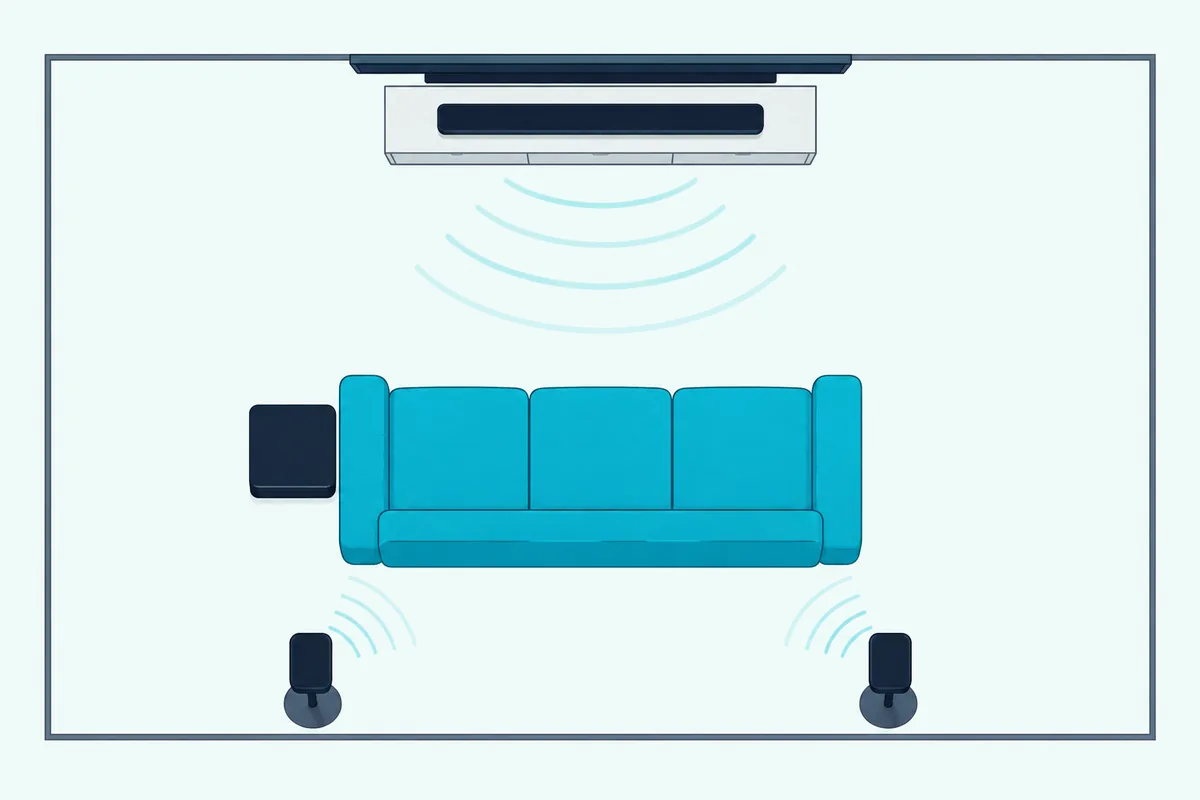
Vizio’s line pages put their loudness in the same order: 96 dB for the V-Series 2.1 and 5.1, 100 dB for the M-Series 5.1 and 103 dB for the 5.1.2. The 5.1.2 also reaches down to 45 Hz, where the others stop at 50 Hz.
Both 5.1 systems wire their two surround speakers to the subwoofer rather than to the bar. If you’re unsure the surrounds are worth it, here’s what a 5.1 adds over a 2.1.
Vizio also sold later V-Series K6 versions, the V214x-K6 2.1 and V514x-K6 5.1, which changed the inputs more than the layouts, as the input section below shows.
Get Studio Tips Weekly
Join 5,000+ creators getting acoustic treatment advice every week.
No spam. Unsubscribe anytime.Does Either Line Decode Dolby Atmos and DTS:X?
Those extra drivers matter less than the decoder behind them. Only the M-Series does: its manuals light a green LED for Dolby Atmos, white for Dolby Audio and amber for DTS, and say Atmos plays over HDMI eARC and HDMI In, while Dolby Audio and DTS also work over optical.
The V-Series manuals list Dolby Audio, DTS Virtual:X and DTS TruVolume instead. The V51x-J6 says Dolby Audio is only available on its HDMI ARC and optical inputs, and its license page names no Dolby Atmos or DTS:X (Vizio’s V51x-J6 manual).
DTS Virtual:X is processing rather than a format, and both lines have it. Vizio’s V514x-K6 page says it gives the sensation of speakers placed throughout your room, above and behind you.
One trap: Amazon’s listing for the V-Series 2.0 Compact (V20x-J8) puts DTS:X in its title. Vizio’s own page for that bar names Dolby Audio and DTS Digital Surround, and its manual’s license list has no DTS:X.
Which Vizio Soundbars Have Up-Firing Speakers?
Atmos decoding and height speakers aren’t the same thing, though. Of the models on Vizio’s M- and V-Series line pages, only the 5.1.2 (M512a-H6) has up-firing drivers: its manual lists one 3-inch height driver each for left and right, which Vizio’s page calls 2 upfiring speakers (Vizio’s M512a-H6 manual).
The M-Series 5.1 and 2.1 decode Atmos without height drivers. Vizio’s M-Series 5.1 page credits DTS Virtual:X with a virtualized floor-to-ceiling 3D sound experience instead, even with non-Atmos content.
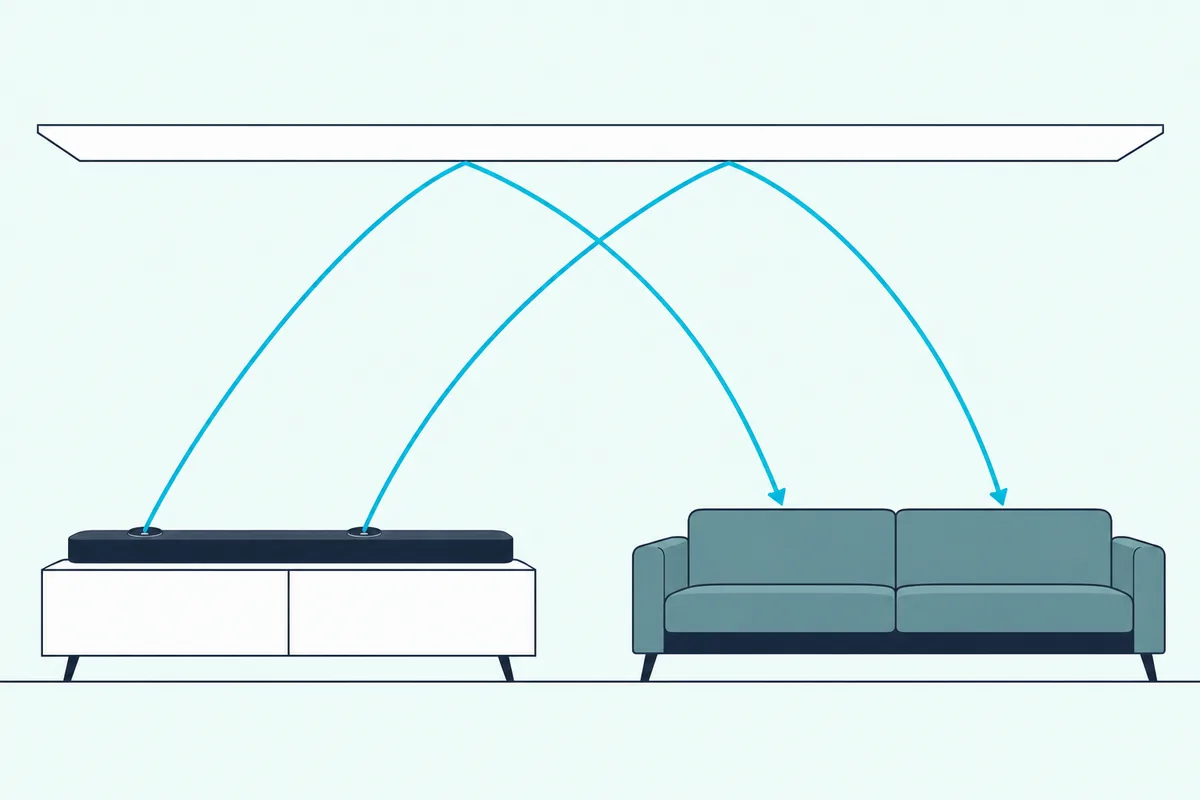
Above the 5.1.2, Vizio’s M-Series pages offered the Elevate, with rotating speakers that project sound off your ceiling. The Elevate P514a-H6 manual lists height speakers in the bar and in both surround speakers.
The page Vizio now sends both bars to, the Elevate SE (SL512X-0806), is also a 5.1.2. Vizio says its adaptive height speakers rotate up automatically when Dolby Atmos or DTS:X content is detected.
Do Both Lines Have Optical, Bluetooth and Wi-Fi?
That height hardware sits on top of nearly identical back panels. Optical and Bluetooth, yes; Wi-Fi, no: the M- and V-Series manuals list an optical input, a 3.5 mm stereo input, a 3.5 mm AUX input for a voice assistant, Bluetooth and a USB port for WAV and MP3 files, and none mentions Wi-Fi or Chromecast.
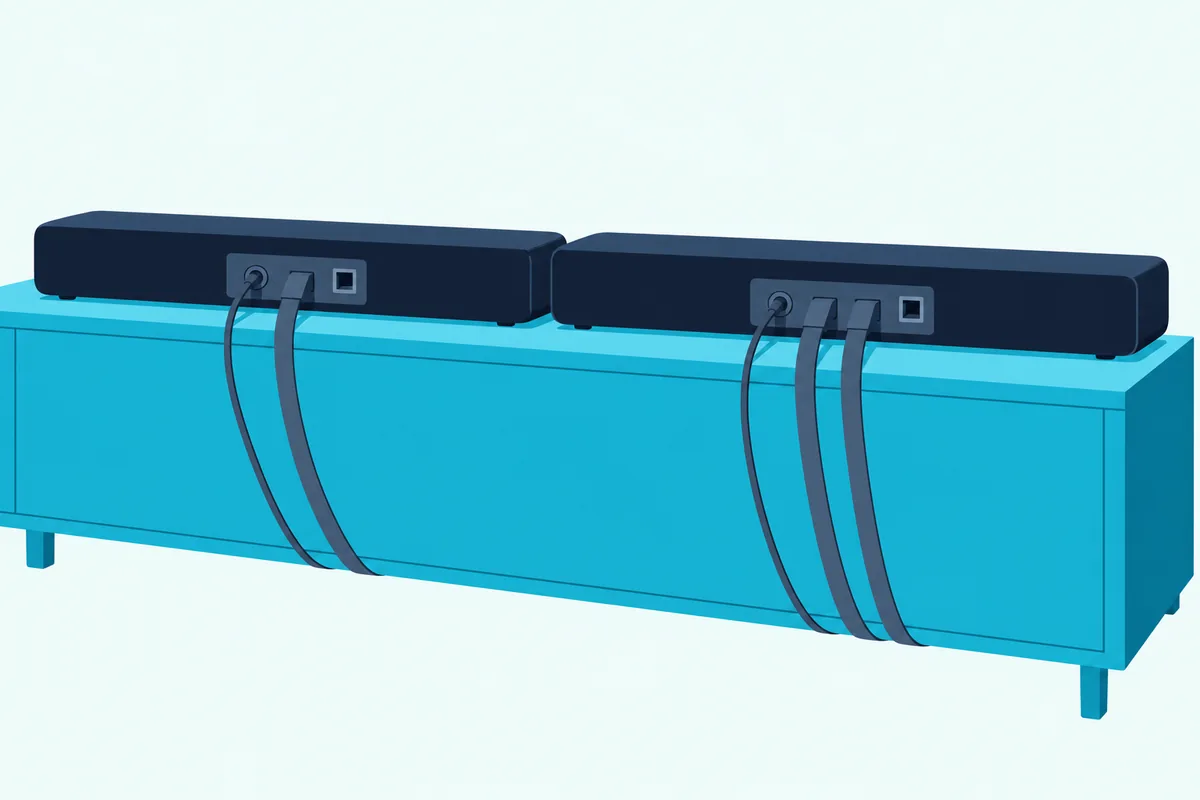
The HDMI ports are where they part. M-Series bars pair an eARC port for the TV with an HDMI In for a source, while the V20x-J8, V21x-J8 and V51x-J6 have one ARC port.
The later V-Series K6 bars dropped HDMI altogether. Vizio’s V214x-K6 and V514x-K6 spec tables show no HDMI input and no ARC, so the TV connects by optical.
Casting only appears one step up: the Elevate P514a-H6, the bar Vizio’s M-Series pages offered above the 5.1.2, is the one whose manual lists Google Chromecast built-in. Everything else in both lines streams from your phone over Bluetooth.
Check your TV before you choose. Vizio’s guides want the HDMI port marked ARC or eARC, and if your TV shows only an optical jack, either line connects by optical.
Do the Remotes and the App Work the Same Way?
Once the cables are in, both lines are run from a remote, not a phone. Yes, mostly: the M51ax-J6 and V51x-J6 manuals show each setting on the remote control’s LCD display, and both let you teach the bar your TV remote’s volume and mute buttons.
Vizio’s pages for the V-Series 2.0 and 2.1 describe a fully-featured remote with comfort grip, and its spec table gives the M213ad-K8 All-in-One a standard remote. None of these manuals sets anything up in an app.
The SV and SL bars flip that. Vizio’s spec tables list Remote: No, and its Core Collection page says the soundbar remote control is sold separately.
Instead, your TV remote handles power and volume over HDMI, and Vizio’s collection pages say the VIZIO mobile app and a Walmart account are required for control of soundbar functionality, settings and system updates. The app pairs with the bar over Bluetooth, and the SV210M-0808 manual says limited audio settings still work from the TV remote if you have no phone.
That split decides where you’ll find the bass and EQ settings. Burton Acoustix’s guide to Vizio bass controls shows where each one lives on the old remotes and in the new app.
Do You Need a Vizio TV for Either Line?
That TV-remote trick works with other brands too, so no. Vizio’s manuals connect both lines to the TV’s HDMI ARC or eARC port or by optical without naming a TV brand, and both can learn your TV remote’s infrared volume and mute buttons.
A Vizio TV adds shortcuts. The M51ax-J6 and V51x-J6 each have a VIZIO TV remote setting that lets a Vizio TV remote turn the bar on and control the volume.
The newer bars go further. Vizio’s Core Collection page says that when one is paired with a Vizio TV, you adjust its settings through the TV’s integrated soundbar menu.
The shared names are easy to mix up, because Vizio also sells M-Series and V-Series TVs. Its M-Series soundbar page pitches the M-Series TV and sound bar as a perfect pairing, but nothing in the bars’ manuals ties a bar line to a TV line.
What Replaced the Vizio M-Series and V-Series?
That integrated menu and the app requirement mark a new generation, and Vizio’s own pages show the handover. On 25 October 2026, the V-Series 2.1 page (V21x-J8) opened Vizio’s SV210M-0808 2.1 Soundbar, the V-Series 5.1 (V51x-J6) and M-Series 5.1 (M51ax-J6) pages both opened the SV510X-0806 5.1 SE Soundbar, and the M-Series 5.1.2 (M512a-H6) and Elevate (P514a-H6) pages opened the SL512X-0806 Elevate SE.
Vizio’s soundbar menu that day had no M-Series or V-Series entry, and the old M-Series and V-Series line addresses opened the store’s soundbar listing. The new bars sit in a Core Collection of 2.0, 2.1 and All-in-One 2.1 models and a Home Theater Collection of 4.1, 5.1 and Elevate models up to 7.1.4 (Vizio’s Home Theater Collection).
Every card on those two pages lists Dolby Atmos and DTS:X, HDMI eARC, Bluetooth 5.2 or 5.3, app control and QuickFit, with a button to buy at Walmart or Sam’s Club. So the old Atmos-or-not split is gone, and what separates the new bars is the layout, the subwoofer and the surround speakers.
What they dropped is the optical input. The SV210M-0808, SV510X-0806 and SL512X-0806 spec tables say Optical: No, and the SV210M-0808 manual tells you to contact Vizio support if your TV requires an optical connection.
QuickFit is Vizio’s tool-free way to fix these bars to the bottom of select Vizio TVs. Our guide shows how to mount a Vizio sound bar with QuickFit or a wall bracket, series by series.
Can You Still Buy a New M-Series or V-Series Bar?
Those old model pages also show what Vizio itself still sells. Not from Vizio: on 25 October 2026 its V20x-J8 page said the requested quantity wasn’t available, and the V514x-K6, M213ad-K8 and M21d-H8R pages each said the product is no longer available.
Amazon still had one that day. A new VIZIO M-Series 2.1 (M215a-J6) listing was in stock, while the V-Series 2.1 and 2.0 listings checked showed “Currently unavailable.”
A renewed SV510X-0806 listing turned up in the same searches. If you want a new bar, check that the title doesn’t say Renewed.
Which One Should You Buy?
So the real choice is between a leftover M-Series bar and one of the SV or SL bars that replaced both lines. If your TV has HDMI eARC and you watch Atmos or DTS:X tracks, buy an M-Series bar while one is still sold new, or an SV or SL bar if you don’t mind buying the remote separately.
For Atmos from one bar and a wireless subwoofer, the VIZIO M-Series 2.1 (M215a-J6) is the M-Series model still listed new on Amazon that day.
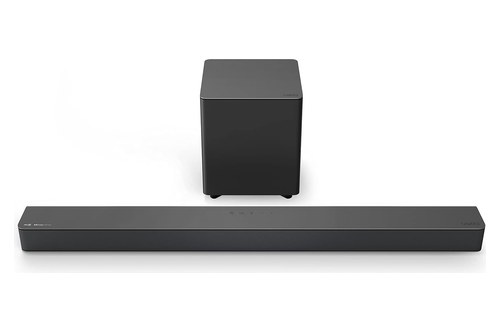
the VIZIO M-Series 2.1 (M215a-J6)
If your TV has only an optical output, stay with the older lines. Every M- and V-Series bar here has an optical input, and the SV and SL bars don’t.
For a small TV in a small room where Atmos doesn’t matter, Vizio pitched the V-Series 2.0 Compact at smaller TVs and small to medium sized rooms. Its Amazon listing was unavailable that day, though.
If height effects are the point, the M512a-H6 is the only bar on those line pages with up-firing drivers. The SL512X-0806 Elevate SE is the bar Vizio now sends that page to.
The Bottom Line
The M-Series is the V-Series plus Dolby Atmos and DTS:X decoding, eARC with an HDMI In, a tweeter per front channel and, on the 5.1.2, up-firing drivers. Both lines are gone from Vizio’s store, and the SV and SL bars that replaced them decode Atmos at every size but drop the optical input and the remote in the box.
Frequently Asked Questions
Is the Vizio V-Series better than the M-Series?
Not on paper. Vizio built the M-Series as its step up: its listing page says “Looking for Dolby Atmos? Check out M-Series,” and the M-Series manuals add DTS:X, an HDMI eARC port, an HDMI In and a tweeter beside each front driver.
The V-Series’s case was size and simplicity, with Vizio pitching the 2.0 Compact at smaller TVs and small to medium sized rooms.
What is the difference between the Vizio V51 and M51?
Both are 5.1 systems with a wireless subwoofer and two surround speakers that plug into the subwoofer. The M51ax-J6 adds Dolby Atmos and DTS:X decoding, an HDMI eARC port plus an HDMI In, and a tweeter beside each front driver, and Vizio lists 9 speakers and 100 dB for it against the V51x-J6’s 6 speakers and 96 dB.
On 25 October 2026, Vizio’s pages for both opened the same SV510X-0806 5.1 SE Soundbar.
Do Vizio’s newer SV soundbars come with a remote?
No. Vizio’s spec tables for the SV210M-0808, SV510X-0806 and SL512X-0806 list Remote: No, and the SV410XW-0905 manual says a soundbar remote can be purchased on vizio.com if you want one.
Your TV remote controls the volume over HDMI, and the VIZIO mobile app, paired over Bluetooth, handles the rest.
Can a Vizio soundbar connect to a TV without HDMI?
The M- and V-Series bars can: every manual and spec table here lists an optical input, and the V214x-K6 and V514x-K6 connect by optical only.
The newer SV and SL bars can’t, since Vizio’s spec tables say Optical: No and its manuals tell you to contact Vizio support if your TV requires an optical connection.