Best 25 Key MIDI Controller Picks for Pads, Keys and DAWs
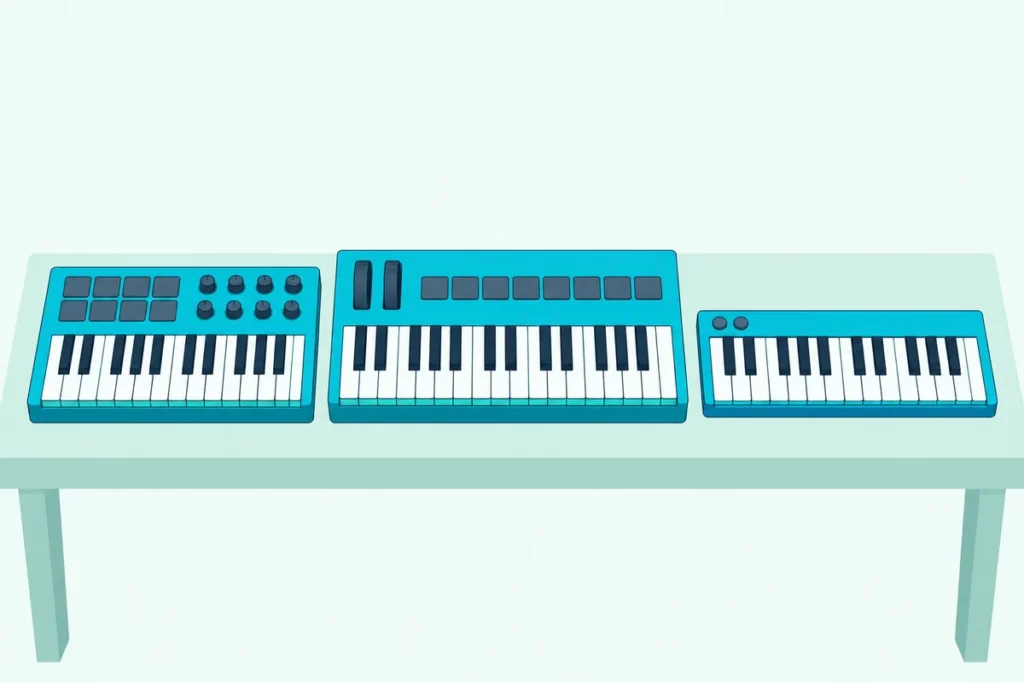
Picking the best 25 key MIDI controller has less to do with the keys than with what sits around them, because every board here gives you the same two octaves to play.
Choose the wrong one and you’re clicking drums into a piano roll, bending notes with a button, or finding no MIDI out on the day you buy a hardware synth.
Choose well and one board narrower than 50 cm handles melodies, chords, drum parts and plugin knobs from a single spot on your desk.
The 11 picks below run from all-in-one boards with pads, knobs and wheels to plain strips of keys, each described from its maker’s own specifications.
Start with the quick answer and the comparison table, then use the sections after the picks to match a board to your DAW, your desk and the way you play.
What Is the Best 25 Key MIDI Controller?
That quick answer comes down to one board that leaves the fewest gaps. The best 25 key MIDI controller for most people is the Akai MPK Mini IV, the only pick here that combines pads, endless knobs, real pitch and mod wheels and a 5-pin MIDI out, per Akai’s MPK mini IV user guide on inMusic’s file server.
The other 10 each win a narrower job, and the table lines all 11 up by what sits beside the keys:
| Pick | Best for | Pads and knobs | Bend control | MIDI out | Weight |
|---|---|---|---|---|---|
| Akai MPK Mini IV | Most people | 8 pads, 8 endless knobs | 2 wheels | 5-pin DIN | 1 kg |
| Novation Launchkey Mini 25 MK4 | Ableton Live | 16 pads, 8 endless encoders | 2 touch strips | 3.5 mm jack | 0.78 kg |
| Arturia MiniLab 3 | Faders and encoders | 8 pads, 8 encoders, 4 faders | 2 touch strips | 5-pin DIN | 1 kg |
| Novation FLkey Mini 25 | FL Studio | 16 pads, 8 endless encoders | 2 touch strips | 3.5 mm jack | 0.78 kg |
| Nektar Impact LX25 mk3 | Many DAWs | 8 pads, 9 encoders | 2 wheels | None listed | 1.9 kg |
| Akai MPK Mini Play MK3 | Built-in sounds | 8 pads, 4 knobs | Thumbstick | None listed | 0.86 kg |
| Korg nanoKEY Studio | Wireless play | 8 pads, 8 knobs, X-Y pad | Pitch/Mod button, X-Y pad | None listed | 471 g |
| Akai MPK Mini MK3 | A smaller Akai | 8 pads, 8 knobs | Thumbstick | None listed | 0.75 kg |
| Korg microKEY-25 | Keys with an arpeggiator | None | Joystick | None listed | 0.65 kg |
| Arturia MicroLab mk3 | Simple keys | None | 2 touch strips | None listed | 0.62 kg |
| Korg nanoKEY2 | The thinnest board | None | Buttons | None listed | 244 g |
Every weight is the maker’s own figure, and Korg’s nanoKEY Studio number leaves out its two AAA batteries. Every linked pick had at least 4.0 stars from 50 or more Amazon reviews and was in stock when checked on 15 October 2026, and prices stay off the page because they change too often.
This guide covers 25-key boards only, with mini or larger keys. If you’d consider 32 keys too, Burton Acoustix’s mini MIDI keyboard picks cover small boards with 25 or 32 keys, and if the board mostly lives in a bag, our list of portable MIDI controllers for travel compares them by battery, cable and weight.
| Product | Size | Link |
|---|---|---|
Best Overall 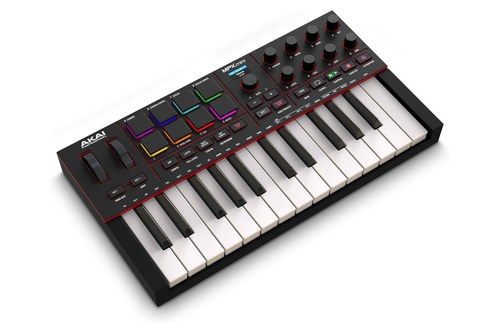 | 8 inch | See ratings |
Best for Ableton Live 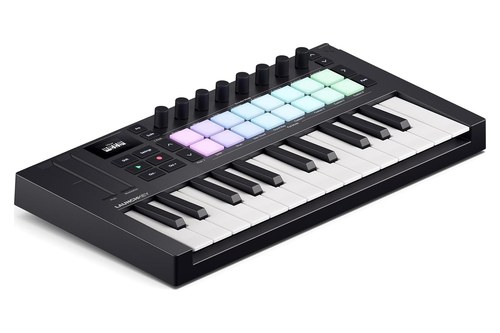 | — | See ratings |
Most Hands-On Controls 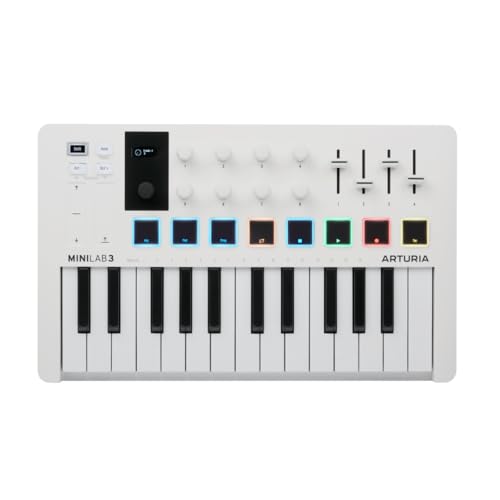 | 8 inch | See ratings |
Best for FL Studio 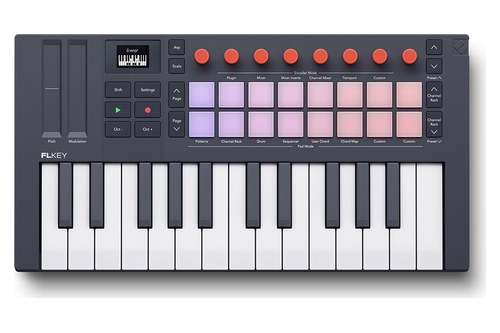 | — | See ratings |
Best for Wide DAW Support 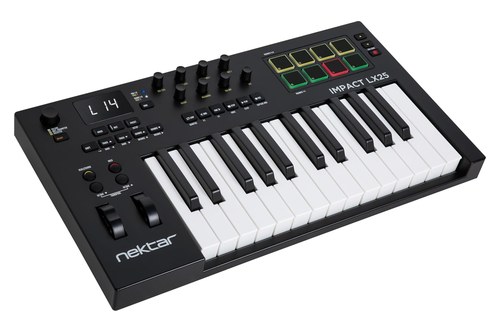 | — | See ratings |
Best With Built-In Sounds 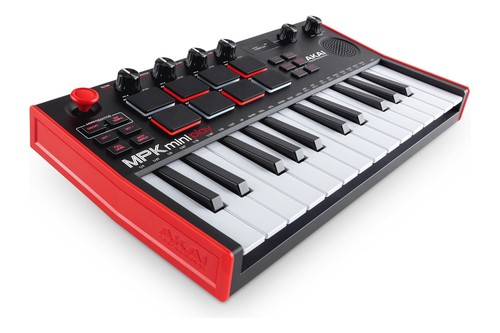 | 8 inch | See ratings |
Best Wireless 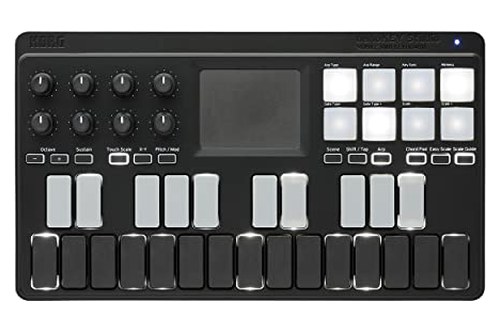 | — | See ratings |
Best Smaller All-in-One 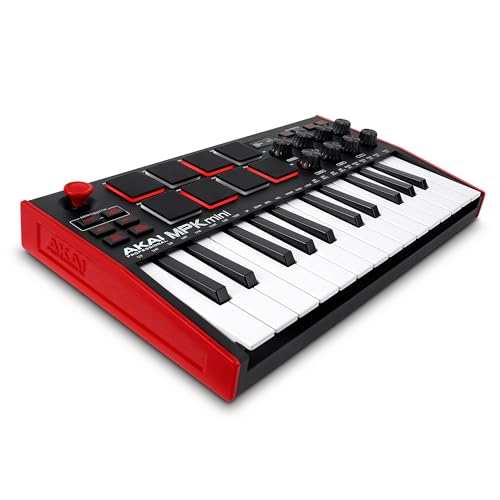 | 8 inch | See ratings |
Which 25 Key MIDI Keyboards Made the List?
Those 11 rows are the short version, and the write-ups below take each board in the same order. The 25 key MIDI keyboards that made the list in October 2026 are eight all-in-ones with pads, one of them with its own speaker, and three keys-first boards for people who program drums some other way.
Each ‘best for’ label is a reading of the maker’s specifications rather than a verdict on feel, for the reasons the section after the picks explains.
Akai MPK Mini IV
If you want one 25-key board that drums, plays chords, mixes and drives a hardware synth, the Akai MPK Mini IV covers all four.
the Akai MPK Mini IV
Akai lists eight RGB pads that answer to both velocity and pressure, eight endless knobs plus a push encoder, and proper pitch and modulation wheels beside 25 velocity-sensitive keys. The keys shift four octaves up or down, and a keyboard curve setting of Light, Norm or Heavy changes how hard you have to play to reach full velocity.
A 0.96-inch color screen and a Plugin/DAW button tie it to Akai’s Studio Instrument Collection, which bundles sounds from Akai Professional, AIR Music Technology and Moog. Control scripts cover Ableton Live 11 and 12, FL Studio, Logic Pro, GarageBand and Cubase.
The rear panel carries USB-C, a 1/4-inch sustain input and a 5-pin MIDI out whose source you set in the Global Menu. Chords and Scales modes, an arpeggiator with a Pattern mode that stores up to 16 patterns, Note Repeat and transport buttons round it out in a 34.7 x 19.2 x 3.7 cm body.
Novation Launchkey Mini 25 MK4
For Ableton Live users who launch clips as often as they play notes, the Novation Launchkey Mini 25 MK4 is the pick.
the Novation Launchkey Mini 25 MK4
Novation’s Launchkey Mini 25 page lists 16 RGB pads with velocity and polyphonic aftertouch, eight endless encoders, pitch and mod touch strips and a 128 x 64 OLED screen over 25 synth-style mini keys. In Ableton Live it adds built-in Sequencer, Drum Rack and Clip modes, and custom scripts also cover Logic, Cubase, Reason Studios, FL Studio and Ardour, with HUI for other DAWs.
Scale Mode holds 30 scales, three chord modes (Chord Map, Fixed Chord and User Chord) build progressions, and the generative arpeggiator has an 8-step editor with tie, accent and ratchet. The bundle includes Ableton Live Lite, Cubase LE, Novation Play and Komplete 15 Select.
Connections are USB-C, a 1/4-inch sustain jack and a 3.5 mm MIDI out jack. It runs on USB bus power and measures 338.5 x 176.8 x 49 mm at 0.78 kg.
Arturia MiniLab 3
If faders matter, the Arturia MiniLab 3 is the only pick here that has them, four beside eight encoders and eight pads.
the Arturia MiniLab 3
Arturia’s MiniLab 3 page lists two banks of eight velocity- and pressure-sensitive RGB pads, eight rotary encoders, four sliders, two capacitive touch strips for bend and modulation, and a mini display with a clickable browse knob. The 25 slim keys are velocity-sensitive, and an arpeggiator that locks to your project tempo sits beside Chord and Hold modes.
Custom scripts cover Ableton Live, Logic Pro, Cubase, FL Studio and Bitwig, with MCU and HUI for other DAWs and NKS support for Native Instruments’ Komplete Kontrol. The box adds Analog Lab Intro, Ableton Live Lite, a Komplete 15 Select bundle, two months of Loopcloud and a Melodics trial.
Its connections are USB-C, which works with computers and iPad, a 5-pin MIDI out that doubles as a MIDI thru, and a pedal input for sustain, expression or a footswitch. Arturia lists it at 1 kg, made with at least 50% recycled plastic and covered by a five-year warranty.
Novation FLkey Mini 25
For FL Studio, the Novation FLkey Mini 25 is the board Image-Line officially supports, and Novation calls FLkey the only keyboard controller made for FL Studio.
the Novation FLkey Mini 25
Novation’s FLkey Mini 25 page says its 16 velocity-sensitive RGB pads step-sequence the Channel Rack and play FPC, Slicex or Fruity Slicer, while eight endless encoders map automatically to the mixer, the Channel Rack and plugins. The keys are 25 synth-style mini keys with pitch and mod touch strips, and the custom scripts need FL Studio 26.1.1 or later.
Scale Mode with 30 scales, three chord modes and an arpeggiator with a step editor come built in, along with Play/Stop and Record buttons and a 128 x 64 OLED screen. Outside FL Studio it works through Mackie HUI, and a 3.5 mm MIDI out sends notes to hardware synths.
The bundle includes six months of FL Studio Producer Edition, Novation Play, four GForce synths and a Komplete Select edition, and the body matches the Launchkey Mini’s 338.5 x 176.8 x 49 mm and 0.78 kg. Novation’s page titles this model the FLkey Mini 25 MK2, the current FLkey in its range.
Nektar Impact LX25 mk3
If you work in Bitwig, Reaper or Studio One as well as the better-known DAWs, the Nektar Impact LX25 mk3 has the longest list of supported DAWs of any pick here.
the Nektar Impact LX25 mk3
Nektar’s Impact LX mk3 page names custom integration for Ableton Live Suite, Bitwig Studio, Cakewalk/Sonar, Cubase, FL Studio, GarageBand, Nuendo, Logic Pro, Reason, Reaper and Fender Studio Pro/Studio One, with NKS control for Native Instruments plugins on top. The 25 velocity-sensitive keys sit beside real pitch bend and modulation wheels, eight velocity-sensitive pads with eight pad maps, and one large encoder plus eight regular ones.
Scale, Chord and Hold modes are built in, and Nektar’s manual lists four velocity curves and three fixed velocities for the keys. The octave buttons double as a transpose of up to 12 semitones either way, a 1/4-inch footswitch jack handles sustain, and USB-C carries power and data.
Nektar’s table shows no MIDI output socket on the 25-key model, and at 48 x 27 x 7 cm and 1.9 kg it’s the widest and heaviest board on this list. The bundle includes Komplete Select 15, Bitwig Studio 8-Track and MOK’s Miniraze synth.
Akai MPK Mini Play MK3
If you want to hear something without opening a laptop, the Akai MPK Mini Play MK3 is the only pick with its own sounds and speaker.
the Akai MPK Mini Play MK3
Akai’s MPK mini Play mk3 user guide, also on inMusic’s server, lists 128 Keys programs and 10 drum kits, picked with a selector knob and shown on a small screen, plus eight Favorites that each store a keys sound, a drum kit and the effect knob settings. The speaker switches off when headphones are plugged in, and four AA batteries or a USB connection power the board.
As a controller it has 25 velocity-sensitive keys, eight velocity-sensitive pads in two banks, a 4-axis thumbstick for pitch bend or CC messages, four assignable knobs, an arpeggiator, Tap Tempo, Note Repeat and Full Level. Those four knobs double as filter, attack, resonance, release, reverb, chorus and EQ controls for the internal sounds.
The rear panel has a USB port, a headphone output and a sustain input but no MIDI out, and the board measures 317 x 178 x 58 mm at 0.86 kg. Akai’s setup steps cover MPC Beats, GarageBand and other DAWs, and the guide suggests switching the internal sounds off so they don’t play on top of your software.
Korg nanoKEY Studio
For playing without a cable, the Korg nanoKEY Studio is the only pick with Bluetooth MIDI.
the Korg nanoKEY Studio
Korg’s nanoKEY Studio specifications list 25 velocity-sensitive keys with four velocity curves, eight velocity-sensitive trigger pads, eight knobs and an X-Y pad, plus Arp, Chord Pad, Easy Scale, Scale Guide and Touch Scale buttons. The keys light up to show the notes of a chosen scale, and the octave buttons reach four octaves either way.
Wirelessly it runs on two AAA batteries for about 10 hours on alkaline cells, by Korg’s figure, and pairs with an iPad or iPhone that has Bluetooth 4.0 and iOS 8 or later, a Mac, or a Windows PC through Korg’s BLE-MIDI driver. Plugged into its micro-B USB port, it takes bus power instead.
KORG Gadget has a native mode for it, and the KORG Software Bundle code in the box adds apps and plugins. At 278 x 160 x 33 mm and 471 g without batteries, it’s the narrowest board here, with a sustain button rather than a pedal jack.
Akai MPK Mini MK3
The board the old version of this page put first, the Akai MPK Mini MK3, is still sold and still makes sense if you want Akai’s pads in a lighter, narrower body than the IV.
the Akai MPK Mini MK3
Akai’s MPK mini mk3 quickstart guide, in the copy zZounds hosts, lists 25 velocity-sensitive keys, eight backlit pads that sense velocity and pressure in two banks, eight assignable 360-degree knobs and a 4-axis thumbstick that bends pitch side to side and adds modulation up and down. Akai’s own product page calls the keybed its Gen 2 enhanced dynamic keybed and names MPC3 among the included software.
The pads can send notes, CC messages or program changes, and Note Repeat, Full Level, Tap Tempo and an arpeggiator sit beside them. Connections stop at one USB port and a 1/4-inch sustain input, so there’s no MIDI out for hardware.
At 31.8 x 18.1 x 4.4 cm and 0.75 kg it’s 2.9 cm narrower and 250 g lighter than the MPK Mini IV, by Akai’s figures. The IV adds wheels and a MIDI out, and the MK3 quickstart lists no chord or scale mode, so choose the MK3 when size and weight matter more than those extras.
Korg microKEY-25
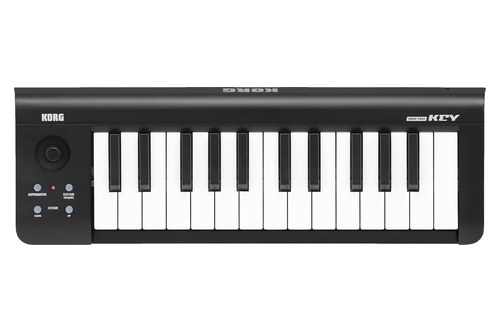
If you mostly play parts in and want more than a strip of buttons, the Korg microKEY-25 keeps things to keys, a joystick and an arpeggiator.
the Korg microKEY-25
Korg’s microKEY2 specifications describe a Natural Touch mini keyboard with a joystick for pitch bend and modulation, an arpeggiator button and a Sustain/TAP button in place of a pedal jack. Octave Shift reaches four octaves either way, and with the key transpose function it covers MIDI’s whole note range.
It’s USB bus-powered, draws under 100 mA and needs no driver on a Mac or Windows PC, and Korg’s KONTROL Editor software fine-tunes its velocity curve. An iPad or iPhone connects through Apple’s Lightning to USB camera adapter, sold separately.
The 25-key model measures 395 x 131 x 52 mm and weighs 0.65 kg. The box adds a USB cable and a KORG Software Bundle code.
Arturia MicroLab mk3
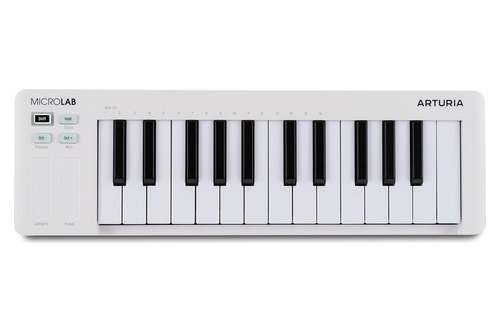
For plain note entry with a little expression, the Arturia MicroLab mk3 pairs 25 slim keys with two touch strips and not much else.
the Arturia MicroLab mk3
Arturia’s MicroLab mk3 page describes a velocity-sensitive two-octave keybed, touch strips for pitch bend and modulation that also browse sounds, and four control buttons for octave shift, Chord Mode, Hold and preset navigation. It takes a sustain or expression pedal, and its USB-C port carries power and MIDI.
It’s class-compliant, with a multi-client driver for Windows, and Arturia says it works with iPads and Android devices through an adapter. The bundle is Analog Lab Intro, with 500 sounds, and Ableton Live Lite.
At 406 x 125 x 39 mm and 0.62 kg it’s the third-lightest board here, though it’s wider than every pad board except the Nektar.
Korg nanoKEY2
When desk space is tight, the Korg nanoKEY2 is the thinnest and lightest pick at 16 mm and 244 g.
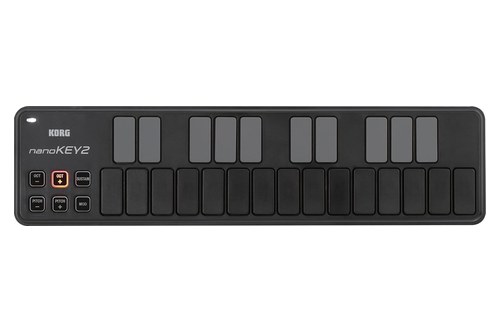
the Korg nanoKEY2
Korg describes a low-profile build borrowed from computer keyboards, with keys spaced to cut wrong notes, and its nanoKEY2 specifications add pitch bend buttons, a modulation button, a sustain button and octave buttons that shift four steps either way. Korg’s free Kontrol Editor offers three velocity curves or a fixed velocity and sets what the mod and sustain buttons send.
It connects over mini-USB with bus power. Korg says it can work with an iPad through Apple’s Camera Connection Kit, without guaranteeing it, and suggests a powered USB hub for long sessions.
The box holds the keyboard, a USB cable and Korg’s software licenses. At 325 x 83 x 16 mm, it’s also the shallowest board on this list.
Get Studio Tips Weekly
Join 5,000+ creators getting acoustic treatment advice every week.
No spam. Unsubscribe anytime.How Were These 25-Key Controllers Picked?
Those 11 write-ups all lean on the same evidence, so here’s what went into them. Every pick is a 25-key controller whose maker publishes its specifications, saved between 6 and 15 October 2026 and linked in the write-ups, and none was played or measured for this guide.
On Amazon, each card had to show at least 4.0 stars from 50 or more reviews and be in stock on the day it was checked. Ratings, review counts and prices stay off the page, so the buttons send you to Amazon to see them.
Models with mini keys at other counts, such as 32 or 37, belong to other guides, and so do boards whose maker documentation couldn’t be read. The ‘best for’ labels come from what each maker lists, so a board can be the right one for you even if its label names a different job.
That approach answers a narrower question than a review of key feel would. It tells you what each board has and how it connects, which is where the mix-ups in the intro happen, and leaves feel to a store visit or a return window.
Should You Choose Keys-Only or an All-In-One Controller?
That split between eight pad boards and three keys-first boards is the first decision to make at this size. Choose an all-in-one if you make beats, want knobs for synth and mixer moves, or need one device to do everything, and choose keys-only if you already own a pad controller or only enter notes.
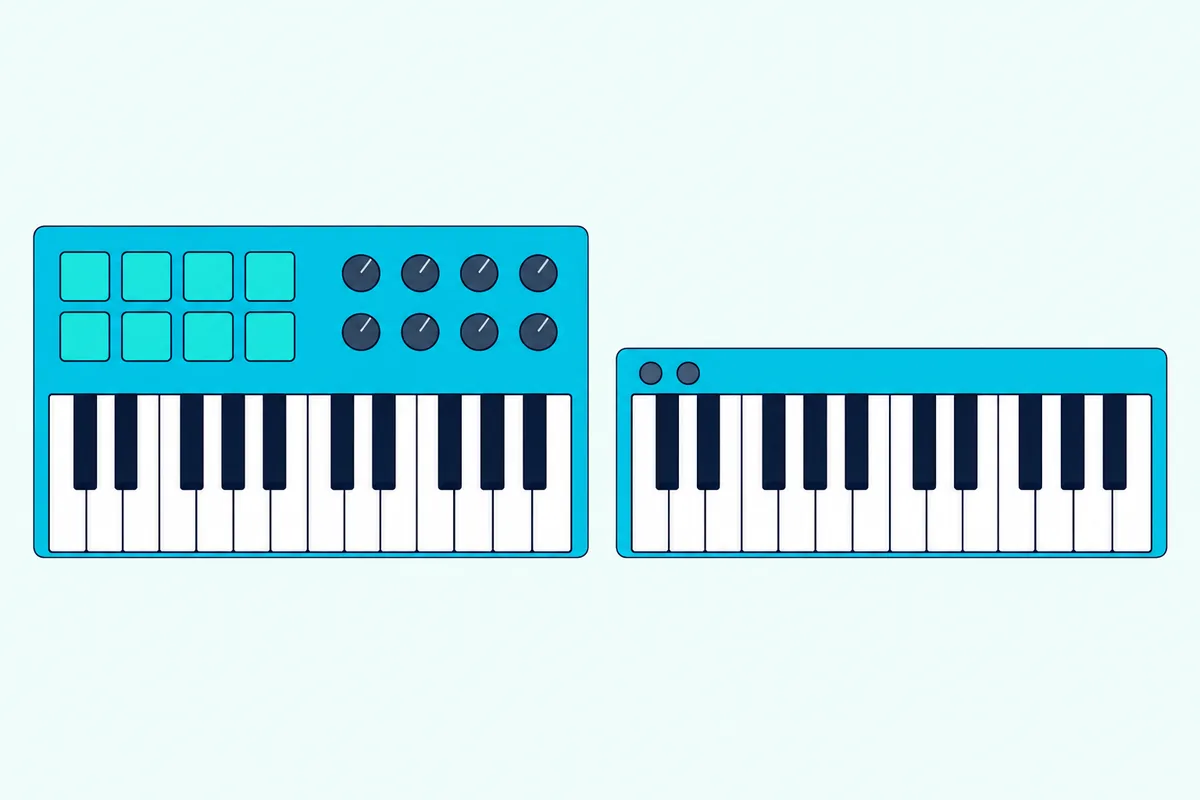
The all-in-ones put eight or 16 pads and four to nine knobs or encoders beside the keys, so drums, chords and plugin changes come from one board and one USB cable. Pad counts split two ways: the Launchkey Mini 25 MK4 and FLkey Mini 25 have 16, and the other six have eight, with two banks on the MiniLab 3 and the three Akai boards.
Keys-first boards drop the pads and most of the knobs. The microKEY-25 keeps a joystick and an arpeggiator, the MicroLab mk3 keeps two touch strips and a pedal input, and the nanoKEY2 keeps buttons for bend, modulation and sustain.
Picture a guitarist adding keyboard parts to demos. The MicroLab mk3’s touch strips and pedal input cover held chords and bends, and the drums can come from loops or a drum plugin, so pads would mostly sit unused.
A simple test helps: open your last project and count how many drum and percussion parts you clicked in with a mouse. If it’s more than one or two, pads will pay for the space they take; if it’s none, a keys-first board leaves more room on the desk.
An all-in-one also makes sense as a first and only controller for beginners who don’t own any MIDI hardware yet. One purchase covers keys, drum pads and knobs, and the Arturia, Akai and Novation all-in-ones each come with software to start on.
A keys-only 25 works well as a second board, too. Keep a 49-key board at the desk for two-handed parts and a light 25 in your bag, and route both to the same DAW.
Can You Get a 25-Key MIDI Controller With Full-Size Keys?
Those keys-first boards and the all-in-ones above share one more trait: none of their makers calls the keys full-size. Yes, full-size 25-key controllers exist, but none made this list on 15 October 2026, and the two documented on makers’ pages read for this guide each missed a check.
Novation’s Launchkey range table lists the Launchkey 25 MK4 with full-size, synth-action keys, against the mini keys of the Launchkey Mini 25 MK4. It’s 461 x 251 x 79 mm and 1.8 kg, so the full-size model is 122.5 mm wider and more than twice as heavy, and Novation gives it real pitch and mod wheels and a 5-pin MIDI out.
When checked on 15 October, its Amazon listing had fewer than the 50 reviews this site requires before a product gets a card. Alesis lists its V25 MKII with 25 full-size, velocity-sensitive, synth-action keys, eight pads and four knobs, but no Amazon listing for it turned up in two searches that day.
The Nektar Impact LX25 mk3 is the widest pick here at 48 cm, yet Nektar lists its key type only as ‘Synth’ and gives no key size. Its width tells you about the whole panel, not the keys, so treat it as a board with big controls rather than as a confirmed full-size keyboard.
Desk space is the other half of this choice. Measure the gap you have: the full-size Launchkey 25 needs 461 mm by 251 mm, while the Launchkey Mini 25 fits in 338.5 mm by 176.8 mm.
Do Any 25-Key Controllers Have Weighted Keys?
That size question leads straight to key action, the other thing people search for with 25 keys. No pick on this list has weighted or semi-weighted keys by its maker’s description: Novation calls its 25-key boards synth-action, Nektar lists ‘Synth’ for the LX25 mk3, Arturia calls its keys slim, and Korg calls the microKEY’s keys Natural Touch mini keys.
Semi-weighted action shows up only on bigger boards in the ranges checked. Novation lists semi-weighted keys from the Launchkey 49 and FLkey 49 upward, and Nektar lists them only on the 88-key Impact LX88 mk3.
Marketing language can blur this. Akai’s MPK Mini MK3 page says its Gen 2 keybed delivers ‘a piano key performance’, but it doesn’t call the keys weighted, and neither does any other maker of a 25-key pick here.
If piano feel matters more than size, weighted MIDI keyboards start where 25-key boards stop. Two octaves won’t hold a pianist’s two hands anyway, so the extra keys and the heavier action tend to come together.
What you can adjust on a 25 is the velocity response. Akai’s MPK Mini IV offers Light, Norm and Heavy key curves, Nektar’s LX25 mk3 four curves and three fixed values, Korg’s nanoKEY Studio four curves and the nanoKEY2 three curves or a fixed velocity, which helps if every note comes out too loud or too soft.
Is There a 25-Key Keyboard With Built-In Sounds?
Those velocity settings shape MIDI data, but most of these boards still need something else to turn it into sound. Yes: the Akai MPK Mini Play MK3 is the one 25-key pick with built-in sounds, 128 Keys programs and 10 drum kits through its own speaker or headphone output, on USB power or four AA batteries.
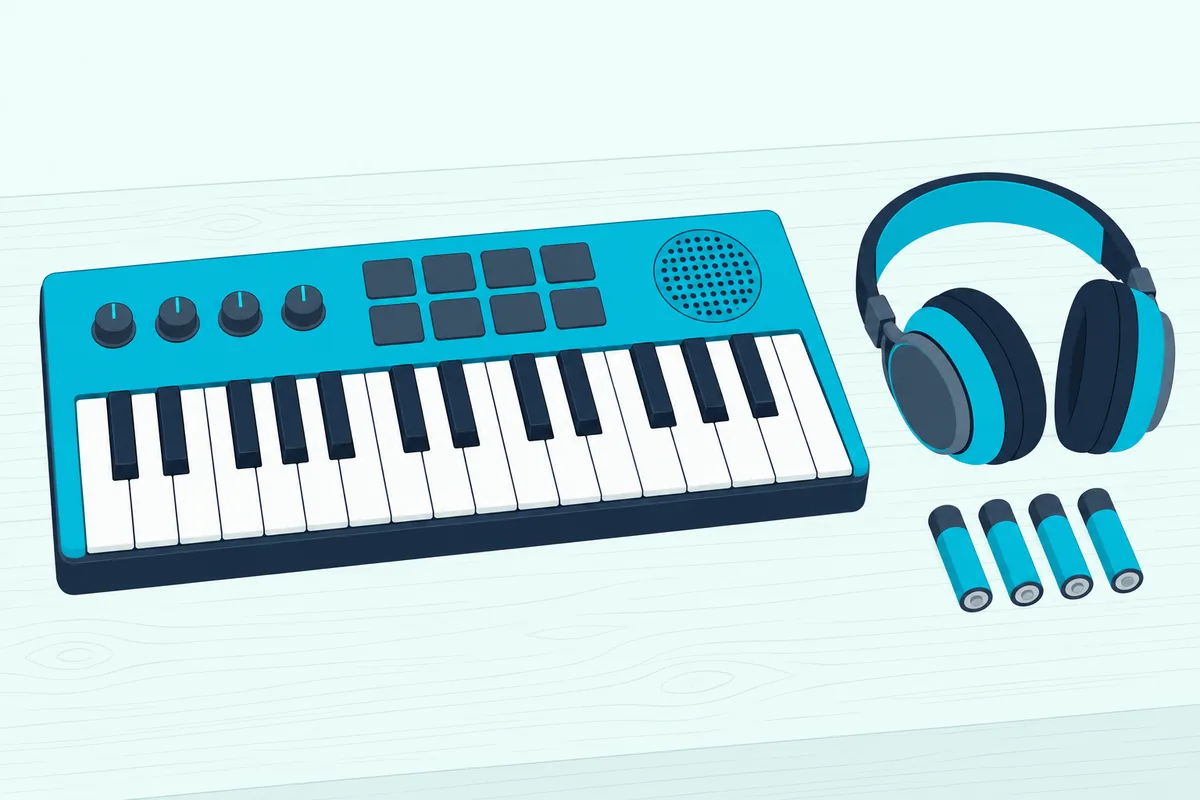
None of the other 10 makers lists internal sounds, so those boards need a computer, an iPad or a synth to turn their MIDI into sound. If that surprises you, here’s why most MIDI controllers make no sound on their own and what fills the gap.
Akai’s Play MK3 keeps its controller side intact, so the same keys and pads can drive MPC Beats, GarageBand or another DAW over USB. Akai suggests turning the internal sounds off for that, so you don’t hear the board’s sound on top of your software’s.
The same guide shows what it gives up: no MIDI out, four knobs instead of eight and a thumbstick instead of wheels. At 317 x 178 x 58 mm, it’s also the tallest pick after the Nektar.
A quick scenario shows where it fits: you’re on the couch with headphones, sketching a chord progression for later. The Play MK3 needs nothing else for that, while every other pick here needs a laptop, a tablet or a synth before it makes a sound.
How Far Can a Two-Octave Keyboard Reach?
Built-in sounds or not, every one of these boards gives you the same two octaves at a time. Twenty-five keys make two full octaves plus one note, and the octave buttons slide that window up or down, four octaves either way on the Akai and Korg boards, which Akai describes as a ten-octave range.
Shifting has limits you’ll feel mid-part. Pressing an octave button between phrases works fine for bass lines and leads, but a part that spans more than two octaves at once, such as a left-hand bass note under a right-hand chord, won’t fit under your hands.
Chord and scale modes stretch what two octaves can do. The MPK Mini IV’s Chords mode turns one key into a triad or seventh chord, the Launchkey and FLkey minis add Chord Map, Fixed Chord and User Chord, the MiniLab 3, MicroLab mk3 and LX25 mk3 have chord modes, and the nanoKEY Studio’s Chord Pad puts chords on its pads.
Arpeggiators help as well. The MPK Mini Play MK3’s arpeggiator spans one to four octaves from the keys you hold, so a two-octave board can play a pattern well beyond its own range.
Here’s a test before you buy: open a MIDI clip you played and look at the lowest and highest notes. If most of your parts fit inside 25 keys, a 25 will do; if they don’t, read how many keys you need on a MIDI keyboard, which compares 25, 49, 61 and 88 keys.
If you keep running out of room, the next sizes up are a 49-key controller or a 61-key controller. You can keep the 25 as well, and our page on using two controllers together explains how the computer handles both.
Which DAW Does Each 25-Key Controller Suit Best?
That octave math is the same on every board, but the software side isn’t. The DAW decides more than the keys do: Novation’s FLkey Mini 25 for FL Studio, its Launchkey Mini 25 MK4 for Ableton Live, and the Nektar LX25 mk3 when you work across several DAWs.
The FLkey is the clearest match. Novation’s scripts need FL Studio 26.1.1 or later, the pads step-sequence the Channel Rack, and the knobs map to the mixer and plugins without setup.
If you switch between DAWs, say FL Studio for beats and Logic Pro for songs, the FLkey’s custom scripts cover only the first. The MPK Mini IV, Launchkey Mini, MiniLab 3 and LX25 mk3 all list scripts for both.
Ableton Live users get the most from the Launchkey Mini, with Sequencer, Drum Rack and Clip modes, though the MPK Mini IV, MiniLab 3 and LX25 mk3 also list Ableton Live support. For Logic Pro, the same four list support, and our guide to MIDI controllers for Logic Pro goes deeper.
Nektar covers the longest list, adding Bitwig Studio, Cakewalk/Sonar, Nuendo, Reason, Reaper and Fender Studio Pro/Studio One to the big names. Akai’s boards lean toward its own ecosystem: the MPK Mini IV’s Studio Instrument Collection, MPC3 on the MK3, and MPC Beats setup steps in the Play MK3’s guide.
The keys-first boards work as plain MIDI keyboards in any DAW that takes MIDI input. Korg says the microKEY needs no driver on a Mac or Windows PC, and Arturia calls the MicroLab mk3 class-compliant.
Bundles differ as well, and they matter if you don’t own a DAW yet. The MiniLab 3, MicroLab mk3 and Launchkey Mini include Ableton Live Lite, the FLkey six months of FL Studio Producer Edition, and the LX25 mk3 Bitwig Studio 8-Track, and our guide to free and paid software covers the rest.
Can a 25-Key Controller Play an iPad, a Synth or Go Wireless?
Those DAW scripts assume a computer, but four picks can also drive hardware directly. The MPK Mini IV and MiniLab 3 have 5-pin MIDI outs, the Launchkey Mini 25 MK4 and FLkey Mini 25 have 3.5 mm MIDI out jacks, and only the nanoKEY Studio connects by Bluetooth.
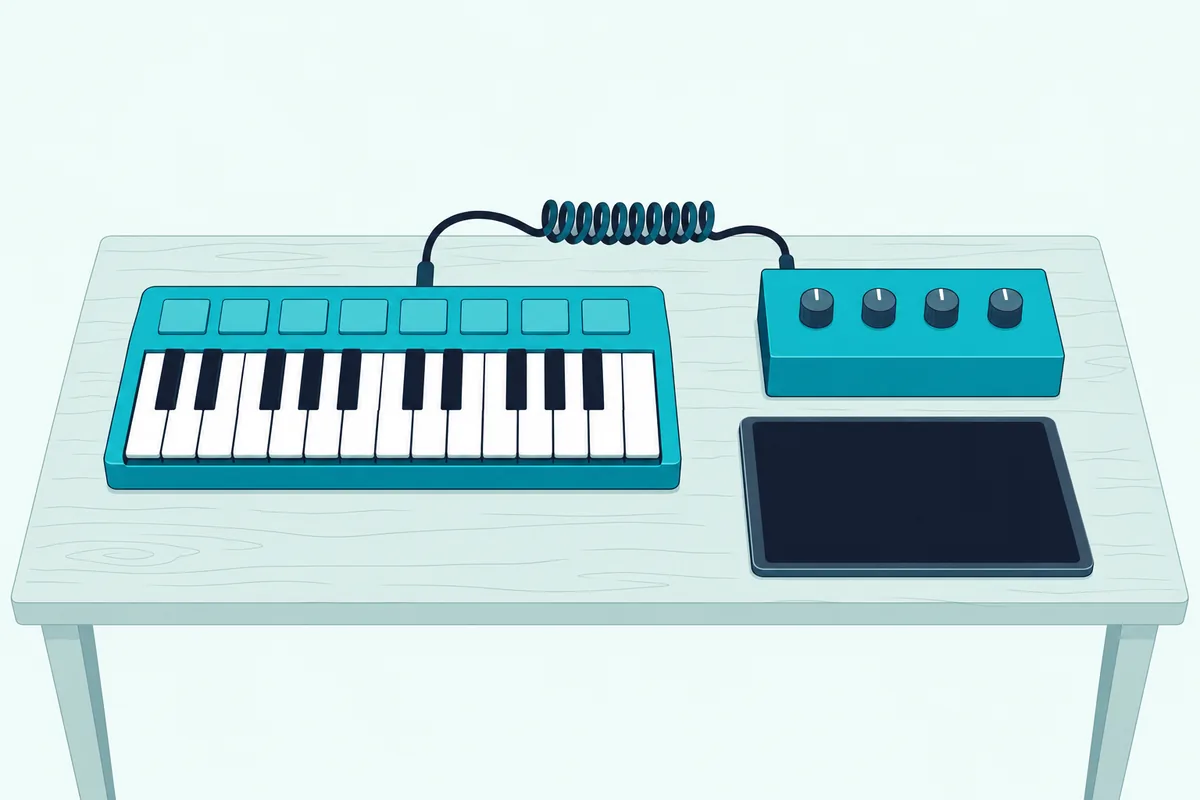
A 5-pin out takes a standard MIDI cable to a synth’s MIDI in. To reach a 5-pin MIDI in, the 3.5 mm jacks on the two Novation boards need a 3.5 mm-to-DIN adapter cable, and Novation’s box lists only the keyboard and a USB cable.
Pedal inputs and power differ just as much, so here’s how all 11 connect, as each maker lists them:
| Pick | MIDI out | Pedal input | Power |
|---|---|---|---|
| Akai MPK Mini IV | 5-pin DIN | 1/4-inch sustain | USB-C bus power or 5 V adapter |
| Novation Launchkey Mini 25 MK4 | 3.5 mm jack | 1/4-inch sustain | USB-C bus power |
| Arturia MiniLab 3 | 5-pin DIN | Sustain, expression or footswitch | USB-C bus power |
| Novation FLkey Mini 25 | 3.5 mm jack | 1/4-inch sustain | USB-C bus power |
| Nektar Impact LX25 mk3 | None listed | 1/4-inch footswitch | USB-C |
| Akai MPK Mini Play MK3 | None listed | Sustain | USB or 4 AA batteries |
| Korg nanoKEY Studio | None listed | None, sustain button | Micro-B USB or 2 AAA batteries |
| Akai MPK Mini MK3 | None listed | 1/4-inch sustain | USB bus power |
| Korg microKEY-25 | None listed | None, Sustain/TAP button | USB bus power |
| Arturia MicroLab mk3 | None listed | Sustain or expression | USB-C bus power |
| Korg nanoKEY2 | None listed | None, sustain button | Mini-USB bus power |
The three Korg boards have a sustain button instead of a pedal jack, so a sustain pedal only works with the other eight. Only the Akai MPK Mini IV lists an optional wall adapter, and only the MPK Mini Play MK3 and nanoKEY Studio run on batteries.
For an iPad, Apple’s iPad USB-C accessories page says MIDI devices plug into the iPad’s USB-C port, and a USB-A device goes through Apple’s USB-C to USB adapter. Arturia says the MiniLab 3 connects to iPad, the MicroLab mk3 works with iPads through an adapter, and Korg describes the microKEY-25 and nanoKEY2 with Apple’s camera adapters.
Power is the catch with an iPad. Nektar’s LX25 mk3 has a Low Power Mode for running from an iPad, which turns the pad lights off, and Korg suggests a powered USB hub for the nanoKEY2 during long sessions.
Bluetooth leaves the nanoKEY Studio as the only cable-free pick. Korg rates it at about 10 hours on two AAA alkaline batteries, and its Bluetooth MIDI Connect apps pair it with apps that don’t support Bluetooth MIDI themselves.
Why Didn’t the Nektar SE25 and Other 25-Key Boards Make the List?
Those 11 aren’t the only 25-key boards you’ll see recommended, and several familiar names fell at the product checks. The Nektar SE25, the old page’s budget pick, showed no offer on its Amazon listing on 14 and 15 October, and Nektar’s SE25 page lists it at 0.4 kg, not the 1.3 pounds the old page gave.
The M-VAVE 25, the old page’s Bluetooth pick, came out because its listing names no model. M-VAVE sells an SMK25 it calls full-size and an SMK25 Mini with mini keys, and the listing’s ‘semi weighted’ claim appears in neither M-VAVE’s product list nor its SMK-25 manual.
Nektar’s Impact LX25+, listed by two of the competing guides, had no offer on 15 October, and the LX25 mk3 above is the 25-key Impact on Nektar’s current Impact LX page. Novation’s first-generation FLkey Mini, the old page’s FL Studio pick, gave way to the FLkey Mini 25 that Novation’s range lists now.
Akai’s LPK25 and APC Key 25 MK2 both passed the Amazon checks, but no readable copy of Akai’s own documentation turned up for either, so neither is described here from retailer text. The Launchkey 25 MK4 and Alesis V25 MKII are covered in the full-size section above.
The old page also carried a 32-key midiplus AKM320 and a 49-key M-Audio Keystation 49 MK3. Those sizes belong to the mini MIDI keyboard and 49-key guides linked above.
The Bottom Line
All 11 picks still come back to the question the intro opened with: what sits around the two octaves. The Akai MPK Mini IV leaves the fewest gaps, the FLkey Mini 25 and Launchkey Mini 25 MK4 fit FL Studio and Ableton Live, the MiniLab 3 adds faders, and the Nektar LX25 mk3 covers the most DAWs with real wheels.
For sound without a computer, the MPK Mini Play MK3 is the only one, and for no cable at all, the nanoKEY Studio. If you only need notes, the microKEY-25, MicroLab mk3 and nanoKEY2 do that at 244 g to 0.65 kg, so check the MIDI out, the bend control and the width against your setup before anything else.
Frequently Asked Questions
How many octaves does a 25-key MIDI controller cover?
Two octaves plus one note, since an octave spans 12 keys. Octave buttons move that window, four octaves up or down on Akai’s MPK Minis and Korg’s nanoKEY2, microKEY-25 and nanoKEY Studio, which Akai describes as a ten-octave range for the MPK Mini MK3. Nektar’s LX25 mk3 also transposes by up to 12 semitones, and Arturia’s MiniLab 3 and MicroLab mk3 shift by semitones as well as octaves, so a part in any key can sit under your hands.
Do 25-key MIDI controllers need a power supply?
Not usually. All 11 picks run on USB bus power from the computer, and Novation lists the Launchkey Mini 25 MK4 and FLkey Mini 25 as bus-powered with no power supply included. Akai’s MPK Mini IV can also use a 5 V, 0.5 A wall adapter, sold separately, which Akai says is useful when it’s working with other MIDI gear. The MPK Mini Play MK3 takes four AA batteries and the nanoKEY Studio two AAA batteries for wireless use. If you go through a USB hub, Akai and Nektar both recommend a powered one.
Can I learn piano on a 25-key MIDI controller?
You can learn note names, simple melodies and one-handed parts, but two octaves can’t hold most piano music written for two hands. None of the 11 picks lists weighted or semi-weighted keys, either, so don’t expect a piano’s touch. For lessons, a larger keyboard with fuller keys is the better start, and a 25 makes a good second board for sketching ideas. Arturia bundles Melodics lessons with the MiniLab 3, and Novation includes Melodics with the Launchkey Mini and FLkey Mini, which suits keyboard basics at this size.
Are 25-key MIDI controller keys velocity sensitive?
Nine of the 11 makers say so directly, and Korg’s microKEY page offers velocity-curve adjustment in its KONTROL Editor. Novation’s FLkey Mini 25 page calls its pads velocity-sensitive without saying the same of its keys, so check that one if dynamics matter. Several boards let you set how hard you have to play: Light, Norm and Heavy on the MPK Mini IV, four curves on the nanoKEY Studio, four curves and three fixed values on the LX25 mk3, and three curves or a fixed velocity on the nanoKEY2. Velocity is about the data each key sends, so small keys don’t lose any of it.
Which 25-key MIDI controller is best for beginners?
For a first controller with a computer, the Arturia MiniLab 3 comes as a complete starting kit: Ableton Live Lite, Analog Lab Intro, a Komplete 15 Select bundle, two months of Loopcloud and Melodics lessons around eight pads, eight encoders, four faders and a 5-pin MIDI out. If FL Studio is your DAW, the FLkey Mini 25 includes six months of FL Studio Producer Edition. If you’d rather hear sounds before installing anything, the Akai MPK Mini Play MK3 plays 128 keyboard sounds and 10 drum kits through its own speaker, and it still works as a USB controller once you add a DAW.
Which 25-key MIDI controller has the most pads?
The Novation Launchkey Mini 25 MK4 and FLkey Mini 25 have the most, with 16 velocity-sensitive RGB pads each, and the Launchkey’s add polyphonic aftertouch. The Akai MPK Mini IV, MPK Mini MK3, MPK Mini Play MK3, Arturia MiniLab 3, Nektar LX25 mk3 and Korg nanoKEY Studio have eight each, though the MiniLab 3 and the Akai boards switch between two banks for 16 assignments, and Nektar stores eight pad maps. The microKEY-25, MicroLab mk3 and nanoKEY2 have no pads at all.