On the Denon soundbar vs Sonos Arc question, pick the Sonos Arc Ultra for up-firing Atmos, or the Denon Home Sound Bar 550 if you run HEOS.
The catch is that the Arc itself now sits out of stock under Sonos’s Last Chance label, and only one of the four bars Denon sells joins a Wi-Fi music system the way a Sonos bar does.
Line the bars up on what their makers’ manuals say, and the choice gets concrete fast.

The sections below cover which bars to compare, the specs side by side, height speakers, DTS:X, inputs, room tuning, the two apps, subwoofers and rear speakers, remotes and voice, warranties, and which bar to buy.
Start with the line-ups, since the Arc you searched for may not be the one you can still buy.
Denon Soundbar vs Sonos Arc: Which Two Bars Should You Compare?
Those line-ups are short, so the match-up is quick to pin down. Compare the Denon Home Sound Bar 550 with the Arc or its successor, the Arc Ultra, because the 550 is the only one of the four bars on Denon’s US sound bar page that is Powered by HEOS, Denon’s Wi-Fi multi-room system.
The other three are TV bars that pair with phones over Bluetooth. Denon lists the DHT-S517 as a 3.1.2 bar with up-firing speakers and a wireless subwoofer, the DHT-S316 as a mid-size bar with a wireless subwoofer and Dolby Digital and DTS decoding, and the DHT-S218 as a 2.1 bar with two built-in subwoofers, Dolby Atmos and HDMI eARC.
Sonos bars set up over Wi-Fi and run in the Sonos app, so the 550 is the like-for-like rival. Denon’s HEOS page names it as the sound bar in a HEOS range that also covers Denon Home speakers, a subwoofer and AV receivers.
The Sonos side has moved too. On Sonos’s own store, the Arc page carries a Last Chance tag and an out-of-stock notice, while the Arc Ultra page describes the older bar as the previous generation.
Is the Arc outdated, then? Sonos’s support articles still list it, and its FAQ says it runs on the latest generation of the Sonos app, but a new one now means finding stock outside Sonos’s store.
The changes between the two Sonos bars have their own page, comparing the Arc with the Arc Ultra, so here they get one row each. The comparison below covers three bars: the Denon Home Sound Bar 550, the Arc you may own or find, and the Arc Ultra that replaced it.
How Do the Denon 550, Arc and Arc Ultra Compare Side by Side?
Those three bars split on the specs below, and each row maps to a section further down. Side by side, the 550 is the short bar with virtual height and DTS:X, while both Arcs are long bars with two up-firing drivers and Trueplay.
| Spec | Denon 550 | Sonos Arc | Arc Ultra |
|---|---|---|---|
| Height sound | Virtual | 2 up-firing drivers | 2 up-firing tweeters |
| Drivers | 6 + 3 passive radiators | 11 | 14 |
| DTS support | DTS:X | DTS Digital Surround | DTS Digital Surround |
| HDMI | Input + eARC output | eARC | eARC |
| Bluetooth | Yes | No | 5.3 |
| Room tuning | None | Trueplay (iOS) | Trueplay (iOS, Android) |
| Width | 25.95 in | 44.96 in | 46.38 in |
| US warranty | 2 years | 1 year | 1 year |
Read the height row first, because it’s the one difference no setting can change after you buy. The width row comes next: the 550 measures 25.95 inches across, while Sonos’s own comparison pitches both Arcs at TVs of 50 inches and up.

Driver counts aren’t a sound score. They tell you how each maker builds the bar, which matters most in the height question below.
Where Does Each Bar’s Dolby Atmos Height Come From?
That height row is the widest gap between them. On both Sonos bars the height comes from drivers aimed at your ceiling, while the Denon Home Sound Bar 550 makes it with processing in drivers that face you.
Sonos’s Arc page counts eleven drivers, two of them dedicated height channels that fire upward. Sonos counts 14 drivers in its successor, the Arc Ultra, and angles two of its tweeters upward for height, beside six midwoofers and a Sound Motion woofer.
On Denon’s spec sheet for the 550, the drivers are a pair of 19 mm tweeters, four 55 mm full-range units and three passive radiators, and none of them points up. In the 550’s manual section on sound modes, Dolby Atmos playback runs Dolby Speaker Virtualizer automatically, and DTS:X runs Virtual:X, each for 3D playback.

Dolby treats these as the two ways a soundbar does height. Its Dolby Atmos sound bar setup guide says upward-firing speakers rely on the ceiling’s reflectivity to put effects above you, while virtualization creates the sensation of overhead sound from listener-level speakers.
So the room matters more than the spec sheet here. For up-firing bars, Dolby’s guide calls a flat, reflective ceiling of 7.5 to 12 feet ideal and warns against acoustic tiles, a cabinet or a spot under a soffit.
For the virtual approach, the same guide says the height virtualizer needs no special room conditions. A plain 8-foot drywall ceiling suits the Arcs, while a shelf spot with no clear path upward is where the 550’s processing gives up least, since it never relied on the ceiling.
Other bars split along the same line, and Burton Acoustix’s best Dolby Atmos soundbar picks sorted by height type cover the ceiling check in full. If height channels are new to you, the soundbar fundamentals guide explains how one bar can put sound above or behind you.
Which Bar Plays DTS:X, and Which Stops at DTS Digital Surround?
Height effects only arrive if the bar can decode the soundtrack, and the two makers part ways on DTS. The Denon Home Sound Bar 550 decodes DTS:X and DTS-HD Master Audio over eARC, while Sonos lists DTS Digital Surround for both Arcs with a note that the listing isn’t an indication of a licensed decoder.
Sonos’s list of home theater audio formats gives the Arc and Arc Ultra Dolby Atmos in its Dolby Digital Plus form with no eARC requirement. It marks Dolby TrueHD, multichannel PCM and the other Atmos forms as needing an eARC connection.
Denon’s manual says the 550’s eARC carries multichannel linear PCM, Dolby TrueHD, Dolby Atmos, DTS-HD Master Audio and DTS:X, formats it says plain ARC can’t transmit. Over optical, it lists two-channel PCM, Dolby Digital and DTS.
Of these three bars, then, only the Denon’s documents list DTS:X. A Blu-ray player can also plug straight into the 550’s HDMI input, which passes 4K video on to the TV.
What the bar receives still depends on the TV in between. Burton Acoustix’s guide to the bitstream vs PCM choice on your TV shows how a TV can hand plain DTS, or PCM, to a bar that could decode more.
What Can You Plug Into Each Bar Besides the TV?
That HDMI input heads a longer list on the Denon side. The 550 adds an optical input, a 3.5 mm AUX input, a USB port for stored music and Ethernet, while the Arc has its one HDMI port, Ethernet and an optical adapter in the box.
The Arc Ultra keeps the single HDMI port and Ethernet, adds Bluetooth 5.3, and sells its optical adapter separately, per Sonos’s Arc Ultra guide. Sonos’s Bluetooth article lists the Arc Ultra among its Bluetooth products and leaves the Arc off, while Denon’s 550 page lists Bluetooth beside Wi-Fi.
Wi-Fi differs as well. The Arc’s store page wants a 2.4 GHz network, the Arc Ultra is a Wi-Fi 6 bar for 2.4 and 5 GHz routers, and the 550’s manual lists 802.11a/b/g/n/ac on both bands.
All three take AirPlay 2 from Apple devices. The 550 also lists Spotify Connect, and its USB port plays music files from a flash drive.
Does Denon Have Anything Like Sonos Trueplay?
Once everything is plugged in, the next question is how each bar adapts to the room it lands in. Denon’s 550 has no equivalent: its manual lists no room-tuning step, so its sound settings are a bass level, a dialog enhancer, a night mode and sound modes you pick by hand.
On the Denon, BASS + and BASS – on the remote set the bass, Dialog Enhancer has Off, Low, Medium and High, and Night mode compresses loud and soft sounds for low volumes. The MOVIE, MUSIC and PURE buttons switch sound modes, and the HEOS app offers every mode the input signal allows.
Sonos’s Trueplay article describes a measurement of how sound bounces off a room’s walls and furnishings, followed by a tune-up of the speaker for that spot. Sonos’s guides add Speech Enhancement for dialogue and Night Sound for loud effects on both Arcs.
The phone you own matters here. The Arc needs an iOS device for Trueplay, while the Arc Ultra can run quick tuning with its own microphones from an iOS or Android phone, and advanced tuning stays iOS-only.
If Android is all you have and the bar is an original Arc, plan to borrow an iPhone or iPad for tuning. If Bose is also on your list, the Arc against the Bose Smart Ultra sets Trueplay next to Bose’s ADAPTiQ room tuning.
Should Your Bar Live in the HEOS App or the Sonos App?
Tuning is a one-time job, but the app is something you’ll open daily, and each system asks for a different commitment. Pick the app that already runs the rest of your speakers: the 550 lives in Denon’s HEOS app with Denon and Marantz gear, and both Arcs live in the Sonos app with other Sonos products.
Sonos’s app guide gathers your music services in one place and handles volume, grouping and alarms from anywhere in the house. Its system guide adds that rooms can play different audio or be grouped to play the same, and what makes a Sonos soundbar smart, model by model lists what Wi-Fi and the app add to each Sonos bar.
HEOS does the same job for two brands. Denon’s HEOS page says it’s built into speakers, sound bars, AV receivers, hi-fi systems and amplifiers from Denon and Marantz, and that its app streams services such as Amazon Music, Pandora, TuneIn, TIDAL and Qobuz.
The 550’s manual allows up to 32 HEOS products in one system and groups of up to 16 playing the same song in sync. That’s the receiver side of the choice: Denon’s HEOS page lists AV receivers such as the AVR-X3800H as Powered by HEOS, so a 550 on a bedroom TV can join the living room receiver in one HEOS group.
If you’re still settling what the main room needs, soundbar vs receiver trade-offs covers what each setup does and what it needs. Apple users also get a bridge between brands: Denon’s manual says an iPhone or iPad on iOS 11.4 or later can send one song to several AirPlay 2 devices at once.
How Far Can Each System Grow With a Subwoofer and Rear Speakers?
That same app is where each bar grows into a surround system, and the add-ons stay inside each family. Both take a subwoofer and a pair of rear speakers: Sonos adds a Sonos Sub and two matching Sonos speakers as surrounds, and Denon adds a HEOS built-in subwoofer and HEOS built-in speakers.
Sonos’s surround article has you choose Set up Surrounds in the room’s settings, and the surrounds connect wirelessly to the bar from the same room. Its Arc guide also allows a Sonos Amp driving your own speakers as the rear pair, and the Arc Ultra guide suggests a Sonos Sub and Era 300 speakers.
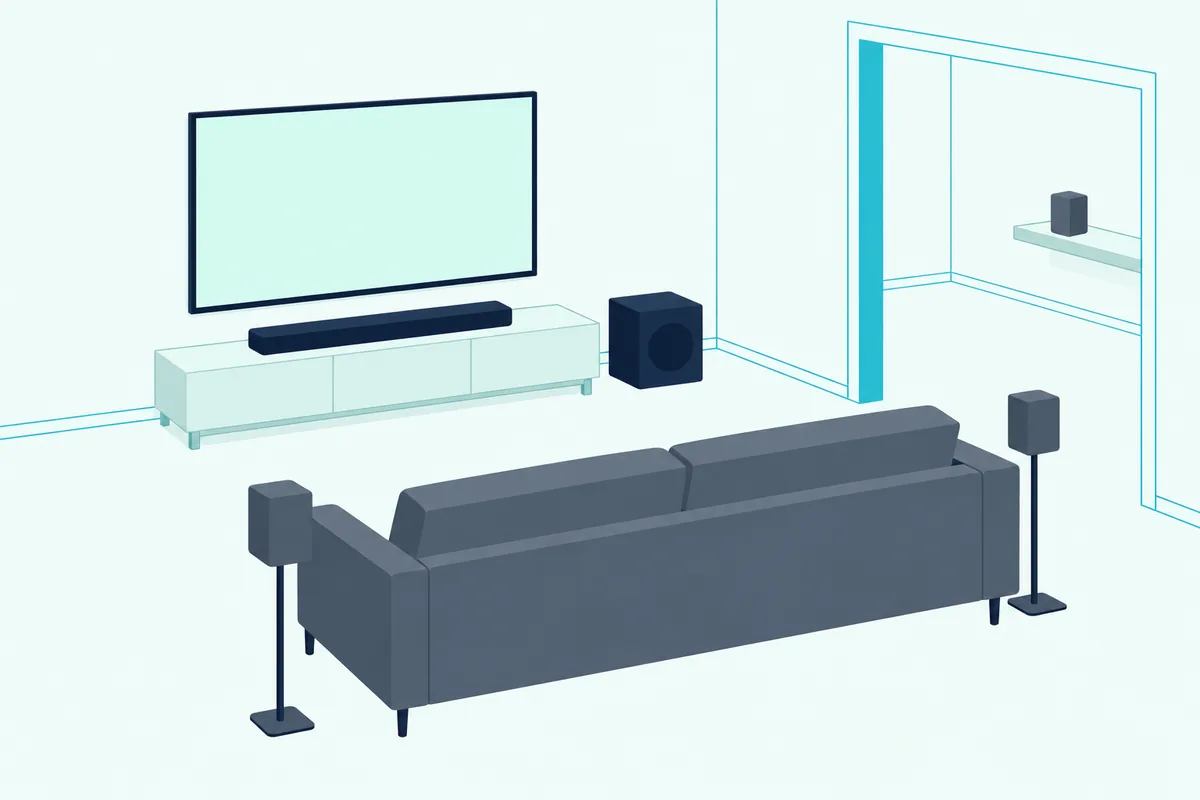
The 550’s manual runs the same job through the HEOS app’s Setup Assistant, under Subwoofer and Surrounds, with a subwoofer setting called Optimized for Denon Home Sound Bar 550. Denon’s product page pairs the bar with the Denon Home Subwoofer and Denon Home 150 speakers, and the manual also accepts a HEOS Amp for the rear pair.
With surrounds connected, the 550 unlocks a Multi-Channel Stereo mode that plays stereo from every speaker. Sonos’s user guide also has a section on dual-sub configurations.
Which TV Remotes and Voice Assistants Work With Each Bar?
Once the speakers are in place, daily control comes down to the remote in your hand and the assistant you talk to. Your TV remote can drive all three: over HDMI ARC the Sonos bars follow it automatically, and the 550 follows it through HDMI control, preset codes or a learning function.
Sonos’s TV remote article adds that an optical connection needs Remote Control Setup in the app, and that only one remote can be programmed at a time. The Arc’s box holds the bar, a power cord, an HDMI cable and the optical adapter, with no remote of its own.
Denon packs an IR remote with the 550, and its manual gives three ways to use the TV’s remote instead: HDMI control, a preset that answers the volume buttons of major TV makers’ remotes, and learning set up in the HEOS app. The TV-remote setup for a Sonos bar, TV by TV covers each brand’s menu on the Sonos side.
On voice, the 550 has Alexa built in, which needs an Amazon account and the HEOS app, and a microphone-off key on top. Denon’s page adds Siri through AirPlay 2 for playing music, changing volume and switching inputs.
The Arc Ultra works with Sonos Voice Control and Amazon Alexa. The Arc’s store page adds Google Assistant, which Sonos’s setup article says can no longer be added from an Android device as of September 2026.
What Do the Warranties and Setup Requirements Say?
Those voice and app features all lean on setup, which is also where the paperwork differs. Denon covers the 550 for two years and Sonos covers both Arcs for one year in the US.
Denon’s limited warranty gives its wireless speakers, streaming amplifiers and sound bars two years from the original purchase from an authorized dealer, in the US and Canada. Its warranty page adds that products bought from other sellers don’t qualify, so check the seller before you order.
Sonos’s US terms offer a one-year full warranty on all products. That’s half of Denon’s term for the same kind of product.
Setup needs a phone either way. Sonos’s app requirements call for iOS or iPadOS 18 or later, or Android 10 or later, and the Arc lists broadband internet and the Sonos app among its requirements.
The 550 sets up in the HEOS app for iOS or Android, which its manual points to on the App Store, Google Play and the Amazon Appstore, with Bluetooth on during setup. An older phone that can’t run iOS 18 or Android 10 is the one setup question to settle before a Sonos order.
Which Bar Should You Buy for Your Setup?
Put those sections together and the buyers behind this search split three ways. Buy the Sonos Arc Ultra if you’re starting fresh or already own Sonos, buy the Denon Home Sound Bar 550 if your home runs HEOS or you need DTS:X, and look at Denon’s DHT-S517 if you want up-firing height and a wireless subwoofer in one box.
For a new system, the Sonos Arc Ultra in white is the one with drivers aimed at the ceiling and Trueplay from either phone. A flat ceiling in Dolby’s range is where it earns that height.
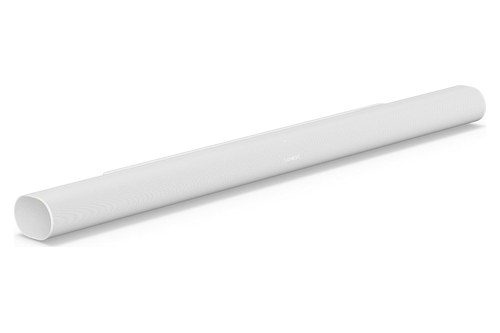
Sonos Arc Ultra
For a home with a HEOS receiver or Denon Home speakers, the Denon Home Sound Bar 550 joins the same app and groups. It’s also the one for a DTS:X disc shelf, a space under 26 inches wide or a spot under a shelf where up-firing drivers would have no clear path to the ceiling.
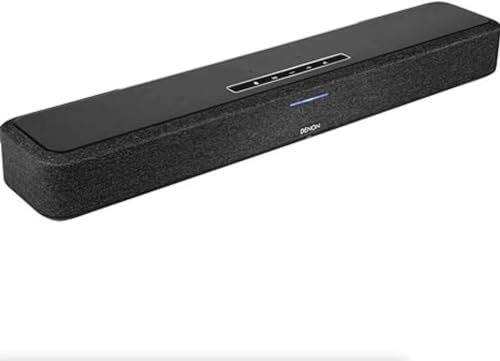
Denon Home Sound Bar 550
The DHT-S517 is Denon’s other route to the Arc’s up-firing idea. Denon lists it as a 3.1.2 bar with up-firing speakers and a wireless subwoofer, connected by HDMI eARC, optical or Bluetooth.
If you already own the Arc, it stays on the latest generation of the Sonos app, so a switch to Denon makes sense mainly if HEOS or DTS:X matters to you. Every pick met Burton Acoustix’s rating, review and stock checks on 8 November 2026.
The Bottom Line
Back at the height row, the deciding facts are the same ones the table showed. The Arc Ultra aims two tweeters at the ceiling and tunes itself with Trueplay from iOS or Android, while the Denon Home Sound Bar 550 builds height with processing, decodes DTS:X, adds an HDMI input and joins HEOS.
Take the Arc Ultra for a fresh system under the kind of ceiling Dolby’s guide favors, and the 550 for a HEOS home, a DTS:X collection or a spot with no clear path to the ceiling. Burton Acoustix’s other brand match-ups are listed on the soundbar hub.
The descriptions come from the makers’ manuals and spec pages.
Frequently Asked Questions
Can you use a Denon Home Subwoofer with a Sonos Arc?
Neither maker’s documents support that pairing. Sonos’s guides add a Sonos Sub through the Sonos app, and Denon’s manual pairs a HEOS built-in subwoofer, such as the Denon Home Subwoofer, through the HEOS app’s Setup Assistant on a HEOS product like the 550. Neither document lists the other brand’s subwoofer, so plan the bass upgrade inside whichever system you choose.
Can you wall-mount the Denon Home Sound Bar 550 or the Sonos Arc?
Yes. Denon’s manual says the 550 has a wall hook hole and ships with a wall mount template and a spacer that leaves room for cables, and it asks you to have a contractor do the mounting. Sonos sells the Arc Wall Mount separately, and its Arc Ultra guide says the Arc Ultra fits both its own mount and the Arc’s. For up-firing bars, Dolby’s setup guide still wants the drivers to have a clear line to the ceiling.
Is Denon or Sonos the better soundbar brand overall?
Neither maker’s documents settle that, but the two ranges are built differently. Sonos’s soundbar page compares four bars, the Arc Ultra, Beam Ultra, Beam and Ray, and says they set up over Wi-Fi and take commands from your TV remote or the Sonos app. Denon’s range leans the other way, with one HEOS bar and three DHT bars that come with a wireless or built-in subwoofer and pair with phones over Bluetooth. So the brand question becomes a format question: an all-Wi-Fi system points to Sonos or to Denon’s 550, and a TV bar with its bass already in the box points to a DHT model.