Sonos Arc vs Arc Ultra: What Changed and Who Should Upgrade

If you’re comparing the Sonos Arc vs Arc Ultra, start with what Sonos still sells: its store lists the original Arc as out of stock under its Last Chance label.
Pick on looks alone and you could end up with a bar whose spec sheet lists no Bluetooth, or one that leaves the optical adapter for an older TV out of the box.
Match the bar to your TV’s ports, your phone and the speakers you already own, and either one brings Dolby Atmos height from two upward-firing drivers.
A side-by-side table from Sonos’s spec sheets comes first, then each change in turn, from Sound Motion to the rear speakers each bar takes.
By the end, you’ll know whether to keep your Arc, buy the Ultra or make the move.
What Separates the Sonos Arc vs Arc Ultra?
That Last Chance label is only the first difference, and the table below lines up the rest from Sonos’s own spec sheets. The short answer: the Arc Ultra adds the Sound Motion woofer, Bluetooth 5.3, Wi-Fi 6, Trueplay tuning from an Android phone and four levels of AI Speech Enhancement, while the original Arc keeps the optical adapter in its box and Google Assistant on its voice list.
| Feature | Sonos Arc (original) | Sonos Arc Ultra |
|---|---|---|
| Sonos store status | Out of stock (Last Chance) | Sold |
| Drivers (Sonos’s count) | 11, including 2 height channels | 14, Sound Motion included |
| Amplifiers | 11 Class-D | 15 Class-D |
| Channel figure from Sonos | Not on its product page | 9.1.4 |
| DTS | DTS Digital Surround listed | DTS Digital Surround listed |
| TV connection | HDMI eARC or ARC; optical adapter in the box | HDMI eARC or ARC; optical adapter sold separately |
| Wi-Fi | 2.4 GHz only (802.11b/g/n) | Wi-Fi 6 on 2.4 and 5 GHz |
| Bluetooth | Not in Sonos’s spec list | Bluetooth 5.3 |
| Trueplay | iOS device required | Quick tuning from iOS or Android |
| Voice | Sonos Voice Control, Alexa, Google Assistant | Sonos Voice Control, Alexa |
| Speech Enhancement | On or off | AI, with four levels |
| Size (H x W x D) | 3.43 x 44.96 x 4.57 in | 2.95 x 46.38 x 4.35 in |
| Weight | 13.78 lb | 13.01 lb |
Read down the columns and the Ultra pulls ahead on wireless, tuning and dialogue, while the Arc’s box and voice list hold the two things the Ultra gave up. If a Bose is on your list too, how the Arc Ultra measures up to Bose’s Smart Ultra runs the same comparison across the two brands.
Is the Original Sonos Arc Discontinued?
That first row of the table is the one most shoppers miss. Sonos’s store treats the Arc as on its way out: Sonos’s Arc page shows it out of stock in black and white under the Last Chance label, and Sonos’s Arc Ultra page calls it the previous generation of Arc.
Support carries on, though. Sonos’s support articles still list the Arc for TV Audio Swap, the Sub Mini, AirPlay and its full set of home theater formats.
The Arc’s own FAQ says it requires the latest generation of the Sonos app, so an Arc you already own runs on the same app as Sonos’s newest speakers. A new one, though, means finding stock somewhere other than Sonos’s store.
Think of it like a car model that’s been replaced but still gets serviced at the dealer. The Arc you have keeps working, and the comparison below is really about whether the newer model’s changes are worth having.
How Do the Drivers and Sound Motion Compare?
Those support lists keep the old bar useful, but the hardware inside is where the two generations split. Sonos builds the Arc from eleven internal speakers, two of them dedicated height channels, on 11 Class-D amplifiers, and the Arc Ultra from 14 Sonos-engineered drivers on 15 amplifiers, Sound Motion among them.
Sound Motion is what Sonos calls a four-motor, dual-membrane woofer with a flat, compact design. Sonos says the technology delivers a deeper, more powerful bass response in a smaller package and frees up space inside the bar for more tweeter and midrange drivers.

Height works the same way on both. Two of the Arc Ultra’s tweeters fire upward to create dedicated height channels, and the Arc’s FAQ describes its two internal speakers that physically fire audio upward for a true height experience.
RTINGS calls the Ultra’s Sound Motion driver an integrated subwoofer, which is the easiest way to picture it: a bass driver built into the bar instead of sitting in a box on the floor. The Arc’s spec sheet lists no Sound Motion driver, and its eleven speakers are three silk-dome tweeters and eight elliptical woofers that handle the mid-range plus the bass.
The processors changed too. Sonos lists a quad-core 1.4 GHz processor with 1 GB of memory for the Arc, compared with a quad-core 1.9 GHz processor for the Arc Ultra.
Does the Arc Ultra Really Play 9.1.4 Dolby Atmos?
Those 14 drivers come with Sonos’s biggest number. Sonos rates the Arc Ultra at 9.1.4 and says it renders a 9.1.4 Atmos signal, while RTINGS notes that those channels aren’t discrete, so on its own the bar works more like a 5.1.2 system.
Sonos’s Arc page gives the original no channel figure at all. It describes eleven speakers with two dedicated height channels instead, which is a count of hardware rather than a channel label.
Both bars play Dolby Atmos as standalone soundbars, according to their FAQs. Sonos adds that a Sub and a pair of surrounds make either one more immersive.
So read 9.1.4 as Sonos’s figure for the signal the Ultra renders, and RTINGS’s 5.1.2 as the lab’s description of what one bar does without the add-ons. The height drivers, two on each bar, are the part both sources agree on.
Music gets the same height treatment on both. The Arc’s FAQ lists Dolby Atmos Music from Amazon Music Unlimited and Apple Music, and the Arc Ultra’s lists Amazon Music and Apple Music.
Is the Arc Ultra Better Than the Arc?
Channel labels aside, the bigger question is whether the newer bar sounds better. In RTINGS’s lab it does: its comparison of the Arc and Arc Ultra calls the Ultra a step up in features and performance, with better bass extension and articulation, and says it compresses even less at maximum volume.
RTINGS also finds the Ultra’s default sound a lot more balanced than the original Arc’s. It calls the Ultra’s center channel a step up from the Arc for dialogue.
Sonos’s own claim for Sound Motion is a more expansive and balanced soundstage that surpasses the previous generation of Arc. That’s the maker’s description, and RTINGS’s measurements are the independent check on it.
RTINGS adds a limit: the Ultra’s bass still doesn’t match the rumble of a dedicated subwoofer. So an Arc that already runs with a Sonos Sub stands to gain less on bass than one playing on its own.
Do Both Bars Play DTS and Need HDMI eARC?
That balanced sound still depends on the signal your TV sends, and here the two bars match line for line. Yes to both: Sonos lists the same home theater formats for the Arc and Arc Ultra, DTS Digital Surround included (with its note that the listing isn’t an indication of a licensed decoder), and marks Dolby TrueHD and multichannel PCM as needing an HDMI eARC connection.
Over plain HDMI ARC, both FAQs say what arrives depends on the TV, which may send Dolby Atmos, Dolby Digital Plus and Dolby Digital, but ARC can’t carry TrueHD or MAT. Through the optical adapter, the TV may send Dolby Digital, and optical can’t carry Dolby Atmos, TrueHD, MAT or Dolby Digital Plus.
Apple TV 4K is the case to watch. Sonos says it sends Dolby Atmos in the high-bandwidth MAT format, which needs an eARC-capable TV with either bar.
Here’s a practical test for either bar: play an Atmos title and open the Sonos app’s Now Playing screen, which Sonos says displays the audio format being decoded. If it shows another format, Sonos’s FAQs point to the source and the TV, since Atmos depends on the material and on the TV passing it through the HDMI port.
One more trap applies to both. Sonos’s Arc guide warns that if the HDMI cable goes into a standard HDMI port instead of one labeled ARC or eARC, you won’t hear any sound.
Which Bar Comes With the Optical Adapter?
That optical route is where the boxes differ. Only the original Arc includes Sonos’s Optical Audio Adapter, while the Arc Ultra’s box holds the bar, a 6-foot power cable and a 4.9-foot HDMI cable, with the adapter sold separately.
The adapter attaches to the end of the included HDMI cable and plugs into the TV’s optical digital out. Sonos’s Arc guide notes that the port is D-shaped and that inserting the adapter the wrong way may damage the cable.
For a TV with HDMI eARC, the missing adapter costs you nothing. For an older TV with optical only, budget for the adapter and accept Dolby Digital as the ceiling, as the format limits above set out.
Say your bedroom TV predates HDMI ARC. Either bar connects to it through the adapter, but optical can’t carry Dolby Atmos, so neither would get Atmos from that TV.
How Different Are the Wi-Fi and Bluetooth?
Once the TV cable is sorted, wireless is where the Ultra moves furthest ahead. The Arc connects to 2.4 GHz Wi-Fi only (802.11b/g/n) and its spec sheet lists no Bluetooth, while the Arc Ultra supports Wi-Fi 6 on 2.4 and 5 GHz and has Bluetooth 5.3 with a pairing button on its back.
For a 5 GHz router, Sonos’s Arc page says to enable 2.4 GHz in the router’s settings or hardwire a Sonos product. Both bars have a 10/100 Ethernet port for that wired route.
RTINGS’s notes on the Arc say the same about Bluetooth. They say it has no Bluetooth compatibility and point to streaming over Wi-Fi or Apple AirPlay 2 instead.
The Ultra has to be set up on Wi-Fi in the Sonos app before it pairs over Bluetooth. Press and hold its Bluetooth button for about 2 seconds and the status light blinks blue, and Burton Acoustix’s guide to the Sonos status lights covers the other colors.
Sonos also lists the Arc Ultra among the products that can share Bluetooth audio with the rest of a Sonos system, so a phone paired to the bar can play through other rooms too. The Arc isn’t on that list.
AirPlay 2 works on both, from an iPhone, iPad or Mac. So an Apple household loses less by staying with the Arc than an Android one does.
Can You Run Trueplay From an Android Phone?
That Android household has a second reason to look at the Ultra. Only the Arc Ultra tunes from an Android phone: Sonos’s Trueplay article lists it among the products that can quick tune with their own microphones from iOS or Android, while the Arc needs a supported iOS device for any Trueplay tuning.
Quick tuning sets the bar up for its current location, on its own or with surrounds and a Sub, and Android phones go straight to it. Advanced tuning still needs an iOS device running iOS 8 or later, takes about 5 minutes as you walk the room, and is the best choice for large rooms, according to Sonos’s guides for both bars.
The Ultra’s quick tuning also needs the microphone switch on its back turned on. Its guide says that switching the microphones off makes quick tuning and voice services unavailable.
One catch carries over to the older bar’s add-ons. Sonos’s Era 300 FAQ says a pair used as surrounds with the Arc requires a supported iOS device for Trueplay.
In an Android-only home, that puts the Arc’s Trueplay out of reach entirely. The Ultra still gets quick tuning, so that household should lean to the newer bar.
Which Voice Assistants Work on Each Arc?
Those same microphones handle voice requests, and here the older bar has the longer list. Sonos’s spec sheets say the Arc works with Sonos Voice Control, Amazon Alexa and Google Assistant, while the Arc Ultra works with Sonos Voice Control and Alexa.
Google Assistant comes with conditions on the Arc. Sonos’s Arc page says Alexa and Google Assistant can’t run on the same product, and its Google Assistant article says that since September 2026 the Assistant can’t be added from an Android device.
An existing Google Assistant setup keeps working under that change. If it’s ever removed, adding it again takes an iOS device.
Sonos Voice Control, the “Hey Sonos” option, is available in US English and French. The Arc Ultra guide lets you add Alexa and Sonos Voice Control to the same product, and both FAQs mention Siri for Apple Music while you stream over AirPlay 2.
For privacy, the Ultra has a switch on its back that cuts power to the microphones. The Arc turns its microphone off from a touch control on top, and its microphone light shows when voice control is on.
If you want Google Assistant built into the bar itself, this is the row where keeping an Arc makes the most sense. Alexa and Sonos Voice Control users give up nothing here by moving.
Do the Controls on Top Work the Same?
That touch control for the Arc’s microphone sits among several on its top, and the Ultra changes them. Mostly, with two additions: the Arc’s guide lists touch to play or pause, touch or hold for volume and a swipe to skip tracks, while the Ultra’s volume is a slider you slide or tap, plus press-and-hold moves for grouping speakers.
On the Ultra, holding Play/Pause for about a second groups the bar with another Sonos speaker that’s playing. Holding it for about 2 seconds, which Sonos calls Sound Swap, moves that speaker’s audio onto the Arc Ultra.
Both bars work with your existing TV remote through their infrared receivers, and neither box includes a remote of its own. The Arc’s guide also lets you switch off the touch controls in the Sonos app, so a child or a curious pet can’t change the volume.
What Do AI Speech Enhancement and Night Sound Change?
Remotes and buttons aside, the voices that matter most are the ones in the film. On the Arc, Speech Enhancement is a single on-off setting that boosts voice frequencies, while the Arc Ultra’s uses AI to detect the human voice and offers four levels: Low, Medium, High and Max.
Sonos’s Speech Enhancement article calls Medium the default level, recommended for most people. High significantly reduces non-dialogue audio, and Max prioritizes dialogue clarity for people with hearing loss by controlling the dynamic range of everything else.
That’s the Advanced Speech Enhancement line in the comparison block on Sonos’s Arc page, set against the Arc’s plain Speech Enhancement. Try Medium first, then step up to High if a quiet drama still loses its lines under the score.
Night Sound works the same on both bars. It reduces the intensity of loud sounds while raising quieter ones, and Sonos suggests it for watching at low volume, such as late at night.
Can Both Swap TV Sound to Sonos Headphones?
Night Sound keeps the room quiet, and TV Audio Swap takes the sound off the speakers entirely. Yes: Sonos’s TV Audio Swap article lists both the Arc and the Arc Ultra, and one session can carry up to two sets of Sonos headphones, Sonos Ace or Sonos Ace Ultra.
Wi-Fi has to stay on at the soundbar for the swap to work. Sonos also says dynamic head tracking switches off while two headphones share the session, and comes back when one disconnects.
The Arc Ultra’s page adds TrueCinema, which Sonos says maps your space so Sonos Ace can render virtual surround sound. The Arc’s page doesn’t mention it, so check Sonos’s headphone pages if that feature is your reason to upgrade.
Will Your Sub and Rear Speakers Work With Both?
Headphones suit one or two listeners, and a full room needs the add-ons each bar accepts. Mostly, yes: Sonos says every generation of Sub works with both bars, the Sub Mini pairs with both, and a matching pair of Era 300, Era 100, Sonos One (SL included) or Five speakers works as rears with either one.
The surround lists differ at the edges. The Arc’s FAQ also accepts Play:1, Play:3 and Play:5 (Gen 2) rears, the Arc Ultra’s names SYMFONISK (Gen 2) speakers instead, and both let a Sonos Amp drive passive in-wall or in-ceiling speakers as surrounds.

For two subwoofers, the Arc Ultra’s FAQ says a dual Sub setup requires Sub 4 and/or Sub (Gen 3), and Sonos’s Sub 4 page suggests a pair with either the Arc Ultra or the Arc. Sonos says the Sub Mini works best with the Arc in a smaller room at low to moderate volume, and points larger spaces to the full Sub.
The Arc Ultra’s page pairs it with a Sub and Era 300 rears for what Sonos calls the ultimate Dolby Atmos surround sound experience. Sonos’s Arc guide suggests placing each surround speaker about 10 feet from your favorite listening position, angled toward the seating area.
An Arc owner with Play:1 rears is the one to check before buying. Those aren’t on the Ultra’s surround list, so moving could mean new rears too.
Will the Arc Ultra Fit Your TV Stand or Wall Mount?
Those rears sit behind you, but the bar itself has to fit under the screen first. Usually, if your stand has 1.42 inches more width to spare: the Arc Ultra is 46.38 inches wide against the Arc’s 44.96, but shorter at 2.95 inches against 3.43, slightly shallower and a little lighter, at 13.01 pounds against 13.78.
Sonos aims both bars at TVs of 50 inches and up. Its guides ask for at least 4 inches (10 cm) between the bar and the TV, and both ends at least 1 foot (30 cm) from a wall or other obstruction.
On a wall, Sonos’s FAQ says the Arc Wall Mount works with the Arc Ultra. Given the bars’ different dimensions, the mount may be visible from certain angles, so Sonos recommends the Arc Ultra Wall Mount.

Sonos’s Arc Ultra user guide also warns against enclosing the bar in a cabinet or a corner. Sonos’s pages add that neither bar works with CCFL-backlit TVs made between 2004 and 2012.
Measure your stand before you order. A 55-inch TV is about 48 inches wide, so either bar fits under it, and the Ultra’s lower height leaves a little more of the screen’s bottom edge clear.
Who Should Buy the Arc Ultra, and Who Should Hunt for an Arc?
With size settled, the choice comes down to your phone, your router and your voice assistant. Buy the Arc Ultra if you want Bluetooth, 5 GHz Wi-Fi, Trueplay from an Android phone or four levels of speech enhancement, and only hunt for an original Arc if your home runs on iPhones and Google Assistant and you find one new.
Sonos’s soundbar comparison aims the Arc Ultra at large living rooms and open floor plans of 350 square feet or more. If that’s more bar than your room needs, the best Sonos soundbar for each room size covers the smaller Beam models and the Ray.
For a new bar today, the Sonos Arc Ultra in white is the one Sonos still sells.
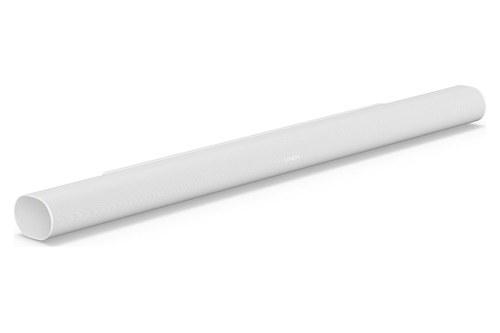
the Sonos Arc Ultra in white
No original Arc is linked here, since Sonos’s store lists it out of stock under Last Chance. The pick met Burton Acoustix’s rating, review and stock checks on 31 October 2026.
Should an Arc Owner Upgrade or Keep It?
That pick suits a new system, and an Arc owner’s sums are different. Upgrade if Bluetooth, Android tuning, 5 GHz Wi-Fi or the four-level speech setting would change how you use the bar, since those are the clearest gains on Sonos’s spec sheets, and RTINGS measures better bass extension and less compression on top.
What carries over is most of the system. The Ultra uses the same HDMI eARC or ARC connection and the same Dolby and DTS format list, and it keeps AirPlay 2, Night Sound, TV Audio Swap and support for every generation of Sub.
What you give up is shorter but real: Google Assistant, the optical adapter in the box and, if you own them, Play:1, Play:3 or Play:5 (Gen 2) rears. The Arc’s wall mount still fits, with the caveat Sonos gives about it showing from some angles.
Picture an Arc with a Sub in a living room with an eARC TV and an iPhone in every pocket. The gains there are Bluetooth, Wi-Fi 6, four-level speech enhancement and the better measured sound, while the Sub already covers the deepest bass.
If the old Arc is going to a new owner, reset the Arc to its factory settings once the Ultra takes its place. Pass on the optical adapter from its box too, since its next owner may need it for an older TV.
The Bottom Line
So the Sonos Arc vs Arc Ultra choice comes down to the phone in your hand and the ports on your TV. The Ultra is the bar Sonos sells now, with Bluetooth 5.3, Wi-Fi 6, Trueplay from Android and AI Speech Enhancement, while the Arc keeps Google Assistant and the optical adapter for anyone who already owns one.
The descriptions come from Sonos’s spec pages, user guides and support articles, and the lab verdicts are RTINGS’s.
Frequently Asked Questions
Does the Sonos Arc have Bluetooth?
Sonos’s Arc spec sheet lists Wi-Fi, Ethernet, HDMI eARC and AirPlay 2 but no Bluetooth, and RTINGS’s notes on the Arc say it has no Bluetooth compatibility. The Arc Ultra adds Bluetooth 5.3, paired from a button on its back once the bar is set up on Wi-Fi in the Sonos app. On the original Arc, phones and tablets play to the bar over Wi-Fi, through the Sonos app or AirPlay 2.
Can the Arc Ultra use the Arc’s wall mount?
Yes. Sonos’s FAQ says the Sonos Arc Wall Mount works with the Arc Ultra, but because the two bars have different dimensions, the mount may be visible from certain angles, so Sonos recommends the Arc Ultra Wall Mount. Either way, Sonos’s guides ask for at least 4 inches (10 cm) between the mounted bar and the TV.
Do you need a Sub with the Arc Ultra?
No. Sonos says the Arc Ultra plays Dolby Atmos as a standalone soundbar, and that adding a Sub and surrounds gives a more immersive result. RTINGS finds its integrated Sound Motion subwoofer puts out much more bass than the average standalone bar, though without the rumble of a dedicated sub.
Do the Arc and Arc Ultra have HDMI inputs?
No. Each has a single HDMI port that connects to the TV’s eARC or ARC port, and Sonos’s guides say to plug external devices such as a cable box, streaming box or DVD player into the TV instead. Sonos’s Arc guide adds that the bar plays sources connected to the TV, including cable boxes and game consoles, so the TV acts as the switch between them.