Use the TV’s HDMI ARC or eARC port for a soundbar, because only that port sends the TV’s sound back out to the bar.
If you’re comparing HDMI vs HDMI ARC for a soundbar, the plug is the same and the difference is direction: a regular HDMI input takes sound into the TV, while the ARC or eARC port can also send the TV’s sound back out to the bar.
Run the bar’s cable to the wrong one and the bar gets none of the TV’s sound, from the built-in apps to the box on the next input.

Use the right port and settings, and one HDMI cable carries the TV’s sound to the bar while the TV remote keeps the volume.
Below are the formats each port carries, what eARC adds, which cable each one asks for, and the setups where a bar skips the ARC port entirely.
Start with which way the sound travels, since every other difference grows out of that.
HDMI vs HDMI ARC for a Soundbar: What’s the Difference?
That direction is the whole difference. HDMI Licensing Administrator’s HDMI 1.4b page says Audio Return Channel lets an HDMI-connected TV send audio “upstream” to an AV receiver or soundbar over an HDMI cable, while a regular HDMI input does the opposite job and takes picture and sound in from a player, stick or console.
HDMI Licensing’s archive of feature descriptions puts the TV “downstream” from its content sources in the ordinary case. It adds that an ARC-enabled TV “can either send or receive audio via HDMI, upstream or downstream, depending on system set-up,” so the port marked ARC still works as an input and simply gains a way back out.
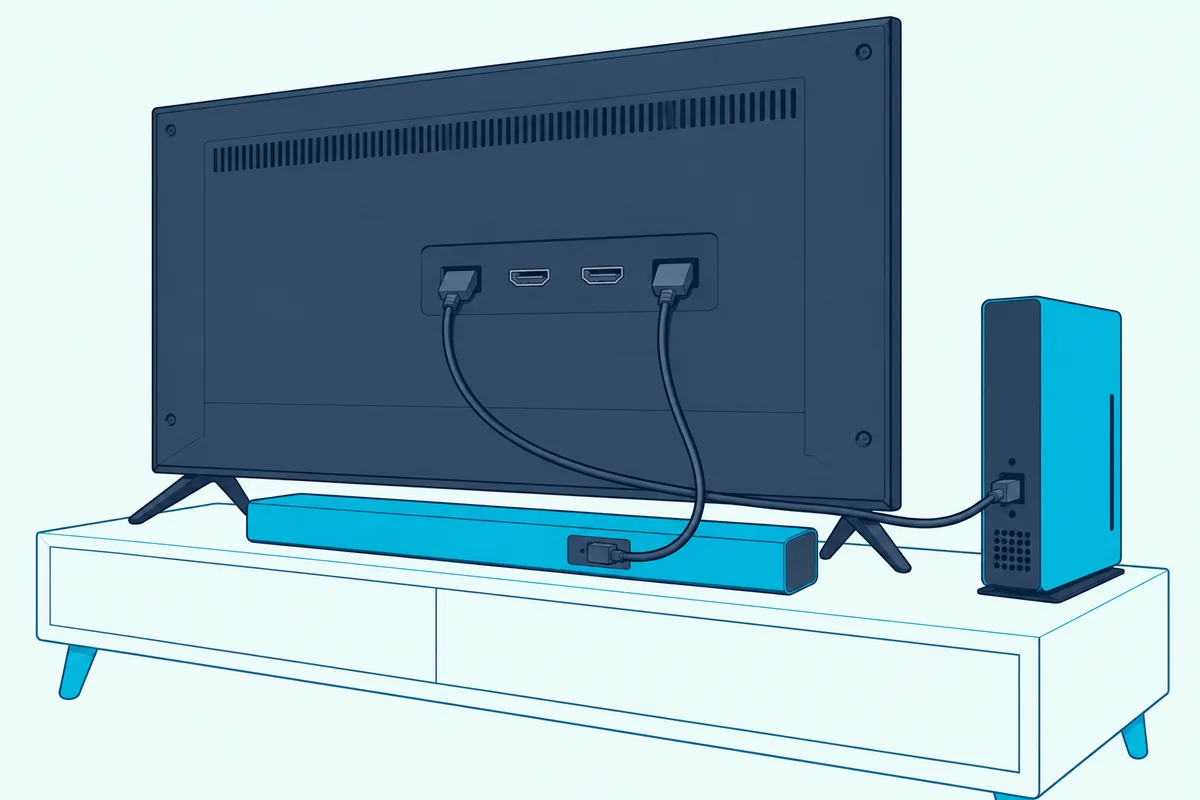
The same archive explains why ARC exists at all. A TV with a built-in tuner or disc player once needed a separate cable, typically S/PDIF, to send its own sound back to the audio system.
A regular HDMI input only takes picture and sound into the TV, and the ARC port does that and also sends sound back out. The plug, the cable and the socket are identical, so the label beside the port is what tells them apart.
HDMI Licensing “strongly recommended” that makers print “ARC” beside every ARC port but doesn’t require it, and it tells owners to check with the maker which ports, if any, support it. Roku’s guide says its port is “often labeled ‘HDMI ARC’ or just ‘ARC’,” and Sony’s TV help guide marks its own “eARC/ARC.”
Here’s how the three kinds of port compare on the back of a TV, from HDMI Licensing’s pages and Roku’s guide.
| Port on the TV | Which way the sound travels | What usually plugs in | Sound it carries to the bar |
|---|---|---|---|
| Regular HDMI input | Into the TV, with the picture | Streaming stick, console, cable box, disc player | Nothing; it only receives |
| HDMI ARC | In from a source, or back out to the bar | The soundbar or AV receiver | Optical’s formats plus Dolby Digital Plus and compressed Dolby Atmos |
| HDMI eARC | The same two ways, with more bandwidth | An eARC soundbar or receiver | ARC’s formats plus Dolby TrueHD, DTS-HD Master Audio, DTS:X and uncompressed 5.1 and 7.1 |
The bottom two rows are where a soundbar goes, and the last column is where ARC and eARC part ways. The top row is the one to watch, because a regular input takes a picture from the bar and sends nothing back.
Do You Need HDMI ARC for a Soundbar?
That return path is what most soundbar setups lean on. For the TV’s own sound to reach the bar over HDMI, yes: Sony’s BRAVIA Theatre Bar 9 and Bar 8 help guide says that if the bar isn’t on the TV’s eARC/ARC-compatible input, “the TV sound cannot be output from the speaker system,” and Samsung’s HW-Q800F user manual says “If the correct port isn’t used, the TV won’t make any sound.”
The TV’s own sound covers more than its built-in apps. HDMI Licensing’s eARC page counts audio “that originates from cable, satellite, streaming or source devices” among what eARC sends to a sound bar, and its archive names the TV’s built-in tuner as the reason ARC was created.
Three setups leave the ARC port out. The TV can send its sound over optical instead, which Sony’s TV help guide names for audio systems without eARC/ARC, or a player can plug straight into a bar with its own HDMI input, which a later section covers.
The third is Bluetooth, which the Bluetooth vs optical guide sets against the optical cable. For optical, the makers spell out what’s lost against ARC.

Roku’s guide to connecting a surround sound system to a Roku TV limits optical to two channels of uncompressed PCM or 5.1 channels of Dolby Digital or DTS. Sonos’s TV requirements page goes further for its own bars: Arc, Beam and the rest “require a TV with an HDMI ARC port” for CEC and voice control, and on an optical connection “you will not be able to control your TV using CEC or voice.”
Sonos also says its Atmos bars must sit on HDMI ARC or eARC “to play any Dolby Atmos content.” So TV sound alone can travel over optical, while the TV remote running the bar and Atmos from the TV both point back to the ARC or eARC port in these makers’ documents.
The HDMI vs optical guide sets ARC against optical format by format. If you’re still choosing a bar, the best soundbar with HDMI ARC depends on what your TV’s port can pass.
Does a Soundbar Need ARC, or Will a Regular HDMI Port Do?
Optical covers a TV without ARC, and the next question is whether a regular HDMI port will do the same job, since the cable fits. Not for the TV’s own sound: Sony’s TV help guide sends an audio system without eARC/ARC to the optical output, and its HT-A7000 help guide, for a TV “not compatible with ARC/eARC,” runs the bar’s HDMI cable to the TV’s regular HDMI input and adds an optical cable from the TV to the bar’s TV IN (OPT) jack.
Read that Sony setup closely, because it shows each cable’s job. The HDMI cable carries the picture from devices plugged into the bar up to the TV, and the optical cable carries the TV’s own sound back down.
So a TV with only regular HDMI ports can still take an eARC soundbar, as long as it has an optical output for its sound. The bar’s eARC jack then works as a plain HDMI output, and none of eARC’s extra formats come into play.
Without optical either, the choices narrow to the bar’s own HDMI inputs, an analog output, Bluetooth or an audio extractor. Burton Acoustix’s guide to soundbars on TVs without ARC compares five routes, from a bar with HDMI inputs to an HDMI audio extractor.
The same split holds on the bar’s end. Samsung’s HW-B750F manual runs the TV cable from the bar’s HDMI TO TV (ARC) port to the TV’s HDMI IN (ARC) or (eARC) port, and keeps the bar’s other HDMI port for an external device.
Those names explain the “in” and “out” labels. On the TV, the ARC port is an input that also returns sound, so Sony’s TV guide calls it HDMI IN (eARC/ARC), while on the bar the matching jack is an output for picture that also receives the TV’s sound, which Sony calls HDMI OUT (TV (eARC/ARC)).
For the names other makers print on both ends, which HDMI to use for a soundbar goes maker by maker. The point for this page is narrower: a regular port carries a bar’s picture to the TV, and only the ARC or eARC port sends the TV’s sound to the bar.
Which Formats Does ARC Carry, and What Does eARC Add?
Once the bar is on the right port, the next difference is what can travel down it. Roku’s guide says ARC carries every format the optical output does, plus Dolby Digital Plus and Dolby Atmos, while eARC adds “full-resolution uncompressed audio formats like DTS-HD Master Audio, DTS:X, Dolby TrueHD, and Dolby Atmos.”
HDMI Licensing’s eARC page puts numbers on the ceiling: audio up to 192 kHz and 24-bit, uncompressed 5.1 and 7.1, and 32-channel uncompressed audio, with DTS-HD Master Audio, DTS:X, Dolby TrueHD and Dolby Atmos. Dolby’s article “What are HDMI 2.1 ARC and eARC cables?” says eARC builds on ARC with HDMI 2.1’s bandwidth “to support a wider range of audio formats,” plus automatic correction of processor delays so sound and picture stay matched.
LG’s webOS 24 user guide spells out, soundtrack by soundtrack, what its TVs send over each link. The table below shortens LG’s Digital Sound Output table to its ARC and eARC columns.
| Soundtrack arriving at the TV | Sent over HDMI ARC | Sent over HDMI eARC |
|---|---|---|
| PCM | PCM | PCM |
| Dolby Digital | Dolby Digital | Dolby Digital |
| Dolby Digital Plus or Atmos | Dolby Digital, Dolby Digital Plus or Atmos | Dolby Digital, Dolby Digital Plus, Dolby MAT or Atmos |
| Dolby TrueHD (HDMI inputs only) | Dolby Digital, Dolby Digital Plus or Atmos | Dolby Digital, Dolby Digital Plus, Dolby TrueHD, Dolby MAT or Atmos |
| DTS or DTS-HD Master Audio | DTS | DTS or DTS-HD MA |
| DTS:X | DTS | DTS, DTS-HD MA or DTS:X |
| AAC or HE-AAC | Dolby Digital or Dolby Digital Plus | Dolby Digital, Dolby Digital Plus or Dolby MAT |
Two rows carry most of the ARC-versus-eARC story. A disc’s TrueHD track and a DTS:X track arrive intact only over eARC, while plain ARC hands the bar a Dolby Digital, Dolby Digital Plus or Atmos version of the first and plain DTS for the second.
LG adds that over eARC “the output audio type will depend on the audio type supported by the connected device,” and that some models may not support Dolby TrueHD, eARC, Dolby Atmos or DTS. So the bar’s own format list has the last word, whatever the TV can send.
Whether the TV sends these formats as they are or turns them into PCM first is a separate setting, which the bitstream vs PCM guide explains. Samsung’s HW-Q800F manual, for one, recommends switching a TV’s Digital Output Audio Format from PCM to Dolby Digital, Dolby Digital+ or Auto when broadcasts are encoded in Dolby.
Can Plain ARC Carry Dolby Atmos?
The Atmos rows in that table give the answer. Yes, in compressed form: Roku says “Dolby Atmos is supported on ARC, but only in a compressed format,” and Sonos’s Dolby Atmos article says “Most Dolby Atmos audio can be played through HDMI-ARC using the Dolby Digital Plus codec.”
Sonos adds that “HDMI-eARC is required to play lossless Dolby Atmos audio using the Dolby TrueHD codec.” Samsung’s HW-Q800F manual says the same from the bar’s side: “ARC/eARC protocol supports Dolby Atmos.”
So ARC against eARC isn’t an Atmos-or-nothing choice. The split is lossy Atmos inside Dolby Digital Plus, which plain ARC carries, against lossless Atmos inside TrueHD, which needs eARC on both ends.
Will Sound From the TV’s Other HDMI Inputs Reach the Soundbar?
That LG table lists HDMI inputs as a source for a reason. Yes: HDMI Licensing’s eARC page says eARC sends audio “that originates from cable, satellite, streaming or source devices” to a sound bar through a single HDMI cable, and LG’s table shows a TrueHD track from an HDMI input leaving over ARC as well as eARC.
So a streaming stick in HDMI 2 and a bar on the ARC port in HDMI 1 is the ordinary layout, not a workaround. The bar takes the ARC port, the other inputs stay free for sources, and a streamer needs no ARC port of its own.
Sony’s TV help guide states it for eARC: these TVs pass audio from “external input devices connected to the TV” through to an eARC audio system. Its list of pass-through formats runs to 7.1-channel linear PCM, Dolby Digital, Dolby Digital Plus, DTS, Dolby TrueHD, DTS-HD MA, Dolby Atmos, DTS:X Master Audio and MPEG-2 and MPEG-4 AAC.
What reaches the bar can still change on the way. Sonos warns that some TVs don’t support Dolby Atmos even when the source does, and that “In most cases the TV will re-encode the audio to Dolby Digital 5.1.”
Roku’s Auto passthrough setting shows the same kind of conversion on a TV’s own menu: it sends unmodified Dolby Digital, Dolby Digital Plus or DTS when the bar supports them, and formats the bar doesn’t support “may be converted to stereo sound (PCM).” Sony notes one more trade, that while an eARC system plays an HDMI input’s sound, the TV’s own system sounds and voice responses aren’t output.
When the consoles, streamers and boxes outnumber the TV’s free inputs, connecting multiple HDMI devices to a soundbar compares the three setups.
Plugging a Player Into the Soundbar Instead of the TV
Relaying through the TV works, but the TV decides the format, as Sonos’s re-encoding note shows. A bar with its own HDMI input takes the TV out of that decision: Sony’s Bar 9 and Bar 8 guide says a player connected straight to the bar can deliver formats such as Dolby Atmos “even if the TV is not compatible with eARC,” and its HT-A7000 guide makes the same offer for Dolby Atmos, Dolby TrueHD and DTS:X.
In that layout the sound and picture split at the bar. The bar plays the soundtrack, and the picture continues up the bar’s TV jack to the TV, which Sony’s HT-A7000 guide shows with a Blu-ray player, set-top box or gaming console on the bar’s HDMI IN 1 or HDMI IN 2.

Samsung’s HW-B750F manual draws the same route: an HDMI cable from the external device’s HDMI OUT to the bar’s HDMI port, a second from the bar’s HDMI TO TV (ARC) port to the TV’s HDMI input, and the bar switched to its “HDMI” source. Two cables, two directions, one bar in the middle.
The catch is video. Samsung’s HW-Q800F manual asks for a Premium High Speed HDMI cable to receive UHD signals through the bar (Ultra High Speed on the HW-Q990F and HW-Q900F), and Sony’s Bar 9 guide says 8K content needs a TV and HDMI cable that support 8K.
The bar’s input still doesn’t replace ARC for the TV’s own apps and tuner. Sony’s HT-A7000 guide covers both connections side by side, the bar’s TV jack on the TV’s eARC/ARC input for TV sound and the player on the bar’s HDMI IN for its soundtrack.
Sony’s same guide also gives the opposite option. With an eARC TV, the player can stay on the TV’s own HDMI input, and eARC carries its high-quality sound down to the bar once the TV’s eARC function is on.
What Happens When Only One End Has eARC?
Those player routes matter most when the TV and the bar don’t share eARC. Usually the pair falls back to ARC: Roku says that if one device lacks eARC “you can still use HDMI ARC,” without the enhanced features, and Sony’s HT-A7000 guide says that with an ARC-only TV “the ARC function works regardless” of the bar’s eARC setting.
HDMI Licensing is more careful. Its eARC FAQ answers “Maybe” to whether ARC products work with eARC ones, explaining that makers can build products compatible with both but that “eARC is not defined to be backwards compatible with ARC,” so the two manuals settle it for a given pair.
Dolby describes the other mismatch, an eARC TV with an ARC bar: the sound still plays, but “due to bandwidth limitations playback support for certain audiovisual formats may be reduced.” In LG’s table, that’s the TrueHD and DTS:X rows dropping to their ARC column.
HDMI Licensing’s FAQ adds that eARC is, “Generally speaking,” not something a firmware upgrade adds, and tells owners to check with the maker. An ARC TV is therefore likely to stay an ARC TV, and the player-into-bar route above is the way around it.
When both ends do have eARC, both usually need it switched on. Sony’s Bar 9 guide says to enable eARC on the bar and the TV, LG’s eARC Support page has owners set eARC Support to On, and Samsung’s HW-Q800F manual points to the TV’s HDMI-eARC Mode setting.
The TV’s own speakers have to step aside too. Sony’s TV help guide has owners set Speakers to Audio system after connecting, and LG’s eARC page has them choose HDMI(ARC) Device under Sound Out.
Samsung’s bars report the result on their own display, which makes a quick test. The HW-Q800F shows “TV ARC” when the TV’s sound is playing through the bar and “TV eARC” when it’s connected to a TV that supports eARC.
Roku names one more eARC difference. eARC has built-in audio and video lip-sync, which Roku calls “an optional feature in the original ARC specification.”
Is There Such a Thing as an ARC or eARC Cable?
With the settings sorted, the cable is the last question. For ARC, no special cable exists in HDMI Licensing’s account: its HDMI 2.1b feature descriptions archive says “All HDMI cables will support Audio Return Channel functionality when connected to Audio Return Channel-enabled devices,” and you can use the cable you already own.
Samsung’s guides still hedge. The HW-Q800F manual says the function “won’t work if the HDMI cable doesn’t support ARC,” the HW-B750F manual says much the same, and both recommend a cable certified by HDMI.org.
eARC is where cable categories start to matter. HDMI Licensing’s eARC FAQ says both Ultra cables, Ultra High Speed and Ultra96, are designed for eARC, while eARC over a Standard or High Speed HDMI Cable with Ethernet “might be possible, but these cable types are not certified for eARC operation.”
The TV makers ask for less. Roku asks for “a High Speed HDMI Cable with support for Ethernet” for eARC, or a Premium High Speed HDMI Cable with Ethernet or an Ultra High Speed cable with a 4K or HDR device, and Sony’s TV help guide lists an “HDMI cable with Ethernet” and recommends Premium High Speed cables bearing the HDMI logo.
So the words to look for on a label are the category names these documents use, such as Ultra High Speed or Premium High Speed with Ethernet, rather than “ARC” or “eARC” alone. If both your TV and bar have eARC and the current lead carries none of those names, a certified Ultra High Speed cable matches HDMI Licensing’s wording, such as Silkland’s certified Ultra High Speed HDMI cable, 6.6 ft, which its listing says can be checked with the HDMI Cable Certification app.
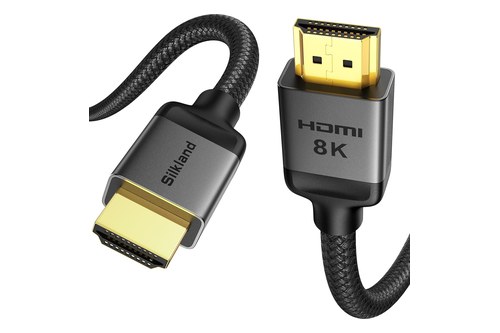
Silkland Certified HDMI 2.1 Cable
Every pick met Burton Acoustix’s rating, review and stock checks on 5 November 2026. For cable grades, lengths and more choices, see these certified HDMI cables for a soundbar.
Why Does ARC Need HDMI-CEC Turned On?
A certified cable on the right port can still give silence if one switch is off. Several makers tie ARC to HDMI-CEC, the HDMI control link: Sony’s Bar 9 guide says that with the TV’s Control for HDMI function off, “the speaker system does not output TV sound,” and its HT-A7000 guide makes the bar’s eARC or ARC function available only when Control for HDMI is on.
Roku makes the same pairing in its setup steps, telling owners to check that ARC or eARC is enabled “along with an HDMI feature called CEC.” With CEC on, Roku says, the TV remote adjusts and mutes the home theater’s volume.
CEC is also what lets the TV remote run the bar day to day. Samsung’s HW-Q800F manual says the TV remote’s volume buttons adjust the bar once it’s connected, and Sony’s guides tie the bar’s power and volume to the TV’s controls through Control for HDMI.
Sony adds two limits. Control for HDMI “may not work if devices other than those manufactured by Sony are connected,” and the HDMI CEC standard allows one audio system on the link, which the bar takes.
TV makers name CEC their own way, so a menu search for “CEC” can come up empty, and Sony’s own documents use two names, Control for HDMI and BRAVIA Sync. The menu names by brand are in how to use HDMI ARC with a soundbar, and the first-time switches are in the soundbar setup guide.
If the bar still stays silent after the port, the cable and CEC check out, the steps for fixing no sound from a soundbar on HDMI ARC go setting by setting.
Should a Soundbar Use HDMI or HDMI ARC?
Put the sections together and your own ports give the answer. For a bar that plays the TV, the cable goes on the TV’s ARC or eARC port, as Samsung’s and Sony’s manuals both direct, and a regular HDMI port earns its place only for a player or console, on the TV or on the bar’s own input.
| Your setup | Where the bar’s TV cable goes | What the documents say you get |
|---|---|---|
| eARC TV and eARC bar | TV’s eARC port, eARC on at both ends | TrueHD, DTS-HD MA and DTS:X intact, plus everything ARC carries |
| ARC TV, with an ARC or eARC bar | TV’s ARC port | Dolby Digital Plus and compressed Atmos; lossless tracks arrive as their ARC versions |
| eARC TV with an ARC-only bar | TV’s eARC port | ARC’s formats, with some formats reduced |
| TV with no ARC but an optical output | Optical for TV sound; HDMI only for players routed through the bar | Two-channel PCM or 5.1 Dolby Digital or DTS, and no CEC control on Sonos bars |
| Disc player or console with lossless audio, ARC-only TV | Player into the bar’s HDMI input; bar’s TV jack to the ARC port | Atmos and the other formats from the player, even without eARC on the TV |
Find your TV’s port first, then your bar’s, and the row follows. The fourth row is the only one where the ARC port plays no part, and the last is the one that gets lossless audio past an ARC-only TV.
HDMI vs HDMI ARC for a soundbar comes down to which way the sound travels and how much fits down the link. A regular input only takes sound in, ARC sends the TV’s sound out with Dolby Digital Plus and compressed Atmos, and eARC adds the lossless formats when both ends have it.
The descriptions come from the makers’ manuals and spec pages.
Frequently Asked Questions
What is the downside of HDMI ARC?
Its ceiling. Roku says ARC carries Dolby Atmos only in a compressed format and leaves Dolby TrueHD, DTS-HD Master Audio, DTS:X and uncompressed multichannel audio to eARC, and LG’s webOS 24 table shows a DTS:X track leaving an LG TV over ARC as plain DTS. Roku also notes that lip-sync, built into eARC, was optional in the original ARC specification. And because several makers tie ARC to HDMI-CEC, a TV with CEC switched off can leave the bar silent, as Sony’s soundbar guides warn.
Are HDMI ARC and HDMI the same?
Same plug and same cable, different job. A regular HDMI input takes picture and sound into the TV, while ARC, in HDMI Licensing’s words, lets the TV send audio “upstream” to a soundbar or receiver over that cable. Only ports built for it do this, and HDMI Licensing recommends an “ARC” label without requiring one, so check the TV’s manual if the sockets aren’t marked. eARC is the newer form, with more bandwidth and the lossless formats.
Does it matter which HDMI port I use for a soundbar?
Yes, on the TV’s end. Samsung’s HW-Q800F manual says that if the bar isn’t on the ARC port “the TV won’t make any sound,” and Sony’s soundbar guides say the TV’s sound can’t reach the bar from any other input. The number varies by model: LG’s 2024 C4 puts eARC on HDMI 2, and Sony says the location of its eARC/ARC terminal “varies depending on the model.” On the bar’s end, the cable goes to the jack named for the TV, such as Sony’s HDMI OUT (TV (eARC/ARC)) or Samsung’s HDMI TO TV (eARC/ARC).
What does TV ARC mean on a soundbar?
It’s a Samsung soundbar telling you the return channel is working. Samsung’s HW-Q800F manual says “TV ARC” appears on the bar’s display when the TV’s sound plays through the bar over ARC, and “TV eARC” when it’s connected to a TV that supports eARC. If “TV ARC” doesn’t appear, Samsung says to check that the HDMI cable is securely connected to the correct port, and the Source button on the remote switches the bar to TV ARC mode by hand.