In a 3.1 vs 2.1 soundbar choice, take the 3.1 if you often miss movie lines, since its center channel carries dialogue; if not, a 2.1 is enough.
Both layouts come with one subwoofer, so the real gap is where voices go: a 2.1 plays them through the same left and right speakers as the score and the explosions.
Products in this guide
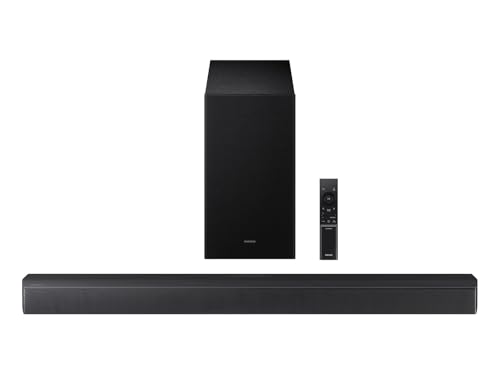
- Built-in center speaker gives dialogue its own channel
- Voice Enhance and Night modes
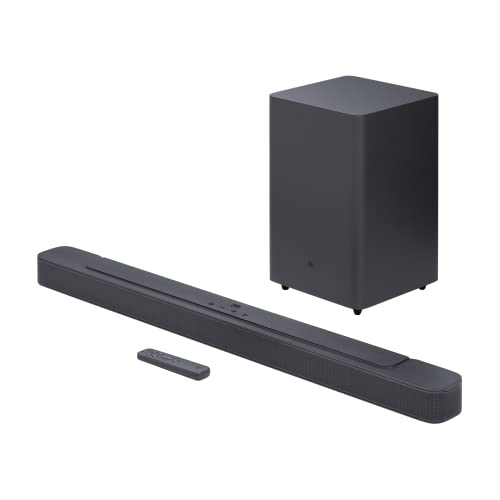
- 6.5-inch wireless subwoofer, bass set to low, middle or high
- 300 W maximum total output
Match the layout to how you watch, and you’ll know before you buy whether a third front channel belongs under your TV.
The sections below cover what the two numbers count, where a 2.1 sends dialogue, what the 3.1’s extra channel adds, seating, music, bass, the volume habit that settles it, the Samsung and JBL pair, the TV setting, where the system should be placed and whether to replace a 2.1 you already own.

Start with what the two numbers on the box count.
Choose a 3.1 soundbar, such as the Samsung HW-B630F, if you routinely miss lines in movies. Its center channel carries the dialogue, apart from the music and effects in the left and right channels.
Choose a 2.1 soundbar, such as the JBL Bar 2.1 Deep Bass (MK2), if dialogue already comes through clearly for you. Both layouts include one subwoofer, so what a 2.1 leaves out is that dialogue channel.
The descriptions come from the makers’ manuals and spec pages. Every pick met Burton Acoustix’s rating, review and stock checks on 8 November 2026.
3.1 vs 2.1 Soundbar: What Do the Two Numbers Count?
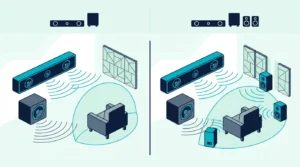
That one extra channel is the whole gap between the two names. The first number counts the main channels and the number after the dot counts subwoofers, so a 3.1 has one main channel more than a 2.1 and the same single subwoofer.
Dolby’s soundbar article spells the 3.1 out as a left, a center and a right channel, with the .1 a subwoofer for low bass. Dolby’s speaker setup guide gives a 2.1 just the left and right main speakers, with one subwoofer beside them.
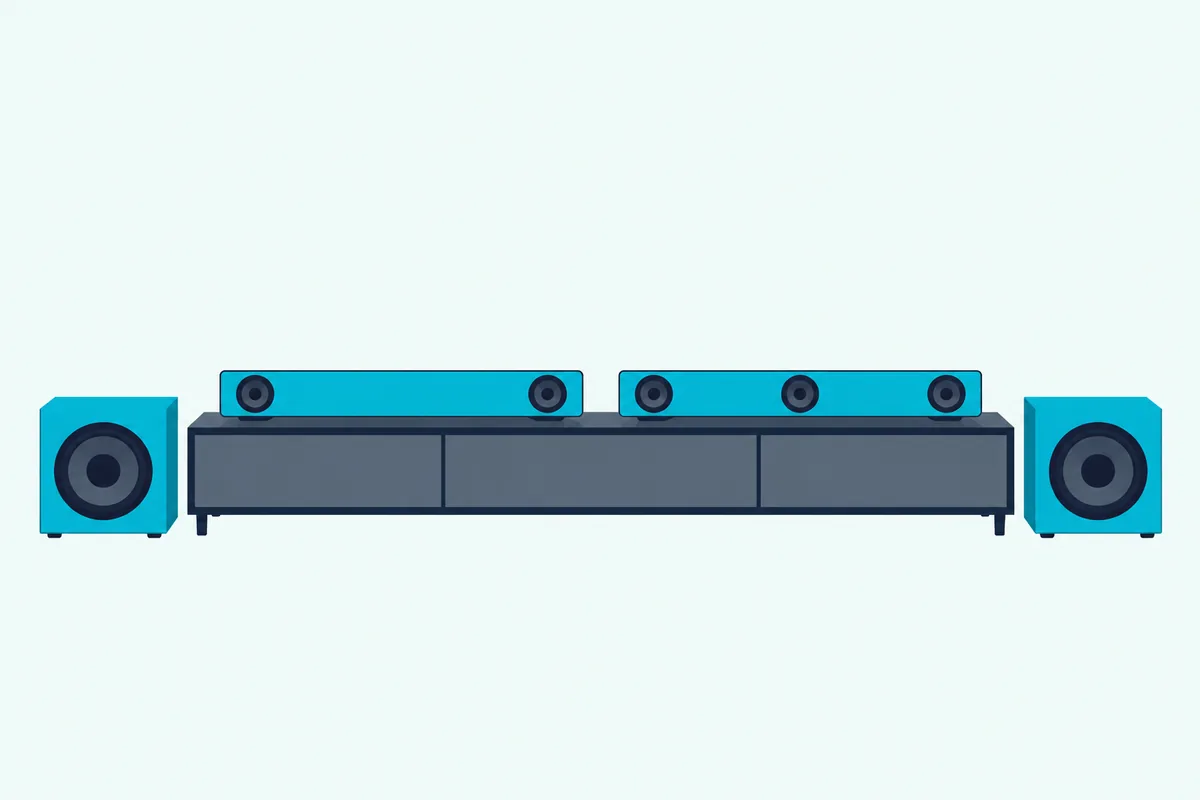
Each channel normally gets its own speaker, Dolby adds, so the 3 points to a third front speaker in the middle of the soundbar. Samsung’s HW-B630F is one model with that layout: its spec page lists 3.1 channels, a center speaker and a wireless subwoofer.
The label counts channels, not drivers. JBL builds six drivers into its Bar 2.1 Deep Bass (MK2), four racetrack drivers and two 1-inch tweeters, yet sells it as a 2.1 channel soundbar: two channels at 50 W each, plus a 6.5-inch wireless subwoofer.
Dolby’s soundbar article also puts the number of channels ahead of physical size when you shop. Every other number you’ll meet on a box, the height digit on Atmos models included, is decoded in what the channels on a soundbar mean.
Where Does a 2.1 Soundbar Send the Dialogue?
Without that middle speaker, a 2.1 still receives the middle channel of a 5.1 soundtrack and has to put it somewhere. It folds that channel into the left and right speakers: Dolby’s metadata guide says the soundtrack carries a downmix level for exactly that case, a listener with only left and right front speakers.
ITU-R BS.775-4, the ITU’s recommendation for 5.1 sound, writes the same fold-down into its two-channel layout. Each side takes that middle channel about 3 dB down, on top of its own left or right signal.
So on a 2.1, voices come out of the two speakers that Dolby’s setup guide names as the main ones for music and sound effects. RTINGS’ soundbar test of the third channel calls this a phantom center, built from the left and right speakers, and says it doesn’t place voices as accurately as a discrete one.
That fold-down is also why 5.1 dialogue can sound muffled on a 2.1, and that page walks through the voice and night settings to try first. None of them adds a third speaker, though, so the voices still share the left and right with everything else.
What Does the Center Channel Add on a 3.1?
That phantom middle is what a 3.1 replaces with a real speaker. It gives dialogue a channel and a speaker of its own: in Dolby’s speaker setup guide, delivering dialog is the center speaker’s main job, while the left and right handle most of the music and sound effects.
The soundtrack is already split that way. Dolby Digital, which Dolby says every DVD and every US HD broadcast uses, carries up to 5.1 channels, and Dolby gives its three front channels the job of clean dialogue and accurate placement of onscreen sounds.
Dolby’s setup guide puts that speaker just below or above the screen, aimed straight at the seats, which is where a soundbar’s middle driver already sits. A soundbar drives its own middle speaker, unlike a separate one on an AV receiver, a difference covered in choosing between a center channel speaker and a soundbar.
Samsung’s earlier HW-B550 and HW-B650 make the difference plain in two tables. The 2.1-channel HW-B550 and the 3.1-channel HW-B650 share Voice Enhance and Night Mode, but a 5.1 input plays as 2.1 ch on the first and 3.1 ch on the second.
Their level controls split the same way: the HW-B650’s CH LEVEL button sets a CENTER LEVEL from -6 to +6, while the HW-B550’s sets a VIRTUAL CENTER LEVEL. That matches RTINGS, which says a discrete third channel lets you set the dialogue level independently of everything else in the mix.
For the current model, Samsung’s description of the HW-B630F credits its built-in center speaker with clearer dialogue and adds a Voice Enhance mode that boosts vocal audio and adjusts the equalizer. A voice mode alone doesn’t make a 3.1, though, since the 2.1 HW-B550 has one too.
Does Your Seating Change the Answer?
That accuracy matters more the farther your seats spread from the middle of the screen. Yes, seating can tip the choice: ITU-R BS.775-4 requires its three-front-channel layout to keep the frontal sound image steady over a wider listening area than two-channel stereo provides.
Stereo is set up around one seat. Dolby’s home theater guide draws each speaker pair as a triangle with the listener at its tip, and calls that position the sweet spot.

RTINGS describes what the side seats get from a phantom center: the dialogue isn’t anchored to the middle of the screen, so voices can seem to come from a broader area. A 3.1 keeps a real speaker in that middle position, whichever seat you’re in.
Try it from your own seats: put on a newscast, move between the armchair and both ends of the sofa, and listen for whether the anchor’s voice stays on the screen. If it drifts away from the picture at the seats your family actually uses, that’s a point for the 3.1.
Room size by itself doesn’t decide it, since neither maker’s documents tie either layout to a room size. For ports, room and bass beyond the channel count, Burton Acoustix’s soundbar buying checklist goes through each.
Which Layout Suits Music Better, 2.1 or 3.1?
Seats aside, the kind of audio you play still changes how much work that middle speaker gets. For stereo music, the 2.1 gives up little: RTINGS notes that most music is mixed in stereo and sends no signal to a third channel, so it matters less there.
A stereo song is the opposite case to a film: it carries a left and a right channel and no middle track, so what a 3.1’s third driver plays depends on its sound mode. Samsung’s HW-B650 full manual shows both behaviors on that 3.1 model.
Its table plays a 2.0 ch input as 2.1 ch in Standard mode, which outputs the original sound, and as 3.1 ch in the Surround Sound, Bass Boost, Game, Adaptive and DTS Virtual:X modes. So on that model, the middle speaker joins a stereo song only once you leave Standard.
The HW-B630F lists a Standard mode among its six as well, and its own manual is the place to check how each mode routes a stereo input. On a 2.1, a stereo song maps straight onto its two channels, and JBL’s Deep Bass (MK2) manual offers a Smart mode, on by default, that adds EQ settings and JBL Surround Sound, or a Standard mode with preset EQ.
Does a 3.1 Soundbar Have More Bass Than a 2.1?
Music raises the bass question, and here the labels match. Not by the label alone: the .1 is one subwoofer in both, so the depth and level of the bass come from that subwoofer, not from the extra front channel.
Dolby explains the .1 of a 5.1 soundtrack as its low-frequency effects channel, named a tenth because it needs only about a tenth of a main channel’s bandwidth. Dolby’s speaker setup guide gives the reason a .1 helps either layout: the subwoofer delivers the deep bass, so the standard speakers can be smaller and easier to place.
The example pair shows why the spec sheet, not the label, answers this. JBL lists a 6.5-inch wireless subwoofer and 300 W of total maximum output for its 2.1, while Samsung’s HW-B630F page lists its wireless subwoofer with no driver size or power output figure, so the makers’ numbers can’t rank the two on bass.
Bass controls differ too: JBL’s remote sets the subwoofer to low, middle or high, and the HW-B630F’s mode list includes Bass Boost, while its Night Mode compresses the bass to cut the decibels at night. If you’re still deciding whether you need the .1 at all, Burton Acoustix’s 2.0 vs 2.1 comparison covers what a subwoofer adds, and our roundup of soundbar and subwoofer systems by room lists more models that ship with one.
Do You Ride the Volume During Movies?
With bass off the table, that leaves one habit to settle it: turning the volume up for a line of dialogue, then down again when the explosions hit. If that habit is yours, a 3.1 suits you, because its third channel carries the dialogue on its own; if not, a 2.1 gives you the same single subwoofer with one channel fewer.
Dolby’s split explains why: the middle speaker takes the dialogue while the left and right take the music and effects, so a 3.1 matters most where speech competes with a loud score. On a 2.1, both share the same two speakers, and the fold-down from earlier sets the voices’ level against everything else.
Night settings help with the other half of the habit, the loud peaks. Samsung’s HW-B650 manual describes its Night Mode as bringing the volume down while keeping the dialog clear, and adds a DRC setting that reduces loud sound on Dolby Digital tracks.
JBL’s manual names no night mode, and for news and weather it suggests switching Smart mode off, which leaves the preset Standard EQ. If the remote still changes hands during loud scenes, the extra channel is the part a setting can’t add, and the best 3.1 soundbar guide compares the HW-B630F with other models of that layout.
How Do the Samsung HW-B630F and the JBL 2.1 Compare?
Those two models make a clean pair for this decision, one on each side of it. They match on the wireless subwoofer and the TV connections and split on the center speaker: the HW-B630F has one and the JBL doesn’t.
The table lines them up, with one row doing the deciding.
| Spec | Samsung HW-B630F | JBL Bar 2.1 Deep Bass (MK2) |
|---|---|---|
| Channels | 3.1 | 2.1 |
| Center speaker | Yes | No |
| Subwoofer | Wireless | Wireless |
| Voice mode | Voice Enhance | None |
| Dolby format | Dolby 5.1 | Dolby Digital |
| TV inputs | HDMI ARC, optical | HDMI ARC, optical |
| Width | 33.9 in | 38.0 in |
Both also take a separate HDMI input beside the HDMI ARC connection, and both list Bluetooth 4.2. Check before routing a 4K player through either: Samsung’s spec page says the HW-B630F has no 4K video pass-through, and JBL’s manual says its HDMI 1.4 input doesn’t support the Apple TV 4K format.
If dialogue is the complaint, the 3.1 side is the Samsung HW-B630F, with Voice Enhance beside its wireless subwoofer.
Samsung HW-B630F
If voices already come through, the 2.1 side is the JBL Bar 2.1 Deep Bass (MK2), 38 inches wide with a 6.5-inch wireless subwoofer.
JBL Bar 2.1 Deep Bass (MK2)
Which TV Audio Setting Does a 3.1 Need for Movies?
That Dolby row in the table only matters if the TV passes the 5.1 track along. Switch the TV’s digital audio output from PCM to Dolby Digital, the change Samsung’s HW-B650 manual recommends for any broadcast encoded in Dolby Digital.
Its output table, the same one from the music section, shows why: a 5.1 input plays as 3.1 ch, while a two-channel input in Standard mode plays as 2.1 ch. A TV that converts the track to two-channel PCM leaves the middle speaker with no channel of its own in Standard mode.
On the HW-B630F, Samsung lists PCM input as 2 ch and Dolby at 5.1 ch, so a movie’s middle channel reaches it only if the TV sends the 5.1 track rather than two-channel PCM. Menu names change from brand to brand, and our guide to the bitstream or PCM setting on your TV lists them maker by maker.
Where Should a 3.1 Sound System Be Placed?
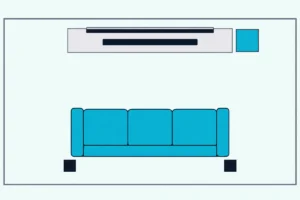
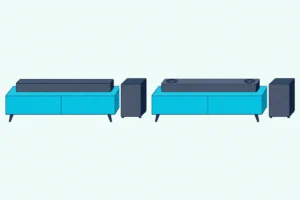
Once the full track arrives, placement decides whether the middle speaker lines up with the picture. Put the soundbar just below the middle of the screen and give the subwoofer its own spot on the floor, clear of the soundbar and the wall.

Dolby’s soundbar article gives the reason: set off to one side, or too high or too low, a soundbar makes the voices seem to start somewhere other than the screen. The same article wants it about level with your ears when you’re seated, and typically below the TV.
The subwoofer is freer. Dolby’s speaker setup guide says bass is not directional, so the subwoofer can go almost anywhere in the room, and suggests trying a few spots.
Some makers set spacing anyway: JBL’s Bar 2.1 Deep Bass (MK2) owner’s manual wants the subwoofer at least 3 ft (1 m) from the soundbar, under 20 ft (6 m) away, and 4 in (10 cm) clear of any wall. At each spot, play a dialogue-heavy scene and a bass-heavy scene until both sound right.
The rest of the job, from choosing the spot to pairing the subwoofer, is in our walkthrough on setting up a soundbar step by step.
Should You Replace a 2.1 Soundbar You Already Own?
If a 2.1 already sits under your TV, those settings and that placement come before any purchase. Replace it only if voices still get lost after you’ve checked them, since no setting adds a speaker the soundbar doesn’t have.
Start with the TV’s Dolby Digital output, then the soundbar’s own modes: on JBL’s 2.1, that means trying Standard mode with Smart mode switched off. The fold-down from the dialogue section still applies afterward, so the voices keep sharing the left and right speakers with the music and effects.
If the lines still get buried during loud scenes at the seats you use, that’s the case the 3.1 side covers. If they don’t, keep the 2.1: it already has the subwoofer, and the third channel is the only thing a 3.1 would add.
The Bottom Line
Back at the label, that 3 in a 3.1 is a center channel. Both include one subwoofer, so the choice turns on that channel and how often your dialogue gets lost.
Choose the 3.1 if you routinely miss lines in movies or your seats spread away from the middle: its middle speaker carries the dialogue apart from the music and effects in the left and right. Pick 2.1 if dialogue already comes through clearly, or if the soundbar mostly plays stereo music, which sends nothing to a third channel.
In the example pair, the Samsung HW-B630F covers the 3.1 side and the JBL Bar 2.1 Deep Bass (MK2) the 2.1 side. If you are also weighing whether to add more channels, the 3.1 vs 5.1 comparison covers that next step.
Frequently Asked Questions
Is 2.1 enough for home theater?
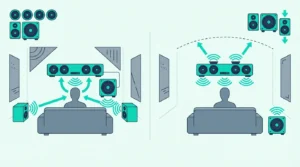
For everyday TV, yes: a 2.1 covers left, right and bass, and its left and right channels carry the dialogue too. A 5.1 layout in Dolby’s speaker setup guide adds a center and two surround speakers to the left and right, so a 2.1 lacks three of its five main speakers. Of the two example models, only the HW-B630F names a route toward it, Samsung’s SWA-9250S wireless rear speaker kit, sold separately, while JBL’s Deep Bass (MK2) manual names no add-on speakers.
Can a 2.1 or 3.1 soundbar play Dolby Atmos?
Some can, though not from height speakers. In Dolby’s notation height speakers get a third number, as in 3.1.2, so a plain 2.1 or 3.1 has none, and Dolby’s soundbar article notes that some all-in-one soundbars deliver Atmos virtually instead. Neither example lists Dolby Atmos: Samsung lists Dolby 5.1 and DTS Virtual:X for the HW-B630F, which it says adds a feeling of height through processing without up-firing speakers, and JBL lists Dolby Digital for its 2.1. Our explainer on what the .2 in a 3.1.2 soundbar adds covers the height channels.