Can You Connect a Microphone to a Soundbar? What Actually Works [2026]

Can I connect mic to soundbar? It seems like it should work — but most soundbars don’t have a mic input, and plugging a mic into the aux jack produces either silence or audio so quiet it’s useless.

The problem is a signal mismatch: microphones produce output roughly 100x weaker than what soundbar inputs expect. Without a built-in preamp to boost that weak signal, the soundbar literally can’t hear you — you end up cranking the volume to maximum and still getting nothing but hiss.

The fix is a $30–80 external mixer that sits between the mic and soundbar, amplifies the signal to the correct level, and outputs audio your soundbar can actually play at normal volume. Below, we cover which soundbars have mic inputs, how the mixer workaround works, and which methods actually produce usable results for karaoke and presentations.

Quick Takeaway

Most consumer soundbars do not have a microphone input — they accept line-level audio from TVs, phones, and streaming devices. To use a mic with a soundbar, you need an external mixer or karaoke machine that amplifies the mic signal and outputs line-level audio into the soundbar’s aux, optical, or Bluetooth input. A few karaoke-specific soundbars and party speakers include built-in mic jacks, but standard TV soundbars from Samsung, Vizio, Sony, and Bose do not. The mixer workaround costs about $30-$80 and works reliably with any soundbar that has an aux or Bluetooth input.

Why Don’t Most Soundbars Have Mic Inputs?

Connecting a microphone to a soundbar setup

Soundbars are engineered as TV audio replacements, not live sound equipment — every input expects a signal that’s already been amplified and processed by the source device. Understanding why this matters changes which workarounds actually solve the problem and which waste your money.

Soundbar Inputs Expect Line-Level Audio

Every input on a standard soundbar — HDMI ARC, optical, aux 3.5mm, and Bluetooth — accepts line-level audio already amplified by the source device. A microphone produces a signal roughly 100x weaker.

Plug a dynamic karaoke mic into your soundbar’s aux jack, turn the volume all the way up, and you might hear a faint whisper of your voice buried under hiss. It’s not broken — the signal just isn’t strong enough for the soundbar’s input stage to process.

Our soundbar to TV connection guide explains how these input types work for their intended purpose of TV audio, and our HDMI vs optical guide covers the differences between digital connection types that all share the same line-level design limitation.

No Built-In Preamp or Mixing Capability

A microphone needs a preamp to boost its weak signal to line level. PA speakers and karaoke machines include this circuitry. Vinyl playback faces the same gain-stage mismatch at phono level instead of mic level — a turntable cartridge outputs phono-level voltage that needs a phono preamp with RIAA equalization before any soundbar input can use it, which is why a turntable cannot be wired into a generic AUX input either.

Soundbars don’t — adding a preamp, gain control, and mixing circuit increases manufacturing cost for a feature that 95% of TV-audio buyers never use. It’s a deliberate design decision, not an oversight.

That’s why you won’t find XLR jacks (professional mic connector) or 6.35mm quarter-inch jacks (karaoke mic connector) on any Samsung, Sony, Vizio, or Bose soundbar. Those connectors are designed for mic-level signals that need preamplification — something the soundbar’s internal circuitry can’t provide.

Exceptions: Karaoke and Party Soundbars

A small number of soundbar-style speakers include dedicated mic inputs — typically marketed as karaoke soundbars or party speakers. JBL PartyBox models, some LG XBOOM speakers, and Singing Machine karaoke bars include one or two 6.35mm mic jacks with built-in preamps.

These units have independent mic volume controls and echo effects built in. They’re designed for karaoke from the ground up, not retrofitted with mic support as an afterthought.

If weekly karaoke is your goal, a dedicated karaoke speaker with built-in mic jacks is the cleanest solution. But if you already own a standard TV soundbar and want mic capability for occasional parties or presentations, the mixer workaround below costs $30–80 and works with any soundbar that has an aux or Bluetooth input.

How Can You Connect a Microphone to Any Soundbar?

Why most soundbars are not designed for microphone input

The reliable method: route the mic through an external device that converts mic-level to line-level output compatible with the soundbar’s inputs. All three methods below work with any soundbar brand — Samsung, Sony, Vizio, Bose, JBL, or LG — as long as it has an aux, Bluetooth, or optical input.

Method 1: External Audio Mixer

An audio mixer ($30–80) accepts mic inputs via XLR or 6.35mm jacks, amplifies the signal with a built-in preamp, and outputs line-level audio through RCA or 3.5mm. Connect the mixer’s output to your soundbar’s aux input with a standard audio cable.

The setup takes five minutes: mic into mixer, mixer output into soundbar aux, done. You get independent mic volume control separate from the soundbar’s master volume, which makes it much easier to prevent feedback and set usable vocal level before the sound reaches the soundbar.

A box like the XTUGA 4 Channel Audio Mixer is the kind of fix that solves the signal mismatch directly. It gives you mic gain, basic vocal control, and the right sort of output stage for a soundbar that only understands normal line-level audio.

This method works best when your soundbar has an aux or analog line input. If the bar only offers optical, HDMI ARC, or Bluetooth, the better move is usually a karaoke-oriented interface that handles both the mic preamp stage and the final TV-friendly output instead of forcing a plain mixer through multiple adapters.

Method 2: Wireless Microphone System With Receiver

Wireless microphones solve the cable problem, but they do not magically change the signal-level problem. In most workable setups, the wireless receiver still feeds a mixer or karaoke interface first, and that device then sends line-level audio to the soundbar.

A system like the PRORECK MX7 dual-channel wireless microphone system makes sense when you want handheld freedom for speeches, parties, or casual karaoke without running long mic cables across the room. The receiver handles mobility, while the mixer or karaoke interface still handles the gain and output conversion the soundbar needs.

If you try to make the final hop to the soundbar over Bluetooth, latency becomes the next limitation. Bluetooth can add 100–300ms of delay, which creates a disorienting echo and makes singing feel off-beat even when the wireless mic itself works well.

That is why the practical rule is simple: use wireless mics for convenience, but keep the actual soundbar feed as direct and stable as possible. Our Bluetooth vs optical soundbar guide explains why the connection you choose for the last step matters so much for real-time voice use.

Method 3: Karaoke Machine as Intermediary

A dedicated karaoke machine accepts mic inputs, mixes the audio with music playback, and outputs the combined signal as line-level audio to your soundbar. Functionally similar to a mixer, but with song libraries, lyrics displays, and vocal effects built in.

This is the most user-friendly option for families and parties. Everyone can browse songs, adjust their own mic volume, and add echo effects without touching the soundbar’s settings.

Connect the karaoke machine’s output to your soundbar via aux, optical, or HDMI depending on available connections. A product like the DIGITNOW portable karaoke microphone mixer system is closer to an all-in-one bridge: it accepts the mics, manages the vocal mix, and gives you TV-friendly outputs in one box.

That makes this route especially useful when your soundbar has no analog aux input or when you want a simpler family karaoke setup instead of piecing together separate mics, mixer, receiver, and adapters.

Samsung Soundbar Mic Connection

Samsung soundbars are the most commonly searched for mic connections. None of Samsung’s current lineup — Q-series, S-series, A-series, or any HW-model — includes a mic input.

The Samsung HW-C450, HW-Q600C, HW-Q990D — none of them. To use a mic with any Samsung soundbar, the external mixer approach is the only reliable method: mic into mixer, mixer output into the Samsung’s aux or Bluetooth input.

This is also where you need to check ports carefully. Some Samsung bars still offer analog input, but many newer models lean on HDMI ARC, optical, and Bluetooth. If your model lacks aux, a karaoke mixer system with optical or ARC support is usually easier than trying to chain analog adapters together.

For general Samsung soundbar setup help, our soundbar setup guide covers the initial configuration process, and our soundbar connection guide covers all available connection methods.

The Bottom Line

Most soundbars can’t accept a mic directly — they lack the preamp circuitry for mic-level signals. The practical fix is an external mixer ($30–80) connected to your soundbar’s aux input, which handles preamplification and gives you independent mic volume control.

If your bar has aux, a small mixer is usually the cheapest stable answer. If you want cordless mics, add a wireless receiver to that chain. If your bar lacks aux or you want an easier family-karaoke workflow, a karaoke mixer system that handles the mics and TV-friendly outputs in one unit is the cleaner path.

For understanding what soundbars are designed for and their intended use cases, start with our fundamentals guide. Our is a soundbar worth it analysis covers the full value proposition, and our soundbar vs speakers comparison helps if you’re considering dedicated speakers with built-in mic support instead.

Frequently Asked Questions

Can you plug a mic directly into a speaker?

Into a PA speaker or party speaker with XLR/6.35mm mic jacks and a built-in preamp — yes. Into a soundbar’s aux input — no.

Soundbar aux inputs expect line-level signals roughly 100x stronger than what a mic produces — you’ll get silence or a barely audible whisper. An external mixer ($30–80) bridges the gap by amplifying the mic signal to line level.

Does the Samsung TV have mic input?

No. Samsung Smart TVs have built-in mics for voice assistants (Bixby/Alexa), but no external mic input for karaoke or audio routing.

To use a mic with a Samsung TV and soundbar setup, bypass the TV entirely: connect the mic to an external mixer and route the mixer’s output directly to the soundbar’s aux or Bluetooth input. The TV’s built-in voice assistant mic cannot be repurposed for karaoke or presentation audio.

How do I connect a wireless microphone to a soundbar?

Use a wireless mic system with a USB or 3.5mm receiver dongle. Plug the receiver into a mixer, then connect the mixer output to your soundbar’s aux input.

Direct Bluetooth mic pairing is technically possible but the 100–300ms latency creates an echo effect that makes singing impractical — you hear your voice delayed, which throws off your timing. For speech at a party or presentation, the delay is tolerable but not ideal.

Bluetooth vs Optical for Soundbar: Which Connection Sounds Better? [2026]

Bluetooth vs optical soundbar seems like a simple spec comparison, but picking the wrong connection for the wrong source quietly ruins your listening experience. If the sound is coming from your TV, optical usually wins — more stable lip sync and better surround preservation.

That does not make optical the universal winner. If you stream casual audio from your phone, Bluetooth is often easier and the quality gap matters less.

The confusion comes from treating every source the same. TV, gaming, and phone audio ask the connection to do different things — so one path can feel clearly better in one setup and fine in another.

The other missing piece is HDMI ARC or eARC. In many living rooms, ARC or eARC is the better primary TV path, and the Bluetooth-versus-optical debate only matters when choosing a fallback.

Below, we sort out which one usually sounds better, what each connection actually sends, and when neither should be your main TV path.

Quick Takeaway

For TV, movies, and gaming, optical is usually the better fallback. It avoids most lip-sync problems and can still pass Dolby Digital 5.1 when the TV and soundbar support it.

For phone music, Bluetooth is usually fine and more convenient. If your gear supports HDMI ARC or eARC, use that as your main TV connection and treat both Bluetooth and optical as secondary paths.

How Do Optical and Bluetooth Actually Sound Different?

The quality gap between these two connections depends more on the source than the cable. A TV, a phone, and a game console each expose the difference in a different way — so the winner changes with the job.

TV audio exposes Bluetooth’s real weakness

Optical usually sounds better for TV before you even argue about pure fidelity. It gives a cleaner lip-sync path and can carry Dolby Digital 5.1, while TV Bluetooth is more likely to add delay or flatten the feed to stereo.

That difference matters more than small codec debates. A movie that stays in sync and keeps its surround separation feels better than one that arrives late and flatter.

People who use TV Bluetooth for movies often notice voices arriving a fraction of a second after lips move. That mismatch is hard to ignore once you spot it, and it gets worse with fast-paced dialogue.

Phone music hides the same gap

The delay and surround issues that make Bluetooth a poor TV path barely matter when there is no picture to sync. Most listeners care more about skipping the cable than about the quality tradeoff.

Modern Bluetooth codecs like AAC and SBC are good enough for casual music at normal volume. The compression artifacts that matter in a studio mix are usually inaudible on a soundbar in a living room.

That is why the short answer is split: optical usually wins for TV audio, while Bluetooth is usually good enough for casual phone audio. Once you separate those two jobs, the comparison gets clearer.

If you only want the phone-listening setup, our soundbar Bluetooth pairing guide walks through the simple pairing flow.

What Do Optical and Bluetooth Actually Send to a Soundbar?

The feel difference between Bluetooth and optical traces back to two fundamentally different signal paths. One compresses and beams audio wirelessly; the other pipes a stable digital stream through a cable.

Bluetooth: wireless convenience with a delay tax

Bluetooth sends audio wirelessly after compressing it into a codec the soundbar can receive. That makes it convenient, but the result depends on codec support, wireless stability, and how the source device handles output.

Most TVs only support the basic SBC Bluetooth codec, which caps quality lower than AAC or aptX. Phones usually offer better codec options, which is another reason Bluetooth works better for phone audio than for TV audio.

For TV use, the bigger problem is usually delay rather than raw sound quality. Many soundbars make stereo Bluetooth acceptable, but they cannot fix late-arriving audio or the two-channel limitation.

Some soundbars advertise lip-sync correction for Bluetooth, but the adjustment range is often too narrow to fix the full delay chain from TV to bar.

If you still need to pair a TV this way, our TV-to-soundbar Bluetooth guide shows the setup steps. The harder part is that no menu path removes the latency tradeoff completely.

Optical: stable transport with a format ceiling

The limitations that make Bluetooth risky for TV are exactly what optical avoids. It is a wired digital connection with near-zero latency and no compression step between the TV and the soundbar.

Optical can pass Dolby Digital 5.1 when the TV and content support it. That 5.1 capability preserves dedicated center, surround, and subwoofer channels, which is why our channel guide matters more than generic cable advice.

A soundbar decoding 5.1 over optical separates dialogue from effects more clearly than a stereo Bluetooth feed. The tradeoff is that optical is not the modern everything-connection.

Even an Atmos-capable bar like the Sonos Beam Gen 2 still hits the same ceiling over optical. The bar may sound excellent, but the connection itself cannot carry the Atmos version of the soundtrack.

Which Connection Works Best for Your Device?

TV and movies: optical wins the sync and surround battle

For everyday TV use, optical is usually the better fallback if ARC or eARC is not in play. It is more predictable for dialogue sync and more likely to preserve the surround format your soundbar can decode.

If your TV is set incorrectly to PCM or stereo, even optical can underperform. Our bitstream vs PCM guide and soundbar to TV connection guide matter more than swapping inputs blindly.

Gaming punishes Bluetooth’s delay even harder

The lip-sync problems that annoy movie viewers become gameplay problems for gamers. Delayed gunshots, menu sounds, or voice lines make the whole system feel disconnected from what is on screen.

The delay is especially noticeable in competitive or rhythm-based games where audio timing directly affects gameplay. Even casual gamers tend to notice the mismatch faster than movie viewers do.

That is why Bluetooth is a poor primary TV-audio path for most gaming setups. Optical is not the most advanced connection, but it is the better choice when the alternative is TV Bluetooth audio.

Phone audio is where Bluetooth earns its place

Unlike TV and gaming, phone audio has no picture to sync and no expectation of surround playback. For phone music, podcasts, or background listening, the wireless convenience usually matters more than the technical losses.

That is also where a living-room bar like the Polk Audio Signa S2 Sound Bar for Smart TV with Subwoofer makes the hierarchy easier to live with. Keep TV audio on HDMI ARC or optical, then use Bluetooth for casual phone listening when convenience matters more than perfect fidelity.

When Do HDMI ARC or eARC Change the Hierarchy?

The Bluetooth-versus-optical debate assumes one of them is your primary TV connection. But if your TV and soundbar both support ARC or eARC, neither one needs to be — and that changes the entire hierarchy.

ARC and eARC as the primary TV path

HDMI ARC usually matches or beats optical for everyday TV use — same surround formats plus easier TV-remote control. eARC goes further by supporting higher-bandwidth formats that optical cannot carry at all.

A TV-first model like the Samsung HW-Q600F makes that hierarchy easier to see. HDMI ARC or eARC should handle the daily TV signal, while optical stays the backup and Bluetooth stays the convenience input.

If you are unsure why one HDMI port works for a soundbar and others do not, our HDMI vs HDMI ARC guide breaks that down. Our HDMI ARC setup guide covers the menu flow, and our HDMI vs optical guide covers the wired-TV-path comparison.

Optical as the fallback when ARC misbehaves

Once ARC or eARC is handling the primary TV path, optical shifts to a fallback role. It still makes sense when the TV has no ARC port or when ARC creates problems you do not want to debug.

Older TVs, budget models, and some projectors only have optical out and no ARC-capable HDMI port. For those setups, optical is the best wired connection available — not a downgrade, just a different starting point.

Bluetooth as the wireless side input

With ARC handling TV duties and optical covering the fallback, Bluetooth fills the only role left — wireless phone audio. It belongs in the setup, just not as anything connected to the TV signal chain where sync and surround matter.

The Bottom Line

Bluetooth vs optical soundbar is not a one-line winner unless you separate TV audio from phone audio first. For TV, movies, and gaming, optical usually sounds better — more stable sync and better surround preservation. For specialty sources like turntables, optical only works after the vinyl signal is converted analog-to-digital via a powered converter, while Bluetooth needs a transmitter and adds compression and pairing windows — the comparison shifts when the source is not already digital.

For phone music, Bluetooth is usually fine and more convenient. If your gear supports ARC or eARC, use that as the main TV connection, keep optical as the fallback, and treat Bluetooth as the wireless side input.

If you need the broader connection basics before you keep tweaking inputs, start with our what is a soundbar guide. From there, you can decide whether you are solving a TV-path problem, a Bluetooth-pairing problem, or a soundbar-limit problem.

Frequently Asked Questions

Is optical better than Bluetooth for a soundbar?

For TV audio, usually yes. Optical avoids most lip-sync problems and can carry Dolby Digital 5.1 instead of a stereo wireless feed.

For phone music, the gap is smaller. Bluetooth is often good enough because convenience matters more and there is no picture to sync.

Does Bluetooth reduce sound quality on a soundbar?

Bluetooth can reduce quality because it compresses the audio. The bigger issue for TV use is usually delay and the stereo limitation rather than pure fidelity loss.

Many people tolerate Bluetooth fine for casual music but dislike it immediately for shows and movies where the delay becomes visible.

Can optical carry Dolby Atmos to a soundbar?

No. Optical handles older compressed formats like Dolby Digital 5.1 but cannot carry Atmos or the higher-bandwidth formats that eARC supports.

What is the best connection type for a soundbar?

For most modern TV setups, HDMI ARC or eARC is the best primary connection. If ARC is unavailable, optical is the next-best TV path — Bluetooth is best kept for phone music and casual wireless audio.

Bitstream vs PCM for Soundbar: Which Setting Preserves Surround? [2026]

The bitstream vs PCM for soundbar question shows up when you dig into your TV’s audio output settings and find two options with no explanation. Pick wrong and nothing breaks — but your soundbar might silently drop from 5.1 surround to plain stereo without any warning on screen.

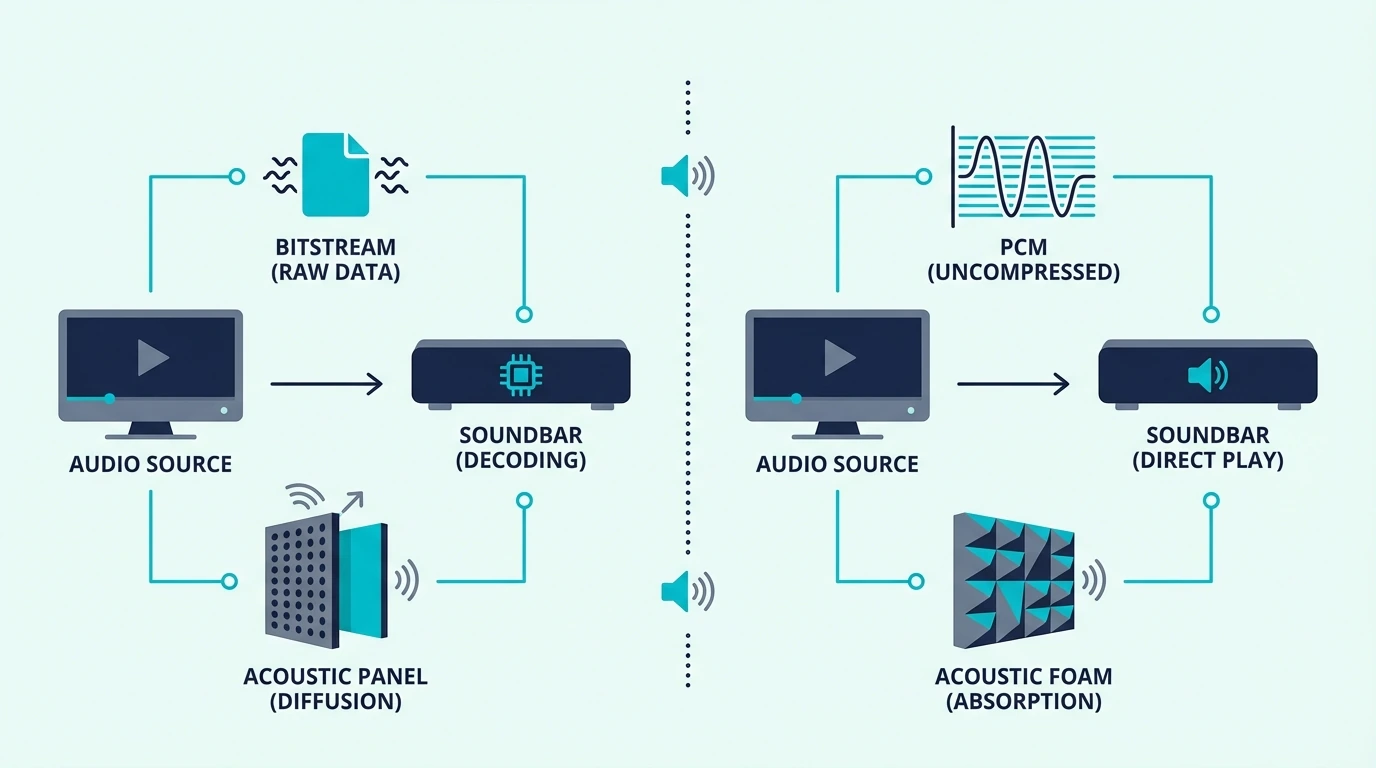
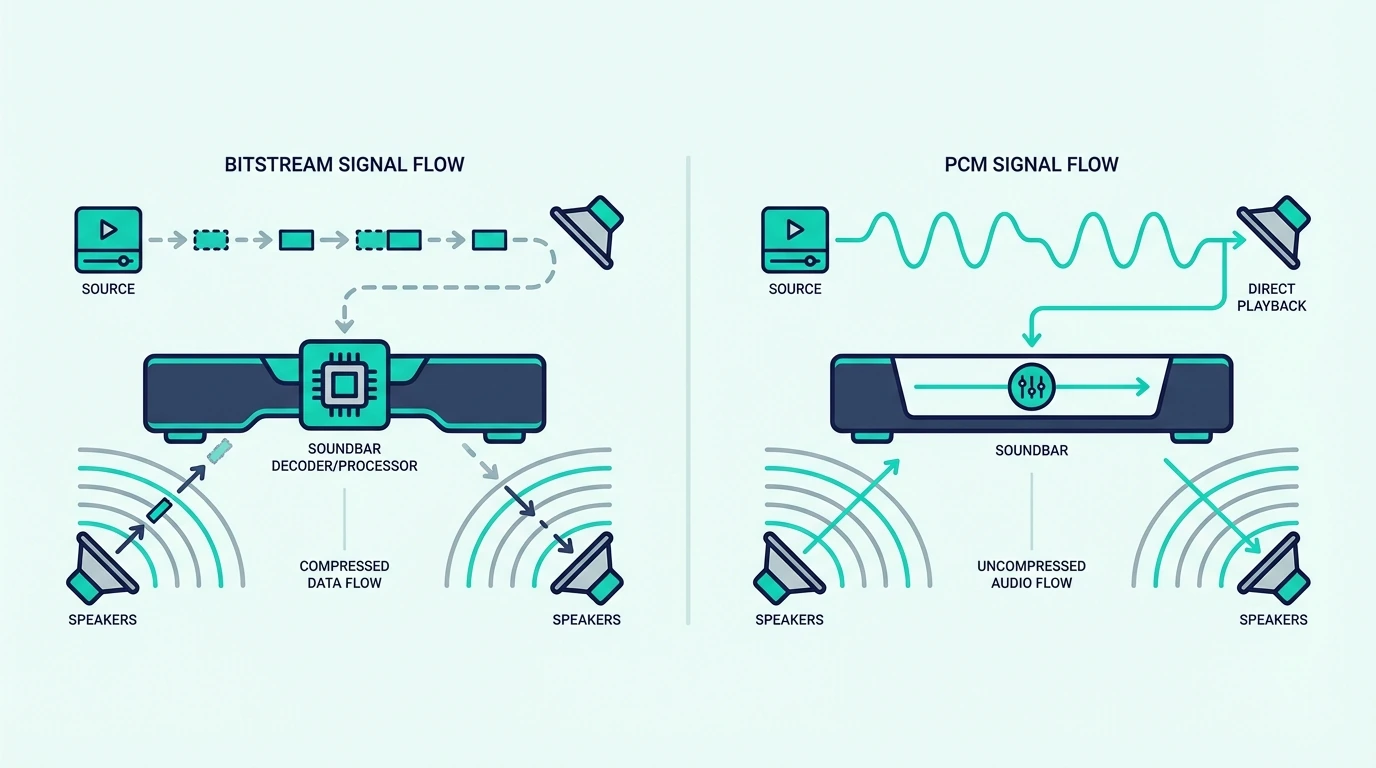
Bitstream sends the original Dolby or DTS stream to the soundbar, while PCM means something upstream decoded the audio first and is now sending raw audio instead. That sounds harmless until HDMI ARC or optical bandwidth forces the TV to collapse a surround mix into two channels.

Once you match the setting to your connection type, your soundbar can actually receive the format the movie or show was mixed in. That is what keeps dialogue separation, surround effects, and Atmos metadata intact instead of quietly flattened.

Below, we explain what each setting does, when PCM is genuinely fine, and how to confirm your soundbar is getting proper surround audio instead of an accidental stereo downmix.

Quick Takeaway

Use bitstream for most soundbar setups, especially over HDMI ARC or optical. It preserves Dolby Digital, DTS, and most TV-app Atmos streams so the soundbar can decode them itself.

Use PCM only when your full chain supports multi-channel PCM correctly, which usually means HDMI eARC or a source device like a console outputting LPCM. Over standard HDMI ARC, PCM usually means stereo only.

What Do PCM and Bitstream Actually Do on a Soundbar?

Bitstream and PCM audio settings for soundbars compared

Both settings describe the same handoff point: the audio leaving your TV or source and heading to the soundbar. The real difference is which device decodes the soundtrack before it reaches the bar.

PCM: TV Decodes, Soundbar Receives Raw Audio

When you select PCM, your TV or source decodes the Dolby or DTS soundtrack internally and converts it into raw PCM audio before sending it onward. The soundbar then plays what it receives instead of decoding the original bitstream itself.

PCM is not a bad format by itself. The problem is that uncompressed multi-channel PCM needs more bandwidth than standard HDMI ARC or optical usually provide.

That is where most setups go wrong. A TV can decode a 5.1 soundtrack perfectly, then downmix it to 2-channel PCM because ARC cannot carry all six raw channels.

If your soundbar already shows PCM when you expected surround, our why does my soundbar say PCM guide walks through that symptom from the troubleshooting side. The short version is that the soundbar is only telling you what it received, not what the movie originally contained.

Bitstream: TV Passes Through, Soundbar Decodes

When you select bitstream, the TV sends the original encoded audio stream to the soundbar without decoding it first. The soundbar does the Dolby, DTS, or Atmos decoding with its own hardware.

That approach is usually safer on soundbars because compressed surround formats fit within HDMI ARC and optical bandwidth much more easily than multi-channel PCM. It also preserves the format flags your soundbar uses to switch into Dolby Digital, DTS, or Atmos playback.

If you bought an Atmos-capable bar like the Bose Smart Dolby Atmos Soundbar, bitstream or passthrough is the default that keeps those immersive formats intact. Switch the TV to PCM and the bar may still play audio, but it is much easier for the TV to strip away the metadata the bar needs to identify the incoming format correctly.

How Your Connection Type Changes the Answer

Over HDMI ARC, bitstream is the right default for almost everyone. ARC comfortably carries Dolby Digital 5.1 and similar compressed formats, but it usually cannot carry uncompressed multi-channel PCM from a TV menu setting.

Over HDMI eARC, the answer becomes more nuanced. eARC has enough bandwidth for multi-channel PCM, so PCM can be perfectly valid if both devices support it properly and the source is intentionally outputting LPCM.

That matters most with game consoles and some streaming boxes. Our HDMI vs HDMI ARC guide breaks down why eARC changes the bandwidth limits that make PCM risky on standard ARC.

For streaming apps built into the TV, bitstream is still the safer default. It asks the TV to pass Dolby Digital, Dolby Digital Plus, or Atmos through instead of reprocessing the audio first.

Over optical (TOSLINK), bandwidth is tighter than ARC. Optical supports PCM stereo and compressed Dolby Digital 5.1, but not lossless Atmos, DTS:X, or full multi-channel PCM, which is why our HDMI vs optical guide recommends HDMI whenever you have the option.

When Should You Use Bitstream or PCM?

When to use bitstream or PCM with a soundbar

The right choice depends on your hardware, connection type, and the specific device creating the audio signal. The goal is not to choose the better-sounding word in the menu, but the setting that preserves the format your soundbar can actually use.

Use Bitstream If…

You have a standard HDMI ARC or optical connection. That is the most common soundbar setup, and bitstream is what lets Dolby Digital 5.1 survive the trip.

You use TV streaming apps or watch movies where the soundtrack is already encoded in Dolby Digital, Dolby Digital Plus, DTS, or Atmos. In that scenario, passing the original stream through is simpler and usually more reliable than asking the TV to decode first.

A 3.1 bar like the Amazon Fire TV Soundbar Plus depends on receiving a surround-capable signal to do anything useful with its center channel and Atmos processing. Set the chain to PCM over standard ARC and you risk turning that setup into plain stereo at the handoff point.

Your soundbar’s front display or app confirms the format after the switch. If it changes from PCM or Stereo to Dolby Digital, DD+, or Atmos, you fixed the actual signal path instead of guessing.

Use PCM If…

You have HDMI eARC on both devices and you know the source is sending multi-channel PCM correctly. That usually applies to consoles, some media boxes, and a few TVs that handle LPCM passthrough cleanly.

You are troubleshooting a format-handshake issue. If bitstream causes silence on DTS content or weird lip-sync behavior, PCM over eARC can be a valid fallback while you isolate whether the source, TV, or soundbar is rejecting the original format.

On a simple front-stage bar like the Amazon Fire TV Soundbar, the audible difference between PCM and bitstream is smaller for stereo-first use. A bar with no rear channels or height speakers has less to lose than a true surround or Atmos model.

The Quick Decision

For most soundbar owners, choose bitstream or passthrough and leave it there. That is the safest default for ARC, optical, TV apps, and Dolby or Atmos playback.

Use PCM only when eARC is present and you have a specific reason to trust or prefer multi-channel PCM from the source. If your setup is not one of those edge cases, PCM is more likely to hide a downmix than improve quality.

How to verify it’s working: Play a known 5.1 or Atmos title and check the soundbar’s display or companion app. It should show a surround format such as Dolby Digital, Dolby Digital Plus, or Atmos instead of PCM or Stereo.

If you want a quick primer on channel counts, our what soundbar channel numbers mean guide explains the numbering. For setup help, our soundbar to TV connection guide covers the full wiring and menu flow.

If you still need the ARC-specific setup path, our how to use HDMI ARC with a soundbar guide walks through the menu flow device by device.

The Bottom Line

Bitstream is the correct default for most soundbar setups because it preserves the original surround format instead of asking the TV to translate it first. That matters most on HDMI ARC, optical, and TV-app playback.

PCM is only the better choice when the entire chain supports multi-channel PCM cleanly, which usually means eARC and a source device that was meant to output LPCM in the first place. In other words, PCM can be right, but it is not the safe blind default.

If you are comparing PCM against Dolby Digital specifically, our PCM vs Dolby Digital guide covers that branch of the decision. If you want the fundamentals before you keep tweaking settings, start with our what is a soundbar guide.

Frequently Asked Questions

Is bitstream or PCM better for sound?

Neither is inherently higher quality in a vacuum. The real question is whether your connection can still carry the signal after decoding.

For most TV-to-soundbar setups on ARC or optical, bitstream is better because it keeps the surround stream compressed until the soundbar decodes it. PCM becomes competitive only when eARC and multi-channel PCM support are both present.

Should I use PCM with my soundbar?

Use PCM only if you have eARC or a source device that is intentionally outputting multi-channel PCM. If your TV is on standard ARC and the bar suddenly shows PCM, you are usually looking at a stereo downmix rather than a premium mode.

Should I set my TV to bitstream or PCM?

Set the TV to bitstream, passthrough, or auto/passthrough for most soundbars. Switch to PCM only when you are solving a known compatibility issue or you have confirmed that your eARC chain is carrying multi-channel PCM correctly.

Can PCM still be surround on a soundbar?

Yes, but usually only when the source, TV, and soundbar all support multi-channel PCM and the link is eARC rather than standard ARC or optical. That is why gamers with eARC sometimes use PCM successfully while TV-app users on ARC usually should not.

What are the disadvantages of bitstream?

Bitstream depends on format compatibility. If the source sends DTS and the soundbar cannot decode DTS, you may get silence, stereo fallback, or a forced format change upstream.

This is most common with Blu-ray discs or older media boxes that default to DTS. The fix is to switch that source to PCM or Dolby Digital, not to assume bitstream is always broken.

What Do the Channels Mean on a Soundbar? How to Read 2.1, 3.1, 5.1 and Atmos

What do the channels mean on a soundbar?

The short answer is that the numbers tell you how many speaker groups the system is built to handle, but they do not tell the whole story about how immersive the bar will sound in your room.

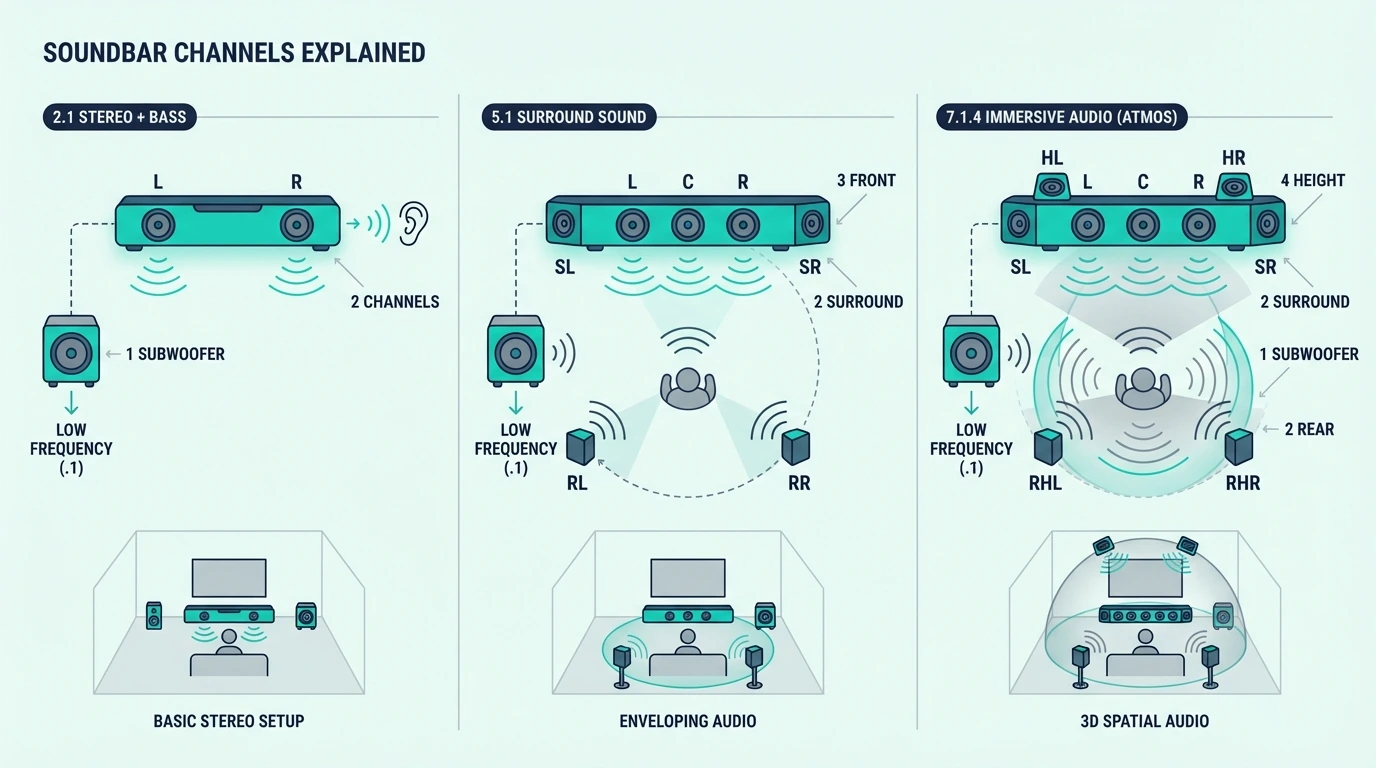
A label like 2.1, 3.1, or 5.1.2 follows a simple X.Y.Z pattern.

X is ear-level channels, Y is subwoofers, and Z is height channels for Dolby Atmos.

The problem is that buyers often treat 5.1 or 7.1 like a quality score when the label is really just a decoder.

Read it correctly first, so you can stop misreading spec sheets and jump to the right comparison page afterward.

Below, you’ll see how to read the numbers, what common examples like 2.1 and 5.1.2 actually describe, and what those numbers do not tell you before you compare soundbars.

Quick Takeaway

To read a soundbar channel label, treat the first number as the main ear-level channels, the second as subwoofers, and the third as Atmos height channels when it appears.

That decoder helps you understand the layout, but it does not tell you whether the bar uses real rear speakers, virtual surround, or room-dependent Atmos tricks.

Use this page to decode the label first, then move to comparison guides to decide whether that layout is actually worth buying.

How Do You Read the First Number on a Soundbar?

What soundbar channel numbers mean

The first number tells you how many channels the soundbar handles across the main horizontal listening plane.

In plain English, it tells you how many front or surround positions the system is trying to reproduce before you even get to bass or Atmos.

2 Means Left and Right Stereo

When the first number is 2, the bar is handling left and right stereo only. That can still be paired with a subwoofer, which is why 2.0 and 2.1 are not the same thing.

The Samsung HW-C450 2.1 is a clean real-world example of that pattern.

Its label starts with 2 because the main bar is still a left-right stereo system, while the .1 tells you bass is being handled separately.

If you want the actual tradeoff between stereo-only bars and stereo-plus-subwoofer systems, use 2.0 vs 2.1 soundbar rather than stretching this page into a buyer guide.

3 Means a Center Channel Is Added

When the first number is 3, the usual layout is left, center, and right.

That center channel is why 3.0 and 3.1 systems are associated with clearer dialogue than 2.0 or 2.1 systems.

When people say a bar has a dedicated dialogue channel, this is usually what they mean. The label is telling you that speech is no longer being handled only by the left and right channels through phantom imaging.

This page is only decoding the number. If you are deciding whether the center channel is worth paying for, 2.0 vs 3.0 soundbar and 2.1 vs 3.1 soundbar handle that decision directly.

5 and 7 Mean Surround Positions Are Being Counted

When the first number jumps to 5, the system is now counting surround positions as part of the layout.

A 5-channel design usually means front left, center, front right, surround left, and surround right.

At 7, two more surround or wide or rear channels are being counted.

In soundbar marketing, though, that does not automatically mean you are getting seven separate boxes around the room.

That distinction matters more than many buyers realize. A 5.1 bar with detachable rear speakers is not the same experience as a single-cabinet bar trying to simulate those surround positions with angled drivers and DSP.

The Sony BRAVIA Theater System 6 is a real-world example of a 5.1 label — five ear-level channels plus a wireless subwoofer, built for movie-focused rooms where surround immersion matters.

Some soundbars reach those counts with wireless rears, some with side-firing drivers, and some with virtual processing.

For the practical difference between true added speakers and simulated surround, go next to adding surround speakers to a soundbar or soundbar vs home theater.

What the First Number Does Not Tell You

The first number does not tell you how large the drivers are, how well the center channel is tuned, or how convincing the surround field will feel in an open room.

It is a layout clue, not a quality score.

It also does not tell you whether those counted channels are being produced by separate speaker modules or by virtualization inside one bar. Two soundbars can both say 5.1 and still create very different real-world results.

That is why direct comparison pages like 3.1 vs 5.1 soundbar and 2.1 vs 5.1 soundbar still need to exist separately. Those pages answer the buying question that this page should not try to own.

What Do the Second and Third Numbers Mean?

Examples of 2.1, 3.1, and 5.1 soundbar layouts

The numbers after the dots describe speaker groups doing special jobs. On soundbars, the second number is usually about bass, and the third number appears when height channels for Atmos are being counted.

The .1 Is the Subwoofer

A .1 means one subwoofer channel. In soundbar systems, that usually means a separate wireless subwoofer handling the low bass that the bar itself cannot reproduce well on its own.

That is also why .0 matters. A 2.0 or 3.0 soundbar has no dedicated subwoofer at all, even if the brand claims the bar still has decent built-in bass.

This is why 2.0 and 2.1 behave differently even when the main bar looks similar.

If you want the deeper explanation of what the sub actually changes, go to what a subwoofer does for a soundbar or the full 2.0 vs 2.1 soundbar breakdown.

You will occasionally see .2 in larger speaker systems, which means two subwoofers.

On soundbars that is less common, and the more important decoder lesson is simply that the second number is about bass handling, not surround immersion.

The .2 or .4 Is the Height Layer

When a third number appears, it is counting height channels used for Dolby Atmos effects.

A 3.1.2 label means three ear-level channels, one subwoofer, and two height channels.

Height channels are not the same as rear surround channels. A 3.1.2 bar can create overhead effects while still remaining a front-stage system, whereas a 5.1 bar adds surround positions without adding height.

The Polk Audio Signa S4 is a clean example of that decoder.

Its 3.1.2 label tells you the system has a center channel for dialogue, a subwoofer for bass, and two upfiring drivers intended to create overhead effects.

But the label still does not promise a great Atmos experience in every room.

Ceiling height, ceiling material, and room shape still matter, which is why Atmos soundbar vs 5.1 remains a separate decision page.

Common Soundbar Labels Decoded Fast

2.0 means left and right only, with no subwoofer.

That usually points to a bar-first setup where clarity and simplicity matter more than deep bass.

2.1 means left and right plus one subwoofer.

This is one of the most common entry-level movie-friendly layouts because it adds bass without adding a dedicated center channel.

3.1 means left, center, right, plus one subwoofer.

It is the clearest decoder shortcut for a dialogue-first soundbar layout.

5.1 means five ear-level channels plus one subwoofer.

Whether those surround channels are coming from real rears or virtual processing still needs a second look.

5.1.2 means five ear-level channels, one subwoofer, and two height channels.

The extra .2 changes the overhead layer, not the basic fact that you still need the room and ceiling to support Atmos properly.

What These Numbers Do Not Tell You

The channel count does not tell you whether rear speakers are included separately, whether the bar uses virtual surround tricks, or whether your TV will pass the right audio format over ARC, eARC, or optical.

It also does not tell you whether the system fits your room size or listening habits.

A 5.1 label also does not mean you are hearing 5.1 all the time.

If the source device, app, or TV connection falls back to stereo, the bar may still be receiving a much simpler signal than the box suggests.

That is why the correct next step after decoding the spec is usually how to choose a soundbar, HDMI vs optical for soundbar, or a direct comparison page like 2.1 vs 3.1 soundbar.

The numbers help you read the label correctly, then the comparison pages tell you what to do with that information.

The Bottom Line

Soundbar channel numbers are a decoder, not a verdict.

The first number counts ear-level channels, the second counts subwoofers, and the third counts height channels when Atmos is involved.

Read the label correctly first, then move to the right next page for the actual decision.

For the broader category start with what a soundbar is, and for shopping decisions jump to how to choose a soundbar or the comparison pages linked above.

Frequently Asked Questions

How Do You Read Soundbar Channel Numbers?

Read them left to right as ear-level channels, subwoofers, and height channels.

A 5.1.2 means five ear-level channels, one subwoofer, and two height channels.

What Does 2.1 Mean on a Soundbar?

A 2.1 soundbar has two main front channels and one subwoofer. In practice, that means stereo sound plus separate bass.

What Does 3.1 Mean on a Soundbar?

A 3.1 soundbar has left, center, and right channels plus one subwoofer. The center channel is the part usually associated with clearer dialogue.

What Does 5.1.2 Mean on a Soundbar?

A 5.1.2 soundbar has five ear-level channels, one subwoofer, and two height channels. It is trying to deliver surround sound across the room plus overhead Atmos effects.

Does 5.1 Always Mean Separate Rear Speakers?

No.

On soundbars, 5.1 can mean real wireless rear speakers, side-firing drivers, or virtual surround processing.

The label counts surround positions. It doesn’t tell you if separate speaker boxes exist behind the couch.

Does a Higher Channel Count Always Mean a Better Soundbar?

No.

Higher numbers tell you about layout. They do not tell you how well the bar executes that layout in your room.

Soundbar vs Receiver: Which One Do You Actually Need?

The soundbar vs receiver decision sounds like a straight sound-quality contest, but most people buy the wrong one when they ignore what their room and daily routine actually need.

The problem is that a receiver can become an expensive mistake when your real goal is only to fix weak TV audio in a living room that does not support proper speaker placement.

A soundbar can also be the wrong move when you already own speakers, care deeply about music imaging, or want to build a system piece by piece so you can avoid replacing everything later.

Below, you will see what each option actually includes, what the same budget really buys, and where modern premium soundbars now blur the old line between simple and serious.

Start by separating “I need better TV sound” from “I want to build a system,” because that one distinction decides most of this guide.

Quick Takeaway

To choose between a soundbar and a receiver, start with the problem you are solving. A soundbar is usually the smarter buy when you want a clean one-cable TV upgrade, your room fights speaker placement, or you care more about ease than tweakability. A receiver is worth it when you already own speakers, plan to build a system over time, or want true surround and music performance badly enough to live with the extra boxes, wire, and calibration.

What Does a Soundbar Replace, and What Does a Receiver Still Need?

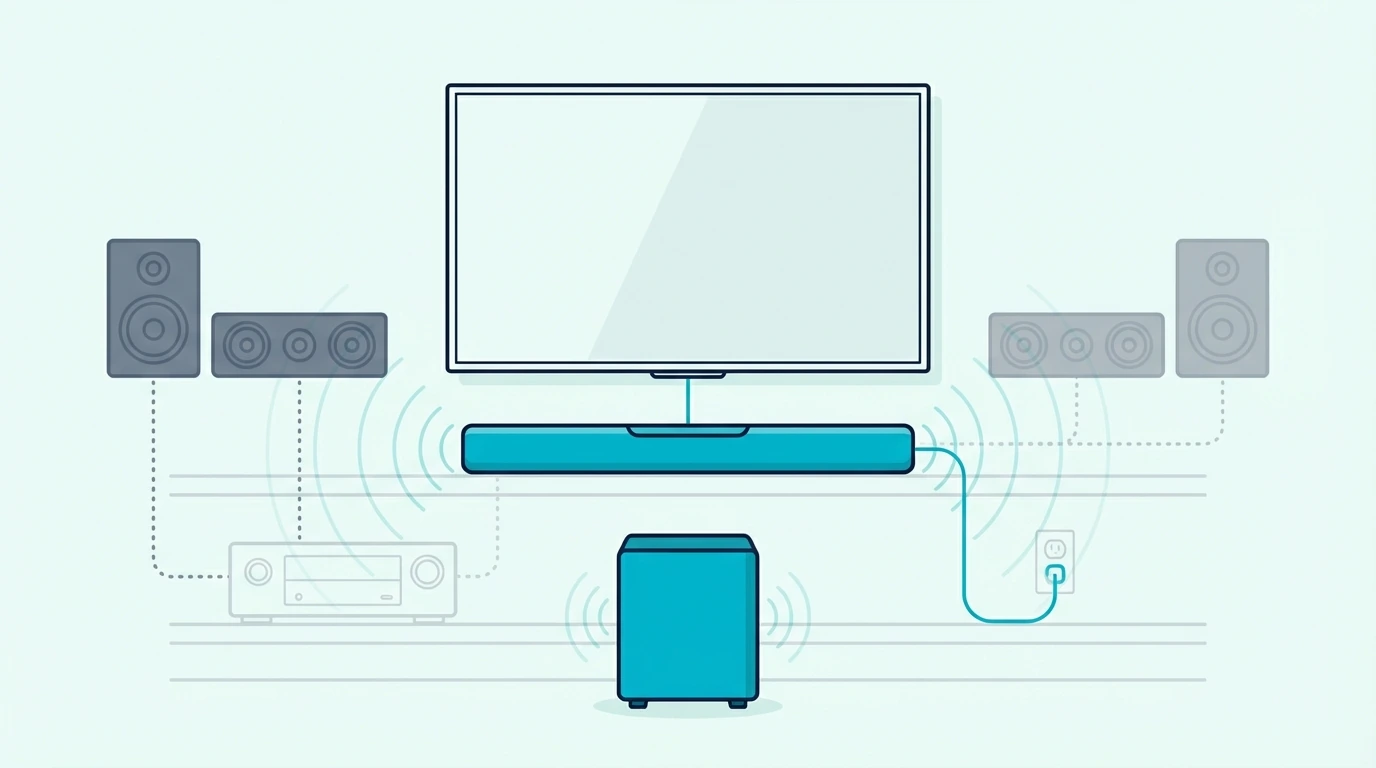
What a soundbar replaces in a TV audio setup

That split between “fix TV audio” and “build a system” only makes sense once you know what each box actually does.

The differences start with the fundamentals: what a soundbar already includes, what a receiver does not, and what you still have to add before anything sounds good.

A Soundbar Is Already the Whole Playback Chain

A soundbar already contains audio processing, amplification, and speaker drivers in one chassis.

When you connect it to your TV, you are buying the brain and the voice at the same time.

That is why a model like the Polk Audio Signa S4 feels so direct in practice.

One bar, one wireless subwoofer, and one HDMI cable get you from weak TV speakers to a finished setup without a rack full of hardware.

Even when a bar adds Atmos, room correction, or wireless rears, those are still features inside a finished product.

You are choosing a complete solution, not a list of parts that need each other before the system makes sense.

If you want the deeper foundation first, our what is a soundbar guide breaks down how that all-in-one design works. That same design is the reason soundbars keep winning with normal TV buyers.

A Receiver Is Only the Control and Power Hub

An AV receiver, usually shortened to AVR, is the command center for a speaker system.

It decodes formats, switches inputs, powers passive speakers, and handles calibration, but it does not replace the speakers themselves.

So a receiver purchase is never the whole story. You still need at minimum a pair of speakers, and most people also need a center channel or subwoofer before the upgrade feels complete.

That is why the receiver sticker price is so misleading.

A budget receiver might cost a few hundred dollars, but a complete 5.1 setup also needs separate speakers, a powered subwoofer, speaker wire, and sometimes stands or wall mounts before the room starts behaving like the theater system you imagined.

That is where new buyers get tripped up. The receiver price tag looks like the start of the answer, but it is really the first line item in a longer build.

The math changes if you already own good passive speakers. If you own nothing, the receiver path starts as a project rather than an instant fix.

The Real Choice Is One Product or a Chain of Products

Once you see that difference, the soundbar vs receiver question stops feeling abstract. You are choosing between a finished appliance and a chain of components that only shine when the whole chain comes together well.

That same ceiling-versus-friction tradeoff shows up in our soundbar vs home theater comparison.

Receiver systems can go further, but they also give you more ways to waste space, money, and patience before you ever hear that higher ceiling.

If your goal is simply to replace muddy TV audio, a soundbar already solves the full problem. If your goal is to build around speakers you plan to keep for years, the receiver starts making more sense.

What Does the Same Budget Actually Buy?

What the same budget buys with a soundbar versus a receiver

Now that the product difference is clear, the next mistake is comparing a finished soundbar package to the price of a receiver alone.

Budget is where most lazy advice falls apart, so compare what the same spend actually buys on both sides.

Budget tier Soundbar path Receiver path
Entry tier Finished 2.0, 2.1, or dialogue-first upgrade Receiver only, or a very compromised stereo start
Mid tier Complete 3.1 or Atmos-ready package with subwoofer Better foundation, but money is still split across more pieces
Premium tier High-end bar or wireless surround package Receiver build finally starts using its higher ceiling

Entry-Level Money Usually Favors Completeness

At the lower end, soundbars usually win because they solve the whole problem in one purchase. A compact Bose TV Speaker makes sense when the real pain point is dialogue clarity and daily ease, not building a hobby system.

If you already know you want more bass from the start, a Samsung HW-C450 is the kind of complete package that makes more sense than receiver-first shopping in the same bracket.

The receiver side at the same spend usually means compromise from day one. You are either buying the box first and delaying the speaker side, or buying a mismatched starter setup that still needs work before it feels satisfying.

That is the first place people overbuy. They chase the serious-looking option, then live for months with a half-finished system that still does not solve the original TV problem very well.

If that is your budget lane, our best budget soundbar guide is a better next stop than forcing an unfinished receiver build. Completeness matters more than theoretical upside when the budget is tight.

Mid-Range Money Is Where Soundbars Look Strongest

The middle tier is where soundbars feel especially honest. The complete packages get meaningfully better, while the receiver path is still dividing money across too many needs at once.

That is why the Polk Signa S4 works as such a useful example.

You get a center channel, a subwoofer, Atmos processing, and a setup most households can finish in one sitting.

A receiver system at the same spend can still turn into something better later, but often not better today.

You may still be living in bare-bones stereo or a thin starter package while the soundbar buyer is already enjoying a finished TV upgrade.

Our Atmos soundbar vs 5.1 comparison helps clarify that exact fork.

The key question is not which format sounds cooler on paper, but whether you are buying a complete experience now or a platform you plan to grow later.

Premium Money Creates a Real Fork in the Road

Premium spending is where the answer stops being automatic.

Now you can either build a receiver-based system that finally uses its higher ceiling, or buy a premium soundbar package that removes most of the wire-and-rack pain without staying basic.

That is where old advice starts to age badly. A premium soundbar is no longer just a prettier budget compromise.

The useful question here is whether you want your money to buy modularity or convenience.

If you want modularity, the receiver path has the stronger long-term case, but if you want convenience, the new generation of premium bars is harder to dismiss than it used to be.

When Is a Soundbar the Smarter Choice?

When a soundbar is the smarter home audio choice

Budget explains a lot, but it does not explain the daily friction. Context changes everything, and the people happiest with soundbars usually buy them for lifestyle reasons as much as audio reasons.

You Want To Fix TV Audio, Not Build a Hobby

If your pain point is simple, a soundbar is usually the direct answer.

Muddy dialogue, flat movie sound, and weak bass are TV problems first, not system-design problems.

That is why soundbars keep winning with families, apartment dwellers, and anyone who wants the improvement fast.

Most households want an appliance, not a weekend project with setup menus and speaker wire.

If you are still deciding whether any external audio is worth adding, our soundbar vs no soundbar guide is the cleaner first checkpoint.

Once you already know TV speakers are not enough, the receiver question becomes a second-step choice.

Your Room or Household Fights Proper Speaker Placement

Receiver systems ask more from the room.

You need usable places for left and right speakers, room for a center channel, paths for wire, and enough separation that the speakers can actually do what you bought them to do.

Apartments, shared living rooms, open floor plans, and media consoles with limited shelf space all push toward a soundbar because they fight the receiver format at the root.

A bar does not beat physics, but it asks far less from the room.

That same room-reality logic shows up in our 2.1 vs 5.1 soundbar guide and soundbar vs 2.1 comparison. Simpler systems usually win when space, placement, and daily use are the real constraints.

You Care More About Daily Ease Than Tweakability

A soundbar wins the first month and the twelfth month the same way.

One remote path, one connection standard, fewer failure points, and almost no pressure to recalibrate because somebody moved a chair.

That convenience is not a small bonus. It is part of the product’s value, especially in homes where more than one person uses the TV and nobody wants to troubleshoot the wrong input chain.

If that sounds more like your house than a dedicated theater room, go straight to our best soundbar guide. Most people who are honest about how they use the room land on the soundbar side of this decision.

When Is a Receiver Actually Worth It?

When an AV receiver is worth buying instead of a soundbar

That convenience case is strong, but it does not erase the receiver’s real advantages.

A receiver starts to justify itself when your room, your habits, and your expectations line up with what separate speakers do better.

You Already Own Speakers or Plan To Build in Stages

If you already have passive bookshelf speakers, tower speakers, or a subwoofer you trust, the receiver path becomes much more logical.

You are no longer starting from zero, which changes the value equation immediately.

The same thing is true if you know you want to build slowly. A receiver lets you start with stereo, add a center channel later, then add surrounds when your space or budget catches up.

Soundbars rarely give you that kind of openness. Once you outgrow the bar, you usually replace the bar.

Music Imaging and Stereo Separation Matter to You

For music-first listening, a receiver with properly spaced speakers still holds an advantage that soundbars do not fully close.

The stereo image opens wider, instruments separate more naturally, and the sound is not forced to originate from one cabinet under the TV.

That gap matters most when you actually sit down to listen. For background music or casual streaming, a soundbar can still be perfectly enjoyable.

If music quality is central to the decision, our soundbar vs bookshelf speakers guide is the sharper comparison to read next. That is the version of the question many receiver buyers are really asking.

Your Room Can Actually Use Real Surround

A receiver system earns its complexity when you can place speakers where they belong.

Rear channels behind the seating area, real separation across the front stage, and enough room for each speaker to breathe let the format show why enthusiasts still defend it.

That caveat matters because the opposite is also true. A badly placed, half-finished, or poorly calibrated receiver system can sound less satisfying in daily use than a well-designed soundbar that fits the room honestly.

That is why dedicated movie rooms and serious gaming rooms still lean receiver. When the room supports real surround, the performance jump is not subtle.

If you want to see how far soundbars can go before that line gets crossed, our 3.1 vs 5.1 soundbar guide and soundbar vs speakers comparison fill in that middle territory.

Receiver systems win here because the room lets them do it honestly.

Is There a Middle Ground Between a Soundbar and a Receiver?

Middle ground options between a soundbar and a receiver system

Those receiver advantages are real, but the old either-or framing is weaker than it used to be. Premium soundbars now solve problems that used to push almost every serious buyer toward an AVR.

Premium Bars Cover More Than Basic Bars Ever Did

A decade ago, choosing a soundbar meant accepting a clear ceiling.

That ceiling is still real, but it is much higher now because premium bars can combine a convincing center channel, strong bass, height effects, and room tuning in one package.

Systems like the Samsung HW-Q990D go further by shipping with wireless rear speakers and a wireless subwoofer in the same box. That gives you real speakers behind the couch without turning the room into a wiring project.

If your priority is movies in a shared living room, that middle ground is often the smarter splurge than a receiver plus compromised speakers. You are paying to remove friction without staying entry-level.

Expandable Ecosystems Reduce the Need for an AVR

Modular soundbar ecosystems matter here too. A premium bar can start under the TV today, then add a subwoofer or wireless surrounds later without forcing you to rebuild from scratch.

That does not make the platform as open as a receiver. It does make the decision less binary for buyers who want a cleaner room now and some upgrade path later.

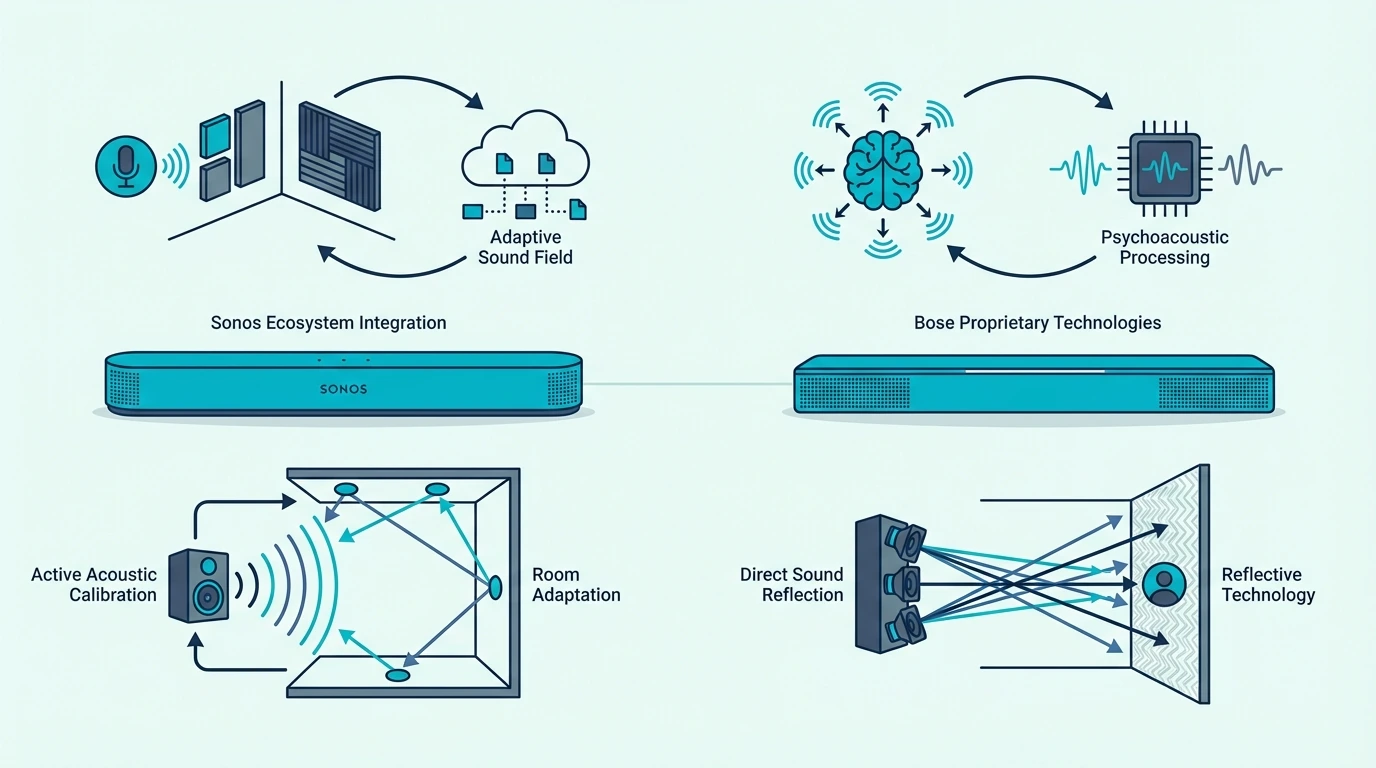
If that route sounds closer to what you want, our Sonos vs Bose comparison shows how major wireless soundbar ecosystems think about expansion. Our best soundbar roundup helps once you know you are staying on the soundbar side.

The Line Still Shows Up in Long-Term Flexibility

The receiver still wins if you want to pick any speaker brand, upgrade one piece at a time, or reuse components across rooms over several years.

Soundbar expansion always stays inside the ecosystem of the brand that sold you the bar.

That tradeoff is why some buyers should stop at the middle ground, while others should jump straight past it. Convenience and openness still pull in different directions, and neither one is fake.

What Do People Regret After Buying the Wrong One?

Common regrets after buying the wrong soundbar or receiver setup

That middle ground helps, but wrong expectations still create buyer’s remorse on both sides. The fastest way to choose well is to understand what people usually regret after the unboxing excitement wears off.

Receiver Regret Starts When the Room Never Lets It Shine

Receiver regret usually starts with good intentions.

You picture a future theater, then spend months living with a bulky box, temporary speaker placement, and wires nobody in the house likes.

When the couch is against the back wall, the room opens on one side, or the TV area doubles as everyday family space, the receiver’s theoretical upside stays theoretical.

You paid for flexibility, but daily life never gave you the conditions to use it properly.

That regret gets worse when the system stays half-finished. A receiver without the right speakers around it rarely delivers the payoff people imagine when they buy the box first.

Soundbar Regret Starts When Expectations Outrun the Format

Soundbar regret is the mirror image.

The buyer wanted theater-level separation, pin-point rear effects, or music-first stereo imaging, then expected a single cabinet under the TV to behave like widely spaced speakers.

Good bars can sound big, clear, and surprisingly immersive. They still cannot change the fact that most of the sound begins from the front wall.

That is why a soundbar can feel incredible as a TV upgrade and still disappoint the person who really wanted a speaker system.

The mistake is not buying the bar, but asking it to solve a different problem than the one it was built for.

The One Question That Prevents Both Mistakes

Ask one blunt question before you buy: am I solving bad TV audio, or am I starting a home audio system. If the honest answer is TV audio, a soundbar is usually the smarter purchase.

If the honest answer is system-building, music focus, or real surround in a room that can support it, skip the halfway logic and plan the receiver path properly.

That one question keeps this whole decision cleaner than any spec sheet ever will.

The Bottom Line

Soundbar vs receiver comes down to whether you want a finished upgrade or a platform.

A soundbar is usually the right answer for normal living rooms, mixed households, and buyers who want better TV sound without turning the room into a project.

A receiver is worth the trouble when you already have speakers, know you want to build slowly, or care enough about music and real surround to accept the extra boxes, wire, and calibration.

If you are still mostly shopping on the soundbar side, our best soundbar guide and soundbar vs home theater guide are the best next reads.

Frequently Asked Questions

Do I Need a Receiver if I Already Have a Soundbar?

No. A soundbar already contains the amplification and audio processing a receiver would normally handle for a TV setup.

Adding a receiver to that chain usually adds confusion instead of value. Use one path or the other.

What Is an AVR in Home Audio?

AVR stands for audio-video receiver.

It is the control center that switches inputs, decodes surround formats, powers passive speakers, and handles calibration for a separate-speaker system.

Is a Receiver Always Better Than a Soundbar for Music?

Not always for casual listening, but usually yes when music is the priority and the speakers are placed correctly.

A receiver with properly spaced left and right speakers creates a wider, more natural stereo image than a bar under the TV.

That gap matters most when you actually sit and listen.

If music is just background while you cook, clean, or stream playlists casually, a soundbar can still be enough.

Can an Expensive Soundbar Replace a Receiver?

For many movie and TV rooms, yes.

Premium soundbars can deliver strong dialogue, deep bass, height effects, and even wireless rear speakers without forcing you into a full receiver build.

They still do not replace the receiver’s openness.

If you want total freedom to mix speakers, amps, and upgrades over time, the receiver keeps that edge.

Should I Buy a Receiver if I Mostly Watch TV and Streaming Apps?

Usually no.

If your habits center on TV shows, movies, and everyday streaming in a normal living room, a soundbar is usually the cleaner match.

The receiver starts making more sense when you already own speakers, have a room that supports real surround, or know you want the hobby as much as the result.

Soundbar vs Home Theater: Which Setup Makes More Sense? [2026]

Soundbar vs home theater is not really an audio quality debate — a system with an AV receiver and five physically placed speakers will always outperform a single bar in raw surround accuracy.

But most people asking this question don’t have a dedicated theater room or a budget north of a thousand dollars.

They have a living room, a TV with weak speakers, and a problem they want solved without rearranging the furniture.

The wrong choice means overspending on components your room won’t use, or settling for a setup that leaves you wanting more.

A third option now exists. Expandable soundbar systems deliver real surround without the receiver-and-wire complexity.

Below, we’ll break down what each system actually involves, compare them at the same budget, and show you which setup fits your room so you can get the best return on every dollar you spend.

Quick Takeaway

To choose between a soundbar and a home theater system, match the system to your room and budget.

A soundbar delivers 70-80% of a home theater’s performance in one device with one cable, starting around $279.

A home theater system with an AV receiver and separate speakers wins on surround accuracy and modularity.

It costs $800 to $2,000 or more and requires speaker wire, placement, and calibration.

For most living rooms, a soundbar or an expandable soundbar system with wireless rears is the better investment.

What Is a Soundbar Setup?

A soundbar is a single enclosure that houses multiple speaker drivers, an amplifier, and a digital signal processor.

It packs everything a home theater receiver does into one bar that sits below your TV. The difference from TV speakers is immediate and obvious.

What You Get in the Box

Most soundbars connect with a single HDMI ARC cable to your TV. The TV remote controls volume, and audio switches automatically when you power on — total setup time is under 10 minutes.

Channel configurations range from basic 2.0 stereo bars to 3.1 bars that add a center channel and wireless sub.

At the top sit Dolby Atmos bars with up-firing drivers that bounce sound off the ceiling for height effects.

For this kind of small-room, dialogue-first setup, a current example is Amazon Fire TV Soundbar, which is a strong fit for Balanced TV and movie upgrade.

For understanding what channel numbers mean, our guide breaks down the naming system.

If you’re weighing a bar against a simpler stereo setup instead of a full 5.1 system, our soundbar vs bookshelf speakers guide covers that middle-ground comparison.

What You Give Up

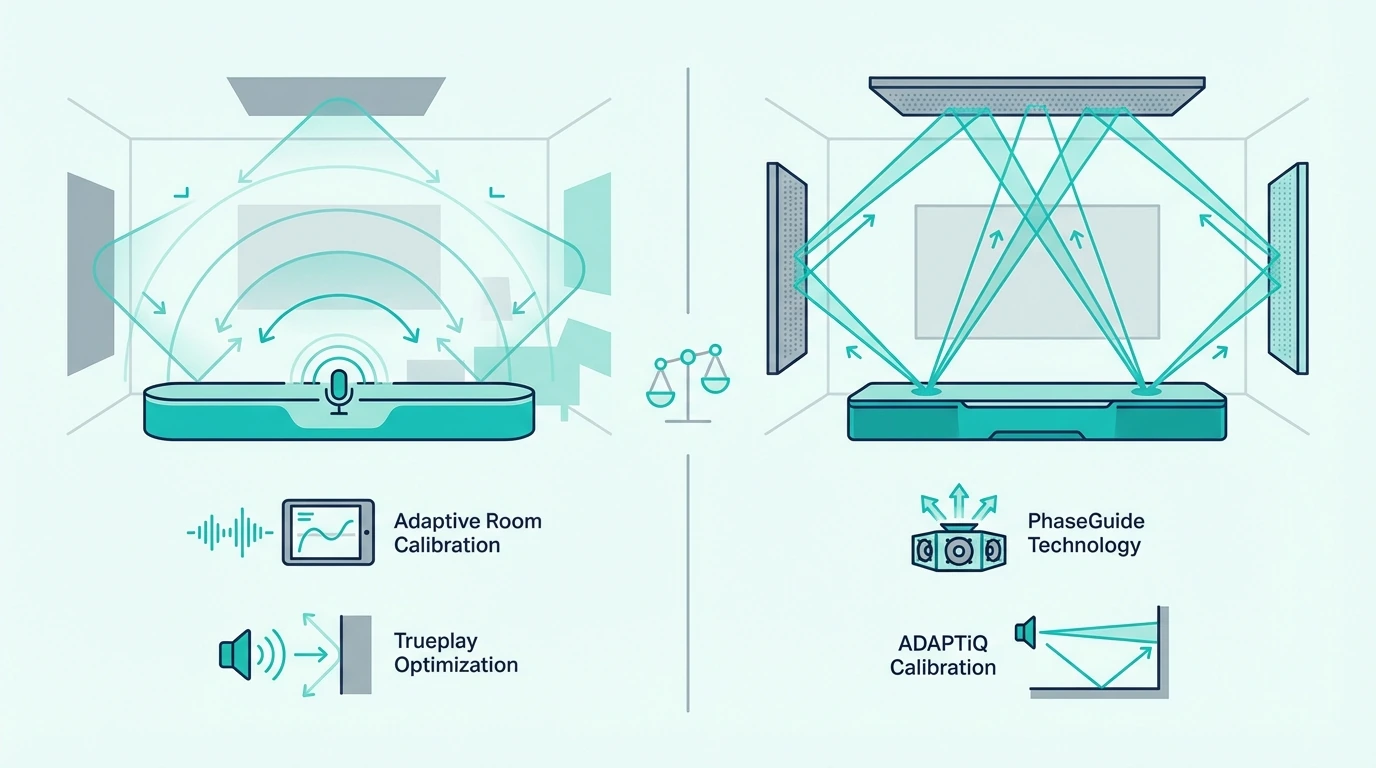
A soundbar simulates surround using psychoacoustic processing — bouncing sound off walls and adjusting timing to create the impression of speakers behind you. It works, but it depends heavily on your room shape and wall material.

You also lose modularity. If one driver inside the bar fails, you replace the whole unit.

If a new HDMI standard comes out like HDMI 2.1, you can’t swap just the processor.

The entire soundbar goes. That’s the core tradeoff: convenience now, but the whole system is one piece.

What Is a Home Theater System?

A home theater system is a collection of separate components wired together. That separation is both its greatest strength and its biggest practical challenge.

Every piece can be chosen independently. Each piece can also be upgraded individually and positioned exactly where it needs to be.

The Component Stack

The core of any home theater is the AV receiver. It decodes audio formats like Dolby Atmos and DTS:X, amplifies the signal, and routes it to each speaker.

Entry-level receivers from Denon, Yamaha, or Sony start around $300 and handle 5.1 or 7.1 channels.

A current example is Sony HT-S40R 5.1ch Home Theater Soundbar System, which is a strong fit for Premium all-around soundbar upgrade.

From there, you add individual speakers.

You need a center channel for dialogue, front left and right for the main soundstage, surround speakers behind the listening position, and a subwoofer for bass.

A basic 5.1 setup means five speakers plus a subwoofer. Each one wires back to the receiver with speaker cable.

The Modularity Advantage

This is what home theater enthusiasts rarely explain to newcomers.

If your center channel speaker dies, you replace that one speaker for $100 to $200, not the entire system.

When HDMI 2.2 arrives, you swap the receiver and keep every speaker you already own.

You can start with a 2.0 stereo pair and a receiver for under $500.

Then you add a center channel next month, a subwoofer after that, and surround speakers when your budget allows.

That incremental upgrade path doesn’t exist with a traditional soundbar. Once you buy the bar, that’s the system.

Our soundbar vs receiver guide covers the receiver-specific tradeoffs in more detail.

How Do Soundbar and Home Theater Compare?

How Do Soundbar And Home Theater Compare? illustration for soundbar vs home theater

The real comparison isn’t “which sounds better” — that’s settled. The real question is how much of that quality gap matters for your room, your content, and your budget.

Sound Quality and Surround Accuracy

A home theater with physically placed speakers creates genuine directional audio.

When a helicopter flies from front to back in a movie, the sound physically moves through speakers that are actually in those positions. Your brain processes real spatial movement.

That advantage is most obvious with movies and shows mixed in 5.1, 7.1, or Dolby Atmos.

Action scenes, horror sound design, and live concerts expose the gap faster than casual TV viewing. The mix is built to move effects around the room.

A soundbar approximates this with virtual surround processing.

For large-room movie use, a current example is Polk Audio Signa S2 Sound Bar for Smart TV with Subwoofer, which is a strong fit for TV and movies when you want fuller bass.

But virtual surround falls apart in open floor plans where there are no side walls to bounce sound off. Our 5.1 surround vs soundbar guide dives deeper into how real rear channels change the spatial audio gap.

Setup and Room Impact

A soundbar needs one shelf, one cable, and 10 minutes.

A home theater needs speaker wire run to five or more positions, correct speaker heights and angles, receiver shelf space, and calibration.

That runs 2 to 4 hours for experienced users and a full weekend for first-timers.

If the rear speakers end up too close to the couch or too high on the wall, the surround effect can collapse surprisingly fast.

In those cases, a good soundbar can produce the better real-world result because it asks less from the room.

In apartments and rentals where you can’t drill into walls, running speaker wire becomes a serious obstacle. For connection specifics, our HDMI vs optical guide covers the cable options.

Budget at the Same Price Point

This is where most comparison articles mislead you — they compare a $200 soundbar against a $3,000 home theater, which isn’t a fair fight. Here’s what the same money actually buys in each world:

Budget Soundbar Gets You Home Theater Gets You
Low 3.1 Atmos bar with wireless sub Used receiver + 2 bookshelf speakers (no sub, no surround)
Mid Premium Atmos bar with sub New receiver + 5.1 speaker package (entry-level components)
Premium Full expandable system with wireless rears + sub Quality receiver + matched speakers + powered sub

At $300, the soundbar wins outright.

You get Dolby Atmos plus a wireless sub. Setup takes minutes.

At $1,500 or more, the home theater pulls ahead on raw performance. The soundbar still closes the gap with expandable systems that include wireless surround speakers.

Aesthetics and Household Buy-In

A soundbar disappears into your TV setup — slim, minimal, no visible wiring. A home theater puts speakers in multiple locations with cable running along baseboards or under carpet.

For shared living spaces, this matters more than sound quality specs. The partner or roommate who doesn’t want speakers on every wall is a real factor — and the one most enthusiast forums ignore entirely.

The Middle Ground: Expandable Soundbar Systems

This is what most “soundbar vs home theater” articles miss entirely — a category of products that didn’t exist five years ago but now bridges the gap between both worlds.

Wireless Surround Without the Receiver

Modern premium soundbars ship with wireless rear speakers and a wireless subwoofer included in the box.

For large-room movie use, a current example is Amazon Fire TV Soundbar, which is a strong fit for Balanced TV and movie upgrade.

That’s the same speaker count as a high-end component system, but with wireless connectivity and automatic calibration.

You place the rear speakers on end tables or shelves behind the couch, plug them into power, and the system configures itself.

Start Small, Expand Later

Other systems take the modular approach. For large-room movie use, a current example is Amazon Fire TV Soundbar, which is a strong fit for Balanced TV and movie upgrade.

You get immediate impact from day one, with a clear upgrade path that doesn’t involve rewiring anything.

Starting with a single bar and expanding wirelessly gives you something a traditional home theater can’t. You get a full surround system without committing to a receiver, speaker wire, and component matching upfront.

For how surround expansion works across brands, our surround speaker guide covers the setup process.

When a Soundbar Is the Better Choice

A soundbar wins when the room, budget, or lifestyle makes a component system impractical — which describes most households. The flipside is that most soundbars have no subwoofer output, pre-out, or passive speaker terminals — the expansion path is closed by design, so the convenience comes at the cost of upgrade flexibility.

Apartments, Rentals, and Open Floor Plans

If you can’t drill into walls or run speaker wire under carpet, a home theater is out.

Open floor plans with no side walls also eliminate the positioning options that surround speakers need. There’s nowhere to mount rear channels in a kitchen-living room combo.

For large-room movie use, a current example is Amazon Fire TV Soundbar, which is a strong fit for Balanced TV and movie upgrade.

No holes in the wall, no wire management, no negotiation with a landlord.

Budget Under $500

At $300 to $500, a soundbar delivers a complete audio solution with Dolby Atmos and a wireless subwoofer.

The same money in home theater territory gets you a used receiver and two bookshelf speakers. No surround, no sub, and hours of setup.

The value equation is not close at this price point.

Shared Living Spaces

The “living room acceptance” factor is real. If one person wants better audio and the other doesn’t want speakers and cables visible on every wall, a soundbar is the compromise that actually works.
Our is a soundbar worth it guide covers the full value analysis for different use cases.

When a Home Theater Is the Better Choice

A home theater system wins in specific conditions — and when those conditions are met, the gap isn’t subtle. Before committing to a full receiver and discrete speakers, the cheaper detour many people try first is chaining a second soundbar — but that produces late, unsynced audio because two soundbar systems do not share processing or timing, which is exactly why the receiver step is the real surround upgrade.

Dedicated Media Room

If you have a room whose primary purpose is watching movies and TV, a component system lets you optimize every speaker position.

Surround speakers sit at ear height with a center channel aligned to the screen.

Dual subwoofers smooth bass across the seating area.

No soundbar, regardless of price, can replicate that physical speaker separation.

Budget Over $1,000 with Long-Term Plans

Home theater makes financial sense when you plan to upgrade incrementally over years.

Start with a receiver and two quality bookshelf speakers for $500.

Then add a center channel for $150, a subwoofer for $200, and surround speakers for $200.

You spread the cost across months while each addition meaningfully improves the system.

The modularity payoff is real.
When HDMI standards change, you swap the $300 receiver instead of replacing a $1,000 soundbar.

When a speaker dies, you replace only that speaker.

Over a 10-year span, a home theater can cost less than replacing soundbars every 3 to 4 years as technology evolves.

For the channel-count side of the decision, our 5.1 surround vs soundbar guide covers what physically adding rear speakers changes in practice.

Maximum Audio Priority

If you have the room for it and audio quality is genuinely the top priority, a well-built 5.1 or 7.1 system will outperform any soundbar at the same price.

That means prioritizing sound over convenience, aesthetics, or simplicity.

Bookshelf speakers placed 6 to 8 feet apart create a stereo triangle that a single bar cannot physically replicate.

Our soundbar vs speakers guide covers this comparison in detail.
The Bottom Line

The honest answer is that neither system is universally better.
For most people reading this, a soundbar or expandable soundbar system delivers the best return on investment.

The gap between a $300 to $500 soundbar and an $800-plus home theater has narrowed dramatically.

Expandable systems now offer real surround without any of the wiring and receiver complexity.

If you have a dedicated room and a long-term budget, build a component system. The modularity and upgrade path will reward you for years.

If you have a living room, an apartment, or a partner who doesn’t want speakers everywhere, get a soundbar and never look back.

Our best soundbar guide ranks the top picks at every budget. If your main priority is movies, our best soundbar for movies guide covers cinema-grade Atmos picks.

For deciding whether any external audio is worth it for your TV, our smart TV soundbar guide covers when built-in speakers are genuinely sufficient.

Frequently Asked Questions

Which is better for movies, a soundbar or a home theater system?

For pure surround immersion in a dedicated room, a home theater wins. Physically placed speakers create directional audio that no virtual processing can fully match.

For a living room where setup and aesthetics matter, a Dolby Atmos soundbar with a wireless subwoofer delivers 70-80% of that experience at a fraction of the cost.

Can I start with a soundbar and upgrade to a home theater later?

You can, but the two systems don’t share components. A soundbar is a self-contained unit where nothing transfers to a receiver-based setup.

The better upgrade path is an expandable soundbar system. You start with the bar and add wireless surrounds and a sub over time, staying within the same ecosystem.

Is a $300 soundbar better than a $300 home theater?

At $300, the soundbar wins decisively. That budget gets you a 3.1.2 Atmos bar with a wireless subwoofer and a 10-minute setup.

The same $300 in home theater buys a used receiver and maybe two speakers. No surround, no sub, and hours of configuration.

Do expandable soundbar systems sound as good as a real home theater?

They close the gap significantly but don’t fully match a component system. A premium expandable system with wireless rears delivers true surround separation, but the individual speaker drivers are smaller than dedicated home theater speakers.

The wireless sub typically can’t match a powered 12-inch home theater subwoofer either. For most living rooms under 400 square feet though, the difference is minor.

What is the main disadvantage of a soundbar compared to a home theater?

Modularity. A home theater lets you replace or upgrade any single component — swap the receiver, upgrade one speaker, add a second subwoofer.

A soundbar is one unit: if the amplifier section fails, the HDMI port becomes outdated, or one driver blows, you replace the entire bar.

Is a Soundbar Worth It? Here’s When It Pays Off (and When It Doesn’t)

Is a soundbar worth it when your TV already plays audio? For basic news and casual YouTube, probably not.

But if you’ve noticed that movie dialogue sounds muddy, music feels flat, or explosions drown out everything else, those are symptoms of a physical limitation that no TV setting can fix. A soundbar solves all three in one device.

Smart TVs ship with speakers that are 8-20 watts total, housed in a chassis barely 10mm thick — the drivers are small, often rear-firing, and physically incapable of producing bass below 150 Hz or projecting a wide stereo soundstage. A soundbar adds dedicated drivers in a wider enclosure with more power, plus a wireless subwoofer that handles the low frequencies your TV speakers cannot produce.

The real question is not whether soundbars work — they do, and the difference is obvious from the first scene. The real question is whether your listening habits justify the extra spend, or whether your built-in speakers are adequate for how you actually use your TV, which is what the rest of this breakdown will sort out.

Quick Takeaway

A soundbar is worth it for anyone who watches movies, sports, or music content on their TV regularly. The improvement over built-in TV speakers is immediate — better dialogue clarity, real bass from a wireless subwoofer, and a wider soundstage.

A good budget bar with a subwoofer delivers most of the value. A soundbar is not worth it if you already have a quality speaker system, if you only watch at very low volumes in a bedroom, or if you expect it to match a dedicated home theater setup.

What Does a Soundbar Actually Do?

TV speaker setup compared with a soundbar upgrade

A soundbar is a single enclosure that houses multiple speaker drivers — tweeters for highs, full-range drivers for mids, and sometimes a dedicated center channel for dialogue. It sits below or in front of your TV and connects with one cable (HDMI ARC or optical).

The core upgrade over TV speakers is physical: a soundbar’s enclosure is wider and deeper, giving drivers more room to move air. That translates to louder output without distortion, wider stereo separation because the drivers are spaced further apart, and better frequency response because larger drivers reproduce lower frequencies that thin TV chassis speakers cannot reach.

Most soundbars above the cheapest bar-only tier include a wireless subwoofer — a separate box that handles bass frequencies below 100-150 Hz. This is the single biggest upgrade because TV speakers produce almost zero bass.

The subwoofer adds the low-end weight that makes movie explosions, music basslines, and sports crowd noise feel present rather than thin. Even a bar-only model like the Amazon Fire TV Soundbar improves dialogue and stereo width without taking up much space, though adding a subwoofer is what makes the upgrade feel transformative.

For a deeper look at how the technology works, our what is a soundbar guide covers the fundamentals. It helps if you want the bigger picture before comparing models.

Channel Configurations

The numbers on a soundbar (2.0, 2.1, 3.1, 5.1.2) describe its driver layout. The first number is how many main channels, the second is subwoofer count, and the third (if present) is upward-firing Atmos height channels.

A 2.1 gives you stereo plus bass, a 3.1 adds a dedicated center channel for dialogue, and a 5.1 or higher adds virtual or physical surround channels. Our soundbar buying guide explains what each configuration delivers in practice.

How Much Should You Spend on a Soundbar?

When a soundbar is worth buying for clearer dialogue

Soundbar pricing falls into three tiers, and the returns diminish as you move up. Understanding where the value plateaus prevents overspending.

Budget Tier: The Sweet Spot for Most People

A 2.1 soundbar with a wireless subwoofer in this range delivers the biggest jump from TV speakers — real bass, wider stereo, and clear dialogue improvement. This tier covers 80% of what most households need.

The main limitation is no dedicated center channel — dialogue shares the stereo mix with effects and music. For casual TV, streaming, and sports, that tradeoff is invisible to most listeners.

Mid-Range Tier: Dialogue and Atmos

This tier adds a dedicated center channel (3.1 configuration) that isolates dialogue from the rest of the audio mix. If someone in the household struggles to hear conversation at comfortable volumes, this is the tier that solves it.

Some bars in this range include Dolby Atmos upward-firing drivers for height effects. The Atmos improvement is real but subtle — noticeable on well-mixed content, invisible on regular TV.

Premium Tier: Diminishing Returns

Premium soundbars add more channels, better room calibration, and higher build quality, though the audio improvement over the mid-range tier is marginal for most content. This tier makes sense if you watch a lot of Atmos movies, if your room is large enough to benefit from the extra power, or if you want features like WiFi streaming and multi-room audio.

Most living rooms should rule out simpler value-focused options in the best overall soundbar guide first. That keeps you from paying for premium features your room may never use.

What Features Actually Matter?

Room scenarios where a soundbar makes the biggest difference

Soundbar marketing pushes dozens of features, but only a handful affect everyday listening. Here is what to prioritize and what to skip.

Wireless Subwoofer — Non-Negotiable

A subwoofer is the single feature that separates a real upgrade from a marginal one — without it, a soundbar improves dialogue and stereo width but misses the bass that makes movies and music feel fundamentally different. Every buying decision should start here: does it include a wireless subwoofer?

HDMI ARC or eARC — Required

HDMI ARC lets your TV send audio to the soundbar and respond to your TV remote for volume control. eARC on newer TVs adds support for lossless formats like Dolby TrueHD and DTS-HD, while optical still works if you can live with compressed audio and follow the cable advice in our TV-to-soundbar guide.

Center Channel — Worth It for Dialogue

A dedicated center channel driver isolates voice frequencies from the rest of the audio. This matters most for households where dialogue clarity is the primary complaint, for older viewers, or for anyone who watches content with heavy background music or effects.

The Bose TV Speaker is a compact example — its dialogue mode keeps voices clear without requiring a separate subwoofer, though bass-heavy content benefits from pairing it with one. It makes more sense for clarity-first viewers than for anyone chasing big bass.

Dolby Atmos — Nice, Not Essential

Atmos adds height effects through upward-firing drivers that bounce sound off the ceiling. The effect depends on room geometry — flat, hard ceilings between 8-10 feet work best, while vaulted or textured ceilings scatter the reflections and weaken the effect.

Worth the upgrade if your room supports it and you stream Atmos content regularly. If the room is wrong for reflected height effects, the jump gets much smaller.

Bluetooth — Convenience Feature

Bluetooth lets you stream music from your phone without the TV on, which is handy for casual listening. It is useful but not a deciding factor, because almost every decent budget soundbar includes it.

When Is a Soundbar Worth Every Dollar?

When a soundbar is not worth the upgrade

The value of a soundbar depends entirely on what you watch, where you watch it, and what you are comparing it to. Here are the scenarios where a soundbar delivers clear, measurable improvement.

Movie and Streaming Content

Movie audio is mixed for speaker systems with separate channels for dialogue, effects, music, and bass. TV speakers collapse all of that into two small drivers, which is why dialogue gets buried under effects and bass is nonexistent.

A soundbar restores that channel separation. Even a mid-range 2.1 system like the Samsung HW-C450 separates bass into a wireless subwoofer so the bar’s drivers can focus on mids and highs, which is why action scenes hit harder and dialogue stays clearer.

Streaming services like Netflix, Disney+, and Amazon Prime deliver content in Dolby Digital and Dolby Digital Plus — formats that a soundbar decodes and reproduces properly while TV speakers often downmix to basic stereo. That is why even modest soundbars tend to sound more deliberate on everyday streaming apps.

Dialogue Clarity for Aging Ears

The single most valuable feature of a soundbar is dialogue clarity. If you or someone in your household turns up the volume to hear conversation but then gets blasted by music and effects, that is the problem a soundbar with a center channel fixes.

A 3.1 or higher soundbar dedicates specific drivers to voice frequencies. The Polk Audio Signa S4 uses a dedicated center channel to isolate dialogue from the rest of the audio mix, keeping voices clear at comfortable volumes.

This is especially valuable for older viewers or anyone with mild hearing loss. Our dialogue-focused roundup explains what to prioritize when clarity matters most.

Sports and Live Events

Sports audio benefits from a soundbar because crowd noise, commentary, and on-field sounds occupy different frequency ranges that TV speakers muddle together. A soundbar with a subwoofer gives crowd roar its own frequency space while keeping commentary crisp and forward.

Live concerts and music streaming also improve substantially because a wider soundbar delivers the stereo separation that recordings are mixed for. Our best overall soundbar guide covers the types of bars that still make sense when music is part of the mix.

Gaming

Gaming soundbars add directional audio cues that competitive and immersive games rely on — footsteps behind you, gunfire from the left, environmental sounds that indicate where to look. A soundbar with virtual surround or Dolby Atmos processing places those cues in wider positions than TV speakers can achieve.

Low-latency game modes on mid-range bars reduce audio delay, keeping sound effects synchronized with on-screen action. For buyers who care most about gaming, our best gaming soundbar guide covers the tradeoffs that matter.

When Is a Soundbar Not Worth It?

Decision guide for whether a soundbar is worth it

There are legitimate scenarios where a soundbar does not deliver enough value to justify even a budget purchase. Knowing when to skip saves money and avoids regret.

You Already Have a Speaker System

If your TV is connected to an AV receiver with bookshelf speakers or a 5.1 surround system, a soundbar is a downgrade in audio quality. Discrete speakers with a receiver will outperform any soundbar at the same price point because they have larger drivers, separate amplification, and physical speaker placement that creates true surround sound.

A soundbar only makes sense as a replacement for an existing speaker system if you are prioritizing simplicity over audio fidelity — fewer components, one remote, no receiver menus. Our best overall soundbar guide helps you judge when that convenience tradeoff is actually worth making.

Bedroom TV at Low Volume

A bedroom TV watched at low volume from a short distance gets minimal benefit from a soundbar. The reduced volume eliminates the dialogue-vs-effects imbalance that plagues living room setups, and the shorter listening distance means TV speakers cover a larger portion of your hearing angle.

The exception is if you watch movies in bed regularly — then a compact soundbar still adds meaningful dialogue clarity and bass. For compact options, our small room guide covers bars designed for tight spaces.

Expecting Home Theater Performance

A soundbar is not a substitute for a properly configured 5.1 or 7.1 surround system in a dedicated room. If you want true directional surround with physically separated speakers and a calibrated receiver, a soundbar will disappoint regardless of price.

Soundbars approximate surround through virtual processing and room reflections, and the result is impressive for a single-bar solution — but it is not the same as speakers physically positioned behind you. Our best Dolby Atmos soundbar guide shows the most realistic single-bar upgrade path if you still want immersion without a full speaker system.

Ultra-Cheap Budgets

Ultra-cheap soundbars typically lack a wireless subwoofer, which eliminates the bass improvement that drives most of the value proposition. A bar-only system without a subwoofer improves dialogue clarity and soundstage width but misses the bass impact that makes movies and music feel substantially different from TV speakers.

If your budget is ultra-tight, consider saving until you can afford a 2.1 system with a wireless subwoofer — the subwoofer is what makes the upgrade feel transformative rather than incremental. A bar like the Sony S100F is a solid save-up target if you want to stay bar-only, though stepping up to a 2.1 system with a subwoofer delivers a noticeably bigger improvement.

The Bottom Line

A soundbar is worth it for anyone watching movies, sports, or music in a living room on TV speakers. The improvement is not subtle — it is a fundamental change in how audio sounds, especially dialogue clarity and bass impact.

Start with a value-focused 2.1 bar if you want immediate improvement without overspending. Move to a 3.1 or higher system with Dolby Atmos if dialogue clarity is your primary concern or if you watch a lot of Atmos content on streaming services.

Skip the soundbar if you already have quality speakers, if your TV is a bedroom set at low volume, or if your budget does not cover a bar with a wireless subwoofer. To understand the next buying step, our how to choose a soundbar guide walks through the decision process, and our subwoofer pairing guide covers compatibility if you already own a separate subwoofer.

Frequently Asked Questions

Does a soundbar really make a difference?

Yes — the difference between TV speakers and even a budget soundbar with a wireless subwoofer is immediately noticeable. Dialogue becomes clearer, bass becomes present (not just suggested), and the soundstage widens from a narrow point source to a room-filling experience.

What are the disadvantages of a soundbar?

A soundbar cannot match the spatial accuracy of discrete surround speakers placed around the room — virtual surround processing approximates the effect but doesn’t replicate speakers physically behind you. Soundbars also take up space below or in front of the TV, and budget models without subwoofers deliver limited bass improvement.

Is a cheap soundbar worth it?

An entry-level soundbar with a wireless subwoofer is absolutely worth it — the subwoofer alone transforms bass performance. A cheap bar-only system without a subwoofer delivers modest improvement in dialogue and soundstage but misses the bass upgrade that makes the biggest perceived difference.

Is a Dolby Atmos soundbar worth the extra cost?

Dolby Atmos adds height channels that create overhead audio effects — rain falling above you, helicopters passing overhead, ambient atmosphere that fills the vertical space. If you watch a lot of movies and streaming content mixed in Atmos, the extra spend for an Atmos bar delivers a noticeable improvement in immersion.

Do You Need a Soundbar for a Smart TV? Usually, Yes [2026]

Do you need a soundbar for smart tv viewing? The short answer: no — your TV works without one.

But every smart TV made in the last five years ships with speakers that are physically too thin to produce real bass, separate dialogue from effects, or create any stereo width worth hearing.

That hard ceiling exists because TV manufacturers optimize for screen size and slim bezels, and the small speakers crammed into the back or bottom of the panel are the tradeoff.

If you’ve turned up the volume during a movie and found dialogue muddy while explosions blast too loud, that’s the limitation a soundbar fixes.

Bass, clarity, and width from a single device and one HDMI cable, so you can stop fighting your remote every scene change.

Below, we cover what smart TV speakers struggle with, what a soundbar actually changes, which TV brands pair best with which bars, and when the built-in speakers are good enough to skip the upgrade.

Quick Takeaway

If your smart TV is the main screen for movies, sports, music, or everyday streaming, a soundbar is usually the best upgrade you can make.

It fixes bass, dialogue clarity, and width all at once.

If the TV is a low-volume bedroom or background set, you can often skip it.

The decision comes down to room use, not whether the TV is technically “smart.”

Why Smart TV Speakers Fall Short

Smart TV speakers compared with a separate soundbar

The audio problem isn’t a quality control issue — it’s a physics issue. TV manufacturers prioritize screen real estate and thin profiles, and speaker performance is what they sacrifice.

The Physical Constraint

A typical smart TV has two downward-firing or rear-firing speakers rated between 8 and 20 watts total.

The drivers measure roughly 40mm across — small enough to fit inside a panel that’s 10-15mm thick, but nowhere near large enough to move serious air.

Bass requires moving large volumes of air. A 40mm driver physically cannot reproduce frequencies below about 150 Hz with any authority — everything below that point is either absent or so faint you’d never notice it.

That’s where movie explosions, music bass lines, thunder, and crowd rumble actually live.

A soundbar with a wireless subwoofer extends response down to 40-50 Hz, closing a gap the TV speakers can’t touch regardless of EQ settings or sound modes.

No firmware update fixes this. The limitation is physical — the drivers are too small and the enclosure is too thin — and it applies to every brand at every price point.

For the hardware fundamentals, our what is a soundbar guide explains how soundbar drivers differ from TV speakers.

The Dialogue Problem

The most common complaint about TV speakers is muddy dialogue — voices sound thin, get buried behind music and effects, and are hard to follow at normal volume.

This happens because movie audio is mixed for speaker systems with separate channels for dialogue, effects, and bass.

TV speakers collapse all of that into two tiny drivers, so voices compete with every other sound in the scene for the same output.

A soundbar with a center channel — any 3.0 or 3.1 configuration — dedicates specific drivers to voice frequencies. The result is dialogue that stays clear even during complex scenes with explosions, music, and ambient sound playing simultaneously.

Our channel configuration guide breaks down what those numbers (2.0, 2.1, 3.1, 5.1.2) mean in practice and which configuration matches which use case.

The Atmos Decoding Myth

Many newer smart TVs advertise Dolby Atmos support. The fine print: this is Atmos decoding, not Atmos reproduction.

Your TV can receive an Atmos signal from Netflix or Disney+.

But it cannot reproduce the spatial height effects that Atmos content is mixed for — the speakers are flat and forward-facing, with no way to bounce sound off the ceiling.

A soundbar with Atmos and upfiring drivers creates the actual height channels that spatial content is designed around.

Rain falls from above, helicopters pass overhead — effects that flat TV speakers produce as standard stereo no matter what the settings menu says.

For the full spatial audio breakdown, our soundbar vs surround sound guide covers what each system type delivers and when Atmos actually matters.

What Does a Soundbar Add to a Smart TV?

Why smart TVs often still need a soundbar for better audio

The physics problem is clear — now here’s what actually changes when you add a bar. The upgrade isn’t subtle, and it doesn’t require a complicated setup.

Bass and Subwoofer Extension

The single biggest change is bass. A wireless subwoofer handles frequencies below 100-150 Hz in a separate cabinet, freeing the soundbar’s drivers to focus on mids and highs without distortion.

The subwoofer doesn’t need to sit next to the TV.

It connects wirelessly, so it can go beside the TV stand, next to the couch, or in a corner — no speaker wire across the living room.

Even a bar-only model like the Amazon Fire TV Soundbar improves stereo width and clarity, though adding a wireless subwoofer is what makes the upgrade feel transformative rather than incremental.

The frequency gap matters more than the wattage number on the box. A TV speaker that can’t go below 150 Hz still misses the entire low-end range regardless of power output.

A soundbar with a subwoofer reaching 40 Hz delivers the bass that actually matters for movies and music.

Dialogue Clarity and Spatial Audio

A center channel dedicates specific drivers to voice frequencies, so dialogue doesn’t compete with explosions, music, or crowd noise for the same two speakers.

This is the fix for the “I can hear the soundtrack but not what they’re saying” problem.

Spatial audio takes it further. A soundbar with Dolby Atmos and upfiring drivers creates height channels that make overhead effects work — rain, aircraft, ambient atmosphere — which flat TV speakers produce as standard stereo regardless of the source format.

If you’re comparing formats, think in tiers.

A 2.0 bar improves clarity and width, a 2.1 adds the bass TV speakers miss, a 3.1 adds a dedicated center channel for voices, and a 3.1.2 or 5.1.2 Atmos bar adds height effects for movies and streaming.

Bluetooth streaming is a bonus most people overlook. Every modern soundbar doubles as a wireless speaker for phone music, podcasts, and audiobooks — better audio from your phone than what most TVs produce through their built-in Bluetooth passthrough.

For connecting your bar, our connect soundbar to TV guide walks through HDMI ARC, optical, and Bluetooth setup step by step.

Which Smart TVs Work Best with Soundbars?

Dialogue clarity improvement from adding a soundbar to a smart TV

Every smart TV made in the last decade works with a soundbar through HDMI ARC or optical. But the three biggest brands each have proprietary features that unlock extra performance when you pair their TVs with their own bars.

Brand-Specific Pairing Features

Samsung’s Q-Symphony runs the TV speakers and a Samsung soundbar at the same time for a wider sound field — extra drivers means a bigger stage without buying rear speakers.

This only works with Samsung-branded bars, and it’s one of the few cases where TV speakers contribute something useful alongside a soundbar.

LG’s WOW Orchestra does the same for LG TVs paired with LG soundbars — the TV and bar coordinate their drivers so the sound expands beyond the width of the bar alone.

Our best soundbar for LG TV guide has the full compatibility list.

Sony’s Acoustic Center Sync uses the TV’s speakers as a dedicated center channel while the soundbar handles left, right, and surround. The approach specifically targets dialogue by routing voice frequencies through the TV panel itself.

A mid-range system like the Samsung HW-C450 pairs with Q-Symphony TVs and adds a wireless subwoofer for bass that the TV speakers alone can’t produce.

Our best Samsung soundbar guide covers the full range of compatible models.

Universal Compatibility

None of these brand features are required. Any soundbar with HDMI ARC connects to any smart TV with an ARC-labeled HDMI port — Samsung bar on a TCL TV, Bose bar on a Hisense TV, any combination works.

HDMI ARC passes audio from the TV to the soundbar through a single cable.

eARC adds support for lossless Dolby TrueHD and DTS-HD Master Audio. Standard ARC still handles Dolby Digital and Atmos-over-Dolby-Digital-Plus without issue.

If your TV doesn’t have HDMI ARC, optical audio is the fallback — slightly lower quality ceiling, but more than adequate for stereo and basic surround formats.

For setup details, our HDMI vs optical guide covers which connection type your TV supports and how to configure it.

When a Soundbar Makes the Biggest Difference

When a smart TV may not need a separate soundbar

Brand features aside, the real question is whether your watching habits justify the upgrade.

The gap between TV speakers and a soundbar varies depending on content type, room size, and how you listen.

Living Room Movies and Streaming

This is where the upgrade delivers the most obvious payoff.

Movie audio is mixed for speaker systems — dialogue on the center channel, effects on the surrounds, bass on the subwoofer — and TV speakers collapse all of that into two small drivers facing the wrong direction.

A 3.1.2 system like the Polk Audio Signa S4 restores the channel separation that movies are mixed for — dedicated center for voices, Atmos upfiring for height effects, and a wireless subwoofer for everything below 100 Hz.

The difference from TV speakers isn’t gradual. Most people notice it within the first scene of the first movie they watch after setting up the bar.

Streaming services like Netflix and Disney+ encode most original content in Dolby Atmos. Without a compatible soundbar, that Atmos track gets downmixed to stereo and the spatial detail disappears.

Our is a soundbar worth it guide breaks down the cost-to-benefit analysis across price tiers.

Sports, Music, and Dialogue-Heavy Content

Sports benefit because crowd noise, commentary, and on-field audio occupy different frequency ranges that TV speakers muddle together.

A soundbar spreads those frequencies across a wider driver array, so the commentator stays intelligible over the crowd without cranking volume to uncomfortable levels.

Music playback improves for the same reason — songs are mixed for stereo separation, and a soundbar delivers that width at a physical level that two speakers tucked behind a TV panel cannot match.

Gaming benefits for the same reason. A soundbar with virtual surround or Atmos makes footsteps, gunfire, and ambient cues easier to place than the flat center-screen output you get from TV speakers.

News, podcasts, and talk shows are the clearest test of whether you need a bar at all.

If voices still sound thin or tiring at normal volume, forward-firing drivers and dialogue modes fix that faster than repeatedly raising the volume.

The improvement matters most for older viewers or anyone with mild hearing loss.

The Bose TV Speaker has a dedicated dialogue mode that boosts voice frequencies without raising the overall volume — a feature TV speakers can’t offer because they lack the driver separation to isolate voices from effects.

Our soundbar vs speakers guide covers when a full speaker system outperforms a bar, especially for music-focused setups where stereo imaging is the priority.

When You Don’t Need a Soundbar

Decision guide for adding a soundbar to a smart TV

Not every TV justifies an external speaker. Knowing when to skip the upgrade saves money and avoids gear that sits underused.

The other mistake is expecting a soundbar to solve problems it is not designed for. Bad source audio, outside noise, or a loud HVAC system will not disappear — you will just hear those flaws through better speakers.

Bedroom and Background TV

A bedroom TV at low volume is the strongest case for skipping a soundbar.

You’re sitting closer to the screen, the content is often simpler — news, YouTube, casual shows — and the shorter listening distance compensates for the TV’s limited soundstage.

The same applies to a TV in a kitchen, gym, or home office where audio is background noise. Built-in speakers handle ambient listening adequately because you’re not focused on dialogue clarity or bass response during those activities.

If you’re on the fence, the Sony S100F is a reasonable save-up target if bedroom dialogue clarity bothers you — it improves on TV speakers without the footprint of a full 2.1 system.

For small rooms where you do want an upgrade, our small room soundbar guide covers compact options that don’t overwhelm tight spaces.

When You Already Own a Speaker System

If you have a stereo receiver with bookshelf speakers or a full 5.1 surround setup, a soundbar would be a downgrade. Soundbars exist to replace TV speakers, not compete with dedicated separates.

The exception is a second TV in another room where running speaker wire isn’t practical. A soundbar gives you most of the upgrade with zero wiring and a single HDMI connection.

If you’re weighing a soundbar against a full surround system for your main TV, our soundbar vs home theater guide covers when discrete speakers justify the extra cost and complexity.

For most people with a single living room TV and no existing speaker setup, a soundbar is the right answer. For anyone who already invested in separates, it isn’t.

The Bottom Line

A soundbar isn’t required for your smart TV to function — but it fixes the three things TV speakers can’t: bass, dialogue clarity, and stereo width.

If your living room TV handles movies, sports, or music, a soundbar is the single biggest quality-of-life upgrade you can make.

Skip the upgrade if your TV lives in a bedroom at low volume or you already own real speakers.

For everything else, the gap between built-in TV speakers and even a budget soundbar is large enough to notice within minutes.

For placement and setup, our soundbar mounting guide covers hardware and positioning once you’ve chosen a bar.

Frequently Asked Questions

Do I need a soundbar if my TV has Dolby Atmos?

Your TV decodes the Atmos signal but can’t reproduce the spatial height effects — the speakers are flat and forward-facing with no way to create height channels. A soundbar with Atmos and upfiring drivers creates those channels.

Without them, the Atmos badge in your TV settings is cosmetic.

Do I need a soundbar with a Samsung TV?

Samsung TVs have the same thin-speaker limitations as every other brand.

Q-Symphony lets you combine TV speakers with a Samsung soundbar for wider coverage, but the TV speakers alone still lack bass, dialogue separation, and stereo width.

A soundbar is recommended for any Samsung TV used for movies or music.

Do all smart TVs support soundbars?

Every smart TV with an HDMI ARC port — which includes virtually every model made since 2015 — works with any HDMI ARC soundbar regardless of brand. Older TVs without ARC can use an optical audio cable instead.

Brand matching is optional, not required.

Is a soundbar better than a Bluetooth speaker for TV?

For TV audio, yes.

Bluetooth speakers add latency that causes lip-sync issues, have no HDMI ARC for automatic TV control, and aren’t tuned for dialogue-heavy content.

A soundbar connects via HDMI with zero latency and is designed for voice frequencies, surround processing, and subwoofer bass that Bluetooth speakers don’t offer.

Where should I put a soundbar with a wall-mounted TV?

Mount the soundbar directly below the TV, centered with the screen. Most soundbars include wall-mount brackets, or they can sit on a shelf beneath the TV.

Placing the bar above the TV shifts the audio origin point higher than the on-screen action, which creates a disconnect between what you see and where the sound comes from.

Our mounting guide covers the hardware and positioning options.

HDMI vs Optical for Soundbar: Which Should You Use?

HDMI vs optical for soundbar setups usually sounds like a sound-quality decision, but for most TVs the bigger difference is what formats and control features your setup can actually pass. Many people swap cables expecting a major upgrade, only to find the sound is unchanged because standard HDMI ARC and optical often carry the same everyday TV audio.

The confusion happens because three different things get mixed together: standard HDMI, HDMI ARC, and HDMI eARC. If you do not separate them, it is easy to blame the cable when the real limit is your TV’s ARC port, your soundbar’s decoder, or a PCM setting buried in the TV menu.

The good news is that the choice is straightforward once you know what your TV and soundbar support. Below, you’ll see when HDMI genuinely beats optical, when optical is the smarter fallback, and which settings decide whether your bar gets stereo, Dolby Digital 5.1, or Atmos.

Quick Takeaway

If your TV and soundbar only support standard ARC, HDMI and optical often sound the same with normal TV audio and Dolby Digital 5.1 content. HDMI ARC is still the better default because it adds TV-remote volume control and a cleaner one-cable setup.

HDMI clearly pulls ahead only when your gear supports eARC or Dolby Digital Plus and Atmos that optical cannot carry. Optical is still the smarter fallback when your TV has no ARC port or ARC/CEC causes dropouts, lip-sync issues, or power-control problems.

HDMI vs Optical for Soundbar: Does It Change Sound Quality?

Most people ask this because they want to know whether one cable makes their soundbar sound better. The honest answer is sometimes, not always.

When they sound the same

If your TV is sending stereo PCM or standard Dolby Digital 5.1, standard HDMI ARC and optical can sound effectively identical on the same soundbar. In that situation, changing the cable does not create more detail, more bass, or wider surround by itself.

That is why a basic 2.1 or 3.1 bar often sounds the same over either connection once it is set up correctly. If you want the bigger picture on what your bar can even decode, our what is a soundbar guide breaks down the hardware inside the bar.

When HDMI really does sound better

HDMI starts to matter when the TV and soundbar can pass audio formats that optical cannot carry. That usually means Dolby Digital Plus from streaming apps, or full lossless formats and Dolby Atmos over eARC on newer gear.

Optical cannot be upgraded into Atmos with a better cable. If your bar supports immersive audio, our best Dolby Atmos soundbar guide shows which current models actually make better use of those extra formats.

What Does Each Connection Actually Do?

The root confusion is that people say “HDMI” when they often mean “HDMI ARC.” Those are not the same thing.

Standard HDMI

A regular HDMI port mostly sends audio and video from a source device to the TV. It does not automatically send TV audio back to the soundbar, which is why plugging a bar into the wrong HDMI port often produces no sound at all.

If that part still feels blurry, our HDMI ARC setup guide shows how to identify the right port and get TV audio flowing to the bar.

HDMI ARC and eARC

HDMI ARC adds the return path that sends TV audio back to the soundbar. It also adds CEC, which is what lets your TV remote change the soundbar volume and power state without a second remote.

eARC is the higher-bandwidth version on newer TVs and bars. A purpose-built Silkland ARC/eARC HDMI cable is a more on-point pick for that job, but the cable alone never overrides the port limits on your TV or soundbar.

Optical

Optical is a digital audio link with no CEC and less bandwidth than eARC. It is excellent as a clean, simple fallback, but it tops out well before the newest surround formats.

A reliable KabelDirekt optical cable is fine if your TV has no ARC port or ARC is acting up, but it does not unlock anything beyond what the optical standard can already carry.

Which Connection Should You Use for Your Setup?

The best choice depends less on theory and more on the exact path your audio takes. Start with the setup you actually have, not the setup you wish you had.

Basic TV plus basic soundbar

If your bar is a simple 2.0, 2.1, or 3.1 model and your TV mostly feeds it streaming apps, cable, or broadcast TV, HDMI ARC is usually the right default. You get the same core TV audio you would get from optical, plus easier control through the TV remote.

If ARC gives you trouble, switching to optical is a practical fallback rather than a downgrade panic. Our soundbar to TV connection guide covers the physical setup for both paths.

Atmos soundbar plus newer TV

If your soundbar advertises Dolby Atmos or higher-end surround processing, the first question is whether both ends support eARC. If they do, use HDMI and keep eARC enabled, because optical cannot carry the formats that make that soundbar worth buying.

If your TV only has standard ARC, you may still get better format support than optical depending on the TV and app. That is also where our soundbar setup guide becomes important, because the wrong TV output setting can make a good HDMI connection behave like a limited one.

Older TV with no ARC

If the TV has no ARC port, optical is the right answer. There is no prize for forcing HDMI adapters and extra boxes into a setup that simply does not support ARC in the first place.

That kind of system can still sound good with standard Dolby Digital 5.1. If you are deciding whether a basic bar is enough or whether you have outgrown it, our best soundbar guide helps you compare the step-up options realistically.

Devices plugged into the soundbar instead of the TV

This is where many guides stay too generic. If you plug an Apple TV, console, or Blu-ray player directly into the soundbar and then pass video to the TV, the bar may get better audio than it would from the TV’s optical output because the TV is no longer the main bottleneck.

That is one reason connection advice changes depending on whether the TV is the hub or the soundbar is. For the broader tradeoff between soundbar convenience and a more expandable surround setup, our soundbar vs home theater guide is the better comparison.

When Is Optical the Smarter Choice?

Optical is older, but older does not mean useless. In a few common setups, it is the more stable decision. On Hisense TVs specifically, where the Digital Sound Out menu sits behind different paths in different model years, the optical setup steps with the exact Hisense menu sequence — bar set to Optical or D.IN, TV sound mode set to external, PCM format first is the brand-targeted reference rather than the brand-neutral comparison above.

ARC handshake or dropouts

If ARC keeps cutting out, losing audio after the TV wakes up, or failing to reconnect when you switch inputs, optical strips away a lot of the complexity. It gives up CEC and advanced formats, but it also removes the ARC handshake layer that causes many of those headaches.

When that happens, use optical first to restore stable sound and then diagnose ARC separately. Our soundbar no sound guide is the right troubleshooting path for that.

CEC conflicts you do not want

Sometimes ARC technically works, but CEC becomes the bigger problem. The TV turns the soundbar on at the wrong time, a console hijacks volume control, or family members keep landing on the wrong input.

Optical avoids all of that because it carries audio only. If you want simple, predictable behavior, optical can be the better real-world choice even when HDMI is theoretically more capable.

You do not gain anything from ARC on this bar

If the soundbar does not support Atmos, the TV only outputs basic formats, and you do not care about one-remote control, optical may not cost you anything that matters. In that setup, using HDMI because it sounds more modern is not the same thing as getting a better result.

Which Settings Make Good Connections Look Bad?

A lot of “HDMI sounds worse than optical” reports are really settings problems. The cable gets blamed because it is the easiest part to see.

TV output set to PCM

When the TV is locked to PCM, the soundbar may only receive stereo even if the content and connection support more. That makes HDMI look pointless when the real fix is changing the TV audio output to bitstream, auto, or passthrough, depending on the brand.

If you are not sure what those menu labels mean, start with our soundbar to TV connection guide before you replace anything.

Soundbar plugged into the wrong HDMI port

This is one of the most common setup mistakes. The cable is fine, but the soundbar is connected to a normal HDMI input instead of the port labeled ARC or eARC, so the TV never sends audio back.

That is why the difference between HDMI and ARC matters more than the difference between HDMI and optical for many users. Our HDMI ARC setup guide and soundbar setup guide walk through that menu and port check.

Both HDMI and optical connected at once

Many soundbars let you physically connect both, but that does not mean you should. Two live paths can confuse input switching, make the wrong source activate, or leave you thinking the soundbar changed formats when it actually changed inputs.

Pick one primary path and test with only that path connected. If you want a wireless backup or temporary workaround instead of a second wired path, our TV-to-soundbar Bluetooth guide is the better next step.

Do You Need a Better Cable?

Usually, no. Most cable problems are really compatibility or settings problems, not premium-cable problems.

If you are using eARC and lossless formats, a properly spec’d HDMI cable matters because the connection has to carry more data reliably. If you are using standard ARC or optical, replacing a working cable with an expensive one does not unlock hidden sound quality.

If you are trying to rule out more than one questionable HDMI lead in the chain, a JSAUX HDMI 2.1 2-pack is a more practical troubleshooting buy than gambling on one mystery cable.

What helps is using the right cable for the connection you already chose. Use HDMI when your setup can benefit from ARC or eARC, and keep optical as a clean fallback when simplicity matters more than features.

The Bottom Line

HDMI vs optical for soundbar decisions are simpler once you separate everyday TV audio from advanced format support. For many basic setups, standard HDMI ARC and optical sound effectively the same, but HDMI ARC is still the better default because it adds TV-remote control and cleaner setup.

HDMI becomes the clear winner when your TV and soundbar support eARC or when your apps and devices can pass formats optical cannot. Optical stays valuable because it is stable, simple, and often the fastest fix when ARC or CEC starts misbehaving.

If you are trying to decide whether those higher-end formats are worth chasing, our best Dolby Atmos soundbar guide shows which current bars actually make use of eARC. Our soundbar vs home theater guide covers when connection capability turns into a system-level advantage.

Frequently Asked Questions

Is HDMI ARC better than optical for sound quality?

If the TV is sending stereo PCM or standard Dolby Digital 5.1, the two can sound the same on the same soundbar. HDMI pulls ahead only when the setup can actually pass formats optical cannot, such as Dolby Digital Plus or full Atmos via eARC.

Can optical carry Dolby Atmos to a soundbar?

No. Optical does not have the bandwidth for Dolby Atmos, Dolby TrueHD, or other newer lossless surround formats.

Why does optical sometimes feel more reliable than HDMI ARC?

Because optical is simpler. It does not depend on ARC handshakes or CEC control, so there are fewer places for power, input, and communication bugs to appear.

Should I connect both HDMI and optical to my soundbar?

Usually no. Keeping both connected can create input confusion and make troubleshooting harder, because the bar may switch inputs without making the reason obvious.

If my TV has ARC but not eARC, should I still use HDMI?

Yes, in most cases. ARC is still the better default because it adds easier control and may support formats optical cannot, even though it does not reach the full capability of eARC.

Sonos vs Bose Soundbar: Same Price, Different Ecosystems — Here’s What Matters

The sonos vs bose soundbar debate comes down to ecosystem, not audio quality. Both brands deliver Dolby Atmos from premium hardware at overlapping price points, so the sound itself won’t settle the decision.

What separates them is how each platform handles streaming, multi-room audio, and room calibration. Buying into either brand means buying into its entire ecosystem.

Sonos builds around WiFi-first multi-room audio where every speaker joins one synchronized system.

Bose builds around streaming flexibility instead. Bluetooth and WiFi both work out of the box.

Bose also adds private headphone pairing and room calibration that runs on any phone.

Those differences matter more than the marginal gap between driver counts or frequency response specs.

Knowing where Sonos earns its multi-room lead and where Bose earns its streaming flexibility helps you avoid the wrong ecosystem before you spend hundreds on a brand that will not fit your household.

Below, we’ll break down each brand’s lineup, compare them head-to-head across the features that actually affect daily use, and help you decide which ecosystem fits your setup.

Quick Takeaway: Sonos wins on multi-room audio and expandable surround — its WiFi ecosystem lets you group any Sonos speaker for whole-home music and add wireless surround channels. Bose wins on streaming flexibility and private listening — Bluetooth works without WiFi, ADAPTiQ calibration runs on any phone, and SimpleSync pairs headphones to the soundbar.

Both offer Dolby Atmos bars from $219 to $1,069 across the two brands.

Choose Sonos for multi-room. Choose Bose for Bluetooth or private headphone pairing.

The Sonos Ecosystem: What You’re Buying Into

Sonos and Bose soundbars compared side by side

Sonos soundbars are WiFi-connected bars built for the Sonos multi-room ecosystem. Every Sonos bar connects to your TV via HDMI eARC or optical.

Music streams over WiFi through AirPlay 2, Spotify Connect, or the Sonos app.

Any Sonos soundbar can be grouped with other Sonos speakers for synchronized whole-home audio.

The defining Sonos feature is Trueplay room calibration. It uses your iPhone’s microphone to tune the soundbar to your room’s acoustics.

Trueplay requires an iPhone — Android users cannot run it.

Sonos does not include Bluetooth on any of its soundbars. This is intentional, because Sonos prioritizes lossless WiFi streaming and synchronized multi-room playback.

If your WiFi drops, your music stops.

Sonos Soundbar Lineup

The Sonos Arc Ultra is the flagship. It is a 14-driver bar with 9.1.4 Dolby Atmos, Sound Motion woofer technology, and the widest soundstage in the Sonos lineup.

At $1,069, it’s built for large rooms that want theater-grade audio from one bar. You can add wireless surround speakers and a Sub later.

The Sonos Beam Gen 2 is the mid-range option at $369. It is a compact Atmos bar that fits under smaller TVs while supporting Sonos multi-room and wireless surround.

For most rooms under 300 square feet, the Beam delivers Atmos performance close to the Arc at a fraction of the price.

The Sonos Ray is the entry-level bar at $219. It is stereo-only with no Dolby Atmos, but it still plugs into the full Sonos multi-room ecosystem.

That makes it the most affordable way to start a Sonos setup in a bedroom or secondary TV room.

The Bose Ecosystem: What You’re Buying Into

Sound quality differences between Sonos and Bose soundbars

Bose soundbars combine WiFi and Bluetooth streaming with proprietary room calibration. Unlike Sonos, every Bose bar includes Bluetooth.

That means you can stream from any phone, tablet, or laptop without being on the same WiFi network.

This makes Bose bars more versatile for guests, mixed-device households, and situations where WiFi is unreliable.

The defining Bose feature is ADAPTiQ room calibration. It uses a dedicated measurement headset placed at five positions in your room.

ADAPTiQ works on any phone platform, Android or iPhone. It measures from multiple listening spots for precise tuning in unusual rooms.

Bose also offers SimpleSync. It pairs compatible Bose headphones like the QuietComfort Ultra to the soundbar for private listening.

You hear the TV audio in your headphones while the soundbar plays at a different volume for the room.

Sonos has no equivalent feature. For understanding how soundbars fit into larger audio setups, our fundamentals guide covers the basics.

Bose Soundbar Lineup

The Bose Smart Soundbar 600 is the Dolby Atmos option at $419. It is a compact bar with TrueSpace spatial processing, Bluetooth plus WiFi streaming, and ADAPTiQ calibration.

It supports Amazon Alexa and Google Assistant. That makes it the only bar in this comparison that works with Google Home ecosystems.

The Bose TV Speaker is the budget entry at $279. It has no Dolby Atmos, but it delivers clear dialogue from a dedicated center tweeter and pairs via Bluetooth without any app setup.

For bedrooms, offices, or secondary TVs where you just want better audio than your TV speakers, it is the simplest plug-and-play option from Bose.

How Do Sonos and Bose Soundbars Compare?

Smart features and app ecosystems for Sonos and Bose soundbars

Both brands make premium soundbars, but they prioritize different things. Here’s how they compare across the features that affect daily use.

Sound Quality

Both the Sonos Arc Ultra and Bose Soundbar 600 deliver Dolby Atmos. The architectures differ, though.

The Arc Ultra’s 14-driver array with dedicated upfiring height channels produces a wider, more enveloping soundstage. It is especially noticeable in large rooms with high ceilings.

The Bose 600’s TrueSpace processing creates convincing spatial audio from fewer drivers. It uses digital signal processing to simulate height channels.

At the entry level, the Sonos Ray and Bose TV Speaker are both stereo bars without Atmos. The Ray has a slightly warmer sound signature; the Bose TV Speaker emphasizes dialogue clarity through its dedicated center tweeter.

The honest answer: in a blind test at the same price tier, most listeners wouldn’t pick a clear winner. The ecosystem differences matter more than the marginal audio gap.

Room Calibration

Sonos Trueplay uses your iPhone’s microphone. You walk around the room while the app plays test tones and adjusts the output to match your room.

It is accurate and simple, but it only works on iPhones. Android users get no room calibration at all with Sonos.

Bose ADAPTiQ uses a physical measurement headset placed at five positions around your room. It works on any phone platform and measures from multiple listening spots, producing more consistent results in rooms with asymmetric layouts or unusual furniture arrangements.

For connection setup details, our HDMI ARC guide covers the TV-to-soundbar link.

Streaming and Connectivity

Bose wins on streaming flexibility. Every Bose soundbar includes Bluetooth, so any device can stream without WiFi or an app.

WiFi streaming through the Bose Music app adds higher-quality options. Bluetooth is the fallback that always works.

Sonos requires WiFi for everything. That means AirPlay 2 or the Sonos app, with no Bluetooth fallback.

If your WiFi goes down, your soundbar goes silent. But that WiFi-only approach is what enables Sonos’s perfectly synchronized multi-room audio.

Voice Assistants

Sonos soundbars support Amazon Alexa and Sonos Voice Control (a privacy-focused assistant that processes commands locally). Google Assistant support was removed from Sonos products in 2024.

Bose soundbars support both Amazon Alexa and Google Assistant. If you’re in a Google Home household, Bose is the only option between these two brands that integrates with your existing voice ecosystem.

Multi-Room Audio

Sonos dominates multi-room audio. Every Sonos speaker from the $219 Ray to the $1,069 Arc Ultra can be grouped for synchronized playback.

You can play the same music in every room or different tracks in each zone from one app.

Sonos also lets you create a full surround setup by adding two Era speakers as wireless rears and a Sonos Sub for bass.

Bose offers multi-room through the Bose Music app, but the compatible speaker lineup is smaller. SimpleSync connects two Bose products at a time, which is more limited than Sonos’s whole-home grouping capability.

Surround Expansion

Both brands support wireless surround speakers, but the philosophy differs.

Sonos lets you add any two matching Era speakers (Era 100 or Era 300) as surround channels. Those same speakers work as standalone music speakers when you’re not watching TV.

Bose uses the Bose Surround Speakers 700 ($799/pair) as wireless rear channels. They connect wirelessly to any compatible Bose soundbar with no cables running from the front of the room to the back.

For bass, the Bose Bass Module 700 ($799) adds a wireless 10-inch subwoofer that pairs directly with the soundbar.

Together, the surround speakers and bass module turn any Bose bar into a full wireless home theater.

These are purpose-built components. They have less standalone versatility than Sonos Era speakers.

For the broader surround question, our soundbar vs surround sound guide covers when a discrete system outperforms a soundbar-based setup. Our adding surround speakers guide walks through the expansion process.

When to Choose Sonos

Setup and room fit comparison for Sonos and Bose soundbars

Sonos is the stronger platform when multi-room audio and long-term expandability are priorities.

You want whole-home audio. Sonos is the only option between these two brands with a deep enough product lineup to cover every room at different price points. The Arc Ultra handles the living room, the Beam covers a bedroom, and the Ray fills a home office — all synchronized.

You’re in an Apple household. Sonos’s AirPlay 2 integration means any iPhone, iPad, or Mac can stream directly to any Sonos speaker without opening the Sonos app. If everyone in your household uses Apple devices, the WiFi-only limitation barely matters.

You want surround speakers that double as standalone speakers. Sonos Era 100 and Era 300 speakers work as surround channels when you’re watching TV and as standalone music speakers the rest of the time. Bose surround speakers are single-purpose units.

You value long-term ecosystem depth. Sonos has a broader product lineup — soundbars, standalone speakers, subwoofers, and portable speakers — with more price tiers at each budget level. To understand whether the premium is justified for your room size, our is a soundbar worth it guide covers the value equation.

When to Choose Bose

Best Sonos or Bose soundbar choice by room and use case

Bose is the stronger platform when streaming flexibility, device compatibility, and private listening matter.

You need Bluetooth. If your WiFi is unreliable, if guests regularly want to play music from their phones, or if you use the soundbar in a space without WiFi (like a garage or patio), Bluetooth is essential. Every Bose soundbar has it; no Sonos soundbar does.

You’re on Android. Sonos Trueplay room calibration only works with iPhones — if your household runs Android devices, you get zero room calibration from Sonos. Bose ADAPTiQ works on any phone platform with its dedicated measurement headset.

You want private headphone listening. Bose SimpleSync lets you pair QuietComfort Ultra headphones to the soundbar for late-night watching or shared spaces. You hear the TV audio in your headphones at your preferred volume while the soundbar plays at a different volume for the room — Sonos offers no equivalent feature.

You’re in a Google Home household. Sonos dropped Google Assistant in 2024. If your smart home runs on Google Assistant, Bose is the only brand here that integrates with your voice ecosystem.

You prioritize dialogue clarity on a budget. The Bose TV Speaker at $279 has a dedicated center tweeter specifically tuned for voice reproduction. For bedrooms or secondary TVs where clear dialogue matters more than Atmos, it’s one of the best simple options available.

Sonos vs Bose: Quick Comparison

Final decision guide for choosing Sonos or Bose soundbars
Feature Sonos Bose
Dolby Atmos models Arc Ultra ($1,069), Beam Gen 2 ($369) Smart Soundbar 600 ($419)
Budget entry Ray ($219) TV Speaker ($279)
Bluetooth ❌ No ✅ Yes (all models)
WiFi streaming ✅ AirPlay 2, Spotify Connect, Sonos app ✅ Bose Music app
Room calibration Trueplay (iPhone only) ADAPTiQ (any phone)
Voice assistants Alexa, Sonos Voice Control Alexa, Google Assistant
Multi-room ✅ Full whole-home grouping ⚠️ Limited (SimpleSync, 2 devices)
Surround expansion Era 100/300 (dual-use) Dedicated surround speakers
Headphone pairing ❌ No ✅ SimpleSync
HDMI eARC Arc Ultra, Beam Gen 2 Soundbar 600

For a broader comparison of how soundbars stack up against full speaker systems, our soundbar vs speakers guide covers that decision. Our soundbar vs home theater guide explains when a full component system is worth the complexity.

If you’re comparing soundbar connection types, our HDMI vs optical guide breaks down the tradeoffs.

The Bottom Line

Sonos and Bose both make excellent soundbars — the audio quality gap between them at any given price tier is smaller than the ecosystem differences that shape your daily experience.

Choose Sonos if you want a multi-room audio system, surround speakers that double as music speakers, and an Apple-heavy household.

The Beam Gen 2 at $369 is the sweet spot for most rooms. The Arc Ultra at $1,069 is for large spaces where you want the widest possible soundstage.

For a full breakdown of each Sonos model, our best Sonos soundbar guide covers every current pick.

Choose Bose if you need Bluetooth, platform-independent calibration, Google Assistant, or private headphone listening.

The Smart Soundbar 600 at $419 is the most capable Bose option. The TV Speaker at $279 is the simplest upgrade for dialogue clarity.

Our best Bose soundbar guide ranks every Bose option by room size and use case.

If you already own speakers from either brand, staying in that ecosystem is the practical choice. Neither brand’s products work with the other’s.

If you’re starting fresh, Sonos offers a deeper lineup with more room-to-room expansion options.

Our soundbar vs receiver guide covers when a traditional receiver setup might be a better fit than either ecosystem.

Frequently Asked Questions

Does Sonos have better sound quality than Bose?

At the flagship level, the Sonos Arc Ultra produces a wider soundstage from its 14-driver array with Sound Motion technology. Bose’s TrueSpace processing creates convincing spatial audio from fewer drivers.

In practice, the sound quality difference at any given price tier is subtle. Most listeners won’t identify a clear winner without a side-by-side comparison, and the ecosystem differences matter more than the marginal audio gap.

Which is better for a small room — Sonos Beam or Bose 600?

Both deliver Dolby Atmos in a compact form factor.

The Sonos Beam Gen 2 at $369 is better if you want a Sonos multi-room system or iPhone Trueplay calibration.

The Bose Soundbar 600 at $419 is better if you need Bluetooth or ADAPTiQ calibration on an Android phone.

Can I mix Sonos and Bose products in the same system?

No. Sonos speakers only work within the Sonos ecosystem, and Bose speakers only work within Bose’s system.

You cannot use a Bose subwoofer with a Sonos soundbar or add Sonos speakers as surround channels for a Bose bar. Choose one ecosystem and build within it.

Is the Sonos Arc Ultra worth $1,069?

The Arc Ultra makes sense for large rooms of 300+ square feet where you want the widest possible Atmos soundstage from a single bar. It also fits if you plan to expand with Sonos surround speakers and a Sub.

For rooms under 300 square feet, the Sonos Beam Gen 2 at $369 delivers close to the same Atmos performance at a third of the price.

Our is a soundbar worth it guide covers the full value calculation.

Which brand is better for someone starting from scratch?

If you don’t own any speakers from either brand, Sonos offers a more future-proof platform. It has more product tiers and broader multi-room capability.

Bose is the better choice if Bluetooth or headphone pairing are non-negotiable requirements for your setup.